 USA
USA UAE
UAESmall Business
Designed for startups and growing businesses


See More




Brand: AVALARA
Avalara is a tax compliance software that helps businesses automate tax calculations, returns filing, exemption certificate management, and compliance across multiple jurisdictions.
See MoreHave you used Avalara before?
Share your insights for better experience
Brand: AVALARA
Founded Year: 2004
Avalara develops a platform that automates the major steps of tax compliance, all in the cloud.
Looking for The Right Pricing?
Share your requirements and get a plan built around your business.
Price Available on Request
Get personalised Avalara pricing that fits your needs. Our team will connect with you.
 Sales Tax Registration Interest Rate Calculation Returns filing & remittance Certificate Management Insights from content & data Stable and reliable Tax Compliance Integration

Watch the demo video to explore key features, real workflows, and how the software fits your business needs.
 Ubuntu
  Windows
  MacOS
MacOS  Linux
Linux  Desktop
  Cloud-Based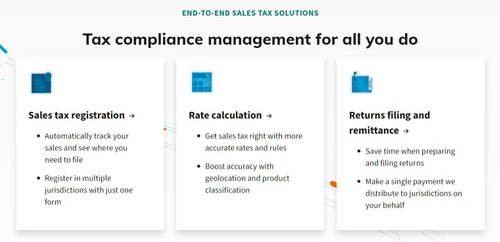
Small Business
Designed for startups and growing businesses
Medium Business
Built for business growth and flexibility
Enterprises
Designed for complex and large-scale business needs
4.2
Out of 5

Overall Rating
Based on
12 Verified Reviews
Rating Breakdown
86% Recommend this Product
Add ReviewCustomers generally appreciate Avalara for its ability to simplify tax management, especially for multi-state operations, providing peace of mind during tax season. Users highlight its reliability, automation, and accuracy in handling complex tax rules, which saves significant time and reduces stress. However, some common concerns include a steep learning curve during setup, occasional syncing issues, and the interface's outdated design. Additionally, the cost can be a consideration for smaller companies or those operating in many states.
Pros
"Integrates really well with platforms like Shopify and Amazon."
"Works with many state tax laws and calculates correctly every time."
"Avalara does a great job with calculating sales tax across different states. It keeps everything up to date automatically."
Cons
"Setting it up was confusing at first, and the interface looks a bit old."



Apr 9, 2025
Techjockey Verified
“Peace of Mind for Tax Season”
Every tax season used to come with panic, missed deadlines, and last-minute stress. Since switching to Avalara, it’s been calm and smooth. I know my taxes are being handled properly, and the filings are on time. I did catch a few sync bugs once or twice, but support fixed them fast. Overall, it’s been a relief.
Pros
Dependable and does what it promises.
Cons
You need to keep an eye on some small sync issues.
Reason to switch
TurboTax was too basic and didn’t offer filing automation. Avalara gave us that full end-to-end solution.
Mar 31, 2025
Techjockey Verified
“Handles Growth Really Well”
As our company grew into more states, tax rules got really complicated. Avalara scaled with us and handled all the new jurisdictions without breaking a sweat. It's like having a whole tax department in one app. It does get expensive if you’re operating in 30+ states, but it’s still cheaper than hiring extra staff.
Pros
Scales with your business without extra stress.
Cons
A bit pricey when you expand into many states.
Reason to switch
Xero was fine when we were small, but it couldn’t keep up as we expanded. Avalara was made for growth.
Mar 21, 2025
Techjockey Verified
“Best Decision for Our Finance Team”
We used to spend days each quarter sorting through tax info for every state we operated in. Avalara simplified that completely. It files on time, calculates everything, and gives us reminders. The first few weeks were tough because there’s a lot to learn, but the support team helped. Now, our finance team has way more free time for other stuff.
Pros
Saves a lot of time on compliance and filing.
Cons
Steep learning curve when starting out.
Reason to switch
That add-on couldn’t handle filings, and Avalara did everything from calculation to submitting the forms.

Avalara
Price On Request
Desktop
Mobile
Web based
On Premises
Windows
Mac OS

EasyGST
₹ 3900
Desktop
Mobile
Web based
On Premises
Windows
Mac OS

GoGSTBill
₹ 1499
Desktop
Mobile
Web based
On Premises
Windows
Mac OS

Kernel GST Billing Software
₹ 1999
Desktop
Mobile
Web based
On Premises
Windows
Mac OS

invny
Price On Request
Desktop
Mobile
Web based
On Premises
Windows
Mac OS
Spectrum Cloud
₹ 6300
Desktop
Mobile
Web based
On Premises
Windows
Mac OS

ClearTax GST
Price On Request
Desktop
Mobile
Web based
On Premises
Windows
Mac OS

ProfitEazy
₹ 1499
Desktop
Mobile
Web based
On Premises
Windows
Mac OS

floTax
₹ 25000
Desktop
Mobile
Web based
On Premises
Windows
Mac OS

HostBooks GST
Price On Request
Desktop
Mobile
Web based
On Premises
Windows
Mac OS

Atease
₹ 15000
Desktop
Mobile
Web based
On Premises
Windows
Mac OS
(0) Product(s) selected
Available
Price on Request
Available
Price on Request
Starting Price:
₹1,499

Available
Price on Request

Available
Price on Request

Available
Price on Request

Starting Price:
₹149

Available
Price on Request

Starting Price:
₹4,237 /Lifetime

Avalara Income Tax Software is compatible with Windows operating systems.
Avalara Income Tax Software app is not available.
Avalara Income Tax Software supports Web-Based.
Avalara Income Tax Software is typically used in All Industries.
Avalara demo is available for free with Techjockey.com. Please request a call back.
Avalara Income Tax Software offers a free trial. However, the premium plan with advanced features available at Techjockey.com.
For Avalara installation, insert the given CD/USB flash storage in your system and open the Setup Wizard to get started. The web-based version can be accessed directly through Avalara portal.
Avalara Income Tax Software helps with Sales Tax Registration,Interest Rate Calculation,Returns filing & remittance and Certificate Management. It's a complete solution for Insights from content & data,Stable and reliable,Tax Compliance and Integration.
Avalara regular updates are available free of cost. There are no hidden software update charges.
Avalara Income Tax Software used for Sales Tax Registration,Interest Rate Calculation,Returns filing & remittance and Certificate Management.
You can directly visit Avalara portal and get in touch with Avalara customer support for any software-related query.
Please contact our product experts to get Avalara lifetime deal with exclusive offers.
Avalara is an automated tax compliance software that integrates with business systems like ERPs to handle tax calculations, manage compliance documents, and automate returns. It works by using AI agents trained on billions of transactions to ensure accuracy across various tax types and jurisdictions.
Avalara is used to automate a wide range of tax compliance tasks, including real-time sales tax calculation, returns preparation and filing, and management of compliance documents like exemption certificates.
Avalara pricing details are available on request on techjockey.com.
No, Avalara is not an ERP system; it is a specialized tax compliance software designed to integrate with over 1,400 business systems, including ERPs, billing platforms, and ecommerce solutions.
Avalara uses AI agents, trained on billions of transactions and over 60,000 data sources, to automate and ensure accuracy in tax calculations, product classification, and returns filing.
Avalara is designed for businesses of all sizes, from new startups and small businesses to large enterprise-level companies, with a pricing model that scales with business growth.
Avalara can manage a wide variety of tax types, including sales and use tax, Value-Added Tax (VAT), cross-border customs duties, property tax, communications tax, and excise tax.
Yes, Avalara helps qualified sellers reduce the burden of managing sales tax calculations and filings in up to 24 SST member states, where the states may cover the cost of the service.
20,000+ Software Listed
Best Price Guranteed
Free Expert Consultation
2M+ Happy Customers
Terms and Condtions

Users with registered businesses can purchase goods from merchants on the platform to satisfy their business needs. Users are not permitted to utilize any products acquired through the platform for resale, advertising, business, or further distribution.
For each purchase made, users will receive a Tax Invoice (or 'GST invoice') that includes specific details such as:
the GSTIN of the user associated with their registered business, and
the specified Entity Name for their business.
It should be noted that not all products are eligible for GST Invoice. Only the products displayed by participating sellers with the 'GST-based Invoice Available' callout on the product description page would qualify.
Certain goods and services are not eligible to get a GST Invoice, including items with VAS, i.e., Value Added Services (e.g., Total Mobile Protection/Assured Buyback) and those involving an exchange offer at the time of purchase.
Users must ensure the accuracy of the GSTIN, and business entity name provided for the GST Invoice. Requests for corrections into GST Invoice would not be accommodated by Techjockey.com or any Seller, and any issues arising from user-provided information are the sole responsibility of users.
Techjockey.com is not liable for the GST Invoice or any associated input tax credit. To efficiently claim an input tax credit, users should select the registered place of business address as per the GST authority's data and follow the provisions of the GST Act and rules.
To claim an input tax credit, the delivery and billing addresses must match. Furthermore, input tax credits will not be granted if the delivery address and GSTIN on the invoice are from different states. In case of incorrect GST details provided during the order placement, the order will be canceled automatically.



