linkedin
Bird Hub logo
play Bird Hub | All-in-one Video Conferencing & Wireless Content Collaboration System | Hybrid Meetings
Bird Hub-Audio & Video Clarity
Bird Hub-Interactivity

Bird Hub

Brand: Bird AI

  • 5

  • 1 Rating & 1 Review

Bird Hub is an easy-to-use Android-based portable video conferencing equipment designed to integrate seamlessly into meeting rooms. It can be easily placed on any display / TV in a meeting room with a simple clip-on without the need for a complex drilling process. As it runs on Android, it doesn't require any laptop to conduct a hybrid video conference through TV. This video conferencing device a...

See More

Have you used Bird Hub before?

Share your insights for better experience

Add a Review

Price Available on Request

Questions about pricing or customization? We’re here to help, just a click away.

100% Genuine
Products
Best Price
Guaranteed
Safe & Secure
Payment
  • Specification

  • Pricing

  • Features

  • Description

  • Review

  • Compare

  • Alternatives

  • FAQ

Bird Hub Specification

Suitable For
All Industries
Business Specific
All Businesses

Bird Hub Pricing & Plans

Looking for The Right Pricing?

Share your requirements and get a plan built around your business.

  • Define your business needs
  • Get customised pricing
  • Choose features that fit your workflow

Price Available on Request

Get personalised Bird Hub pricing that fits your needs. Our team will connect with you.

Bird Hub Features

  • icon_check Super HD Camera
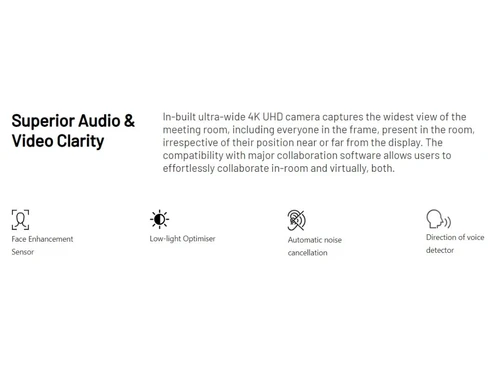
    With wide FOV to capture entire team in a single frame.
  • icon_check Beamforming Microphone Array
    With a good pickup range of about 5m.
  • icon_check Integrated Touch Controller
    Users can control any TV/display via pen like stylus.
  • icon_check Image Enhancer
    In-built image enhancer improves the picture quality during any video call.
  • icon_check Low Light Optimiser
    Users can make a high-quality video call even in soft lighting indoor conditions.
  • icon_check Automatic Noise Cancellation
    Speak and hear voices loud and clear with the automated noise cancellation feature of Bird Hub.
  • icon_check Direction of Voice Detector
    The software quickly detects the speaker's direction based on voice.
  • icon_check Draw, Write & Annotate Naturaly
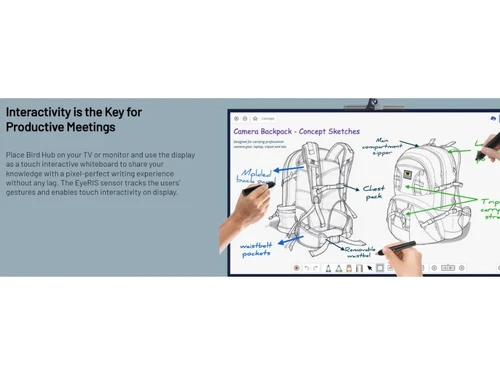
    Users can easily draw or write on the screen with the touch screen stylus.
  • icon_check Creative, Presentation & Focus Tools
    Bird AI Canvas tool allows users to share engaging creatives and presentations during the meetings.
  • icon_check Wireless Content Sharing from own devices
    Users can share content or files directly to the screen without requiring any wired connection.
  • icon_check Multiple Screen Sharing with Remote Users
    Hosts can simultaneously share multiple screens with remote users.

Bird Hub Overview

What is Bird Hub?

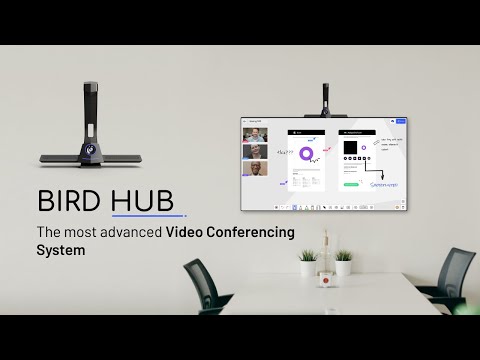
Bird Hub is an easy-to-use Android-based portable video conferencing equipment designed to integrate seamlessly into meeting rooms. It can be easily placed on any display / TV in a meeting room with a simple clip-on without the need for a complex drilling process.

As it runs on Android, it doesn't require any laptop to conduct a hybrid video conference through TV. This video conferencing device also comes with a stylus that converts your regular TV into a touch display for easy canvas drawing, writing, and more.

Bird Hub offers an easy plug-and-play video call device for the hybrid meeting. The video conferencing device is equipped with a super HD camera & noise cancellation microphone array. The device supports other functions like wireless content sharing, screen mirroring, and multiple screen sharing. In short, Bird Hub is an affordable VC solution for hybrid meeting rooms.

Benefits of Bird Hub

  • Removes Dependency on Systems: Users don't need to depend on laptops and screen mirroring for video conferences. The video call device for TV has inbuilt apps on the Android platform that could be easily used as a separate device for video calling.
  • Integrated Solution: Bird Hub video conferencing system provides a comprehensive video conferencing experience with an integrated webcam, noise cancellation, microphone, touch stylus, and voice detection features.
  • Automatic Configuration: The setup is quick and easy, and there is no need for manual configuration for video conferencing.
  • Wireless Content Sharing: Participants can share videos, pictures, and other files wirelessly on the main screen from their system or smartphone.
  • Screen Mirroring: Host can easily mirror devices' screens with or without a wired connection.
  • Multiple Screen Sharing: Allows users to share many screens simultaneously with remote participants during virtual meetings.

How to use Bird Hub?

  • Standalone Mode: Bird Hub can be used as a standalone device for video calls by directly plugging into the TV. Users can download and login to different apps like Google Meet, Teams, Zoom, etc., through the device itself.
  • USB Mode: This integrated video conferencing device can also be connected to any desktop or laptop via a USB port. This allows users to run a hybrid meeting from a system while using the camera, microphone, and noise cancellation features of the Bird Hub.
  • Mirror Mode: With the mirror mode, you can mirror the screen of your smartphone or laptop onto the screen connected to the Bird Hub device.

Why Should You Choose Bird Hub Video Conferencing Device?

  • Affordable video conferencing solution for small businesses
  • Easily converts regular TV in touch displays with Stylus
  • Provides creative tools like Bird AI Canvas for sharing ideas, drawing, etc.
  • Extremely easy to install and configure
  • Reduces dependency on other hardware and IT experts
  • Eliminates the need to connect additional video calling equipment

What Is the Price of Bird Hub?

Bird Hub price details are available on request with our product experts, who will assist you at every stage of the device purchase.

Bird Hub's price in India may vary based on the number of devices required, additional software or hardware, etc. Please request a call back for price-related details and avail offers on premium packages.

Read more

Bird AI Company Details

Founded Year:  2021

At Bird AI, We build Intelligent Communication Systems to help people connect and collaborate from anywhere.

Director/Founders Mr. Nishant Rajawat
Company Size 1-100 Employees
Bird Hub Demo Video play icon

Get Bird Hub Demo

Watch the demo video to explore key features, real workflows, and how the software fits your business needs.

Understand
Key Features
Personal
Demo Insights
Interactive
Demo Support

Bird Hub Review

5

Out of 5

img

Overall Rating

Based on
1 Verified Review

Rating Breakdown

  • Features 5
  • Value for Money 5
  • Ease of Use 5
  • Customer Support 5

100% Recommend this Product

Add Review

Ajay Kumar

Director

Industry: IT User since: < 6 months

5

Reviewed on: Mar 22, 2022

Techjockey Verified

“Superb! It’s worth the purchase!!”

Pros

Set up was really easy. I did it just by watching their videos. After using it I feel we got a worthful product. It gave the best audio and video quality. Also, we were missing our whiteboard discussions when it came to a remote meeting. With Bird Hub, the ability to convert display to digital whiteboard was outstanding. Overall, it is superb product for any organisation.

Cons

N/A

Reason to switch

It turns the TV/ Monitor into a touchscreen interactive device, It gave the best audio and video quality before I had never seen this quality on any device. It is suitable for meeting rooms like conference rooms, huddle spaces, focus rooms, or any other hybrid workspaces.

Compare Bird Hub With other USB Camera

Products
Ratings
Pricing
Device Supported
Deployment
Supported Platforms
  • img

    Bird Hub

  • 5

  • Price On Request

  • Desktop

    Mobile

  • Web based

    On Premises

  • Windows

    Mac OS

  • img

    Poly Studio P5

  • 4.4

  • ₹ 19484

  • Desktop

    Mobile

  • Web based

    On Premises

  • Windows

    Mac OS

  • img

    Logitech MeetUp

  • 4.8

  • Price On Request

  • Desktop

    Mobile

  • Web based

    On Premises

  • Windows

    Mac OS

  • img

    LogiTech Scribe

  • 4.2

  • Price On Request

  • Desktop

    Mobile

  • Web based

    On Premises

  • Windows

    Mac OS

  • img

    Logitech Rally Bar

  • 4.2

  • Price On Request

  • Desktop

    Mobile

  • Web based

    On Premises

  • Windows

    Mac OS

  • img

    Huawei TE30

  • 4.5

  • Price On Request

  • Desktop

    Mobile

  • Web based

    On Premises

  • Windows

    Mac OS

(0) Product(s) selected

Bird Hub Alternatives

See All Bird Hub Alternatives

Articles for Bird Hub

See All Related Articles

Which devices can be connected to Bird Hub?

Bird Hub VC solution can be connected with TV, laptop, desktop or even smartphones.

Is there any Bird Hub app?

Bird Hub video conferencing equipment has Bird HubCanvas for Windows and Android systems, allowing meeting participants to share and work on a digital whiteboard.

How much does Bird Hub cost?

Bird Hub video conferencing device pricing is kept extremely low to make it affordable for small businesses. You can contact the Techjockey team for pricing details.

Who are the potential users of Bird Hub?

Bird Hub video conferencing equipment is used in hybrid meeting rooms.

Is there any free trial or demo for Bird Hub?

Bird Hub video conferencing equipment demo is available for free at techjockey.com.

How does Bird Hub work?

Bird Hub device helps with video conferencing in Hybrid meeting rooms. It's a complete solution for wireless content sharing, screen mirroring and more.

Can I connect Bird Hub with my laptop?

Yes, Bird Hub can be connected to your laptop via USB and a wireless connection.

20,000+ Software Listed

Best Price Guranteed

Free Expert Consultation

2M+ Happy Customers

Terms and Condtions

close

Users with registered businesses can purchase goods from merchants on the platform to satisfy their business needs. Users are not permitted to utilize any products acquired through the platform for resale, advertising, business, or further distribution.

For each purchase made, users will receive a Tax Invoice (or 'GST invoice') that includes specific details such as:

  • the GSTIN of the user associated with their registered business, and

  • the specified Entity Name for their business.

It should be noted that not all products are eligible for GST Invoice. Only the products displayed by participating sellers with the 'GST-based Invoice Available' callout on the product description page would qualify.

Certain goods and services are not eligible to get a GST Invoice, including items with VAS, i.e., Value Added Services (e.g., Total Mobile Protection/Assured Buyback) and those involving an exchange offer at the time of purchase.

Users must ensure the accuracy of the GSTIN, and business entity name provided for the GST Invoice. Requests for corrections into GST Invoice would not be accommodated by Techjockey.com or any Seller, and any issues arising from user-provided information are the sole responsibility of users.

Techjockey.com is not liable for the GST Invoice or any associated input tax credit. To efficiently claim an input tax credit, users should select the registered place of business address as per the GST authority's data and follow the provisions of the GST Act and rules.

To claim an input tax credit, the delivery and billing addresses must match. Furthermore, input tax credits will not be granted if the delivery address and GSTIN on the invoice are from different states. In case of incorrect GST details provided during the order placement, the order will be canceled automatically.