linkedin
Huawei TE30 logo
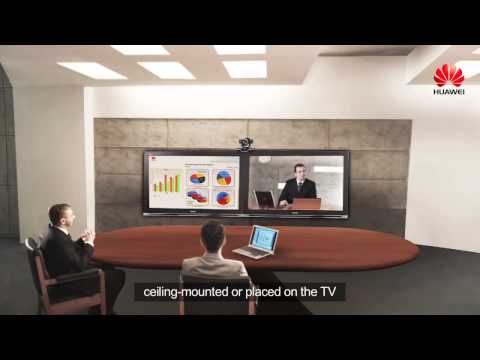
play Huawei TE30 All in one video conference system
TE30 VideoConferencing
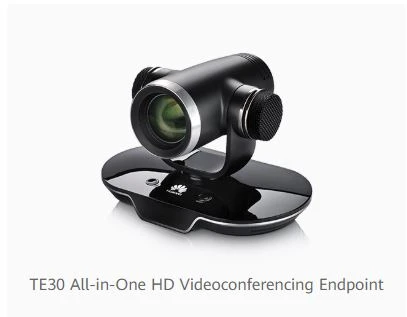
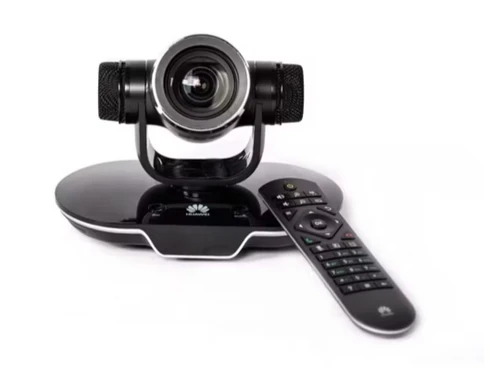
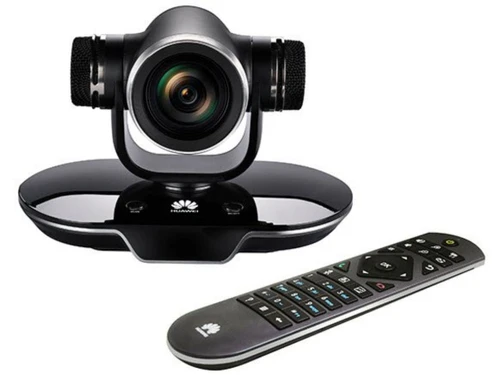
huawei te30 all in one hd videoconferencing endpoint device

All-in-One HD Videoconferencing Endpoint

Brand: Huawei

  • 4.5

  • 3 Ratings & 3 Reviews

Huawei TE30 All-in-One HD Video conferencing Endpoint helps users connect with their clients via video and audio conference calls in a hassle-free manner. The device supports a wide variety of languages from all around the globe, enabling its users to join a conference or make a person to person video call, just by saying their names. The inbuilt Super Error Concealment ensures high-quality video...

See More

Have you used Huawei TE30 before?

Share your insights for better experience

Add a Review
Starting Price
₹23166

View plans

100% Genuine
Products
Best Price
Guaranteed
Safe & Secure
Payment
  • Specification

  • Pricing

  • Features

  • Description

  • Review

  • Compare

  • Alternatives

  • FAQ

Starting at ₹23,166

Huawei TE30 Specifications

Suitable For
All Industries
Business Specific
All Businesses

Huawei TE30 Pricing & Plans

Huawei TE30
Key Features
  • Voice Dialing
  • Audio / Video Conferencing
  • Easy Deployment and Management
  • High Defination Live Learning
  • Wi-Fi Access
Starting at ₹23166
    • Quantity

      Quantity
      Quantity

Key Features

  • Voice Dialing

  • Audio / Video Conferencing

  • Easy Deployment and Management

  • High Defination Live Learning

  • Wi-Fi Access

Huawei TE30 Features

  • icon_check Voice Dialing
    Use voice recognition to join or initiate video calls hands-free on devices like TE30.
  • icon_check User Friendly Interface
    Intuitive 3D GUI and wizards enable easy setup and operation of meetings.
  • icon_check Audio / Video Conferencing
    Supports HD audio, 4K video, screen sharing, dual-annotation, and real-time collaboration.
  • icon_check Easy Deployment and Management
    Compact all-in-one design with Wi‑Fi and one-cable setup; managed via cloud or local interface.
  • icon_check High Defination Live Learning
    Real-time video education with 1080p/4K resolution, interactive whiteboards, and attendance controls.
  • icon_check Wi-Fi Access
    Built-in wireless connectivity enables flexible deployment in various environments.
  • icon_check High Quality Voice Over IP (VoIP)
    AI noise cancellation delivers clear high-fidelity voice, even in noisy settings.

Huawei TE30 Overview

What is Huawei TE30 All-in-One HD Videoconferencing Endpoint?

Huawei TE30 All-in-One HD Video conferencing Endpoint helps users connect with their clients via video and audio conference calls in a hassle-free manner. The device supports a wide variety of languages from all around the globe, enabling its users to join a conference or make a person to person video call, just by saying their names. The inbuilt Super Error Concealment ensures high-quality video experience and LCD display of the device shows all the local site related information in real-time. The device also features an in-built wi-fi that allows seamless content sharing. 

Further, it features a front background color that can be modified as per the user’s choice. Most importantly, Huawei TE30 All-in-One HD Videoconferencing Endpoint maintains log records of all the events related to its user’s business. This video conferencing hardware supports a wide variety of network protocols like DHCP, Telnet, HTTPS, RTCP, ARP and more.

What are the technical specifications of Huawei TE30 All-in-One HD Videoconferencing Endpoint?

  1. Item Code: Huawei TE30 All-in-One HD Videoconferencing Endpoint
  2. Operating Temperature: The device can be operated at a temperature ranging between -5 degrees celsius to 45 degrees celsius.
  3. Operating Humidity: The device can be operated at a humidity level ranging between 10% to 95%.
  4. Audio Standards and protocols: The device supports IETF SIP and ITU-T H.323 audio standards and protocols.
  5. Power Consumption: 60W
  6. Number of preset positions: 30
  7. Video output Pixels: It features video output pixels of 1080@50/60fps
  8. Zoom: 12x optical zoom
  9. Lens: The device features ⅓-inch CMOS imaging chip along with a 2-megapixel lens
  10. Dual Stream: BFCP and ITU-T H.239

Pricing of Huawei TE30 All-in-One HD Videoconferencing Endpoint

Huawei TE30 All-in-One HD Videoconferencing Endpoint is available at a price of Rs.23,166. To buy Huawei TE30 All-In-One HD Videoconferencing Endpoint, send us a callback request. Our sales experts will get back to you shortly.

What are the benefits of using Huawei TE30 All-in-One HD Videoconferencing Endpoint?

  1. Intuitive Voice Recognition: Huawei TE30 All-in-One HD Videoconferencing Endpoint is capable of recognizing multiple languages from all around the globe. Users can join a conference or dial a number just by saying the name of that person or the scheduled conference.
  2. Extensive Integration System: By using Huawei TE30 All-in-One HD Videoconferencing Endpoint, users can access multiple third party APIs, and customize them as per their requirements. 
  3. Advanced Technological Support: Huawei TE30 All-in-One HD Videoconferencing Endpoint supports H.264 HP and Video Motion Enhancements (VME). It also features a microphone that is capable of recognizing sounds within a 6m radius. 
  4. Enhanced HD experience: The inbuilt Video Motion Enhancements (VME), intelligent video processing capability along with intelligent face recognition, enable the device to adapt itself as per different lighting conditions. It also reduces bandwidth consumption and enhances the quality of the video calls. 
  5. Intuitive Security Mechanism: The standard H.460 accompanied by SNP technology ensures a safe and secure firewall traversal for the users of Huawei TE30 All-in-One HD Videoconferencing Endpoint. Further, all the media streams are encrypted by SRTP, HTTPS and TLS encryptions. Users can even protect their conferences with passwords.
Read more

Huawei Company Details

Founded Year:  1987

Huawei is a leading global provider of information and communications technology (ICT) infrastructure and smart devices. With integrated solutions across four key domains – telecom networks, IT, smart devices, and cloud services – we are committed to bringing digital to every person.

Director/Founders Ren Zhengfei
Company Size 1000+ Employees
Huawei TE30 Demo Video play icon

Get Huawei TE30 Demo

Watch the demo video to explore key features, real workflows, and how the software fits your business needs.

Understand
Key Features
Personal
Demo Insights
Interactive
Demo Support

Huawei TE30 Reviews

4.5

Out of 5

img

Overall Rating

Based on
3 Verified Reviews

Rating Breakdown

  • Features 4.6
  • Value for Money 4.3
  • Ease of Use 4.6
  • Customer Support 4.6

86% Recommend this Product

Add Review

Rushali Roy

User

4.3

Reviewed on: May 12, 2020

Techjockey Verified

“Highly Compatible”

Pros

I wanted to invest in a video conferencing software that would be compatible with the network presentation technologies like microphones and touchpanels. Huawei TE30 All-in-One HD Videoconferencing Endpoint exactly does that. It also seamlessly integrates with external APIs.

Cons

Though the software provides a seamless performance most of the time, in some instances, however, it gets slow.

Bikash Paul

User

4.5

Reviewed on: Apr 24, 2020

Techjockey Verified

“Safe and secure!”

Pros

Thanks to Techjockey for their valuable suggestion. All the conferences made via Huawei TE30 are completely encrypted with (Asymmetric 720P)/SD video sites, allowing me to have a safe video conferencing experience.

Cons

The software has not given me any trouble as of now.

Reema Burman

User

4.8

Reviewed on: Feb 21, 2019

Techjockey Verified

“Seamless Voice Dialling”

Pros

I was looking for a software that will help me in my video conferences. One of my friends told me about Huawei TE30 All-in-One HD Videoconferencing Endpoint. I can seamlessly dial my client’s number just by saying their name with this high definition video conferencing software.

Cons

I have not faced any problem until now with the type of communication features provided by the software. However, the software does create a problem when the network connectivity is not strong.

Compare Huawei TE30 With other USB Camera

Products
Ratings
Pricing
Device Supported
Deployment
Supported Platforms
  • img

    Huawei TE30

  • 4.5

  • Price On Request

  • Desktop

    Mobile

  • Web based

    On Premises

  • Windows

    Mac OS

  • img

    Poly Studio P5

  • 4.4

  • ₹ 19484

  • Desktop

    Mobile

  • Web based

    On Premises

  • Windows

    Mac OS

  • img

    Huawei IdeaHub

  • 4.0

  • Price On Request

  • Desktop

    Mobile

  • Web based

    On Premises

  • Windows

    Mac OS

  • img

    Bird Hub

  • 5

  • Price On Request

  • Desktop

    Mobile

  • Web based

    On Premises

  • Windows

    Mac OS

  • img

    LogiTech Scribe

  • 4.2

  • Price On Request

  • Desktop

    Mobile

  • Web based

    On Premises

  • Windows

    Mac OS

  • img

    Logitech Rally Bar

  • 4.2

  • Price On Request

  • Desktop

    Mobile

  • Web based

    On Premises

  • Windows

    Mac OS

  • img

    Logitech MeetUp

  • 4.8

  • Price On Request

  • Desktop

    Mobile

  • Web based

    On Premises

  • Windows

    Mac OS

(0) Product(s) selected

Huawei TE30 Alternatives

See All Huawei TE30 Alternatives

Available

Price on Request

What type of input and output interfaces are featured by Huawei TE30 All-in-One HD Videoconferencing Endpoint?

The device features two 3.5mm line in and out jack interfaces, HD-AI, HDMI audio and video output jack interfaces along with USB 2.0 host interface.

What type of compliances are offered by Huawei TE30 All-in-One HD Videoconferencing Endpoint?

The device is in compliance with RoHS, FCC, CE, WEEE, REACH, CCC and UL protocols.

Can I get a demo of Huawei TE30 All-in-One HD Videoconferencing Endpoint?

Techjockey provides an online demo for Huawei TE30 All-in-One HD Videoconferencing Endpoint. You can send us a demo request along with a preferred date and time.

What are the working voltage and working frequencies of Huawei TE30 All-in-One HD Videoconferencing Endpoint?

The device can be operated at a working voltage of 12V DC and 100-240 V AC. It requires 50 to 60 Hz working frequency.

What is the lowest luminance and recommended luminance of Huawei TE30 All-in-One HD Videoconferencing Endpoint?

The lowest luminance rate of the device is 7lux and the recommended luminance is >300lux.

20,000+ Software Listed

Best Price Guranteed

Free Expert Consultation

2M+ Happy Customers

Terms and Condtions

close

Users with registered businesses can purchase goods from merchants on the platform to satisfy their business needs. Users are not permitted to utilize any products acquired through the platform for resale, advertising, business, or further distribution.

For each purchase made, users will receive a Tax Invoice (or 'GST invoice') that includes specific details such as:

  • the GSTIN of the user associated with their registered business, and

  • the specified Entity Name for their business.

It should be noted that not all products are eligible for GST Invoice. Only the products displayed by participating sellers with the 'GST-based Invoice Available' callout on the product description page would qualify.

Certain goods and services are not eligible to get a GST Invoice, including items with VAS, i.e., Value Added Services (e.g., Total Mobile Protection/Assured Buyback) and those involving an exchange offer at the time of purchase.

Users must ensure the accuracy of the GSTIN, and business entity name provided for the GST Invoice. Requests for corrections into GST Invoice would not be accommodated by Techjockey.com or any Seller, and any issues arising from user-provided information are the sole responsibility of users.

Techjockey.com is not liable for the GST Invoice or any associated input tax credit. To efficiently claim an input tax credit, users should select the registered place of business address as per the GST authority's data and follow the provisions of the GST Act and rules.

To claim an input tax credit, the delivery and billing addresses must match. Furthermore, input tax credits will not be granted if the delivery address and GSTIN on the invoice are from different states. In case of incorrect GST details provided during the order placement, the order will be canceled automatically.