linkedin
BotStar logo
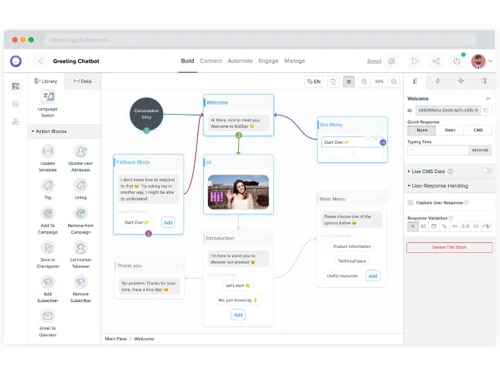
BotStar-visual flow editor
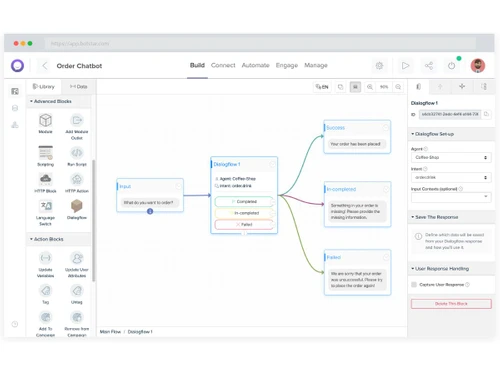
BotStar-smart NLP training
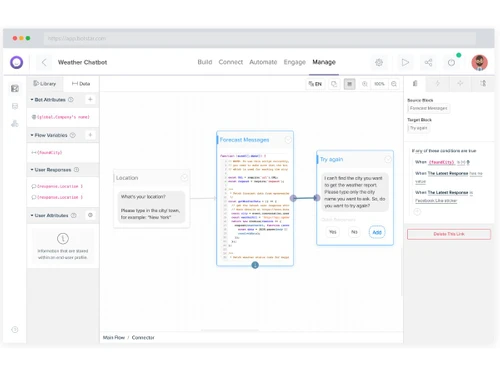
BotStar-coding editor

BotStar

Brand: BotStar

  • 4.1

  • 4 Ratings

A chatbot software that turns conversations into opportunities with smart, no-code automation to naturally build, engage, and grow faster.

See More

Have you used BotStar before?

Share your insights for better experience

Add a Review
Starting Price
$29

View plans

100% Genuine
Products
Best Price
Guaranteed
Safe & Secure
Payment
  • Description

  • Pricing

  • Features

  • Specification

  • Review

  • FAQ

Starting at $29

BotStar Software Overview

What is BotStar?

BotStar is a smart chatbot software built for effortless communication. It helps organizations connect with customers through quick and engaging conversations. The platform combines creativity and automation in perfect balance. It keeps customer engagement running efficiently without sacrificing quality.

Businesses use the BotStar chatbot solution to reduce workload and improve user experience. It is built to handle tasks smoothly across multiple channels. Every exchange feels guided, structured, and natural in tone. Over time, the platform helps build stronger relationships between customers and brands.

Why Choose BotStar Software?

  • Simple Interface: The design of the platform is clean and very easy to follow. Even beginners find it equally comfortable to use.
  • Smooth Communication: Every chat runs naturally without robotic stiffness. It helps build customer trust in no time.
  • Automation Balance: Routine replies come about automatically with a human-like tone. Workload reduces without losing quality.
  • All-in-One Access: Everything from design to reporting stays in one place. Teams save numerous hours that were once wasted in managing different tools.
  • Personalization: Each chatbot feels unique to a business style. It reflects the brand personality clearly.
  • Time Efficiency: The setup takes minutes to become operational. Teams stay focused on customers, not tools.
  • Reliable Support: Help is always available whenever needed! Assistance feels absolutely prompt and friendly.

Benefits of BotStar Software

  • Workflow Clarity: Processes stay organized with visual mapping. Every step is transparent and manageable.
  • Fast Resolution: Customer queries get solved in seconds. Waiting time shortens drastically every day.
  • Revenue Impact: Automation keeps conversations running nonstop. Leads turn into buyers more consistently.
  • Integration Reach: Bots link with CRMs, forms, and calendars. The workflow feels naturally connected.
  • User Empowerment: Non-technical users create bots confidently. Creativity grows without coding stress.
  • Better Visibility: The dashboard never fails to offer clear status updates. Teams always know what's happening live.
  • Market Readiness: Businesses adapt to new demands before you even know it. No heavy rework or downtime is ever required.

BotStar Pricing

BotStar price starts at USD 29 per month at techjockey.com. The pricing model is based on different parameters, including extra features, deployment type, and the total number of users. For further queries related to the product, you can contact our product team and learn more about the pricing and offers.

Read more

BotStar Pricing & Plans

Pro
Starting at $29
    • Licenses

      Licenses
      Licenses
    • Monthly

      Monthly
      Monthly

Key Features

  • 1 Active Bot

  • 1,000 Monthly Sessions

  • Unlimited Member Seats

  • Live Chat Customization

  • Broadcast & Drip Campaigns

  • API & Integrations

Agency
Starting at $299
    • Licenses

      Licenses
      Licenses
    • Monthly

      Monthly
      Monthly

Key Features

  • 3 Active Bot

  • 5,000 Monthly Sessions

  • Unlimited Member Seats

  • Custom Permission

  • Custom App Branding

  • Template Exports & Cloning

BotStar Features

  • icon_check Visual Flow Builder
    Create chatbot conversations easily using a drag-and-drop visual editor without coding.
  • icon_check Multi-Channel Support
    Deploy chatbots across web, Messenger, and other channels for wider audience reach.
  • icon_check Live Chat Handover
    Switch seamlessly from chatbot to human agent for better customer support interactions.
  • icon_check Broadcast Messaging
    Send scheduled broadcasts and announcements to targeted user groups.
  • icon_check Drip Campaigns
    Automate follow-up messages in sequences to nurture and re-engage users over time.
  • icon_check Integrations
    Connect with APIs and third-party tools to extend chatbot capabilities.
  • icon_check Content Management
    Manage chatbot content with a built-in CMS for quick updates and organization.
  • icon_check User Segmentation
    Segment users by behavior and preferences to deliver personalized experiences.
  • icon_check Analytics Dashboard
    Track conversations, engagement, and performance metrics in real time.
  • icon_check Multilingual Support
    Build chatbots that support multiple languages for global user engagement.
  • icon_check Team Collaboration
    Add unlimited team members to collaborate on bot building and management.
  • icon_check Custom Branding
    Personalize chatbot appearance with brand logos, themes, and custom styling.
  • icon_check Template Library
    Use pre-built chatbot templates for faster setup and customization.
  • icon_check Keyword Recognition
    Detect and respond to user keywords for smarter and contextual replies.
  • icon_check Lead Capture
    Collect customer data and leads directly through conversational forms.

BotStar Specifications

Supported Platforms
Ubuntu Ubuntu Windows Windows MacOS MacOS Linux Linux
Devices
Desktop Desktop
Deployment
Cloud-Based Cloud-Based
Suitable For
All Industries
Business Specific
All Businesses
Business Size
Small Business Startups Medium Business Enterprises
Customer Support
Email Communities
Language
English
Integration
API Integration
Training Resources
Videos
AI Features
AI Integrated

BotStar Review

4.1

Out of 5

img

Overall Rating

Based on
4 Verified Ratings

Rating Breakdown

  • Features 4.1
  • Value for Money 4.2
  • Ease of Use 4.3
  • Customer Support 3.8

80% Recommend this Product

Add Review

Techjockey Trusted Reviews from Verified Users

No reviews are currently available for BotStar. Discover similar Chatbot Software reviews

  • Engati

    4.8

    Whats great - Interface Easy to use 14 deployment channels read more

  • TailorTalk

    5.0

    Whats great - Put all your Routine stuff on auto mode read more

  • REVE Chat

    4.9

    Whats great - It boosts my business by improving customer experience. It allows businesses to communicate with their customers in real-time... read more

Articles for BotStar

See All Related Articles

How much does BotStar cost?

The BotStar Software price starts at USD 29 per month at techjockey.com. The final cost, however, may vary depending on the number of users, features, and deployment type.

Who uses BotStar Software?

BotStar is widely used by businesses of all sizes to automate sales, support, and marketing tasks. The trusted chatbot software solution helps teams manage customer conversations efficiently across different digital channels.

Is there a mobile app available for BotStar Software?

No, BotStar does not have a dedicated mobile app for managing or building chatbots. All creation and management activities are carried out directly through its web platform.

Which operating systems are compatible with BotStar Software?

BotStar works smoothly on Windows, macOS, Linux, and Ubuntu systems. The software solution runs through a web browser, making it easily accessible across these platforms.

Does BotStar Software offer a free trial?

Yes, BotStar does offer a free trial for new or interested users. It allows businesses to explore features prior to purchasing a paid plan.

How does BotStar Software function?

BotStar helps users create and manage chatbots without coding using a visual, drag-and-drop interface. The solution connects with CRMs, analytics tools, and messaging platforms to automate customer interactions and improve engagement.

20,000+ Software Listed

Best Price Guranteed

Free Expert Consultation

2M+ Happy Customers

Terms and Condtions

close

Users with registered businesses can purchase goods from merchants on the platform to satisfy their business needs. Users are not permitted to utilize any products acquired through the platform for resale, advertising, business, or further distribution.

For each purchase made, users will receive a Tax Invoice (or 'GST invoice') that includes specific details such as:

  • the GSTIN of the user associated with their registered business, and

  • the specified Entity Name for their business.

It should be noted that not all products are eligible for GST Invoice. Only the products displayed by participating sellers with the 'GST-based Invoice Available' callout on the product description page would qualify.

Certain goods and services are not eligible to get a GST Invoice, including items with VAS, i.e., Value Added Services (e.g., Total Mobile Protection/Assured Buyback) and those involving an exchange offer at the time of purchase.

Users must ensure the accuracy of the GSTIN, and business entity name provided for the GST Invoice. Requests for corrections into GST Invoice would not be accommodated by Techjockey.com or any Seller, and any issues arising from user-provided information are the sole responsibility of users.

Techjockey.com is not liable for the GST Invoice or any associated input tax credit. To efficiently claim an input tax credit, users should select the registered place of business address as per the GST authority's data and follow the provisions of the GST Act and rules.

To claim an input tax credit, the delivery and billing addresses must match. Furthermore, input tax credits will not be granted if the delivery address and GSTIN on the invoice are from different states. In case of incorrect GST details provided during the order placement, the order will be canceled automatically.