USA
USA UAE
UAESmall Business
Designed for startups and growing businesses


See More





Brand: C-Square
C Square PharmAssist is one of the best Pharma ERP software for pharmaceutical distributors and wholesalers. Pharmacy management software offers a robust distribution management system for pharmacy distributors. It helps in managing all aspects of pharma wholesale and distribution business by offering the business owners an edge over their competitors. The pharmacy software offers a user-friendly...
See MoreHave you used C Square PharmAssist before?
Share your insights for better experience
Brand: C-Square
Founded Year: 2002
Covenant PharmAssist Inc. founded by Sripal Bachawat, was the pioneer in providing solutions on Windows platform, and it was one of the first software solution providers for Pharmaceutical Industry.
Looking for The Right Pricing?
Share your requirements and get a plan built around your business.
Price Available on Request
Get personalised C Square PharmAssist pricing that fits your needs. Our team will connect with you.
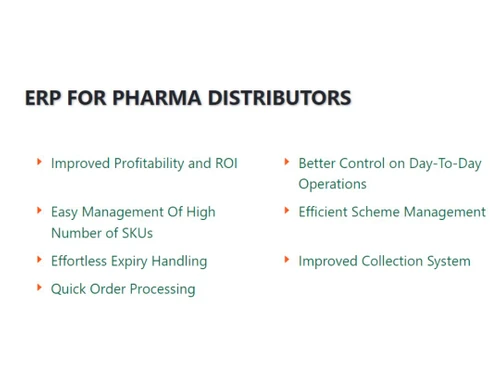
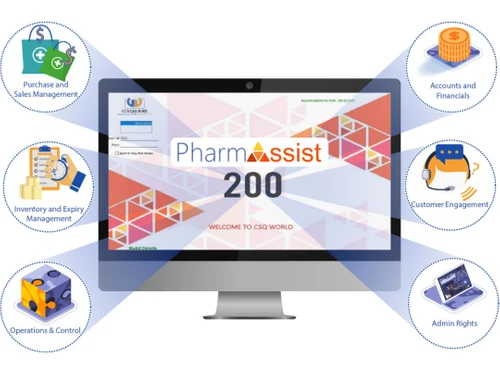
 Sales Management Inventory Management Financial Management Reports Value Added Features People Management Purchase Management

Watch the demo video to explore key features, real workflows, and how the software fits your business needs.
 Ubuntu
  Windows
  MacOS
MacOS  Linux
Linux  Desktop
  Cloud-Based
Small Business
Designed for startups and growing businesses
Medium Business
Built for business growth and flexibility
Enterprises
Designed for complex and large-scale business needs
4.7
Out of 5

Overall Rating
Based on
10 Verified Reviews
Rating Breakdown
98% Recommend this Product
Add ReviewCustomers generally express high satisfaction with C Square PharmAssist, highlighting its user-friendly interface, quick access to prescribers, and effective updates. Many appreciate the software's compatibility with third-party programs and its reporting capabilities. However, users commonly note limitations such as the inability to sync medication information directly, challenges in navigation, and restrictions on viewing patient notes. While the software is praised for its functionality, there are calls for improvements in certain areas to enhance the overall user experience.
Pros
"Advanced and Very easy to use software and User interface is also friendly."
"Prescribers are quick to get in touch with for refills, and the software's POS was easy to use. Customers may be checked out quickly."
"The reports function was incredibly easy to use and provided excellent insight into daily P&L."
Cons
"There wasn't a fully integrated shipping capability you could only track deliveries and manually scan delivery receipts."
"The navigation is challenging because the system is not windows-based. Running DUR reviews on the pharmacist verification screen is similarly challenging."
"In a specified technical job, technician skills are too constrained to effectively perform the duties of a pharmacy technician in most environments."


Jun 13, 2021
Techjockey Verified
“one of the top systems for outpatient pharmacies”
Pros
This technology is incredibly user-friendly.
Cons
In a specified technical job, technician skills are too constrained to effectively perform the duties of a pharmacy technician in most environments.
Nov 22, 2021
Techjockey Verified
“however, there are great opportunities for its improvement.”
Pros
Prescribers are quick to get in touch with for refills, and the software's POS was easy to use. Customers may be checked out quickly.
Cons
Medication information must be recorded on paper because it cannot be directly synced on the programme. Additionally, it doesn't provide an update on the status of the prescription's processing or assist with inventory.
Sep 13, 2021
Techjockey Verified
“some improvements”
Pros
It updates effectively and moves extremely quickly. a lot of third-party programme compatibility. suitable for computerised prescription. provides statistics on patient compliance, which is great.
Cons
always one patient may be viewed at once. Because there is no notes function, there is no practical method to record each patient encounter. You're only able to see a few notes at once before having to click the next page button, and you have a character restriction for each note—basically, you can only compose around 1-2 lines.

C Square PharmAssist
Price On Request
Desktop
Mobile
Web based
On Premises
Windows
Mac OS

Ecogreen Express
Price On Request
Desktop
Mobile
Web based
On Premises
Windows
Mac OS

Ecogreen
Price On Request
Desktop
Mobile
Web based
On Premises
Windows
Mac OS

eVitalRx
₹ 3500
Desktop
Mobile
Web based
On Premises
Windows
Mac OS

Medicin DMS
₹ 13000
Desktop
Mobile
Web based
On Premises
Windows
Mac OS

LocalWell
₹ 2004
Desktop
Mobile
Web based
On Premises
Windows
Mac OS

Digikhaata Pharmacy Software
₹ 99
Desktop
Mobile
Web based
On Premises
Windows
Mac OS

Medivision Gold Retail
Price On Request
Desktop
Mobile
Web based
On Premises
Windows
Mac OS

Medicin Pharmacy Management Software
₹ 9000
Desktop
Mobile
Web based
On Premises
Windows
Mac OS

SmartPharma360
₹ 10000
Desktop
Mobile
Web based
On Premises
Windows
Mac OS

Pharmasoft
₹ 4068
Desktop
Mobile
Web based
On Premises
Windows
Mac OS
(2) Product(s) selected
Yes, C Square PharmAssist generates all the invoices in compliance with GST guidelines.
There is a set of mobile applications that are provided with the purchase of C Square PharmAssist to help in working and reporting tasks through a smartphone. Please request a call for more information.
This software offers mobile application only Android platform.
This distribution management software for the pharmaceutical industry is a web application, i.e., it can be accessed through an internet browser.
To get the demo for C Square PharmAssist, please request a call at Techjockey. Our salesperson will contact you with the demo.
20,000+ Software Listed
Best Price Guranteed
Free Expert Consultation
2M+ Happy Customers
Terms and Condtions

Users with registered businesses can purchase goods from merchants on the platform to satisfy their business needs. Users are not permitted to utilize any products acquired through the platform for resale, advertising, business, or further distribution.
For each purchase made, users will receive a Tax Invoice (or 'GST invoice') that includes specific details such as:
the GSTIN of the user associated with their registered business, and
the specified Entity Name for their business.
It should be noted that not all products are eligible for GST Invoice. Only the products displayed by participating sellers with the 'GST-based Invoice Available' callout on the product description page would qualify.
Certain goods and services are not eligible to get a GST Invoice, including items with VAS, i.e., Value Added Services (e.g., Total Mobile Protection/Assured Buyback) and those involving an exchange offer at the time of purchase.
Users must ensure the accuracy of the GSTIN, and business entity name provided for the GST Invoice. Requests for corrections into GST Invoice would not be accommodated by Techjockey.com or any Seller, and any issues arising from user-provided information are the sole responsibility of users.
Techjockey.com is not liable for the GST Invoice or any associated input tax credit. To efficiently claim an input tax credit, users should select the registered place of business address as per the GST authority's data and follow the provisions of the GST Act and rules.
To claim an input tax credit, the delivery and billing addresses must match. Furthermore, input tax credits will not be granted if the delivery address and GSTIN on the invoice are from different states. In case of incorrect GST details provided during the order placement, the order will be canceled automatically.









![[Infographic] – Pharmaceutical Software for Pharma Industry](https://cdn.techjockey.com/blog/wp-content/uploads/2018/02/26140156/infographic-pharmaceutical-software_feature.jpg?d=265x163 "Blog - [Infographic] – Pharmaceutical Software for Pharma Industry")