linkedin
CAOA logo
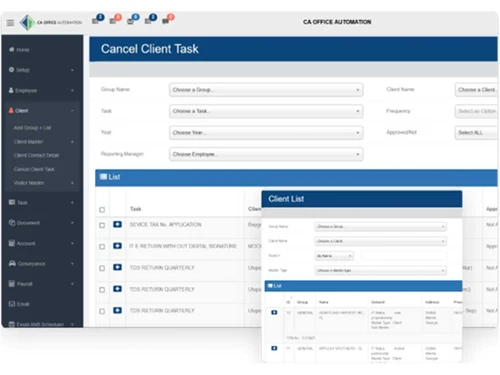
caoa client
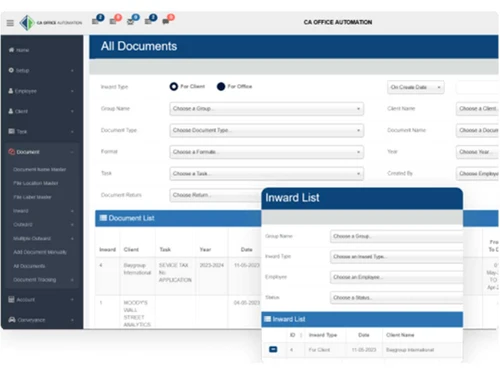
caoa documents
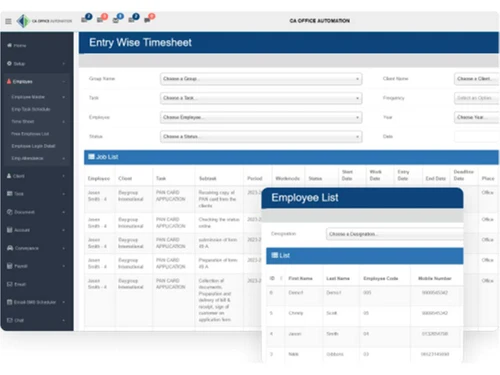
caoa timesheet

CAOA

Brand: Aequitas Infotech Pvt Ltd

  • 4.2

  • 5 Ratings

CAOA is to streamline workflow processes, enhances collaboration, and provides comprehensive solutions for practice management, enabling accounting professionals to work more efficiently and deliver exceptional services to clients.

See More

Have you used CAOA before?

Share your insights for better experience

Add a Review

Price Available on Request

Questions about pricing or customization? We’re here to help, just a click away.

100% Genuine
Products
Best Price
Guaranteed
Safe & Secure
Payment
  • Description

  • Pricing

  • Features

  • Specification

  • Review

  • Compare

  • Alternatives

  • FAQ

CAOA Software Overview

What is CAOA?

CAOA stands for CA Office Automation. It's a CA office management software designed to help accounting businesses manage their tasks more easily. With CAOA, users can do things like track their work, automate processes, communicate with clients, and handle documents all in one place.

It's user-friendly so people can focus on their work instead of dealing with technical stuff. CAOA has different modules for task management, client management, document management, and more, making it a comprehensive solution for accounting firms. Overall, CAOA helps accounting businesses streamline their operations and work more efficiently.

Why Choose CAOA Software?

  • Tailored for Accounting: It is specifically designed for CPAs, CAs, and accounting firms, ensuring it meets the industry's unique needs and requirements.
  • Comprehensive Solutions: It offers a comprehensive suite of integrated modules, providing solutions for various aspects of accounting practice management, including task management, client management, document management, and more.
  • Simplified Workflow: It streamlines workflow processes, making tasks such as tracking, automation, communication, and document management easier and more efficient.
  • User-Friendly Interface: The platform is user-friendly and accessible, with both web and mobile applications available for convenient access anytime, anywhere.
  • Bank-Grade Security: With its bank-grade security features and robust infrastructure built on Microsoft Azure, users can trust that their data is protected.
  • Comprehensive Support: It provides comprehensive support and training to ensure seamless adoption, expert training, and smooth data migration for users.
  • Integration Capabilities: It integrates seamlessly with over 5000 applications, expanding capabilities and enhancing productivity for users.
  • Trusted by Thousands: Trusted by over 6000 accounting firms globally, it has a proven track record of empowering firms to streamline workflows, boost efficiency, and deliver exceptional services to clients.

Benefits of CAOA Platform

  • Enhanced Collaboration: It facilitates collaboration among team members by providing a centralized platform for communication, document sharing, and task assignment.
  • Real-Time Updates: Users can stay informed with real-time updates on tasks, projects, and client activities, enabling better decision-making and improved client service.
  • Customization Options: It offers customization options, allowing users to tailor the software to their specific needs and preferences.
  • Time and Cost Savings: CAOA helps accounting firms save time and reduce operational costs by automating repetitive tasks and streamlining workflows.
  • Improved Client Satisfaction: With features such as client management and automated document sharing, it enables accounting firms to provide a higher level of service and satisfaction to clients.
  • Scalability: As businesses grow, it can easily scale to accommodate increased workload and user requirements, ensuring continued efficiency and productivity.
  • Regulatory Compliance: It helps accounting firms stay compliant with industry regulations and standards, reducing the risk of errors and penalties.
  • Data Insights: The software provides valuable data insights and analytics, allowing firms to identify trends, track performance, and make data-driven decisions for business growth.
  • Mobile Accessibility: With web and mobile applications, users can access it from anywhere, making it convenient for remote work and on-the-go productivity.
  • Competitive Advantage: Accounting firms can gain a competitive edge in the market and attract more clients by leveraging this software's advanced features and capabilities.

Pricing of CAOA CA Office Management Software

CAOA price details are available on request at techjockey.com.

The pricing model is based on different parameters, including extra features, deployment type, and the total number of users. If you have further queries related to the product, you can contact our product team to learn more about the pricing and offers.

Read more

Aequitas Infotech Pvt Ltd Company Details

Founded Year:  2011

Aequitas Infotech Private Limited's Annual General Meeting (AGM) was last held on N/A and as per records from Ministry of Corporate Affairs (MCA), its balance sheet was last filed on 31 March 2021.

Director/Founders HOMI VALLABHBHAI KANERIYA
Company Size 1-100 Employees

CAOA Pricing & Plans

Looking for The Right Pricing?

Share your requirements and get a plan built around your business.

  • Define your business needs
  • Get customised pricing
  • Choose features that fit your workflow

Price Available on Request

Get personalised CAOA pricing that fits your needs. Our team will connect with you.

CAOA Features

  • icon_check Task Management
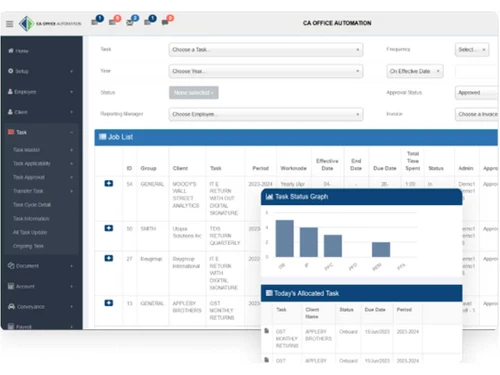
    Organize tasks, deadlines, and priorities for smooth workflow.
  • icon_check Client Management
    Maintain detailed client records for personalized service and relationship building.
  • icon_check Document Management
    Centralize document storage and sharing for easy access and collaboration while ensuring security.
  • icon_check Account Management
    Seamlessly handle financial transactions, invoices, and payments for accurate accounting.
  • icon_check Dashboards
    Access real-time insights through a visual dashboard for informed decision-making.
  • icon_check Employee Management
    Streamline onboarding, scheduling, performance tracking, and communication for workforce productivity.
  • icon_check Seamless Integration
    Integrate with other software for efficient data exchange across platforms.

CAOA Specifications

Supported Platforms
Windows Windows MacOS MacOS
Devices
Desktop Desktop
Deployment
Cloud-Based Cloud-Based
Suitable For
CA Firms
Business Specific
CA Firms
Business Size
Small Business Medium Business SMBs SMEs
Customer Support
Email
Language
English
Integration
API Integration
Training Resources
In Person
AI Features
AI Integrated

Explore the Best Alternative Solutions Similar to Your Business Size and Needs

CAOA Review

4.2

Out of 5

img

Overall Rating

Based on
5 Verified Ratings

Rating Breakdown

  • Features 4.6
  • Value for Money 4
  • Ease of Use 4.3
  • Customer Support 4.2

94% Recommend this Product

Add Review

Techjockey Trusted Reviews from Verified Users

No reviews are currently available for CAOA. Discover similar CA Office Management Software reviews

  • SPRO

    4.9

    Whats great - Web-based access allows users to access data from anywhere. read more

  • CAProWin

    4.7

    Whats great - Easy software with the best UI. Suitable for small and Large firms. Software Specifically for CA read more

  • Vider Atom

    4.9

    Whats great - User-friendly tools, easy to maintain, and extraordinary support services. read more

Compare CAOA With other CA Office Management Software

Products
Ratings
Pricing
Device Supported
Deployment
Supported Platforms
  • img

    CAOA

  • 4.2

  • Price On Request

  • Desktop

    Mobile

  • Web based

    On Premises

  • Windows

    Mac OS

  • img

    EasyCloudBooks

  • 4.7

  • Price On Request

  • Desktop

    Mobile

  • Web based

    On Premises

  • Windows

    Mac OS

  • img

    Turia

  • 4.7

  • ₹ 100

  • Desktop

    Mobile

  • Web based

    On Premises

  • Windows

    Mac OS

  • img

    CADashboard

  • 4.9

  • ₹ 12000

  • Desktop

    Mobile

  • Web based

    On Premises

  • Windows

    Mac OS

  • img

    ERPCA

  • 4.7

  • ₹ 1000

  • Desktop

    Mobile

  • Web based

    On Premises

  • Windows

    Mac OS

  • img

    MyTask

  • 3.7

  • ₹ 690

  • Desktop

    Mobile

  • Web based

    On Premises

  • Windows

    Mac OS

  • img

    CAProWin

  • 4.6

  • ₹ 100

  • Desktop

    Mobile

  • Web based

    On Premises

  • Windows

    Mac OS

  • img

    eProcessify

  • 4.2

  • ₹ 600

  • Desktop

    Mobile

  • Web based

    On Premises

  • Windows

    Mac OS

(0) Product(s) selected

CAOA Alternatives

See All CAOA Alternatives

Starting Price:

₹100 /Month

SPRO

4.8

Available

Price on Request

Starting Price:

₹600 /Month

Articles for CAOA

See All Related Articles

Which operating system does CAOA Software Support?

CAOA Software is compatible with Windows and MacOS.

Is there any CAOA Software App?

CAOA Software app is not available for Android and iOS app users.

What is the deployment type of CAOA Software?

CAOA Software supports web-based deployment.

How much does CAOA Software Cost?

CAOA price details are available on request at techjockey.com.

Who are the potential users of CAOA Software?

CAOA Software is typically used by CA firms to streamline administrative tasks, enhance organization, and optimize office operations.

Is there any free demo for CAOA Software?

Yes, a demo of CAOA is available at techjockey.com.

Is CAOA Software Free?

CAOA Software is not free. Contact our product experts to learn more about the pricing plans.

Does CAOA offer a free trial?

CAOA Software does not offer a free trial.

How can you download CAOA Software?

CAOA Software installation is not required, as it is web-based. Just open the Setup Wizard to get started.

How does CAOA Software Work?

CAOA Software works by centralizing office management tasks and facilitating seamless coordination among team members through intuitive digital tools.

20,000+ Software Listed

Best Price Guranteed

Free Expert Consultation

2M+ Happy Customers

Terms and Condtions

close

Users with registered businesses can purchase goods from merchants on the platform to satisfy their business needs. Users are not permitted to utilize any products acquired through the platform for resale, advertising, business, or further distribution.

For each purchase made, users will receive a Tax Invoice (or 'GST invoice') that includes specific details such as:

  • the GSTIN of the user associated with their registered business, and

  • the specified Entity Name for their business.

It should be noted that not all products are eligible for GST Invoice. Only the products displayed by participating sellers with the 'GST-based Invoice Available' callout on the product description page would qualify.

Certain goods and services are not eligible to get a GST Invoice, including items with VAS, i.e., Value Added Services (e.g., Total Mobile Protection/Assured Buyback) and those involving an exchange offer at the time of purchase.

Users must ensure the accuracy of the GSTIN, and business entity name provided for the GST Invoice. Requests for corrections into GST Invoice would not be accommodated by Techjockey.com or any Seller, and any issues arising from user-provided information are the sole responsibility of users.

Techjockey.com is not liable for the GST Invoice or any associated input tax credit. To efficiently claim an input tax credit, users should select the registered place of business address as per the GST authority's data and follow the provisions of the GST Act and rules.

To claim an input tax credit, the delivery and billing addresses must match. Furthermore, input tax credits will not be granted if the delivery address and GSTIN on the invoice are from different states. In case of incorrect GST details provided during the order placement, the order will be canceled automatically.