 USA
USA UAE
UAESmall Business
Designed for startups and growing businesses



See More




Brand: Chatmitra
An AI-powered WhatsApp marketing software designed to enhance customer engagement and streamline operations for businesses across various sectors.
See MoreHave you used ChatMitra before?
Share your insights for better experience
View plans
 Save upto 18%, Get GST Invoice on your business purchase T&C Buy Now & Pay Later, Check offer on payment page.
 Brand: Chatmitra
Founded Year: 2024
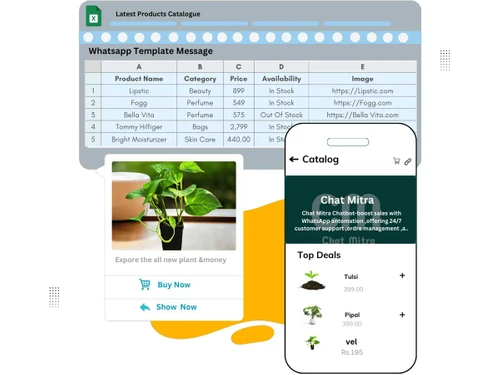
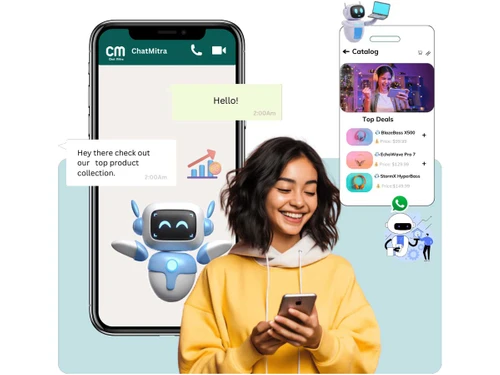
Chat Mitra is an innovative WhatsApp-based chatbot designed to help vendors easily list and sell their products directly through WhatsApp.
Bulk Messaging & Broadcasting
 Bulk Messaging Customizable Templates Auto Replies Rich Media Support Scheduled Messaging Message Templates Preview Mode Broadcast Lists
 Contact Management & Segmentation
Sync Contacts Import/Export Contacts Contact Tagging & Segmentation Blacklist/Unsubscribe Deduplication Chatbot & Automation
Drip Campaigns Workflow Automation Canned Responses Auto Replies Automated Follow-Ups Automatic Retry Hybrid Mode Recurring Messaging Campaign Scheduling AI Features
Lead Qualification AI Chatbots Auto-Responders AI Sentiment Analysis Predictive Analytics Multi-Agent & Team Collaboration
Alerts & Notifications Shared Inbox Unlimited Agents Live Agent Support Chat Transfer Internal Notes Integrations
Payment Gateway Integration CRM Integration API Integration Third Party Integrations OpenAI Integration WhatsApp Business API E-Commerce Platforms Webhooks Integration Chatbot Integration ERP Integration TallyPrime Integration E-Signatures Analytics & Reporting
Conversion Tracking Campaign Performance Delivery & Read Reports Real Time Dashboards Agent Performance Metrics Engagement Metrics Security & Compliance
Audit Trail Audit Logs Data Encryption IP Whitelisting Role-Based Access Control (RBAC) GDPR & CCPA Compliance Anti Spam Filtering Opt-In/Opt-Out Management API Rate Limiting Data Retention 

Watch the demo video to explore key features, real workflows, and how the software fits your business needs.
 Ubuntu
  Windows
  Android
  MacOS Windows(Phone)
  Linux
Linux  Desktop
  Mobile
  Tablet
  iPad
iPad  Cloud-Based
  Perpetual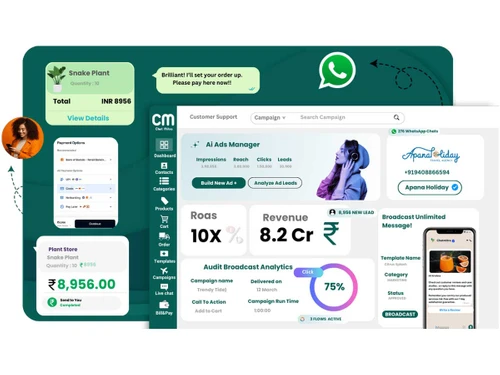
Small Business
Designed for startups and growing businesses
Medium Business
Built for business growth and flexibility
Enterprises
Designed for complex and large-scale business needs
4.5
Out of 5

Overall Rating
Based on
2 Verified Reviews
Rating Breakdown
88% Recommend this Product
Add Review
Sep 22, 2026
Techjockey Verified
“Simple and Cost-Effective WhatsApp Messaging”
I have been using Chat Mitra for WhatsApp bulk messaging, and it has made my daily customer communication much easier. The bulk messaging feature saves considerable time compared with sending messages manually, while the pricing structure and responsive support add to the overall convenience.
Pros
Chat Mitra makes bulk WhatsApp messaging simple and time-saving. Its annual plan offers good value without additional platform markup, while responsive customer support makes the overall experience convenient.
Cons
Some dashboard sections could be made more intuitive, and new users may need a little time to become familiar with the available options.
Reason to switch
low delivery rate and bad user interface
Sep 21, 2026
Techjockey Verified
“A Top-Tier WhatsApp API Tool with Incredible Pricing and Support”
Overall, Chat Mitra has been a fantastic, reliable, and cost-effective partner for our business communication and automation needs. Having managed a business for 10 years, finding software that delivers enterprise-grade performance without bloated pricing is rare. Their robust APIs, seamless webhooks, and exceptionally responsive support team make them stand out in a crowded market. Highly recommended for any organization looking to scale up their WhatsApp workflows effortlessly.
Pros
Seamless integration of high-performance developer features like reliable APIs and real-time webhooks, fair and transparent pricing that protects profit margins, and a remarkably responsive, hands-on customer support team.
Cons
Minor webhook documentation depth could be improved to make payload formatting slightly more straightforward for absolute beginners.
ChatMitra
₹ 980.00 excl. GST
Desktop
Mobile
Web based
On Premises
Windows
Mac OS

RichAutomate
Price On Request
Desktop
Mobile
Web based
On Premises
Windows
Mac OS

Whatso
Price On Request
Desktop
Mobile
Web based
On Premises
Windows
Mac OS
Flowcart
₹ 1900
Desktop
Mobile
Web based
On Premises
Windows
Mac OS

Chati
₹ 999
Desktop
Mobile
Web based
On Premises
Windows
Mac OS

WappBlaster
₹ 1549
Desktop
Mobile
Web based
On Premises
Windows
Mac OS

Gallabox
₹ 43188
Desktop
Mobile
Web based
On Premises
Windows
Mac OS

Foxglove
₹ 10000
Desktop
Mobile
Web based
On Premises
Windows
Mac OS

WAPlus
₹ 9999
Desktop
Mobile
Web based
On Premises
Windows
Mac OS

WhatSender Pro
₹ 1000
Desktop
Mobile
Web based
On Premises
Windows
Mac OS

NovoChat
Price On Request
Desktop
Mobile
Web based
On Premises
Windows
Mac OS
(0) Product(s) selected
Available
Price on Request
Starting Price:
₹999 /Month
Starting Price:
₹10,000 /OneTime
Starting Price:
$25 /Month

Starting Price:
₹24,999 /Year

Starting Price:
₹1,999

Available
Price on Request

Starting Price:
₹9,999 /Month






ChatMitra pricing starts at INR 980 for 1000 conversations at Techjockey.com. Pricing is customised based on specific business needs.
ChatMitra is web-based and works on Windows, macOS, Linux, and mobile browsers.
It automates WhatsApp messaging, manages campaigns, responds to queries, and provides analytics for engagement.
Yes, it's scalable and cost-effective, ideal for small businesses to automate customer communication.
Yes, ChatMitra provides demos and trial options to explore its features before subscribing.
Features include broadcast lists, drip campaigns, auto-responders, chatbot integration, live agent support, RBAC, and opt-in/out management.
ChatMitra is primarily web-based and accessible via desktop or mobile browsers; no separate app is required.
Businesses in e-commerce, education, healthcare, finance, retail, and customer support can benefit from ChatMitra.
It uses encrypted messaging, secure access controls, and compliance with WhatsApp and data privacy regulations.
20,000+ Software Listed
Best Price Guranteed
Free Expert Consultation
2M+ Happy Customers
Terms and Condtions

Users with registered businesses can purchase goods from merchants on the platform to satisfy their business needs. Users are not permitted to utilize any products acquired through the platform for resale, advertising, business, or further distribution.
For each purchase made, users will receive a Tax Invoice (or 'GST invoice') that includes specific details such as:
the GSTIN of the user associated with their registered business, and
the specified Entity Name for their business.
It should be noted that not all products are eligible for GST Invoice. Only the products displayed by participating sellers with the 'GST-based Invoice Available' callout on the product description page would qualify.
Certain goods and services are not eligible to get a GST Invoice, including items with VAS, i.e., Value Added Services (e.g., Total Mobile Protection/Assured Buyback) and those involving an exchange offer at the time of purchase.
Users must ensure the accuracy of the GSTIN, and business entity name provided for the GST Invoice. Requests for corrections into GST Invoice would not be accommodated by Techjockey.com or any Seller, and any issues arising from user-provided information are the sole responsibility of users.
Techjockey.com is not liable for the GST Invoice or any associated input tax credit. To efficiently claim an input tax credit, users should select the registered place of business address as per the GST authority's data and follow the provisions of the GST Act and rules.
To claim an input tax credit, the delivery and billing addresses must match. Furthermore, input tax credits will not be granted if the delivery address and GSTIN on the invoice are from different states. In case of incorrect GST details provided during the order placement, the order will be canceled automatically.



