linkedin
Ciferon KDS logo
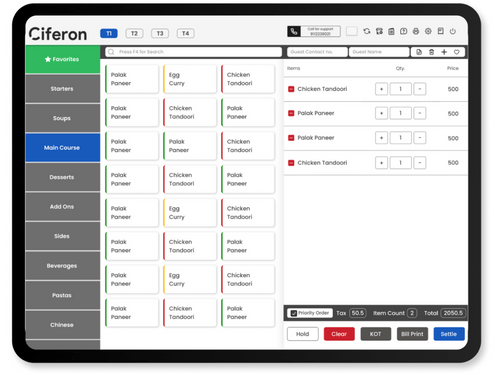
Ciferon KDS dashboard
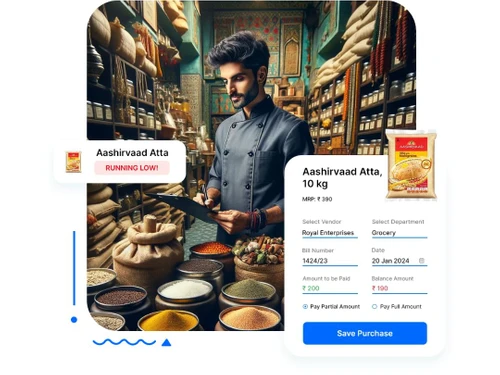
ciferon kds inventary
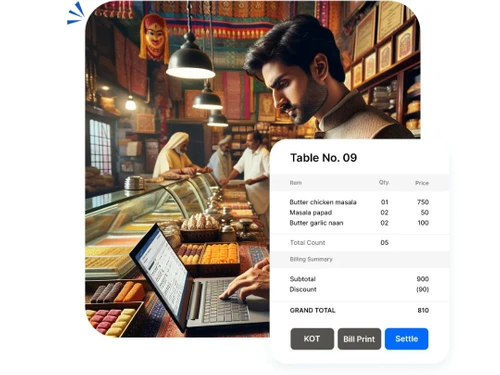
ciferon kds billing

Ciferon KDS

Brand: Ciferon

  • 4.4

  • 5 Ratings

Ciferon KDS is a kitchen display system which helps restaurants get away with the manual order management. The software automates the back-end tasks of a restaurant. It integrates with the billing system to streamline the management of KOTs generated and display all of them on the screen along with their current status. The software allows restaurant staff to mark the food “ready” when it is ...

See More

Have you used Ciferon KDS before?

Share your insights for better experience

Add a Review

Price Available on Request

Questions about pricing or customization? We’re here to help, just a click away.

100% Genuine
Products
Best Price
Guaranteed
Safe & Secure
Payment
  • Description

  • Pricing

  • Features

  • Specification

  • Review

  • Compare

  • Alternatives

  • FAQ

Ciferon KDS Software Overview

What is Ciferon KDS?

Ciferon KDS is a kitchen display system which helps restaurants get away with the manual order management. The software automates the back-end tasks of a restaurant. It integrates with the billing system to streamline the management of KOTs generated and display all of them on the screen along with their current status. The software allows restaurant staff to mark the food “ready” when it is prepared. Ciferon KDS works in complete synchronization with Ciferon POS for restaurants and the Captain application. It helps cloud kitchens to work and deliver food on time.

Ciferon KDS eliminates the requirement of manually handling kitchen processes. It creates a digital channel to pass on the information instantly. This kitchen display solution also effortlessly integrates with online pickup applications like Dunzo, Swiggy, and Zomato, etc. Restauranteurs can also use this software to evaluate the efficiency of kitchen operations.

How does Ciferon Kitchen Display System help in improving kitchen operations?

Ciferon KDS helps in increasing accountability amongst all the employees working in the kitchen. It helps in enhancing the quality of communication between different divisions within the kitchen to keep them informed about incoming orders. The software also helps in increasing the pace at which the orders are delivered. Plus, restauranteurs can use Ciferon KDS to assess the performance of every individual chef at regular intervals.

How is Ciferon KDS’s synchronization with POS and Captain App helpful for restaurants?

Ciferon KDS when synced with POS and Captain app, makes it easier for restaurants to manage their food business with ease.

  1. Updating all the relevant information on the POS eliminates double work and helps in managing accounts and food orders on a daily or weekly basis without any complication.
  2. By synchronizing with Captain app, restaurants get to accept orders directly within their system, which gets displayed on the kitchen screens and dedicated prep stations.
  3. Having all the data synchronized into multiple platforms in real-time saves a lot of time and effort for the restaurant manager and eliminates all chances of human-made errors.

Compatible Platforms for Ciferon KDS

Ciferon KDS is compatible with Windows and Mac operated devices. The software also comes with a dedicated mobile app that is compatible with iOS and Android platforms.

What are the features offered by Ciferon Kitchen Display System App?

  1. Here are some salient features offered by Ciferon KDS:
  2. Displaying KOTs and their status on screen
  3. Turnover time maintenance
  4. Food ready marking for online portal integration
  5. Order history maintenance logs
  6. Automated KOT management
  7. Channeling all the online orders from different portals directly to Ciferon KDS

Benefits of Ciferon KDS

  1. Integrated Online Ordering Process - KDS software eliminates the need for human intervention and routes the orders from the restaurant’s online ordering system directly to the display in the kitchen. It eliminates all chances of manual errors and increasing the efficiency of restaurants in return.
  2. Enhance the efficiency of your kitchen - Ciferon KDS directly routes the tickets to specific kitchen screens and prep stations. It helps the kitchen staff to keep track of all the tickets that are to be addressed based on their priority. Managers can also color code the tickets to ensure that the order gets fulfilled in time.
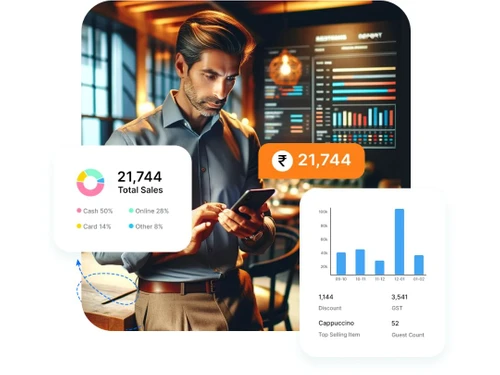
  3. Track fulfilment time accurately - With Ciferon KDS, managers can generate kitchen reports, showcasing a wide range of metrics such as average fulfilment time on a daily or a weekly basis. It helps the managers to identify the most efficient staff within their kitchen, who can be additionally trained to manage the orders more efficiently.
  4. SMS and alerts - Chefs can send out notifications to the waiters once the food is ready to be served. It ensures on-time order fulfilment and enabling the guests to enjoy their meal before it gets cold.

What is the Ciferon Kitchen Display System Pricing?

The price of Ciferon KDS is available on request. Please request a call back from one of our experts to know about the plans & pricing in detail.

Read more

Ciferon Company Details

Founded Year:  2016

Simplest Restaurant billing software to manage your restaurant billing, inventory, accounting, and customer details with online aggregator integrations and real-time restaurant reports at a glance. Also has a captain ordering app, kitchen display system (KDS), loyalty wallet, feedback system.

Director/Founders Ankit Gupta
Company Size 1-100 Employees

Ciferon KDS Pricing & Plans

Looking for The Right Pricing?

Share your requirements and get a plan built around your business.

  • Define your business needs
  • Get customised pricing
  • Choose features that fit your workflow

Price Available on Request

Get personalised Ciferon KDS pricing that fits your needs. Our team will connect with you.

Ciferon KDS Features

  • icon_check Kitchen Display
    The software provides visibility into kitchen operations and all the KOTs that are being managed.
  • icon_check Mark Food Ready
    This kitchen display system allows users to mark the food prepared or ready for online orders.  
  • icon_check Maintain Order History
    The software keeps a consistent track of all the orders received through various means.
  • icon_check Synced with POS & Captain App
    Ciferon KDS offers direct synchronization with Ciferon POS and the Captain application.
  • icon_check Know your kitchen Team Efficiency
    The software helps business owners to keep track of their kitchen efficiency and evaluate employee efficiency in real-time.
  • icon_check Online Orders
    Ciferon KDS helps restaurants manage online orders with ease.
  • icon_check Online/Offline Mode
    This kitchen display system works both with and without internet.  
  • icon_check Touch-enabled UI
    The software is fully capable of working touch screen POS devices.  
  • icon_check No More Manbual KOT's
    Ciferon KDS system assists restaurants in eliminating their dependence on manual KOT handling and completely digitize the

Ciferon KDS Specification

Supported Platforms
Windows Windows iOS iOS Android Android
Devices
Desktop Desktop Mobile Mobile
Deployment
Web-Based Web-Based
Suitable For
All Industries
Business Specific
All Businesses
Language
English

Explore the Best Alternative Solutions Similar to Your Business Size and Needs

Ciferon KDS Review

4.4

Out of 5

img

Overall Rating

Based on
5 Verified Ratings

Rating Breakdown

  • Features 4.6
  • Value for Money 4.5
  • Ease of Use 4.3
  • Customer Support 4.3

90% Recommend this Product

Add Review

Techjockey Trusted Reviews from Verified Users

No reviews are currently available for Ciferon KDS. Discover similar Restaurant Management Software reviews

  • Microtech POS

    4.5

    Whats great - Access to real-time data allows for better decision-making. Many billing software solutions offer mobile apps for on-the-go ... read more

  • Limetray

    4.5

    Whats great - Limetray has proved to be very profitable for us. It offers multiple user login facilities, which saves huge operational cost... read more

  • POSist

    4.5

    Whats great - It was one of the best investments we made. POSist helped us analyse all the loopholes and barriers in our operations and cut... read more

Compare Ciferon KDS With other Restaurant Management Software

Products
Ratings
Pricing
Device Supported
Deployment
Supported Platforms
  • img

    Ciferon KDS

  • 4.4

  • Price On Request

  • Desktop

    Mobile

  • Web based

    On Premises

  • Windows

    Mac OS

  • img

    Ciferon POS

  • 4.2

  • ₹ 7499

  • Desktop

    Mobile

  • Web based

    On Premises

  • Windows

    Mac OS

  • img

    Captain App

  • 4.3

  • Price On Request

  • Desktop

    Mobile

  • Web based

    On Premises

  • Windows

    Mac OS

  • img

    POSist

  • 4.4

  • ₹ 36800

  • Desktop

    Mobile

  • Web based

    On Premises

  • Windows

    Mac OS

  • img

    Limetray

  • 4.6

  • Price On Request

  • Desktop

    Mobile

  • Web based

    On Premises

  • Windows

    Mac OS

  • img

    eRe4u

  • 4.6

  • ₹ 4000

  • Desktop

    Mobile

  • Web based

    On Premises

  • Windows

    Mac OS

  • img

    Eatlot

  • 4.1

  • Price On Request

  • Desktop

    Mobile

  • Web based

    On Premises

  • Windows

    Mac OS

  • img

    OrderSeva

  • 4.1

  • ₹ 2000

  • Desktop

    Mobile

  • Web based

    On Premises

  • Windows

    Mac OS

  • img

    HDRestaurant

  • 4.4

  • Price On Request

  • Desktop

    Mobile

  • Web based

    On Premises

  • Windows

    Mac OS

(0) Product(s) selected

Ciferon KDS Alternatives

See All Ciferon KDS Alternatives

Available

Price on Request

Available

Price on Request

SAVE UPTO 40%

Available

Price on Request

Articles for Ciferon KDS

See All Related Articles

Does Ciferon KDS provide touch-enabled UI?

Yes, Ciferon KDS does provide its users with a touch-enabled user interface.

Does Ciferon KDS display KOT on the screen?

Ciferon KDS displays the entire KOT on the screen making it easier and faster for the chefs to manage individual orders.

Which mobile platforms can I use Ciferon KDS on?

You can use Ciferon KDS on both Android and Apple smartphones.

Where does Ciferon KDS saves all the data?

Ciferon KDS uses cloud-based storage facility for data storage.

Can I get a demo for Ciferon KDS?

Yes, Ciferon KDS is available for a demo at Techjockey. Please request a call from our team to get the demo scheduled.

20,000+ Software Listed

Best Price Guranteed

Free Expert Consultation

2M+ Happy Customers

Terms and Condtions

close

Users with registered businesses can purchase goods from merchants on the platform to satisfy their business needs. Users are not permitted to utilize any products acquired through the platform for resale, advertising, business, or further distribution.

For each purchase made, users will receive a Tax Invoice (or 'GST invoice') that includes specific details such as:

  • the GSTIN of the user associated with their registered business, and

  • the specified Entity Name for their business.

It should be noted that not all products are eligible for GST Invoice. Only the products displayed by participating sellers with the 'GST-based Invoice Available' callout on the product description page would qualify.

Certain goods and services are not eligible to get a GST Invoice, including items with VAS, i.e., Value Added Services (e.g., Total Mobile Protection/Assured Buyback) and those involving an exchange offer at the time of purchase.

Users must ensure the accuracy of the GSTIN, and business entity name provided for the GST Invoice. Requests for corrections into GST Invoice would not be accommodated by Techjockey.com or any Seller, and any issues arising from user-provided information are the sole responsibility of users.

Techjockey.com is not liable for the GST Invoice or any associated input tax credit. To efficiently claim an input tax credit, users should select the registered place of business address as per the GST authority's data and follow the provisions of the GST Act and rules.

To claim an input tax credit, the delivery and billing addresses must match. Furthermore, input tax credits will not be granted if the delivery address and GSTIN on the invoice are from different states. In case of incorrect GST details provided during the order placement, the order will be canceled automatically.