linkedin
CINC logo
play Turn prospective home buyers into lifelong clients with CINC
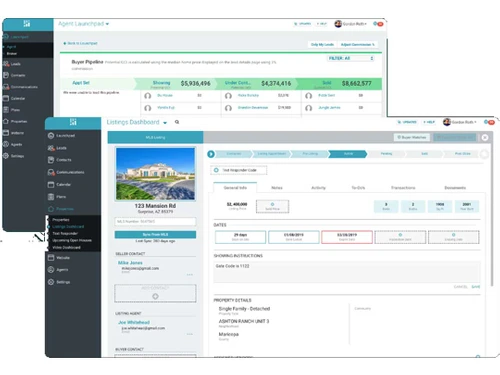
cinc agent
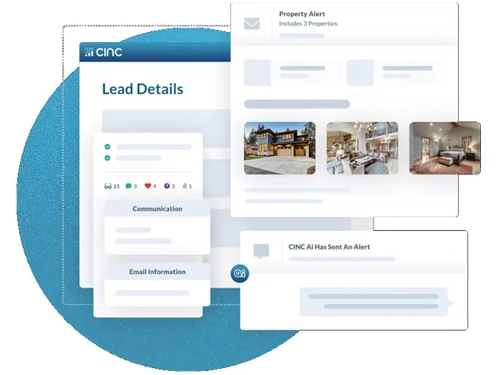
cinc lead details

CINC

Brand: CINC

  • 4.1

  • 5 Ratings

It is a powerful real estate CRM designed to help agents convert leads, manage relationships, and grow their businesses.

See More

Have you used CINC before?

Share your insights for better experience

Add a Review

Price Available on Request

Questions about pricing or customization? We’re here to help, just a click away.

100% Genuine
Products
Best Price
Guaranteed
Safe & Secure
Payment
  • Description

  • Pricing

  • Features

  • Specification

  • Review

  • Compare

  • Alternatives

  • FAQ

  • Questions

CINC Software Overview

What is CINC?

Commissions Inc. (CINC) is a full-featured CRM and lead creation tool for real estate. It provides advanced capabilities for lead tracking, customer relationship management, and marketing automation. To assist agents in closing more business and enhancing their marketing tactics, CINC offers analytics and an easy-to-use dashboard. CINC was created to assist high-growth real estate teams. It provides tools that automate routine activities, nurture prospects, and deliver insightful information about market trends. Businesses can increase conversion rates and scale effectively with CINC's customisation possibilities.

Why Choose CINC Software?

  • Advanced Automation: Automate marketing and follow-ups to maintain leads' interest throughout the entire process.
  • Customizable Dashboards: Use customised dashboards to monitor performance and corporate objectives as per your business needs.
  • Comprehensive Analytics: To maximise marketing efforts, learn more about lead sources, conversions, and other topics.
  • Multi-Channel Marketing: Use social media, text messaging, and email to reach a large audience.
  • Easy Team Collaboration: Manage workflows, monitor progress, and simplify tasks for your team.

Features of CINC Software

  • Lead Generation: Gather, monitor, and develop leads from various sources.
  • Pipeline Management: Use a visual pipeline to track and manage leads and deals with ease.
  • Online Lead Capture Forms: To collect data from website users, design easily customisable lead capture forms.
  • Lead Scoring: Prioritise high-potential clients by giving leads scores based on their behaviour.
  • Client Relationship Tracking: Keep track of your contacts and correspondence with clients to create enduring bonds.
  • Customer Segmentation: Sort leads into groups according to their demographics, behaviours, or requirements for focused advertising.
  • Property Listings Management: Ensure accurate and current information by centralising and updating property listings.
  • Transaction Management: From contract to close, streamline and monitor every facet of real estate transactions.
  • Property Valuation Tools: Use advanced resources to determine property values and assist clients in setting reasonable prices.
  • Automated Marketing: Distribute campaigns, tailored emails, and messages to leads automatically.
  • Task Management: To be on top of crucial sales activities, assign tasks and establish reminders.
  • Customisable Websites: Create expert websites that are suited to your requirements and brand.
  • Advanced Analytics: Use thorough reports to keep an eye on team performance and lead activity.
  • Mobile Access: Use the mobile app to access the CRM and conduct business while on the go.

CINC Pricing

CINC offers custom pricing based on the size of your team and specific business needs. The pricing model is based on different parameters, including extra features, deployment type, and the total number of users.

For further queries related to the product, you can contact our product team and learn more about the pricing and offers.

Read more

CINC Company Details

Founded Year:  2011

Since 2011, our team has empowered real estate agents, brokers, and lenders to run their businesses from one simple, convenient, scalable platform. And all while keeping the focus on the people on both sides of a real estate transaction.

Director/Founders Bill Blanton
Company Size 101-500 Employees

CINC Pricing & Plans

Looking for The Right Pricing?

Share your requirements and get a plan built around your business.

  • Define your business needs
  • Get customised pricing
  • Choose features that fit your workflow

Price Available on Request

Get personalised CINC pricing that fits your needs. Our team will connect with you.

CINC Features

Contact Management

  • icon_check Client Management
    Manage clients, preferences, and communication efficiently for better service.
  • icon_check Interaction Tracking
    Track client interactions across all channels to stay updated on ongoing discussions.
  • icon_check Customer History
    View complete client history to personalize engagement and improve customer relationships.
  • icon_check Centralized Database
    Centralised database for client information. Access contact history and customise fields for details.

Lead Management

  • icon_check Lead Scoring
    Rank leads by their likelihood of conversion to target efforts more effectively.
  • icon_check Lead Distribution
    Distribute leads to the right agents based on expertise or location for faster conversion.
  • icon_check Lead Nurturing
    Maintain ongoing engagement with leads to increase the chances of successful conversion.
  • icon_check Lead Qualification
    Prioritize high-quality leads based on predefined criteria for focused follow-ups.
  • icon_check Lead Capture
    Automatically gather leads from various sources to create a database of potential clients.
  • icon_check Lead Segmentation
    Categorize leads into groups for tailored marketing strategies and personalized outreach.

Property Management

  • icon_check Transaction Tracking
    Monitor transactions through each stage to ensure smooth processing and record-keeping.
  • icon_check Property Listing Management
    Easily add, update, and track the status of property listings with advanced filtering.
  • icon_check Property Matching
    Match clients with suitable properties using advanced search and recommendation tools.
  • icon_check Commission Management
    Automate tracking and gain real-time insights into commission payouts.
  • icon_check Payment Tracking
    Track payments and outstanding dues to ensure proper financial management.

Marketing Automation

  • icon_check Campaign Management
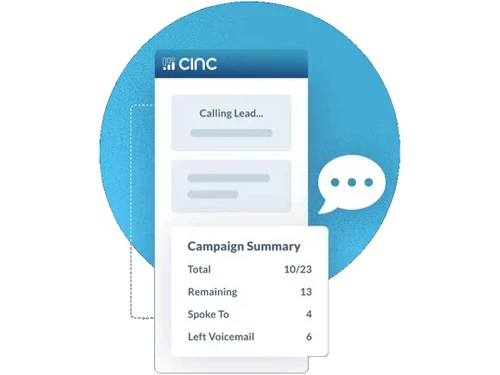
    Oversee and manage marketing campaigns for lead generation and client engagement.
  • icon_check Landing Page Builder
    Design and deploy custom landing pages for lead generation and property promotion.
  • icon_check Email Campaigns
    Create and automate email marketing campaigns to engage clients and nurture leads.
  • icon_check SMS Campaigns
    Send targeted SMS messages to clients and leads for promotions and updates.

Task and Workflow Automation

  • icon_check Alerts & Notifications
    Receive real-time notifications for appointments, tasks, and lead activities.
  • icon_check Task Scheduling
    Organize and schedule tasks to stay on top of appointments and deadlines.
  • icon_check Automated Workflows
    Automate repetitive tasks and processes to enhance efficiency and reduce errors.
  • icon_check Automated Follow-Ups
    Set up automated follow-up reminders to never miss an opportunity for client interaction.
  • icon_check Auto Lead Distribution
    Automatically distribute leads to the right team members based on set rules.

Analytics and Reporting

  • icon_check AI Insights
    Leverage AI to gain insights and recommendations for optimizing sales and marketing.
  • icon_check Real-Time Updates
    Get up-to-the-minute information on listings, leads, and transactions.
  • icon_check Performance Dashboards
    View key performance metrics in real time for a quick overview of business progress.
  • icon_check Commission Tracking
    Monitor and track commission data to ensure accuracy in payments.
  • icon_check Comparative Market Analysis (CMA)
    Generate market reports to help agents price properties competitively.
  • icon_check Conversion Rate Tracking
    Track the success rate of leads converting to clients for better strategy planning.

Integrations

  • icon_check Payment Gateway Integration
    Accept online payments easily with integrated payment gateways.
  • icon_check API Integration
    Connect the CRM with external systems to expand functionality and integrate workflows.
  • icon_check Calendar Integration
    Sync your calendar for appointment scheduling and reminders across all devices.
  • icon_check Third Party Integrations
    Integrate with third-party platforms for extended capabilities in lead generation and client management.
  • icon_check Multiple Listing Services (MLS) Integration
    Seamlessly integrate MLS data for updated property listings and details.
  • icon_check E-Signature Integration
    Facilitate digital document signing for faster, paperless transactions.
  • icon_check IVR Integration
    Streamline client communication with integrated Interactive Voice Response systems.

Collaboration and Communication

  • icon_check Internal Communication
    Facilitate team collaboration with built-in chat and messaging features.
  • icon_check Call Tracking and Recording
    Track, record, and analyze calls to improve client service and sales strategies.
  • icon_check Document Management
    Store, organize, and share important documents securely within the CRM.
  • icon_check Bulk Email and SMS
    Send mass emails and SMS messages to clients or leads in just a few clicks.

Security & Compliance

  • icon_check API Access
    Enable custom integrations and extend functionality with secure API access.
  • icon_check Data Encryption
    Protect sensitive data with high-level encryption for secure storage and transmission.
  • icon_check Backup & Disaster Recovery
    Ensure data protection with automatic backups and disaster recovery features.
  • icon_check Role-Based Access Control (RBAC)
    Assign specific roles and permissions to ensure proper access control within the CRM.
  • icon_check Audit Logs
    Keep detailed logs of system activity for security and accountability.
  • icon_check Audit Trails
    Track changes and updates within the system for enhanced security and transparency.
  • icon_check IP Whitelisting
    Restrict access to the system by allowing only specific IP addresses for enhanced security.
  • icon_check GDPR and CCPA Compliance
    Ensure full compliance with privacy regulations like GDPR and CCPA.

Others

  • icon_check Chatbot
  • icon_check Sales Pipeline Management
  • icon_check Appointment Scheduling
CINC Demo Video play icon

Get CINC Demo

Watch the demo video to explore key features, real workflows, and how the software fits your business needs.

Understand
Key Features
Personal
Demo Insights
Interactive
Demo Support

CINC Specifications

Supported Platforms
Ubuntu Ubuntu Windows Windows MacOS MacOS Linux Linux
Devices
Desktop Desktop
Deployment
Cloud-Based Cloud-Based
Suitable For
Real Estate
Business Specific
Real Estate
Business Size
Small Business Medium Business Enterprises SMBs SMEs MSMBs
Customer Support
Phone Email Live Chat Forums
Language
English
Integration
API Integration
Training Resources
Live Online Webinars Videos
AI Features
AI Integrated

Explore the Best Alternative Solutions Similar to Your Business Size and Needs

CINC Review

4.1

Out of 5

img

Overall Rating

Based on
5 Verified Ratings

Rating Breakdown

  • Features 3.9
  • Value for Money 4.3
  • Ease of Use 4.2
  • Customer Support 4.3

88% Recommend this Product

Add Review

Techjockey Trusted Reviews from Verified Users

No reviews are currently available for CINC. Discover similar Real Estate CRM Software reviews

  • sell.do

    4.1

    Whats great - Sell.Do has a robust WhatsApp marketing feature that allows users to send mass WhatsApp messages to their contacts. Bulk, per... read more

  • Leadrat CRM

    4.8

    Whats great - Most simple and easy-to-use CRM, Mobile app UI is just awesome, Customer support is always available even on Saturday and Sun... read more

  • OrgGen CRM

    4.4

    Whats great - Automated workflows reduce manual tasks and errors. read more

Compare CINC With other Real Estate CRM Software

Products
Ratings
Pricing
Device Supported
Deployment
Supported Platforms
  • img

    CINC

  • 4.1

  • Price On Request

  • Desktop

    Mobile

  • Web based

    On Premises

  • Windows

    Mac OS

  • img

    Leadrat CRM

  • 4.8

  • Price On Request

  • Desktop

    Mobile

  • Web based

    On Premises

  • Windows

    Mac OS

  • img

    B2BBricks

  • 4.2

  • ₹ 18000

  • Desktop

    Mobile

  • Web based

    On Premises

  • Windows

    Mac OS

  • img

    TiggerOn

  • 4.9

  • Price On Request

  • Desktop

    Mobile

  • Web based

    On Premises

  • Windows

    Mac OS

  • img

    HomeLead

  • 4.9

  • ₹ 1000

  • Desktop

    Mobile

  • Web based

    On Premises

  • Windows

    Mac OS

  • img

    WorkVEU

  • 5

  • ₹ 800

  • Desktop

    Mobile

  • Web based

    On Premises

  • Windows

    Mac OS

  • img

    REsimpli

  • 4.3

  • Price On Request

  • Desktop

    Mobile

  • Web based

    On Premises

  • Windows

    Mac OS

  • img

    eBuildAuto

  • 4.5

  • ₹ 1500

  • Desktop

    Mobile

  • Web based

    On Premises

  • Windows

    Mac OS

  • img

    PropFlo

  • 4.5

  • ₹ 1200

  • Desktop

    Mobile

  • Web based

    On Premises

  • Windows

    Mac OS

  • img

    DiscoveriCRM

  • 4.7

  • ₹ 5000

  • Desktop

    Mobile

  • Web based

    On Premises

  • Windows

    Mac OS

  • img

    Aaram CRM

  • 4.0

  • Price On Request

  • Desktop

    Mobile

  • Web based

    On Premises

  • Windows

    Mac OS

(0) Product(s) selected

CINC Alternatives

See All CINC Alternatives

Starting Price:

₹12,990 /Month

Starting Price:

$199 /Month

Starting Price:

$25 /Month

Available

Price on Request

Available

Price on Request

Starting Price:

$79 /Month

Available

Price on Request

Articles for CINC

See All Related Articles

How can I purchase CINC from techjockey.com?

You can buy CINC directly from techjockey.com. Simply choose your preferred subscription plan and complete the checkout process.

What payment methods are accepted on techjockey.com?

Techjockey.com accepts a range of payment methods, including credit/debit cards, net banking, UPI, and popular digital wallets.

How will I receive my CINC license key after purchase?

After completing your purchase, the license key will be sent to your email instantly techjockey.com ensures 24-hour delivery, allowing you to activate the software immediately.

Is the CINC software purchased from techjockey.com genuine?

Yes, all software bought from techjockey.com is completely authentic and comes with a valid license.

Can I get assistance with installing CINC?

Yes, techjockey.com offers support for software installation. You can contact our customer support team for help with the installation process.

What should I do if I encounter issues with CINC?

If you encounter any issues with CINC, you can reach out to CINC's customer support team for help.

How can I renew my CINC subscription?

You can renew your subscription right on techjockey.com. We'll remind you before it expires, and you can easily extend it on our website.

Can I transfer my CINC license to another device?

Yes, you can move your license to a new device. Just uninstall the software from your current device and install it on the new one using the same license key.

Are there any special offers or discounts available for CINC on techjockey.com?

Yes, techjockey.com often has special discounts and deals on CINC. Visit our website to find the latest offers.

At what pricing CINC is available?

CINC price in India is available on request at techjockey.com

CINC Questions

A:

Yes, CINC includes automated follow-up features that send emails, texts, and reminders at specific intervals.

Sunil Susnna Dec 30, 2024
A:

Yes, CINC uses AI to analyze lead behavior and assign a score, helping agents prioritize their outreach.

Ravi Garg Dec 28, 2024
Q:

How customizable is CINC for real estate agents?

Soumya Ranjan Sahoo Dec 24, 2024
A:

CINC (Commissions Inc.) is highly customizable for real estate agents. You can tailor lead capture forms, client interaction workflows, and email campaigns to suit your business model. CINC’s platform also allows custom branding, personalized templates, and specific lead routing, ensuring a seamless fit for each agent’s needs.

Prajwal Dec 26, 2024
Q:

How can CINC integrate with third-party marketing tools?

Shivakumar Kumar Dec 24, 2024
A:

CINC integrates with a variety of third-party marketing tools through APIs or pre-built integrations. You can link CINC with email marketing platforms, social media advertising tools, and lead generation systems. This allows for streamlined data flow and the ability to run coordinated campaigns across multiple channels.

Rahul Dec 27, 2024
Q:

Is there a mobile app for CINC?

Sunil Kumar Dec 24, 2024
A:

Yes, CINC offers a mobile app that is compatible with both Android and iOS for real-time updates and lead management.

Rishabh Dec 26, 2024

20,000+ Software Listed

Best Price Guranteed

Free Expert Consultation

2M+ Happy Customers

Terms and Condtions

close

Users with registered businesses can purchase goods from merchants on the platform to satisfy their business needs. Users are not permitted to utilize any products acquired through the platform for resale, advertising, business, or further distribution.

For each purchase made, users will receive a Tax Invoice (or 'GST invoice') that includes specific details such as:

  • the GSTIN of the user associated with their registered business, and

  • the specified Entity Name for their business.

It should be noted that not all products are eligible for GST Invoice. Only the products displayed by participating sellers with the 'GST-based Invoice Available' callout on the product description page would qualify.

Certain goods and services are not eligible to get a GST Invoice, including items with VAS, i.e., Value Added Services (e.g., Total Mobile Protection/Assured Buyback) and those involving an exchange offer at the time of purchase.

Users must ensure the accuracy of the GSTIN, and business entity name provided for the GST Invoice. Requests for corrections into GST Invoice would not be accommodated by Techjockey.com or any Seller, and any issues arising from user-provided information are the sole responsibility of users.

Techjockey.com is not liable for the GST Invoice or any associated input tax credit. To efficiently claim an input tax credit, users should select the registered place of business address as per the GST authority's data and follow the provisions of the GST Act and rules.

To claim an input tax credit, the delivery and billing addresses must match. Furthermore, input tax credits will not be granted if the delivery address and GSTIN on the invoice are from different states. In case of incorrect GST details provided during the order placement, the order will be canceled automatically.