linkedin
Core Incident Software logo
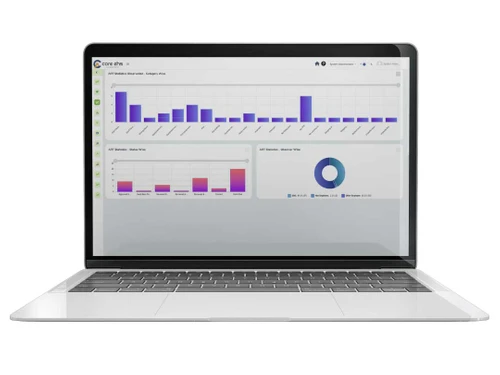
core ehs incident
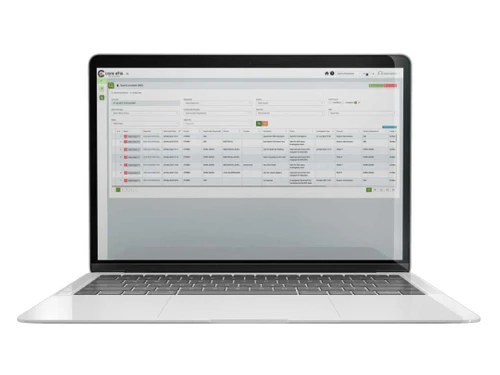
core ehs workflow
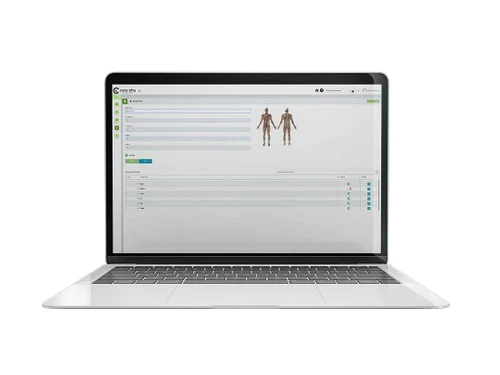
core ehs report

Core Incident Software

Brand: CORE EHS

  • 4.2

  • 3 Ratings

Core Incident Software is a tool that helps organizations track and manage incidents, ensuring effective response and resolution to any issues that arise.

See More

Have you used Core Incident Software before?

Share your insights for better experience

Add a Review

Price Available on Request

Questions about pricing or customization? We’re here to help, just a click away.

100% Genuine
Products
Best Price
Guaranteed
Safe & Secure
Payment
  • Description

  • Pricing

  • Features

  • Specification

  • Review

  • Compare

  • Alternatives

  • FAQ

Core Incident Software Overview

What is Core Incident Software?

Core Incident Software is an incident management software that helps organizations manage workplace incidents effectively. It makes it easy for employees to report incidents using a simple interface, allowing them to provide important details like the type of incident, location, and description. The software efficiently sends these reports to the right people for review and action.

It also includes a centralized system for storing all incident reports and investigation findings, making them easy to access. Additionally, the software tracks tasks from investigations to ensure accountability and closure. The 5 Why analysis feature helps organizations find the root causes of incidents, encouraging ongoing improvements in safety practices. By promoting timely reporting and resolution of safety issues, this software improves workplace safety and creates a proactive safety culture within organizations.

Why Choose Core Incident Software?

  • Streamlined Reporting: The software makes it easy for employees to report incidents through a simple interface, encouraging more people to participate in safety efforts.
  • Efficient Workflow Management: It automatically sends incident reports to the right people, ensuring quick reviews and actions, which helps reduce the workload for management.
  • Centralized Documentation: All reports and related documents are stored in one place, making it easy to access past information for reference and compliance.
  • Root Cause Analysis: It includes tools for identifying the main causes of incidents using methods like the 5 Why analysis, helping to prevent similar issues in the future.
  • Improved Safety Culture: By encouraging employees to report incidents, the software helps create a proactive safety culture that focuses on managing risks.
  • Continuous Improvement: The software supports ongoing improvement by tracking how well corrective actions work and finding areas that need enhancement.
  • Comprehensive Reporting Tools: Users can generate detailed reports that show trends in incidents, helping organizations make better safety decisions.
  • User-Friendly Interface: Designed to be easy to use, the software is accessible for all employees, no matter their technical skills, making it easier for everyone to adopt.

Benefits of Core Incident Software

  • Efficiency in Reporting: It makes the incident reporting process quick and easy through a user-friendly interface, reducing the workload for management.
  • Incident Reporting: Employees can easily report incidents through a user-friendly interface, capturing essential details like type, location, date, and description.
  • Correction Loop: If necessary, reports can be sent back for corrections, allowing responsible personnel to make required changes before resubmission.
  • Investigating Team Assignment: Accepted reports are assigned to specific investigating teams or individuals for further processing.
  • 5 Why Analysis: Investigators can perform root cause analysis using the 5 Why technique to identify underlying issues contributing to incidents.
  • Progress Tracking: Assigned teams can update the status of their tasks, request deadline revisions, or mark tasks as completed.
  • Completion and Approval Process: Upon task completion, investigators can submit their findings for approval, including comments and relevant documentation.
  • Automated Notifications: The system sends alerts and notifications throughout the reporting and investigation process to keep all stakeholders informed.

Pricing of Core Incident Software

Core Incident price details are available on request at techjockey.com.

The pricing model is based on different parameters, including extra features, deployment type, and the total number of users. For further queries related to the product, you can contact our product team and learn more about the pricing and offers.

Read more

CORE EHS Company Details

Founded Year:  2005

At CORE EHS, we redefine the landscape of Environment, Health, and Safety (EHS) services, integrating ESG principles to offer unparalleled support globally during both construction and operational phases.

Director/Founders Mr. J.K. Anand
Company Size 501-1000 Employees

Core Incident Software Pricing & Plans

Looking for The Right Pricing?

Share your requirements and get a plan built around your business.

  • Define your business needs
  • Get customised pricing
  • Choose features that fit your workflow

Price Available on Request

Get personalised Core Incident Software pricing that fits your needs. Our team will connect with you.

Core Incident Software Features

  • icon_check Progress Tracking
    Keeps an eye on the status of incidents and related tasks to ensure they are moving forward.
  • icon_check Incident Categorization
    Incidents can be categorized by type, severity, or department for easier filtering and analysis.
  • icon_check Action Tracking Tools
    Tracks corrective actions from incident investigations, assigning ownership and tracking closure.
  • icon_check Progress Tracking Dashboard
    Investigators can update task status, request date revisions, or mark tasks complete.
  • icon_check Workflow Management
    Organizes and automates the process of handling incident reports, making sure they reach the right people quickly.
  • icon_check Document Management
    Stores all incident reports and documents in one place for easy access and reference.
  • icon_check Incident Reporting
    Allows employees to easily report incidents through a simple interface.
  • icon_check Action Tracking
    Monitors tasks that come from investigations to ensure follow-up actions are completed.
  • icon_check Risk Reduction
    Helps identify and address safety risks to lower the chances of future incidents.
  • icon_check Continuous Improvement
    Tracks the effectiveness of corrective actions and finds areas for further enhancement.
  • icon_check Approval Process
    Streamlines the process of getting approvals for actions taken based on incident reports.

Core Incident Software Specifications

Supported Platforms
Windows Windows iOS iOS Android Android MacOS MacOS Windows(Phone) Windows(Phone)
Devices
Desktop Desktop Mobile Mobile Tablet Tablet iPad iPad
Deployment
Cloud-Based Cloud-Based
Suitable For
All Industries
Business Specific
All Businesses
Business Size
Small Business Medium Business Enterprises
Customer Support
Phone Email Forums
Language
English
Training Resources
In Person Documentation

Core Incident Software Review

4.2

Out of 5

img

Overall Rating

Based on
3 Verified Ratings

Rating Breakdown

  • Features 4.6
  • Value for Money 4.6
  • Ease of Use 4
  • Customer Support 3.8

83% Recommend this Product

Add Review

Techjockey Trusted Reviews from Verified Users

No reviews are currently available for Core Incident Software. Discover similar Incident Management Software reviews

  • ServiceNow

    4.5

    Whats great - ServiceNow is incredibly well-suited for large organizations with complex IT needs. Its enterprise-level capabilities and int... read more

  • New Relic

    4.5

    Whats great - The real-time app monitoring, deep visibility, and unified views are very helpful. read more

  • VComply

    4.2

    Whats great - Setting up a compliance and assigning a responsibility is very easy. Moreover there is no need for any installation of the so... read more

Compare Core Incident Software With other Incident Management Software

Products
Ratings
Pricing
Device Supported
Deployment
Supported Platforms
  • img

    Core Incident Software

  • 4.2

  • Price On Request

  • Desktop

    Mobile

  • Web based

    On Premises

  • Windows

    Mac OS

  • img

    StatusPage

  • 4.7

  • Price On Request

  • Desktop

    Mobile

  • Web based

    On Premises

  • Windows

    Mac OS

  • img

    SmartITSM

  • Price On Request

  • Desktop

    Mobile

  • Web based

    On Premises

  • Windows

    Mac OS

  • img

    FireHydrant

  • Price On Request

  • Desktop

    Mobile

  • Web based

    On Premises

  • Windows

    Mac OS

  • img

    incident io

  • Price On Request

  • Desktop

    Mobile

  • Web based

    On Premises

  • Windows

    Mac OS

  • img

    Momentus WeTrack

  • 4.3

  • Price On Request

  • Desktop

    Mobile

  • Web based

    On Premises

  • Windows

    Mac OS

  • img

    PagerDuty

  • Price On Request

  • Desktop

    Mobile

  • Web based

    On Premises

  • Windows

    Mac OS

  • img

    ilert

  • Price On Request

  • Desktop

    Mobile

  • Web based

    On Premises

  • Windows

    Mac OS

  • img

    xMatters

  • 4.5

  • Price On Request

  • Desktop

    Mobile

  • Web based

    On Premises

  • Windows

    Mac OS

(0) Product(s) selected

Core Incident Software Alternatives

See All Core Incident Software Alternatives

Starting Price:

$29 /Month

Available

Price on Request

Starting Price:

$25 /Month

Starting Price:

$24 /Month

Starting Price:

$9

What is the pricing for Core Incident Software?

Price details for Core Incident can be obtained upon request at techjockey.com.

Is there a mobile app available for Core Incident Software?

Yes, Core Incident Software has a mobile app available for both iOS and Android devices.

Which operating systems are compatible with Core Incident Software?

Core Incident Software is a cloud-based platform, accessible via web browsers on any operating system, including Windows, MacOS, iOS, Windows(Phone), and Android.

Does Core Incident Software provide a free trial option?

No, Core Incident Software does not offer a free trial.

What is the operational mechanism of Core Incident Software?

Core Incident Software operates by allowing users to log incidents, categorize and prioritize them, automate notifications, and track the resolution process through a centralized platform, ensuring efficient incident management and timely responses.

Who can benefit from using Core Incident Software?

Core Incident Software can benefit various organizations, including safety managers, compliance officers, HR departments, and operational teams, by streamlining incident reporting, enhancing safety protocols, and improving overall incident management efficiency.

Is there a free demo available for Core Incident Software?

Yes, Core Incident Software offers a free demo.

Is Core Incident Software available at no cost?

No, Core Incident Software is not free.

20,000+ Software Listed

Best Price Guranteed

Free Expert Consultation

2M+ Happy Customers

Terms and Condtions

close

Users with registered businesses can purchase goods from merchants on the platform to satisfy their business needs. Users are not permitted to utilize any products acquired through the platform for resale, advertising, business, or further distribution.

For each purchase made, users will receive a Tax Invoice (or 'GST invoice') that includes specific details such as:

  • the GSTIN of the user associated with their registered business, and

  • the specified Entity Name for their business.

It should be noted that not all products are eligible for GST Invoice. Only the products displayed by participating sellers with the 'GST-based Invoice Available' callout on the product description page would qualify.

Certain goods and services are not eligible to get a GST Invoice, including items with VAS, i.e., Value Added Services (e.g., Total Mobile Protection/Assured Buyback) and those involving an exchange offer at the time of purchase.

Users must ensure the accuracy of the GSTIN, and business entity name provided for the GST Invoice. Requests for corrections into GST Invoice would not be accommodated by Techjockey.com or any Seller, and any issues arising from user-provided information are the sole responsibility of users.

Techjockey.com is not liable for the GST Invoice or any associated input tax credit. To efficiently claim an input tax credit, users should select the registered place of business address as per the GST authority's data and follow the provisions of the GST Act and rules.

To claim an input tax credit, the delivery and billing addresses must match. Furthermore, input tax credits will not be granted if the delivery address and GSTIN on the invoice are from different states. In case of incorrect GST details provided during the order placement, the order will be canceled automatically.