linkedin
PagerDuty logo
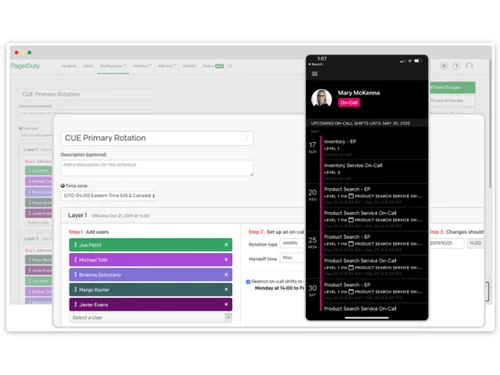
PagerDuty-scheduling
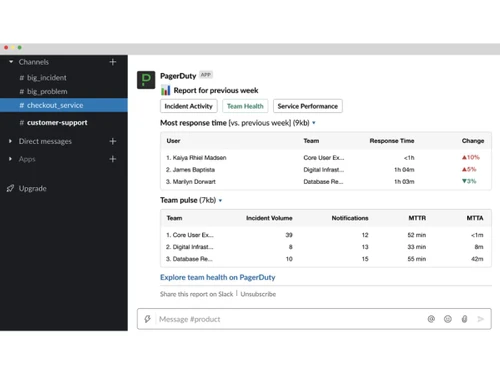
PagerDuty-team health
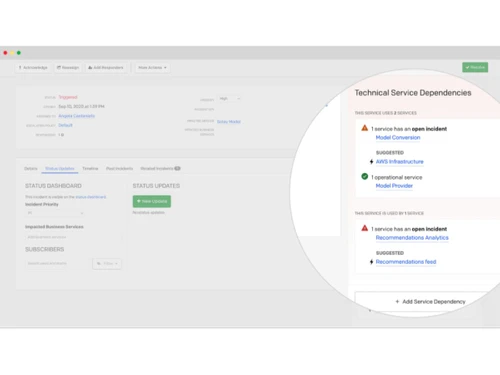
PagerDuty-dependencies

PagerDuty

Brand: PagerDuty

  • No Ratings & Reviews

PagerDuty is a software that helps businesses detect, manage, and resolve IT incidents and system outages quickly using alerts, automation, and real-time collaboration tools.

See More

Have you used PagerDuty before?

Share your insights for better experience

Add a Review
Starting Price
$25

View plans

100% Genuine
Products
Best Price
Guaranteed
Safe & Secure
Payment
  • Description

  • Pricing

  • Features

  • Specification

  • Review

  • FAQ

Starting at $25

PagerDuty Software Overview

What is PagerDuty?

PagerDuty is an incident management software that helps companies detect, manage, and solve IT and system problems quickly before they affect customers. It is mainly used by IT teams, DevOps teams, and businesses that manage websites, apps, and online services.

The software automatically sends alerts to the right team members when a system problem or outage happens. PagerDuty helps teams respond faster using notifications, automation, and real-time collaboration tools.

It supports on-call scheduling so the correct person gets alerted at the right time. The platform also works with tools like Slack, Microsoft Teams, Jira, and ServiceNow for better teamwork. PagerDuty uses AI and automation to reduce alert noise and speed up issue resolution.

Teams can track incidents, monitor system health, and analyze performance through reports and dashboards. The software helps businesses reduce downtime, improve customer experience, and keep services running smoothly.

Why Choose PagerDuty Software?

  • Real-Time Incident Alerts: Instantly notifies teams when system issues occur.
  • Faster Incident Response: Helps reduce downtime through quick action.
  • Centralized Alerting System: Combines alerts from multiple monitoring tools.
  • Smart On-Call Scheduling: Automatically assigns the right responder.
  • Automated Escalations: Ensures no critical issue is missed.
  • Improved Team Coordination: Keeps all stakeholders aligned during incidents.
  • AI-Powered Insights: Helps identify patterns and prevent future issues.
  • Reduces System Downtime: Speeds up issue detection and resolution.
  • Customizable Alert Rules: Users can set alerts based on priorities.
  • Mobile-Friendly Access: Manage incidents from anywhere.
  • Incident Tracking History: Keeps records for analysis and improvement.
  • Improves Service Reliability: Helps maintain stable digital services.

Benefits of PagerDuty Software

  • Faster Root Cause Analysis: Makes debugging easier and quicker.
  • Collaboration Tools: Supports communication during outages.
  • Operational Efficiency: Reduces manual workload with automation.
  • Secure and Reliable: Built with enterprise-grade security.
  • Multi-Channel Notifications: Alerts via SMS, email, push, and calls.
  • Better Customer Experience: Minimizes service disruption for users.

PagerDuty Pricing

PagerDuty price starts at USD 25 at techjockey.com.

The pricing model is based on different parameters, including extra features, deployment type, and the total number of users. For further queries related to the product, you can contact our product team and learn more about the pricing and offers.

Read more

PagerDuty Company Details

Founded Year:  2009

PagerDuty

Director/Founders Alex Solomon, Andrew Miklas, Baskar Puvanathasan
Company Size 1000+ Employees

PagerDuty Pricing & Plans

Professional
Starting at $25
    • Users

      Users
      Users
    • Monthly

      Monthly
      Monthly

Key Features

  • Basic Chat Experience (Slack, Microsoft Teams)

  • More international phone/SMS notifications

  • More On-call Schedules

  • More Escalation Policies

  • External Status Page (up to 250 subscribers)

Business
Starting at $49
    • Users

      Users
      Users
    • Monthly

      Monthly
      Monthly

Key Features

  • Custom Fields

  • Up to 3 custom Incident Types

  • Advanced admin features

  • Advanced ITSM integrations

  • Multi-year historical data access

PagerDuty Features

  • icon_check Incident Management
    Centralizes incident creation, ownership, and resolution workflows to restore services quickly and reliably.
  • icon_check Real-Time Alerts
    Instantly notifies the right responders via phone, SMS, push, or email based on predefined rules.
  • icon_check Scheduling
    Manages complex on-call rotations, overrides, and time zones to ensure 24/7 coverage.
  • icon_check Escalation Policies
    Automatically escalates unresolved incidents to additional responders based on time or priority.
  • icon_check Event Intelligence
    Uses machine learning to de-duplicate, suppress noise, and highlight the most critical alerts.
  • icon_check Incident Prioritization
    Assigns severity levels to incidents so teams can focus on the most business-critical issues first.
  • icon_check Automated Incident Response
    Triggers automated actions and workflows to reduce manual effort during incident resolution.
  • icon_check Integrations
    Connects with monitoring, logging, DevOps, and collaboration tools to unify operations data.
  • icon_check Post-Incident Analysis
    Generates incident timelines and reports to support root cause analysis and continuous improvement.
  • icon_check Service Directory
    Maintains a real-time inventory of services, dependencies, and ownership for faster incident triage.
  • icon_check Runbook Automation
    Executes predefined response steps automatically to accelerate resolution and reduce human error.
  • icon_check Notification
    Sends real-time incident updates to internal teams or external stakeholders automatically.
  • icon_check Collaborations
    Enables responders to collaborate using notes, status updates, and integrated chat tools.
  • icon_check Analytics & Reporting
    Provides insights into MTTR, incident trends, and team performance for operational optimization.
  • icon_check Role-Based Access Control (RBAC)
    Controls user permissions to ensure secure access based on roles and responsibilities.

PagerDuty Specifications

Supported Platforms
Windows Windows MacOS MacOS Linux Linux
Devices
Desktop Desktop
Deployment
Cloud-Based Cloud-Based
Suitable For
All Industries
Business Specific
All Businesses
Business Size
Small Business Startups Medium Business Enterprises
Customer Support
Email Communities
Language
English
Training Resources
Videos
Compliance Regulation
SOC 2

PagerDuty Review

Techjockey Trusted Reviews from Verified Users

No reviews are currently available for PagerDuty. Discover similar Incident Management Software reviews

  • ServiceNow

    4.5

    Whats great - ServiceNow is incredibly well-suited for large organizations with complex IT needs. Its enterprise-level capabilities and int... read more
  • New Relic

    4.5

    Whats great - The real-time app monitoring, deep visibility, and unified views are very helpful. read more

  • VComply

    4.2

    Whats great - Setting up a compliance and assigning a responsibility is very easy. Moreover there is no need for any installation of the so... read more

How much does PagerDuty Software cost?

PagerDuty price starts at USD 25, as listed on techjockey.com.

Is there a mobile app available for PagerDuty Software?

No, PagerDuty does not offer mobile apps for both Android and iOS devices.

Which operating systems are compatible with PagerDuty Software?

PagerDuty is cloud-based and works on Windows, macOS, and Linux.

Does PagerDuty Software offer a free trial?

Yes, PagerDuty provides a free trial for users to explore its features.

How does PagerDuty Software function?

PagerDuty functions by collecting alerts from monitoring tools and sending real-time incident notifications to the right responders.

Who uses PagerDuty Software?

PagerDuty is used by IT teams, DevOps engineers, SREs, and enterprise organizations managing digital services.

Is a free demo available for PagerDuty Software?

Yes, PagerDuty offers a free demo to help users understand its features and workflow.

Is PagerDuty Software available for free?

No, PagerDuty is a paid software.

20,000+ Software Listed

Best Price Guranteed

Free Expert Consultation

2M+ Happy Customers

Terms and Condtions

close

Users with registered businesses can purchase goods from merchants on the platform to satisfy their business needs. Users are not permitted to utilize any products acquired through the platform for resale, advertising, business, or further distribution.

For each purchase made, users will receive a Tax Invoice (or 'GST invoice') that includes specific details such as:

  • the GSTIN of the user associated with their registered business, and

  • the specified Entity Name for their business.

It should be noted that not all products are eligible for GST Invoice. Only the products displayed by participating sellers with the 'GST-based Invoice Available' callout on the product description page would qualify.

Certain goods and services are not eligible to get a GST Invoice, including items with VAS, i.e., Value Added Services (e.g., Total Mobile Protection/Assured Buyback) and those involving an exchange offer at the time of purchase.

Users must ensure the accuracy of the GSTIN, and business entity name provided for the GST Invoice. Requests for corrections into GST Invoice would not be accommodated by Techjockey.com or any Seller, and any issues arising from user-provided information are the sole responsibility of users.

Techjockey.com is not liable for the GST Invoice or any associated input tax credit. To efficiently claim an input tax credit, users should select the registered place of business address as per the GST authority's data and follow the provisions of the GST Act and rules.

To claim an input tax credit, the delivery and billing addresses must match. Furthermore, input tax credits will not be granted if the delivery address and GSTIN on the invoice are from different states. In case of incorrect GST details provided during the order placement, the order will be canceled automatically.