USA
USA UAE
UAESmall Business
Designed for startups and growing businesses


See More





Brand: Servicenow
ServiceNow productivity software is a comprehensive solution that streamlines workflows and automates tasks, empowering teams with collaborative tools, intelligent insights, and seamless integrations.
See MoreHave you used ServiceNow before?
Share your insights for better experience
Brand: Servicenow
Founded Year: 2003
ServiceNow (NYSE: NOW) makes the world work better for everyone. Our?cloud-based?platform and solutions help digitize and unify organizations so that they can find smarter, faster, better ways to make work flow.
Looking for The Right Pricing?
Share your requirements and get a plan built around your business.
Price Available on Request
Get personalised ServiceNow pricing that fits your needs. Our team will connect with you.
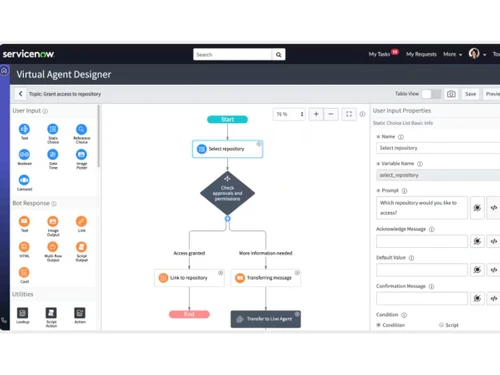
 Incident Management Problem Management Change Management Release Management Request Management Knowledge Management Performance Analytics Configuration Management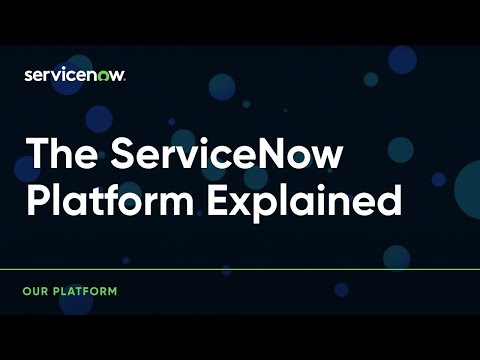

Watch the demo video to explore key features, real workflows, and how the software fits your business needs.
 Ubuntu
  Windows
  MacOS
MacOS  Linux
Linux  Desktop
  Cloud-Based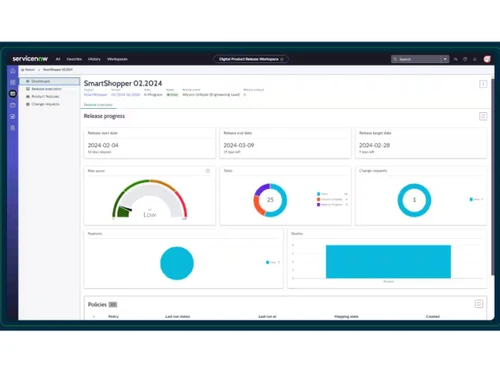

Small Business
Designed for startups and growing businesses
Medium Business
Built for business growth and flexibility
Enterprises
Designed for complex and large-scale business needs
4.4
Out of 5

Overall Rating
Based on
15 Verified Reviews
Rating Breakdown
91% Recommend this Product
Add ReviewCustomers generally appreciate ServiceNow for its robust automation capabilities and seamless integration with other enterprise tools, making it ideal for larger organizations with complex IT needs. Many users highlight its effectiveness in streamlining workflows and ensuring ITIL compliance. However, a common concern is the high cost of implementation and maintenance, particularly for smaller teams, which may find the platform overly complex and challenging to navigate. Overall, while ServiceNow is well-regarded for its comprehensive features, it may not be the best fit for all organizations, especially those with limited resources.
Pros
"ServiceNow integrates effortlessly with a variety of enterprise tools and has a user-friendly interface, making it easy to navigate despite its powerful features."
"ServiceNow shines when it comes to managing complex IT environments. Its integrations with other enterprise systems and workflow automation are top-notch."
"ServiceNow is a powerful platform that streamlines operations with its extensive toolset. It’s particularly strong in automating tasks and simplifying workflows."
Cons
"The implementation process can be slow and costly, especially for smaller organizations or teams with limited resources."
"The learning curve is steep, and the platform is tailored more for larger organizations, so smaller teams might struggle with it."
"The biggest downside is its cost. For small teams or startups, the pricing can be prohibitive, especially when you’re only using a fraction of what the platform offers."



Jan 15, 2025
Techjockey Verified
“Ideal for Large Organizations, Not Great for Smaller Teams”
I switched from a more affordable IT service management tool to ServiceNow to handle our growing IT needs. While it’s great for larger companies, I found it to be unnecessarily complicated for our team’s scale.
Pros
ServiceNow is incredibly well-suited for large organizations with complex IT needs. Its enterprise-level capabilities and integrations are top-notch.
Cons
The platform is overkill for smaller organizations and can be intimidating for teams that don’t have dedicated IT staff or resources to fully utilize it.
Reason to switch
We switched from Spiceworks to ServiceNow because we needed a more comprehensive solution that could handle complex IT workflows and integrate seamlessly with other systems as our business expanded.
Jan 30, 2025
Techjockey Verified
“Great for IT Automation but Requires Significant Investment”
We decided to switch to ServiceNow from a simpler ITSM tool in search of better automation and more advanced features. While ServiceNow has delivered in terms of automation, the cost of entry and maintenance has been quite high.
Pros
ServiceNow excels at IT automation, which has saved my team a lot of time and effort. The workflows are streamlined and easy to set up once you get the hang of it.
Cons
The upfront investment required to implement ServiceNow is steep. It’s not the most cost-effective solution, especially for smaller businesses.
Reason to switch
We switched from Freshservice to ServiceNow because it offered better scalability, advanced automation features, and a stronger ability to integrate with our larger enterprise systems.
Jan 4, 2025
Techjockey Verified
“Excellent for Enterprise Use, But Requires Expertise”
I switched to ServiceNow from a more straightforward platform, and while the new system is much more powerful, the amount of expertise required to manage it has been a challenge.
Pros
ServiceNow is perfect for enterprises with complex IT systems, offering customizable workflows, extensive reporting tools, and integrations with other enterprise systems.
Cons
It requires specialized knowledge to implement and use effectively, making it less suitable for smaller teams or those without dedicated IT staff.
Reason to switch
We switched from Ivanti to ServiceNow because ServiceNow provided deeper integration options and more advanced reporting capabilities, which were critical as our IT infrastructure grew.

ServiceNow
Price On Request
Desktop
Mobile
Web based
On Premises
Windows
Mac OS

Freshservice
₹ 2099
Desktop
Mobile
Web based
On Premises
Windows
Mac OS
ManageEngine ServiceDesk Plus
Price On Request
Desktop
Mobile
Web based
On Premises
Windows
Mac OS

BOSSDesk
Price On Request
Desktop
Mobile
Web based
On Premises
Windows
Mac OS

HaloITSM
Price On Request
Desktop
Mobile
Web based
On Premises
Windows
Mac OS

TeamDynamix
Price On Request
Desktop
Mobile
Web based
On Premises
Windows
Mac OS

OpenText Service Management
Price On Request
Desktop
Mobile
Web based
On Premises
Windows
Mac OS

IncidentMonitor
Price On Request
Desktop
Mobile
Web based
On Premises
Windows
Mac OS

SolarWinds Service Desk
Price On Request
Desktop
Mobile
Web based
On Premises
Windows
Mac OS

SMART Service Desk
Price On Request
Desktop
Mobile
Web based
On Premises
Windows
Mac OS

Atomicwork
Price On Request
Desktop
Mobile
Web based
On Premises
Windows
Mac OS
(0) Product(s) selected
Available
Price on Request
Available
Price on Request
Available
Price on Request
Available
Price on Request
Starting Price:
$90 /Employee/Year

Available
Price on Request

Available
Price on Request

Available
Price on Request

Available
Price on Request

Starting Price:
₹1

Available
Price on Request
Servicenow software is compatible with Windows and macOS operating systems.
Servicenow app is unavailable on Android and iOS devices.
Servicenow system supports web-based deployment.
Servicenow pricing is available on request at techjockey.com.
Servicenow system can be used by businesses, offices, employees, and individuals who need robust productivity software.
Servicenow demo is available for free with techjockey.com.
Servicenow does not offer a free trial.
Servicenow is a cloud-based platform. So, download the installation file on your system and open the Setup Wizard to get started.
ServiceNow is a powerful productivity software streamlining and automating various business processes, such as IT service management and customer support. It offers a user-friendly interface, allowing organizations to efficiently manage tasks, workflows, and communication, resulting in improved productivity and customer satisfaction.
20,000+ Software Listed
Best Price Guranteed
Free Expert Consultation
2M+ Happy Customers
Terms and Condtions

Users with registered businesses can purchase goods from merchants on the platform to satisfy their business needs. Users are not permitted to utilize any products acquired through the platform for resale, advertising, business, or further distribution.
For each purchase made, users will receive a Tax Invoice (or 'GST invoice') that includes specific details such as:
the GSTIN of the user associated with their registered business, and
the specified Entity Name for their business.
It should be noted that not all products are eligible for GST Invoice. Only the products displayed by participating sellers with the 'GST-based Invoice Available' callout on the product description page would qualify.
Certain goods and services are not eligible to get a GST Invoice, including items with VAS, i.e., Value Added Services (e.g., Total Mobile Protection/Assured Buyback) and those involving an exchange offer at the time of purchase.
Users must ensure the accuracy of the GSTIN, and business entity name provided for the GST Invoice. Requests for corrections into GST Invoice would not be accommodated by Techjockey.com or any Seller, and any issues arising from user-provided information are the sole responsibility of users.
Techjockey.com is not liable for the GST Invoice or any associated input tax credit. To efficiently claim an input tax credit, users should select the registered place of business address as per the GST authority's data and follow the provisions of the GST Act and rules.
To claim an input tax credit, the delivery and billing addresses must match. Furthermore, input tax credits will not be granted if the delivery address and GSTIN on the invoice are from different states. In case of incorrect GST details provided during the order placement, the order will be canceled automatically.