USA
USA UAE
UAESmall Business
Designed for startups and growing businesses

See More





Brand: Spiceworks
Spiceworks helps you run a ship-shape help desk, at the office and on the road. It acts as a customer service software and helps you manage user tickets. It intends to make the flow of your organization as streamlined as possible following the customer support virtue. It ’s no easy task: Knowi...
See MoreHave you used Spiceworks before?
Share your insights for better experience
Brand: Spiceworks
Founded Year: 2006
Spiceworks is the marketplace that connects the IT industry to help tech buyers and sellers get their jobs done, every day.
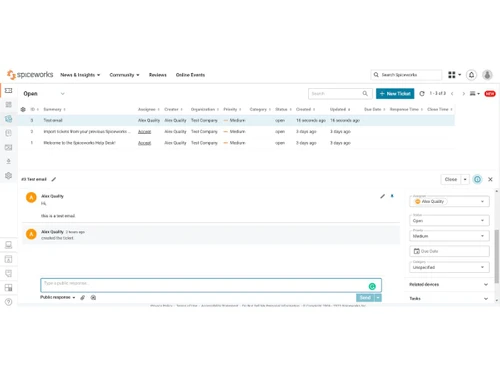
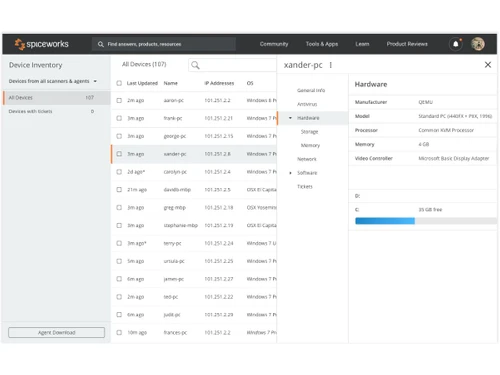
 Ticket Management Custom Reports Management Organization Management Help Desk Management Inventory Management Dashboards IP Scanner Network Monitor

Watch the demo video to explore key features, real workflows, and how the software fits your business needs.
 Windows
  Desktop
  Cloud-Based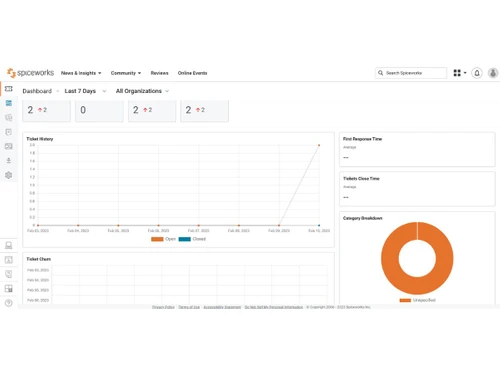
Small Business
Designed for startups and growing businesses
Medium Business
Built for business growth and flexibility
Enterprises
Designed for complex and large-scale business needs
4.1
Out of 5

Overall Rating
Based on
5 Verified Ratings
Rating Breakdown
88% Recommend this Product
Add ReviewTechjockey Trusted Reviews from Verified Users
No reviews are currently available for Spiceworks. Discover similar Help Desk Software reviews

Support CRM
Whats great - Features, Ease of use, Simplicity and Comprehensive customer service management tools read more

Uvdesk
Whats great - Stable performance, consistent updates, marketplace extensions, and responsive support team. read more

iHelpdesk
Whats great - Reliable ticketing system, easy to use. read more

Spiceworks
Price On Request
Desktop
Mobile
Web based
On Premises
Windows
Mac OS

Freshdesk
₹ 1799
Desktop
Mobile
Web based
On Premises
Windows
Mac OS
Nuevadesk
Price On Request
Desktop
Mobile
Web based
On Premises
Windows
Mac OS
Support CRM
₹ 3750
Desktop
Mobile
Web based
On Premises
Windows
Mac OS

Spinso ServiceDesk
Price On Request
Desktop
Mobile
Web based
On Premises
Windows
Mac OS

Zoho Desk
₹ 540
Desktop
Mobile
Web based
On Premises
Windows
Mac OS

Zendesk
Price On Request
Desktop
Mobile
Web based
On Premises
Windows
Mac OS

TxHelpDesk
₹ 1250
Desktop
Mobile
Web based
On Premises
Windows
Mac OS

Stingo Helpdesk
₹ 599
Desktop
Mobile
Web based
On Premises
Windows
Mac OS

Vision Helpdesk
Price On Request
Desktop
Mobile
Web based
On Premises
Windows
Mac OS

Desku
Price On Request
Desktop
Mobile
Web based
On Premises
Windows
Mac OS
(2) Product(s) selected
Starting Price:
$25 /Agent/Month
Starting Price:
$19 /Month

Starting Price:
₹1,799 /Month

Available
Price on Request

Starting Price:
$29 /Month

Starting Price:
$49 /Month

Available
Price on Request

Starting Price:
₹15,600 /Lifetime

Starting Price:
$1,129 /License

Starting Price:
$89 /Month

Starting Price:
$12 /Month
So, you selected a service, and chose to stop it. Then when the list refreshed, it’s still there. Well that’s just great. This is likely happening because Windows was unable to actually stop the service. There must be something keeping it from being able to be stopped; it looks like you’re going to have to walk over there. Sorry, dude.
If you are having trouble getting an RDP session going (especially in Internet Explorer), check that the device you are trying to connect to does not require Network Level Authentication (NLA). Instead you want to check the option “Allow connections from computers running any version of Remote Desktop (less secure)”
The quick answer is no. We like using the integrated SQLite database because a user can be up and running simply and quickly, which is one of our install goals. Plus, it's free, which is often the IT pro's goal. Making a change like this would also have a significant impact on Spiceworks Support, since an external database is subject to many different kinds of environmental factors and configuration options. It would be much more difficult for Support to help people as easily as they can now.
Most IT pros currently have no MDM solution at all, so our initial focus with MDM has been to implement the key features needed to do that part of your job. We did that by partnering with MaaS360 to provide an integrated MDM solution. Unfortunately, we were unable to include an easy way to migrate existing MaaS360 accounts to Spiceworks MDM, as the MaaS360 APIs do not provide functionality that would allow us to port over existing customer data
20,000+ Software Listed
Best Price Guranteed
Free Expert Consultation
2M+ Happy Customers
Terms and Condtions

Users with registered businesses can purchase goods from merchants on the platform to satisfy their business needs. Users are not permitted to utilize any products acquired through the platform for resale, advertising, business, or further distribution.
For each purchase made, users will receive a Tax Invoice (or 'GST invoice') that includes specific details such as:
the GSTIN of the user associated with their registered business, and
the specified Entity Name for their business.
It should be noted that not all products are eligible for GST Invoice. Only the products displayed by participating sellers with the 'GST-based Invoice Available' callout on the product description page would qualify.
Certain goods and services are not eligible to get a GST Invoice, including items with VAS, i.e., Value Added Services (e.g., Total Mobile Protection/Assured Buyback) and those involving an exchange offer at the time of purchase.
Users must ensure the accuracy of the GSTIN, and business entity name provided for the GST Invoice. Requests for corrections into GST Invoice would not be accommodated by Techjockey.com or any Seller, and any issues arising from user-provided information are the sole responsibility of users.
Techjockey.com is not liable for the GST Invoice or any associated input tax credit. To efficiently claim an input tax credit, users should select the registered place of business address as per the GST authority's data and follow the provisions of the GST Act and rules.
To claim an input tax credit, the delivery and billing addresses must match. Furthermore, input tax credits will not be granted if the delivery address and GSTIN on the invoice are from different states. In case of incorrect GST details provided during the order placement, the order will be canceled automatically.