linkedin
Zoho Desk logo
play ZOHO Desk demo
zoho-tickets
zoho-tasks

Zoho Desk

Brand: Zoho Corporation

  • 4.0

  • 3 Ratings

Zoho desk is a cloud-based client management software that helps businesses enhance their customer support system. The software collects and analyses interactions from various media such as phone, email, social media, chat, forums and self-service portals and presents them in one place. It provides agents with the right tools to increase their productivity and equip the managers to evaluate and m...

See More

Have you used Zoho Desk before?

Share your insights for better experience

Add a Review
Starting Price
₹540 excl.GST
₹ 637 incl. GST

View plans

offer Save upto 18%, Get GST Invoice on your business purchase T&C
offer Buy Now & Pay Later, Check offer on payment page.
Buy Now
100% Genuine
Products
Best Price
Guaranteed
Safe & Secure
Payment
  • Description

  • Pricing

  • Features

  • Specification

  • Review

  • Compare

  • Alternatives

  • FAQ

Starting at ₹540
Buy Now

Zoho Desk Software Overview

What is Zoho Desk?

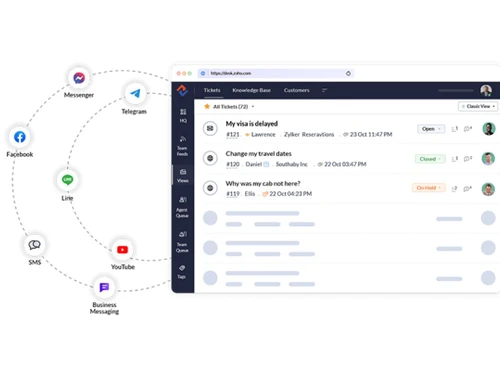
Zoho desk is a cloud-based client management software that helps businesses enhance their customer support system. The software collects and analyses interactions from various media such as phone, email, social media, chat, forums and self-service portals and presents them in one place. It provides agents with the right tools to increase their productivity and equip the managers to evaluate and make the right decisions.

The Team Feeds feature of Zoho Desk helps teams to collaborate and perform customer relationship management operations seamlessly. It provides a platform where team members can discuss and resolve various customer issues and manage tickets for customer queries efficiently.

What is the Zia Feature in Zoho Desk?

Zia is a feature that uses Artificial Intelligence to enhance customer service by speaking to the customers and helping them find solutions faster. It identifies the critical aspect of tickets and adds them as tags. With this feature, businesses can also share relevant solutions directly with customers from the knowledge base of the user. Zia notifies the user each time there is any unusual activity in the ticket stream. You can train Zia to perform actions that are specific to your business and monitor its vital statistics from a unified screen.

How does Zoho Desk Help in Call Centre Automation?

Zoho Desk helps users save a lot of time by automating several customer management functions. The software can assign tickets to the next available agents automatically. It even notifies the customers and agents about the progress made on their tickets and maintains the service levels as well. Zoho Desk can manage complex cross-functional service processes very efficiently. The user can write custom codes to connect modules and other software products. The application also allows the user to collect and store details related to service processes.

Benefits of using Zoho Desk

Zoho Desk helps the user to manage tickets and to identify the trends and patterns in the workflow. It contributes towards team collaboration effectively and empowers the customers with self-service. At the same time, the software integrates with all the necessary applications required within the business. Zoho Desk comes with a social support feature that helps customers enter their support requests and ask questions to the experts. Customer insights acquired from the software helps the management boost the performance and productivity of the business.

Zoho Desk Pricing

Zoho Desk price in India starts at INR 540 at Techjockey.com.

The pricing model is based on different parameters, including extra features, deployment type, and the total number of users. For further queries related to the product, you can contact our product team and learn more about the pricing and offers.

Read more

Zoho Corporation Company Details

Founded Year:  1996

Zoho Corporation is an Indian multinational company that specialises in software development, cloud computing, and web-based business tools. It is best known for Zoho Office suite and its enterprise IT management division, ManageEngine

Director/Founders Sridhar Vembu / Tony Thomas
Company Size 1000+ Employees

Zoho Desk Pricing & Plans

Express

Calculated Price

₹ 540 Exclusive of all taxes
    • Licenses

      Licenses
      Licenses
    • Monthly

      Monthly
      Monthly

Key Features

  • Email

  • Social media

  • Web forms

  • Direct assignment

  • Workflows

Standard

Calculated Price

₹ 1300 Exclusive of all taxes
    • Licenses

      Licenses
      Licenses
    • Monthly

      Monthly
      Monthly

Key Features

  • Business Messaging

  • Instant messaging

  • Community forum

  • Knowledge base

  • Work modes

Professional

Calculated Price

₹ 2100 Exclusive of all taxes
    • Licenses

      Licenses
      Licenses
    • Monthly

      Monthly
      Monthly

Key Features

  • Telephony

  • Blueprints

  • Multi-department

  • Round-robin assignment

  • Custom lookup fields

Enterprise

Calculated Price

₹ 3200 Exclusive of all taxes
    • Licenses

      Licenses
      Licenses
    • Monthly

      Monthly
      Monthly

Key Features

  • Answer bot

  • Zia, AI assistant

  • Live chat (Zoho SalesIQ)

  • Guided Conversations

  • Skill-based assignment

Zoho Desk Features

  • icon_check Manager Self Service
    Zoho Desk lets supervisors track employee performance and deliver targeted training based on real-time insights.
  • icon_check Security
    The software prevents critical customer details from falling into the wrong hands.
  • icon_check Customization
    The users can create a distinct self-service portal for each customer.  
  • icon_check Third Party Integration
    Users can integrate with third-party apps, enabling them to work with several other applications.
  • icon_check Reports
    Zoho Desk allows its users to create reports and visualizations to monitor the performance of the teams.
  • icon_check Time Tracking
    The user can keep track of the time spent on every task and ticket.
  • icon_check Ticket Management
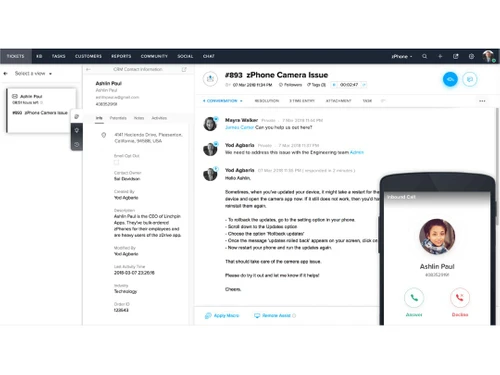
    Zoho Desk provides its users with ticket management services, helping them solve customer issues efficiently.
  • icon_check Call Center Management
    The software comes with several features to manage customer queries and concerns on the priority basis.
  • icon_check Social Network
    Zoho Desk lets users handle calls, emails & posts in one interface and integrates with major social media platforms.
  • icon_check Agent Management
    The software helps businesses manage and assign tickets to the right customer service agents efficiently.
  • icon_check Layout Management
    Organize tickets by priority, due time, and CRM status using Work Modes for efficient agent workflows.
  • icon_check Self-Service System
    Offer multi-brand help centers, AI-powered answer bots, and live chat for enhanced customer self-service.
  • icon_check Mobility
    Manage tickets, collaborate with teams, and monitor metrics on-the-go with Zoho Desk's mobile apps and Radar.
  • icon_check CRM Integration
    Integrate with Zoho CRM to access customer details, past interactions, and happiness ratings within tickets.
  • icon_check Alerts & Notifications
    Automate alerts for customers and agents about ticket progress, ensuring timely updates and responses.
  • icon_check Knowledge Base
    Create multilingual help articles and FAQs, enabling customers to find answers without agent assistance.
Zoho Desk Demo Video play icon

Get Zoho Desk Demo

Watch the demo video to explore key features, real workflows, and how the software fits your business needs.

Understand
Key Features
Personal
Demo Insights
Interactive
Demo Support

Zoho Desk Specifications

Supported Platforms
Windows Windows iOS iOS Android Android
Devices
Desktop Desktop Mobile Mobile Tablet Tablet iPad iPad
Deployment
Cloud-Based Cloud-Based
Suitable For
All Industries
Business Specific
All Businesses
Customer Support
Email Live Chat
Language
English

Explore the Best Alternative Solutions Similar to Your Business Size and Needs

Zoho Desk Review

4.0

Out of 5

img

Overall Rating

Based on
3 Verified Ratings

Rating Breakdown

  • Features 4.1
  • Value for Money 4
  • Ease of Use 3.6
  • Customer Support 4.3

93% Recommend this Product

Add Review

Techjockey Trusted Reviews from Verified Users

No reviews are currently available for Zoho Desk . Discover similar Help Desk Software reviews

  • Support CRM

    4.9

    Whats great - Features, Ease of use, Simplicity and Comprehensive customer service management tools read more

  • Uvdesk

    4.4

    Whats great - Stable performance, consistent updates, marketplace extensions, and responsive support team. read more

  • iHelpdesk

    4.2

    Whats great - Reliable ticketing system, easy to use. read more

Compare Zoho Desk With other Help Desk Software

Products
Ratings
Pricing
Device Supported
Deployment
Supported Platforms
  • img

    Zoho Desk

  • 4.0

  • ₹ 540.00 excl. GST

  • Desktop

    Mobile

  • Web based

    On Premises

  • Windows

    Mac OS

  • img

    Freshdesk

  • 4.7

  • ₹ 1799

  • Desktop

    Mobile

  • Web based

    On Premises

  • Windows

    Mac OS

  • img

    Nuevadesk

  • 4.2

  • Price On Request

  • Desktop

    Mobile

  • Web based

    On Premises

  • Windows

    Mac OS

  • img

    Support CRM

  • 4.8

  • ₹ 3750

  • Desktop

    Mobile

  • Web based

    On Premises

  • Windows

    Mac OS

  • img

    Spinso ServiceDesk

  • 4.2

  • Price On Request

  • Desktop

    Mobile

  • Web based

    On Premises

  • Windows

    Mac OS

  • img

    Zendesk

  • 4.5

  • Price On Request

  • Desktop

    Mobile

  • Web based

    On Premises

  • Windows

    Mac OS

  • img

    TxHelpDesk

  • 5

  • ₹ 1250

  • Desktop

    Mobile

  • Web based

    On Premises

  • Windows

    Mac OS

  • img

    Stingo Helpdesk

  • 5

  • ₹ 599

  • Desktop

    Mobile

  • Web based

    On Premises

  • Windows

    Mac OS

  • img

    Vision Helpdesk

  • 4.3

  • Price On Request

  • Desktop

    Mobile

  • Web based

    On Premises

  • Windows

    Mac OS

  • img

    Desku

  • 4.1

  • Price On Request

  • Desktop

    Mobile

  • Web based

    On Premises

  • Windows

    Mac OS

(0) Product(s) selected

Zoho Desk Alternatives

See All Zoho Desk Alternatives

Starting Price:

$25 /Agent/Month

Starting Price:

$19 /Month

Starting Price:

$29 /Month

Available

Price on Request

Starting Price:

₹15,600 /Lifetime

Starting Price:

$89 /Month

Starting Price:

$12 /Month

Starting Price:

$699 /year

Articles for Zoho Desk

See All Related Articles

Does Zoho Desk provide multi-channel communication?

Yes, the software provides multichannel communication to enable the employees to be available for their customers through any channel of communication they choose.

Is live chat available for the customers?

The live chat option is available, enabling the employees to help the customers in an instant.

How does the knowledge base of the software works?

The knowledge base of Zoho Desk creates a repository of solutions for all commonly asked questions.

Does Zoho Desk provide mobility?

Yes, the software enables users to manage the tickets even when they are away from their desk.

Can we extend the help desk?

Yes, the software allows users to customize and extend the help desk to suit their needs.

20,000+ Software Listed

Best Price Guranteed

Free Expert Consultation

2M+ Happy Customers

Terms and Condtions

close

Users with registered businesses can purchase goods from merchants on the platform to satisfy their business needs. Users are not permitted to utilize any products acquired through the platform for resale, advertising, business, or further distribution.

For each purchase made, users will receive a Tax Invoice (or 'GST invoice') that includes specific details such as:

  • the GSTIN of the user associated with their registered business, and

  • the specified Entity Name for their business.

It should be noted that not all products are eligible for GST Invoice. Only the products displayed by participating sellers with the 'GST-based Invoice Available' callout on the product description page would qualify.

Certain goods and services are not eligible to get a GST Invoice, including items with VAS, i.e., Value Added Services (e.g., Total Mobile Protection/Assured Buyback) and those involving an exchange offer at the time of purchase.

Users must ensure the accuracy of the GSTIN, and business entity name provided for the GST Invoice. Requests for corrections into GST Invoice would not be accommodated by Techjockey.com or any Seller, and any issues arising from user-provided information are the sole responsibility of users.

Techjockey.com is not liable for the GST Invoice or any associated input tax credit. To efficiently claim an input tax credit, users should select the registered place of business address as per the GST authority's data and follow the provisions of the GST Act and rules.

To claim an input tax credit, the delivery and billing addresses must match. Furthermore, input tax credits will not be granted if the delivery address and GSTIN on the invoice are from different states. In case of incorrect GST details provided during the order placement, the order will be canceled automatically.