 USA
USA UAE
UAESmall Business
Designed for startups and growing businesses

See More




Brand: Defencebyte
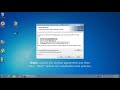
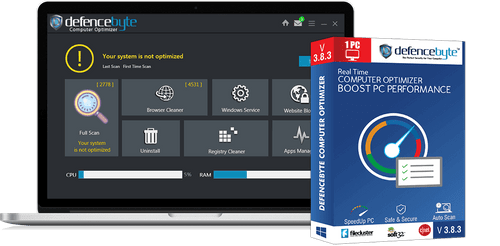
Defencebyte Computer Optimizer is an online PC optimizer. It works as a registry cleaner as well. Defencebyte Computer Optimizer smartly maps and removes all the unused entries within the computer’s registry from past driver installations, failed software installation attempts and incomplete uninstallation. Further, users no longer need to wait for their system to get started as Defencebyte Com...
See MoreHave you used Defencebyte Computer Opmitizer before?
Share your insights for better experience
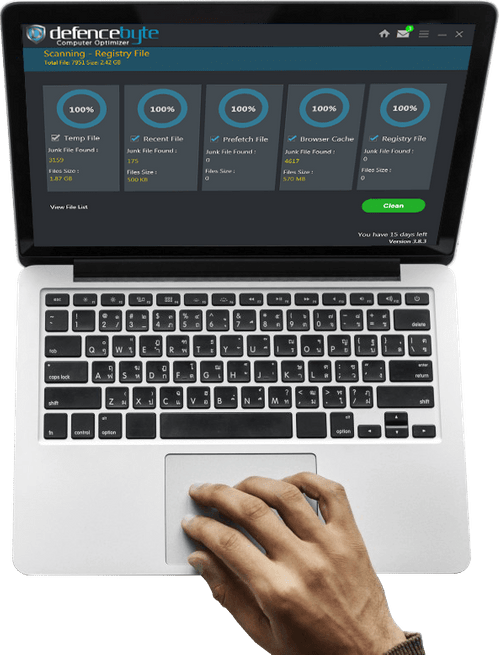
 Empty Registry Keys Empty Uninstall Entries Fix System issues Task Management Optimize PC Performance Scan Scheduling Block Unwanted URL Startup Manager Junk File Cleaner Browser Cleaner Invalid File Sync RAM Monitoring Duplicate Finder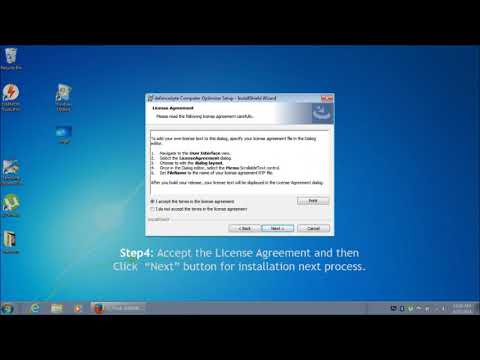

Watch the demo video to explore key features, real workflows, and how the software fits your business needs.
 Windows
  Desktop
  Cloud-Based
  Perpetual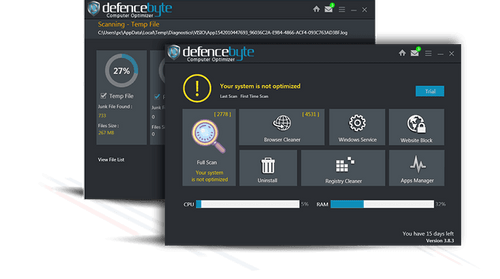
Small Business
Designed for startups and growing businesses
Medium Business
Built for business growth and flexibility
Enterprises
Designed for complex and large-scale business needs
4.0
Out of 5

Overall Rating
Based on
7 Verified Reviews
Rating Breakdown
78% Recommend this Product
Add ReviewOverall, users express a positive sentiment towards Defencebyte Computer Optimizer, highlighting its effectiveness in boosting PC performance and user-friendly interface. Many appreciate the software's ability to automate cleanup tasks and resolve system issues. However, some users report drawbacks, including annoying pop-up messages and inconsistent performance of certain features. A few reviews indicate significant dissatisfaction, with one user experiencing slow system performance and concerns about data security. Despite mixed feedback, the majority recommend the software for its ease of use and effectiveness.
Pros
"Really I am happy now after using defencebyte Computer optimizer, My Pc performance boost after using defencebyte Computer optimizer"
"Really its a nice product which really boost my pc performance"
"There is no pros as it is a software that is not fully developed and in testing phase. "
Cons
"This defencebyte computer optimizer makes your system very slow and might be stealing your data. "

Dec 7, 2020
Techjockey Verified
“Best Computer optimizer ”
Pros
Really I am happy now after using defencebyte Computer optimizer, My Pc performance boost after using defencebyte Computer optimizer
Cons
no cons I have found
Nov 27, 2020
Techjockey Verified
“'Top-Notch and Robust PC Tune-Up Software'”
Pros
I’m pretty impressed by its hi-end and sophisticated PC cleanup features. Right from the day I downloaded this software, I’m not forced to carry forward manual decluttering session as this prodigious software is there to do it on my behalf. After deployment, it started performing its job, and it boosted my PC’s performance right away. The best attribute is its interface is simple and straightforward, and within a few minutes, it got installed in my system. To name a few of the Pros of this reliable software: (1) It removed unwanted files, invalid paths, registry and junk files from the system. (2) It resolved all the system issues in order to maintain the optimal performance of the system. (3) It blocks unwanted URLs and also eliminates malware.
Cons
The least thing that I liked about defencebyte Computer optimizer is: (1) It sends tons of annoying pop-up messages that define your computer is clean. (2) Only sometimes, it asks for permission, whether to permanently delete the file or not.
Nov 26, 2020
Techjockey Verified
“Nice product ”
Pros
Really its a nice product which really boost my pc performance
Cons
no cons I have found

Defencebyte Computer Opmitizer
Price On Request
Desktop
Mobile
Web based
On Premises
Windows
Mac OS

Nero Platinum Suite
₹ 4065
Desktop
Mobile
Web based
On Premises
Windows
Mac OS

Truecaller
₹ 84
Desktop
Mobile
Web based
On Premises
Windows
Mac OS

WizTree
Price On Request
Desktop
Mobile
Web based
On Premises
Windows
Mac OS

RestoreX360
₹ 1499
Desktop
Mobile
Web based
On Premises
Windows
Mac OS

Xplorer
Price On Request
Desktop
Mobile
Web based
On Premises
Windows
Mac OS
CHIRP
Price On Request
Desktop
Mobile
Web based
On Premises
Windows
Mac OS

IrfanView
Price On Request
Desktop
Mobile
Web based
On Premises
Windows
Mac OS

Iobit Driver Booster 13 Pro
Price On Request
Desktop
Mobile
Web based
On Premises
Windows
Mac OS

Opal
Price On Request
Desktop
Mobile
Web based
On Premises
Windows
Mac OS

Iobit Protected folder
Price On Request
Desktop
Mobile
Web based
On Premises
Windows
Mac OS
(2) Product(s) selected
Starting Price:
₹4,065 /PC/Year ₹5,350
Starting Price:
₹84 /Month
Starting Price:
$25 /Quantity
Available
Price on Request
Available
Price on Request
Starting Price:
$12 /License
Starting Price:
$20 /Month

Starting Price:
$60 /Year

Available
Price on Request

Available
Price on Request

Available
Price on Request







Yes, with the help of Defencebyte Computer Optimizer, users can perform system defragmentation, create a backup and restore all the necessary files with ease.
Yes, the software enables users to scan all the installed applications within a device. They can also find and remove the unwanted files.
Yes, we at Techjockey offer online demos for Defencebyte Computer Optimizer. You can send us a request along with a preferable time and date.
The minimum system requirement for Defencebyte PC Optimizer utility software are: ? RAM: Minimum 1GB RAM. ? Processor: 800 MHz or higher processor. ? Hard Disk: the software needs a minimum of 400MB free space out of the total space available within their hard disk to operate.
No, Defencebyte Computer Optimizer does not have a dedicated mobile app.
20,000+ Software Listed
Best Price Guranteed
Free Expert Consultation
2M+ Happy Customers
Terms and Condtions

Users with registered businesses can purchase goods from merchants on the platform to satisfy their business needs. Users are not permitted to utilize any products acquired through the platform for resale, advertising, business, or further distribution.
For each purchase made, users will receive a Tax Invoice (or 'GST invoice') that includes specific details such as:
the GSTIN of the user associated with their registered business, and
the specified Entity Name for their business.
It should be noted that not all products are eligible for GST Invoice. Only the products displayed by participating sellers with the 'GST-based Invoice Available' callout on the product description page would qualify.
Certain goods and services are not eligible to get a GST Invoice, including items with VAS, i.e., Value Added Services (e.g., Total Mobile Protection/Assured Buyback) and those involving an exchange offer at the time of purchase.
Users must ensure the accuracy of the GSTIN, and business entity name provided for the GST Invoice. Requests for corrections into GST Invoice would not be accommodated by Techjockey.com or any Seller, and any issues arising from user-provided information are the sole responsibility of users.
Techjockey.com is not liable for the GST Invoice or any associated input tax credit. To efficiently claim an input tax credit, users should select the registered place of business address as per the GST authority's data and follow the provisions of the GST Act and rules.
To claim an input tax credit, the delivery and billing addresses must match. Furthermore, input tax credits will not be granted if the delivery address and GSTIN on the invoice are from different states. In case of incorrect GST details provided during the order placement, the order will be canceled automatically.



