linkedin
EasyGoIVR logo
play IVR System for Call Center | Cloud Based IVR System | Interactive Voice Response System
EasyGoIVR Dashboard
EasyGoIVR CDR

EasyGoIVR

Brand: SAN SOFTWARES ts_icon_wide

  • 4.8

  • 2 Ratings & 2 Reviews

EasyGo IVR is an Interactive Voice Response software that supports, monitors, and reports on incoming and outgoing calls in real-time. It provides a graphical representation of all calls answered or connected and intelligent call routing and personalized voice greetings. EasyGo IVR system records and tracks the calls to attribute these towards the proper marketing channels. It is an agent-friendl...

See More

Have you used EasyGoIVR before?

Share your insights for better experience

Add a Review
Starting Price
₹3,000 excl.GST
₹ 3,540 incl. GST

View plans

offer Save upto 18%, Get GST Invoice on your business purchase T&C
offer Buy Now & Pay Later, Check offer on payment page.
Buy Now
100% Genuine
Products
Best Price
Guaranteed
Safe & Secure
Payment
  • Description

  • Pricing

  • Features

  • Specification

  • Review

  • Compare

  • Alternatives

  • FAQ

Starting at ₹3,000
Buy Now

EasyGoIVRSoftware Overview

What is EasyGoIVR?

EasyGo IVR is an Interactive Voice Response software that supports, monitors, and reports on incoming and outgoing calls in real-time. It provides a graphical representation of all calls answered or connected and intelligent call routing and personalized voice greetings.

EasyGo IVR system records and tracks the calls to attribute these towards the proper marketing channels. It is an agent-friendly IVR calling software offering scalable solutions to call centers, marketing companies, and help desks. It streamlines the entire calling process by automating recording, blocklisting, and tracking operations.

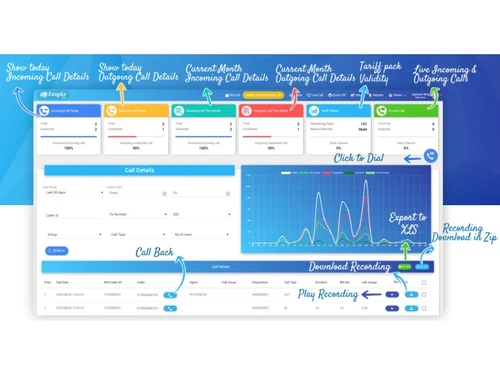
EasyGo interactive voice response software lets it check the call's status, recording, and responses with its centralized dashboard. The dashboard is a centralized point for managing & monitoring calls for customer agent mapping, call recording, and tracking.

Why Choose EasyGo IVR?

EasyGoIVR could be used by any business that handles incoming and outgoing calls. Here are a few reasons why you should choose EasyGoIVR over other IVR software.

  • Automatic telephony system for interacting with callers, gathering information, and routing calls to the right agents
  • Blacklisting module for blocking nonessential callers for protecting the callers' database
  • CDR or call detail records with all information regarding telecommunication transactions and telephone calls
  • Powerful IVR system for keypad selection, speech recognition, and pre-recorded messages

Benefits of EasyGo IVR Software

EasyGoIVR offers a wide range of benefits. Here are a few benefits that small and medium businesses could avail themselves with EasyGo IVR solution

  • Accurate Routing: Routing calls to the correct department/agent to improve the response time.
  • Increases Efficiency: Higher operational efficiency as calling processes are automated and wait times are decreased drastically
  • Automated agent interactions: Automatic customer agent interaction process helps in effortless lead conversion
  • Intelligent call routing: Routes interested callers immediately to live agents after answering a few pre-recorded questions.
  • Tracking the calls: Collects customer data for marketing efforts and doing post-campaign analysis.
  • Custom-built menus: Custom-built automatic menu system for expediting incoming calls.
  • Improved lead conversion: As calls get routed to live agents chatbot interaction, the possibility of lead conversion is always higher.

Key Functionalities of EasyGo IVR Software

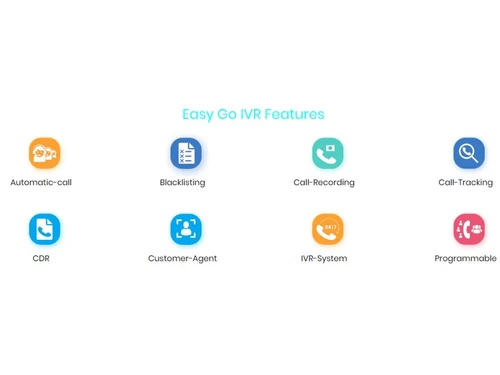
  • Programmable interface for analog and digital phone lines
  • Blacklisting module for blocking unsolicited calls
  • Customer-Agent mapping for analyzing customer interactions
  • Call recording for performance evaluation and agent training
  • Call tracking for caller information management

How Does EasyGo IVR System Work?

The latest version of EasyGo IVR is primarily used for call tracking, recording, and IVR. It has an intuitive interface and is simple to use. EasyGo IVR software can be easily integrated with your existing systems to ensure a smooth workflow. For more information, you can also refer to user manuals and take an online EasyGo IVR demo at Techjockey.com.

How to Use EasyGo IVR?

Get started with EasyGo IVR in 5 simple steps:

Step 1: Buy EasyGo IVR installation key from techjockey.com

Step 2: Directly login through the official website.

Step 3: Sign up & create your account

Step 4: Add users & assign permissions

Step 5: Get started with EasyGo IVR

What is the price of EasyGo IVR?

EasyGo IVR comes with multiple pricing plans and caters to a diverse customer base:

EasyGoIVR Price ranges:

  • Gold: ₹3000
  • Platinum: ₹5000
  • Diamond: ₹8000

The price may vary based on customization, additional features required, number of users, and the deployment type. For subscription-related details and offers on premium packages, please request a call back from our product experts.

Read more

EasyGoIVR Pricing & Plans

Gold

Calculated Price

3000 Exclusive of all taxes
    • Quantity

      Quantity
      Quantity

Key Features

  • 5000 Free Minutes

  • 0.50 Call Rate / Minute

  • 4 Channels

  • 50 Agents

  • 10 Group

  • 0.15 Paisa / SMS

  • 4 Months Report Availability

  • (6 Months Validity)

Platinum

Calculated Price

5000 Exclusive of all taxes
    • Quantity

      Quantity
      Quantity

Key Features

  • 8000 Free Minutes

  • 0.40 Call Rate / Minute

  • 16 Channels

  • 100 Agents

  • 30 Group

  • 0.15 Paisa / SMS

  • 6 Months Report Availability

  • (6 Months Validity )

Diamond

Calculated Price

8000 Exclusive of all taxes
    • Quantity

      Quantity
      Quantity

Key Features

  • 16000 Free Minutes

  • 0.40 Call Rate / Minute

  • 16 Channels

  • 100 Agents

  • 30 Group

  • 0.15 Paisa / SMS

  • 6 Months Report Availability

  • (1 Year Validity )

EasyGoIVR Features

  • icon_check Time Based Call Routing
    The feature routes calls to the agents based on specific dates and time zones.
  • icon_check Sticky agent
    The IVR software helps connect a caller to the previous agent for easy follow-ups.
  • icon_check Call Tracking/Push API
    The module captures the caller's information and saves it in the database for marketing & follow-up purposes.
  • icon_check Call Recording
    EasyGo IVR makes it easy to record customer calls for performance evaluation and agent training purposes.
  • icon_check Click to Call
    This option prevents the possibility of misdialed numbers by providing single-click call buttons.
  • icon_check Voice Mail
    Voice commands help callers interact with chatbots to resolve their queries before a live agent hops in partially.
  • icon_check CRM Integration
    CRM integration links customer data and insights together for intelligent call routing.
  • icon_check Analytics & Reporting
    Use the feature in the EasyGoIVR system for optimizing call flows and menu selections.
  • icon_check SMS & Email Alerts
    Send account updates and notifications to customers with built-in SMS and email alerts function.
  • icon_check Blacklisting
    EasyGoIVR blocks unnecessary callers and protects the callers' database.
  • icon_check Programmable Extensions With Multi-Level IVR
    Call forwarding and virtual number support provides callers an interactive calling experience.
  • icon_check Customer Agent Mapping
    The process records and analyses the customer interactions for better engagement.
  • icon_check CDR (Call Detail Records)
    Detailed call records are available for training and performance management purposes.
  • icon_check Automatic Call Distribution
    The IVR software makes connecting and distributing calls to suitable agents easy.
EasyGoIVR Demo Video play icon

Get EasyGoIVR Demo

Watch the demo video to explore key features, real workflows, and how the software fits your business needs.

Understand
Key Features
Personal
Demo Insights
Interactive
Demo Support

EasyGoIVR Specification

Supported Platforms
Windows Windows iOS iOS Android Android
Devices
Desktop Desktop Mobile Mobile iPad iPad
Deployment
Web-Based Web-Based
Suitable For
All Industries
Business Specific
All Businesses
Business Size
Small Business Startups Medium Business SMBs SMEs
Customer Support
Phone Email Forums
Language
English

Explore the Best Alternative Solutions Similar to Your Business Size and Needs

EasyGoIVR Reviews

4.8

Out of 5

img

Overall Rating

Based on
2 Verified Reviews

Rating Breakdown

  • Features 5
  • Value for Money 5
  • Ease of Use 4.5
  • Customer Support 5

100% Recommend this Product

Add Review

abhinav kumar singh

Associate

Industry: Education User since: 2+ years

5

Reviewed on: Nov 22, 2021

Techjockey Verified

“The Best IVR Solution”

Pros

Easy to connect IVR solution and solve the reasonable solution.

Cons

No.

Reason to switch

in all fields of operations

Krishna

Associate

Industry: Logistics and Supply Chain User since: 6-12 months

4.7

Reviewed on: Nov 13, 2021

Techjockey Verified

“One of the best Hosted IVR Solution”

Pros

Easy to use and affordable IVR solution to try, no prior learning is required and that's the good part.

Cons

No Cons.

Reason to switch

Tracking agents all activity

Compare EasyGoIVR With other IVR Software

Products
Ratings
Pricing
Device Supported
Deployment
Supported Platforms
  • img

    EasyGoIVR

  • 4.8

  • ₹ 3000.00 excl. GST

  • Desktop

    Mobile

  • Web based

    On Premises

  • Windows

    Mac OS

  • img

    Exotel

  • 4.8

  • ₹ 9999

  • Desktop

    Mobile

  • Web based

    On Premises

  • Windows

    Mac OS

  • img

    Agilis IVR

  • 5

  • ₹ 899

  • Desktop

    Mobile

  • Web based

    On Premises

  • Windows

    Mac OS

  • img

    Easy Serve - IVR

  • 4.5

  • ₹ 15000

  • Desktop

    Mobile

  • Web based

    On Premises

  • Windows

    Mac OS

  • img

    LinkArise

  • 4.6

  • ₹ 10000

  • Desktop

    Mobile

  • Web based

    On Premises

  • Windows

    Mac OS

  • img

    IVR Guru

  • 4.8

  • ₹ 15600

  • Desktop

    Mobile

  • Web based

    On Premises

  • Windows

    Mac OS

(0) Product(s) selected

EasyGoIVR Alternatives

See All EasyGoIVR Alternatives

Available

Price on Request

Available

Price on Request

Available

Price on Request

Articles for EasyGoIVR

See All Related Articles

Which operating system does EasyGo IVR support?

EasyGo IVR is compatible with all operating systems as it is a web-based IVR software.

Is there any EasyGo IVR app?

EasyGo IVR app is available for iOS and Android.

What is the deployment type of EasyGo IVR?

EasyGo IVR calling software supports web-based deployment type.

How much does EasyGo IVR cost?

EasyGo IVR integrated voice response software pricing starts at Rs. 3000 for the gold plan.

Who are the potential users of EasyGo IVR?

EasyGo IVR calling software is typically used in call centers, BPOs, banks, and more.

Is there any free trial or demo for EasyGo IVR?

EasyGo IVR software demo is available for free with techjockey.com.

Is EasyGo IVR free?

EasyGo IVR integrated voice response software offers a free trial. However, the premium plan with advanced features starts at Rs. 1770.

How can you download EasyGo IVR?

EasyGoIVR doesn't require any installation as it is web-based IVR software

How does EasyGo IVR work?

EasyGo IVR calling software helps with call recording, tracking, and monitoring. It's a complete solution for blacklisting and automatic call distribution.

20,000+ Software Listed

Best Price Guranteed

Free Expert Consultation

2M+ Happy Customers

Terms and Condtions

close

Users with registered businesses can purchase goods from merchants on the platform to satisfy their business needs. Users are not permitted to utilize any products acquired through the platform for resale, advertising, business, or further distribution.

For each purchase made, users will receive a Tax Invoice (or 'GST invoice') that includes specific details such as:

  • the GSTIN of the user associated with their registered business, and

  • the specified Entity Name for their business.

It should be noted that not all products are eligible for GST Invoice. Only the products displayed by participating sellers with the 'GST-based Invoice Available' callout on the product description page would qualify.

Certain goods and services are not eligible to get a GST Invoice, including items with VAS, i.e., Value Added Services (e.g., Total Mobile Protection/Assured Buyback) and those involving an exchange offer at the time of purchase.

Users must ensure the accuracy of the GSTIN, and business entity name provided for the GST Invoice. Requests for corrections into GST Invoice would not be accommodated by Techjockey.com or any Seller, and any issues arising from user-provided information are the sole responsibility of users.

Techjockey.com is not liable for the GST Invoice or any associated input tax credit. To efficiently claim an input tax credit, users should select the registered place of business address as per the GST authority's data and follow the provisions of the GST Act and rules.

To claim an input tax credit, the delivery and billing addresses must match. Furthermore, input tax credits will not be granted if the delivery address and GSTIN on the invoice are from different states. In case of incorrect GST details provided during the order placement, the order will be canceled automatically.