USA
USA UAE
UAESmall Business
Designed for startups and growing businesses

See More



Brand: Free Software Foundation
Have you used Emacs text editor before?
Share your insights for better experience
Brand: Free Software Foundation
Founded Year: 1985
The Free Software Foundation (FSF) is a non-profit corporation founded by Richard Stallman on October 4th, 1985 to support the free software movement, a copyleft-based movement which aims to promote the universal freedom to distribute and modify computer software without restriction.
This Product is Available Free Forever.
Start instantly with no fees, no subscriptions, and no commitments.
Free Forever Plan
Get started immediately at no cost. Upgrade anytime if your business demand more.
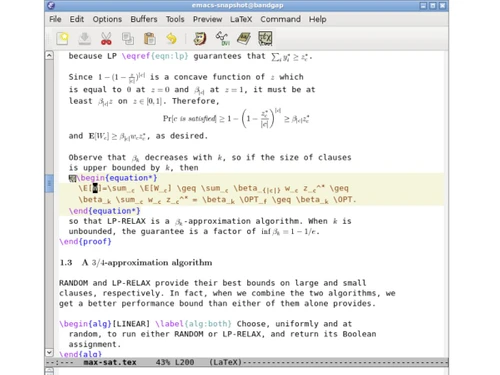
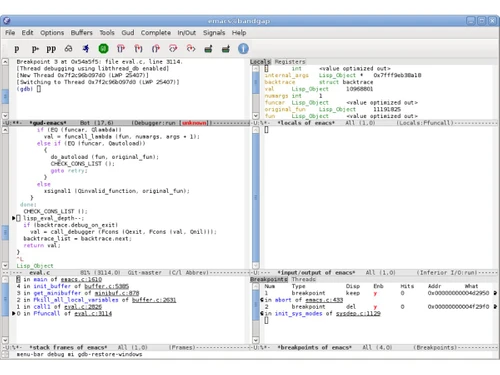
Free Forever Documentation Unicode text support Customizable keybindings Extensible via Lisp programming File Manager Version Control Keyboard macros Shell interaction mode Multi-Language Support Split windows Project planner Debugger interfaces Packaging and extension Real time display editing
  Windows
  Android
  MacOS
MacOS  Desktop
  Mobile
  Perpetual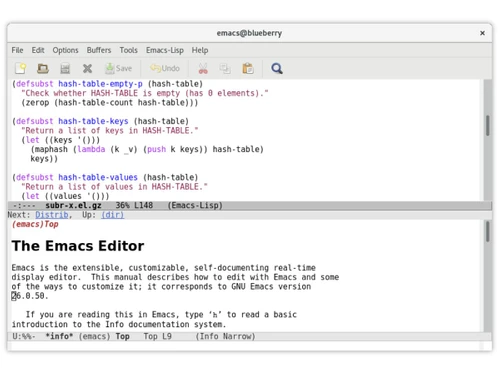
4.5
Out of 5

Overall Rating
Based on
3 Verified Ratings
Rating Breakdown
80% Recommend this Product
Add ReviewTechjockey Trusted Reviews from Verified Users
No reviews are currently available for Emacs text editor. Discover similar Text Editor Software reviews
UltraEdit
Whats great - It loads quickly and has a lot of useful features. One of my favourites is the Syntax Highlighting, which adapts to the type ... read more

Notepad++
Whats great - Notepad++ is user-friendly and versatile. It serves as a text editor, code-writing platform, and note-taking tool. Its flexib... read more

Visual Studio Code
Whats great - I love Visual Studio's simplicity and the abundance of handy extensions. It makes coding with others a breeze and simplifies ... read more

Emacs text editor
FREE
Desktop
Mobile
Web based
On Premises
Windows
Mac OS

Brackets
Price On Request
Desktop
Mobile
Web based
On Premises
Windows
Mac OS

EmEditor
Price On Request
Desktop
Mobile
Web based
On Premises
Windows
Mac OS

FocusWriter
Price On Request
Desktop
Mobile
Web based
On Premises
Windows
Mac OS
Notepad++
Price On Request
Desktop
Mobile
Web based
On Premises
Windows
Mac OS

BBEdit
₹ 6896
Desktop
Mobile
Web based
On Premises
Windows
Mac OS

Sublime Text
Price On Request
Desktop
Mobile
Web based
On Premises
Windows
Mac OS
UltraEdit
₹ 10990
Desktop
Mobile
Web based
On Premises
Windows
Mac OS
Neovim
Price On Request
Desktop
Mobile
Web based
On Premises
Windows
Mac OS

CodePen
Price On Request
Desktop
Mobile
Web based
On Premises
Windows
Mac OS

Bluefish
Price On Request
Desktop
Mobile
Web based
On Premises
Windows
Mac OS
(0) Product(s) selected
Starting Price:
$6 /Month
Available
Price on Request
Available
Price on Request

Starting Price:
$20 /Quantity

Starting Price:
$40

Starting Price:
$92 /Month

Available
Price on Request

Available
Price on Request

Available
Price on Request

Available
Price on Request

Available
Price on Request
20,000+ Software Listed
Best Price Guranteed
Free Expert Consultation
2M+ Happy Customers
Terms and Condtions

Users with registered businesses can purchase goods from merchants on the platform to satisfy their business needs. Users are not permitted to utilize any products acquired through the platform for resale, advertising, business, or further distribution.
For each purchase made, users will receive a Tax Invoice (or 'GST invoice') that includes specific details such as:
the GSTIN of the user associated with their registered business, and
the specified Entity Name for their business.
It should be noted that not all products are eligible for GST Invoice. Only the products displayed by participating sellers with the 'GST-based Invoice Available' callout on the product description page would qualify.
Certain goods and services are not eligible to get a GST Invoice, including items with VAS, i.e., Value Added Services (e.g., Total Mobile Protection/Assured Buyback) and those involving an exchange offer at the time of purchase.
Users must ensure the accuracy of the GSTIN, and business entity name provided for the GST Invoice. Requests for corrections into GST Invoice would not be accommodated by Techjockey.com or any Seller, and any issues arising from user-provided information are the sole responsibility of users.
Techjockey.com is not liable for the GST Invoice or any associated input tax credit. To efficiently claim an input tax credit, users should select the registered place of business address as per the GST authority's data and follow the provisions of the GST Act and rules.
To claim an input tax credit, the delivery and billing addresses must match. Furthermore, input tax credits will not be granted if the delivery address and GSTIN on the invoice are from different states. In case of incorrect GST details provided during the order placement, the order will be canceled automatically.