linkedin
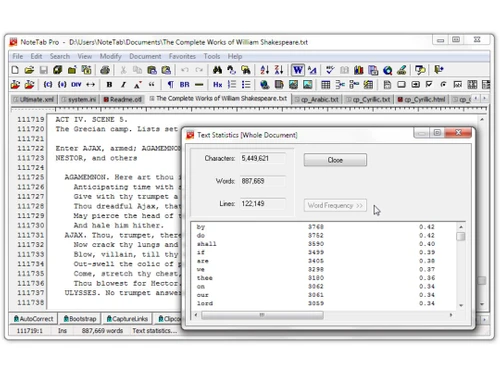
NoteTab logo
notetab document
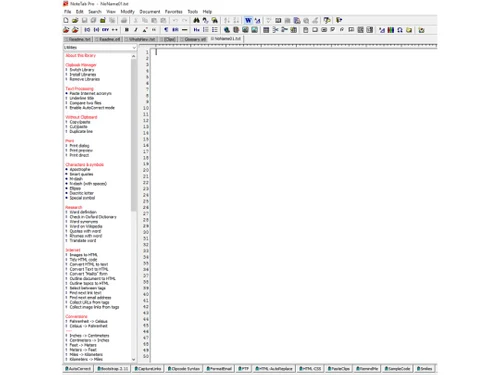
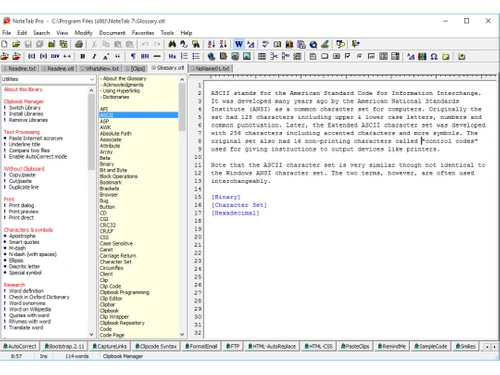
notetab library
notetab utilities

NoteTab

Brand: Fookes Holding

  • 4.2

  • 5 Ratings

NoteTab is a powerful and versatile text and code editor designed for programmers, writers, and editors. It offers an array of features that make editing and coding tasks easier and more efficient. This software is suitable for users seeking cross-platform compatibility and robust coding support.

See More

Have you used NoteTab before?

Share your insights for better experience

Add a Review
Starting Price
$40

View plans

100% Genuine
Products
Best Price
Guaranteed
Safe & Secure
Payment
  • Description

  • Pricing

  • Features

  • Specification

  • Review

  • Compare

  • Alternatives

  • FAQ

Starting at $40

NoteTab Software Overview

What is NoteTab?

NoteTab is a feature-rich business software and text editor software that caters to the needs of writers, programmers, and professionals who manage large amounts of text or code daily. It is well-regarded for its user-friendly interface and advanced functionalities. Whether you're working on Website Development Tools, writing HTML code, scripting, or managing plain text documents, NoteTab provides all the tools you need in a single, compact software.

Designed for versatility, NoteTab supports syntax highlighting for various programming languages, making it ideal for coders. Its advanced find-and-replace function helps users make quick, bulk changes in long documents or multiple files. Moreover, NoteTab is open-source, allowing developers to customize it based on their preferences. The software also offers cross-platform support, ensuring that users can work seamlessly across different operating systems.

NoteTab stands out as an all-in-one solution for text and code management. It’s not just a basic text editor; it is a robust tool designed to simplify workflows, improve productivity, and ensure compatibility across various platforms.

Why Choose NoteTab Text Editor Software?

  • Ease of Use: Its intuitive interface allows beginners and professionals to navigate easily.
  • Customizable Options: Open-source flexibility lets users tweak the software as per their requirements.
  • Efficient Workflow: Streamline text and code editing with advanced automation tools.
  • Cross-Platform Compatibility: Access your work from any operating system without hassle.
  • Comprehensive Language Support: Ideal for developers working with multiple programming languages.
  • Enhanced Productivity: Save time with efficient tools like syntax highlighting and bulk text replacements.
  • Security Features: Keeps your work protected from data breaches and loss.
  • Versatility: Suitable for both casual text editing and advanced coding needs.

Benefits of NoteTab

  • Improved Efficiency: Simplifies coding and text editing tasks with automation and advanced features.
  • Cost-Effective: Open-source nature eliminates the need for expensive subscriptions.
  • Time-Saving Tools: Advanced find-and-replace and syntax highlighting reduce manual effort.
  • Collaborative Features: Work seamlessly on projects that require input from multiple users.
  • Wide Compatibility: Works across major platforms, ensuring seamless accessibility.
  • Ideal for Developers and Writers: Tailored to meet the diverse needs of professionals in text and code management.
  • User-Friendly Interface: Offers a clean, easy-to-navigate workspace, even for beginners.
  • Customizable Experience: Modify the software to suit your specific needs and preferences.

Pricing of NoteTab Text Editor Software

NoteTab price starts at $ 40 at techjockey.com.

The pricing model is based on different parameters, including extra features, deployment type, and the total number of users. For further queries related to the product, you can contact our product team and learn more about the pricing and offers.

Read more

Fookes Holding Company Details

Founded Year:  1996

Fookes Software Ltd is a Swiss high-tech company incorporated in 1996 and owned by Fookes Holding Ltd since 2008. Developer of award-winning Windows software, including NoteTab and Aid4Mail. Specializes in email processing with a focus on email forensics and eDiscovery.

Director/Founders Eric Fookes
Company Size 1-100 Employees

NoteTab Pricing & Plans

NoteTab
Key Features
  • Syntax highlighting
  • Advanced find and replace
  • Coding
  • Language Support
  • Open source text editor
  • Cross-Platform Support
  • Security
Starting at $40
    • Licenses

      Licenses
      Licenses

Key Features

  • Syntax highlighting

  • Advanced find and replace

  • Coding

  • Language Support

  • Open source text editor

  • Cross-Platform Support

  • Security

NoteTab Features

  • icon_check Syntax Highlighting
    Highlight different programming language elements for better readability and efficiency.
  • icon_check Advanced Find and Replace
    Quickly search and replace text or code in large documents or across multiple files.
  • icon_check Coding
    A dedicated environment for writing and editing code with efficiency and ease.
  • icon_check Language Support
    Support for multiple programming languages, including HTML, CSS, JavaScript, and more.
  • icon_check Open Source Text Editor
    Modify and customize the software as per your needs, thanks to its open-source nature.
  • icon_check Cross-Platform Support
    Seamlessly work across different operating systems like Windows, macOS, and Linux.
  • icon_check Security
    Ensures your data and projects remain safe with built-in security features.
  • icon_check Paste Board auto-capture
    Automatically pastes copied clipboard text into a chosen document to streamline data collection.
  • icon_check Scripting support
    Built-in scripting lets users automate, expand, or customize text-processing functions.
  • icon_check Portable application
    Can be run from a USB drive without installation or leaving traces on the host machine.

NoteTab Specifications

Supported Platforms
Windows Windows MacOS MacOS Linux Linux
Devices
Desktop Desktop
Deployment
Perpetual Perpetual
Suitable For
All Industries
Business Specific
All Businesses
Business Size
Small Business Startups Medium Business SMBs
Customer Support
Email Communities
Language
English
Training Resources
Documentation Videos

Explore the Best Alternative Solutions Similar to Your Business Size and Needs

Medium Business

Built for business growth and flexibility

BBEdit

4.1

CodePen

4.5

Atom

4.3

See More

NoteTab Review

4.2

Out of 5

img

Overall Rating

Based on
5 Verified Ratings

Rating Breakdown

  • Features 4.1
  • Value for Money 4.2
  • Ease of Use 4.2
  • Customer Support 4.4

92% Recommend this Product

Add Review

Techjockey Trusted Reviews from Verified Users

No reviews are currently available for NoteTab. Discover similar Text Editor Software reviews
  • UltraEdit

    4.9

    Whats great - It loads quickly and has a lot of useful features. One of my favourites is the Syntax Highlighting, which adapts to the type ... read more

  • Notepad++

    4.7

    Whats great - Notepad++ is user-friendly and versatile. It serves as a text editor, code-writing platform, and note-taking tool. Its flexib... read more

  • Visual Studio Code

    4.3

    Whats great - I love Visual Studio's simplicity and the abundance of handy extensions. It makes coding with others a breeze and simplifies ... read more

Compare NoteTab With other Text Editor Software

Products
Ratings
Pricing
Device Supported
Deployment
Supported Platforms
  • img

    NoteTab

  • 4.2

  • Price On Request

  • Desktop

    Mobile

  • Web based

    On Premises

  • Windows

    Mac OS

  • img

    Brackets

  • 4.1

  • Price On Request

  • Desktop

    Mobile

  • Web based

    On Premises

  • Windows

    Mac OS

  • img

    Emacs text editor

  • 4.5

  • Price On Request

  • Desktop

    Mobile

  • Web based

    On Premises

  • Windows

    Mac OS

  • img

    EmEditor

  • 4.3

  • Price On Request

  • Desktop

    Mobile

  • Web based

    On Premises

  • Windows

    Mac OS

  • img

    FocusWriter

  • 4.0

  • Price On Request

  • Desktop

    Mobile

  • Web based

    On Premises

  • Windows

    Mac OS

  • img

    Notepad++

  • 4.7

  • Price On Request

  • Desktop

    Mobile

  • Web based

    On Premises

  • Windows

    Mac OS

  • img

    BBEdit

  • 4.1

  • ₹ 6896

  • Desktop

    Mobile

  • Web based

    On Premises

  • Windows

    Mac OS

  • img

    Sublime Text

  • 4.4

  • Price On Request

  • Desktop

    Mobile

  • Web based

    On Premises

  • Windows

    Mac OS

  • img

    UltraEdit

  • 4.8

  • ₹ 10990

  • Desktop

    Mobile

  • Web based

    On Premises

  • Windows

    Mac OS

  • img

    Neovim

  • 4.1

  • Price On Request

  • Desktop

    Mobile

  • Web based

    On Premises

  • Windows

    Mac OS

  • img

    CodePen

  • 4.5

  • Price On Request

  • Desktop

    Mobile

  • Web based

    On Premises

  • Windows

    Mac OS

(0) Product(s) selected

NoteTab Alternatives

See All NoteTab Alternatives

Starting Price:

$6 /Month

Available

Price on Request

Starting Price:

$92 /Month

Available

Price on Request

Available

Price on Request

Available

Price on Request

Available

Price on Request

Articles for NoteTab

See All Related Articles

Is NoteTab Text Editor Software suitable for beginners in coding?

Yes, NoteTab’s user-friendly interface and syntax highlighting make it easy for beginners to write and edit code.

Does NoteTab support multiple programming languages?

Yes, it supports popular languages like HTML, CSS, JavaScript, and more, making it ideal for diverse coding projects.

Is NoteTab available on macOS and Linux?

Yes, NoteTab offers cross-platform support, allowing users to work on macOS, Linux, and Windows.

How does NoteTab improve productivity?

Features like advanced find-and-replace, syntax highlighting, and bulk text editing streamline your workflow, saving time and effort.

Is NoteTab Text Editor Software open source?

Yes, NoteTab is open-source software, meaning users can modify and customize it to meet their specific needs.

Can I use NoteTab for managing large files?

Absolutely! NoteTab handles large files effectively, making it suitable for projects involving extensive text or code.

Does NoteTab provide any security features?

Yes, it includes security options to ensure your data remains safe and protected during use.

What makes NoteTab Text Editor Software better than standard text editors?

NoteTab offers advanced features like syntax highlighting, coding support, and cross-platform compatibility, setting it apart from basic editors.

Is NoteTab suitable for professional developers?

Yes, with its comprehensive language support and coding tools, NoteTab is an excellent choice for professional developers.

Does NoteTab Text Editor Software offer customer support?

Yes, NoteTab provides detailed documentation and community support for troubleshooting and guidance.

How much does NoteTab cost?

NoteTab price starts at $ 40 at techjockey.com.

20,000+ Software Listed

Best Price Guranteed

Free Expert Consultation

2M+ Happy Customers

Terms and Condtions

close

Users with registered businesses can purchase goods from merchants on the platform to satisfy their business needs. Users are not permitted to utilize any products acquired through the platform for resale, advertising, business, or further distribution.

For each purchase made, users will receive a Tax Invoice (or 'GST invoice') that includes specific details such as:

  • the GSTIN of the user associated with their registered business, and

  • the specified Entity Name for their business.

It should be noted that not all products are eligible for GST Invoice. Only the products displayed by participating sellers with the 'GST-based Invoice Available' callout on the product description page would qualify.

Certain goods and services are not eligible to get a GST Invoice, including items with VAS, i.e., Value Added Services (e.g., Total Mobile Protection/Assured Buyback) and those involving an exchange offer at the time of purchase.

Users must ensure the accuracy of the GSTIN, and business entity name provided for the GST Invoice. Requests for corrections into GST Invoice would not be accommodated by Techjockey.com or any Seller, and any issues arising from user-provided information are the sole responsibility of users.

Techjockey.com is not liable for the GST Invoice or any associated input tax credit. To efficiently claim an input tax credit, users should select the registered place of business address as per the GST authority's data and follow the provisions of the GST Act and rules.

To claim an input tax credit, the delivery and billing addresses must match. Furthermore, input tax credits will not be granted if the delivery address and GSTIN on the invoice are from different states. In case of incorrect GST details provided during the order placement, the order will be canceled automatically.