 USA
USA UAE
UAESmall Business
Designed for startups and growing businesses


See More




Brand: PearlMountain
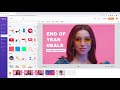
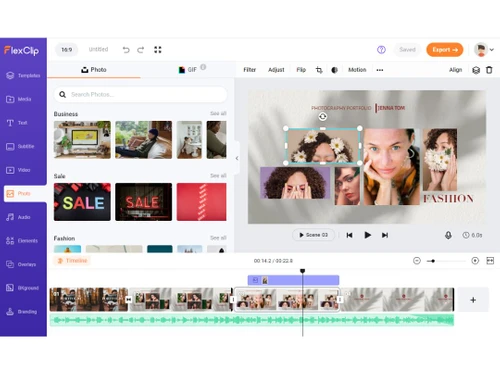
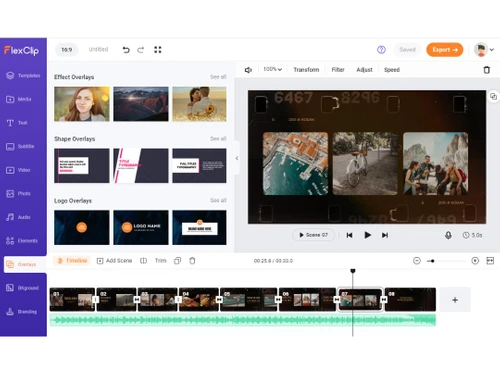
FlexClip Video Making Software empowers users to create professional-quality videos effortlessly with its intuitive drag-and-drop interface, extensive media library, and versatile editing tools.
See MoreHave you used FlexClip before?
Share your insights for better experience
View plans
 Save upto 18%, Get GST Invoice on your business purchase T&C Buy Now & Pay Later, Check offer on payment page.
 Brand: PearlMountain
Founded Year: 2006
PearlMountain has focused on the research and development of Graphics & Multimedia software since 2006. We aim to make professional graphic design and video production capability accessible to everyone.
Basic Editing Tools / Timeline Editing
 Non-Linear Editing (NLE) Trim, Crop & Resize Split & Merge Drag and Drop Functionality Transition Effects Video Masking Video Overlays Preview Functionality Speed Ramping and Speed Changing Scene Cut Detection
 Color Correction & Enhancement
Color Grading and Correction Color Blending and Filters Color LUTs Video Enhancer Advanced Editing Tools
Video Stabilization Key Frames and Animations Background Removal Screen / Camera Recording Auto Reframe Object Motion Tracking 3D Animations Proxy Tools Nested Timelines Duplicate Detection Visual Effects & Motion Graphics
Content Library and Elements Green Screen and Chroma Key / Luma Key SFX VFX Audio Editing Tools
Voiceovers, Subtitles and Transcripts Silence Remover Audio Mixing Audio Waveforms Audio Denoise Audio Stretching Auto Synchronization Beat Synchronization Image Editing Tools
Image Stabilization Noise Removal File Storage and Management
File Rendering 4K and HD Export Audio / Video Conversion Automatic Project Backup AI Video Creator / Editor
AI Text to Speech AI Text-To-Video AI Co-Pilot Editing AI Voice Changer AI Auto Face Blur AI Speech / Dialogue Enhancer AI Text-Based Editing Collaboration & Sharing
Real Time Collaboration Multi Device Compatibility Multi Format Compatibility Video Brand Kit Social Media Integration Others
Audio Ducking AI Image Generator Video Looping 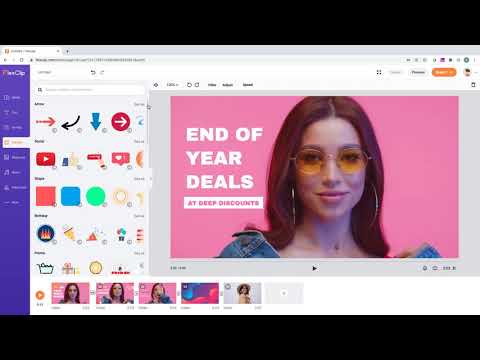

Watch the demo video to explore key features, real workflows, and how the software fits your business needs.
 Windows
  MacOS
MacOS  Desktop
  Cloud-Based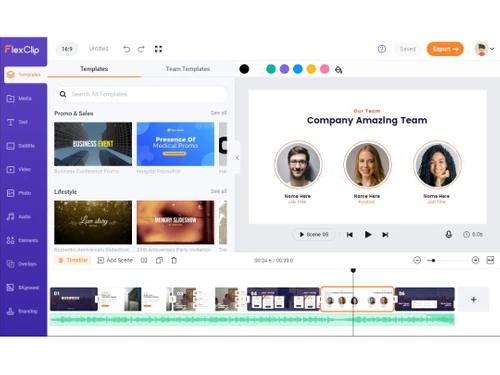
Small Business
Designed for startups and growing businesses
Medium Business
Built for business growth and flexibility
Enterprises
Designed for complex and large-scale business needs
4.7
Out of 5

Overall Rating
Based on
3 Verified Reviews
Rating Breakdown
83% Recommend this Product
Add Review


FlexClip
₹ 1729.11 excl. GST
Desktop
Mobile
Web based
On Premises
Windows
Mac OS

Wondershare Filmora
₹ 3800
Desktop
Mobile
Web based
On Premises
Windows
Mac OS

Final Cut Pro
Price On Request
Desktop
Mobile
Web based
On Premises
Windows
Mac OS

Adobe Premiere Pro
Price On Request
Desktop
Mobile
Web based
On Premises
Windows
Mac OS

Flixier
₹ 984
Desktop
Mobile
Web based
On Premises
Windows
Mac OS

DaVinci Resolve
₹ 29980
Desktop
Mobile
Web based
On Premises
Windows
Mac OS

InShot
Price On Request
Desktop
Mobile
Web based
On Premises
Windows
Mac OS

Adobe Premiere Pro CC for teams
Price On Request
Desktop
Mobile
Web based
On Premises
Windows
Mac OS

KineMaster
Price On Request
Desktop
Mobile
Web based
On Premises
Windows
Mac OS

Avid Media Composer
Price On Request
Desktop
Mobile
Web based
On Premises
Windows
Mac OS

Monarch Smart Cut Pro
₹ 3190
Desktop
Mobile
Web based
On Premises
Windows
Mac OS
(0) Product(s) selected
Available
Price on Request
Starting Price:
$10 /Month

Starting Price:
$15 /Month

Starting Price:
$30 /Month

Starting Price:
$20 /LifeTime

Starting Price:
$50 /Year

Starting Price:
$15 /Month

Starting Price:
$13 /Month

Starting Price:
$10 /Month






FlexClip is compatible with Windows and macOS operating systems.
FlexClip app is unavailable on Android and iOS devices.
FlexClip supports web-based deployment.
FlexClip Video Making Software pricing starts from INR 1729 per month at techjockey.com.
FlexClip can be used by content creators, marketers, and social media enthusiasts, enabling them to effortlessly enhance their videos with the help of artificial intelligence.
FlexClip Video Making Software demo is available for free with techjockey.com.
FlexClip does not offer a free trial.
FlexClip is a web-based platform. So, you need not download any software to use it.
FlexClip is a user-friendly, web-based video editing and creation platform that allows users to produce engaging videos by incorporating text, music, animations, and other effects effortlessly. It offers a seamless and accessible solution for crafting visually appealing videos without needing advanced technical skills.
20,000+ Software Listed
Best Price Guranteed
Free Expert Consultation
2M+ Happy Customers
Terms and Condtions

Users with registered businesses can purchase goods from merchants on the platform to satisfy their business needs. Users are not permitted to utilize any products acquired through the platform for resale, advertising, business, or further distribution.
For each purchase made, users will receive a Tax Invoice (or 'GST invoice') that includes specific details such as:
the GSTIN of the user associated with their registered business, and
the specified Entity Name for their business.
It should be noted that not all products are eligible for GST Invoice. Only the products displayed by participating sellers with the 'GST-based Invoice Available' callout on the product description page would qualify.
Certain goods and services are not eligible to get a GST Invoice, including items with VAS, i.e., Value Added Services (e.g., Total Mobile Protection/Assured Buyback) and those involving an exchange offer at the time of purchase.
Users must ensure the accuracy of the GSTIN, and business entity name provided for the GST Invoice. Requests for corrections into GST Invoice would not be accommodated by Techjockey.com or any Seller, and any issues arising from user-provided information are the sole responsibility of users.
Techjockey.com is not liable for the GST Invoice or any associated input tax credit. To efficiently claim an input tax credit, users should select the registered place of business address as per the GST authority's data and follow the provisions of the GST Act and rules.
To claim an input tax credit, the delivery and billing addresses must match. Furthermore, input tax credits will not be granted if the delivery address and GSTIN on the invoice are from different states. In case of incorrect GST details provided during the order placement, the order will be canceled automatically.


