linkedin
LUXEA logo
play LUXEA Pro Video Editor 7 - Introduction to Video Editing
luxea image1
luxea image2

LUXEA

Brand: ACD Systems

  • 4.2

  • 5 Ratings

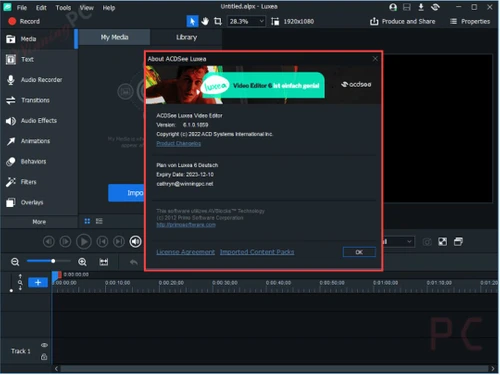
Luxea Video Editor is a comprehensive video editing software that combines ease of use with powerful editing tools. Luxea provides a range of features that cater to both beginners and experienced video editors, making it a versatile tool for any video creation project.

See More

Have you used LUXEA before?

Share your insights for better experience

Add a Review
Starting Price
$50

View plans

100% Genuine
Products
Best Price
Guaranteed
Safe & Secure
Payment
  • Description

  • Pricing

  • Features

  • Specification

  • Review

  • Compare

  • Alternatives

  • FAQ

Starting at $50

LUXEA Software Overview

What is Luxea?

Luxea Video Editor is a powerful and user-friendly video editing software that enables users to create stunning videos with ease. Whether you're a beginner or a seasoned video editor, Luxea offers a range of tools that make the editing process simple and efficient. This video making software is ideal for anyone looking to produce professional-quality videos without spending hours learning complex features. As a business software, Luxea also caters to professionals needing reliable tools for their video projects.

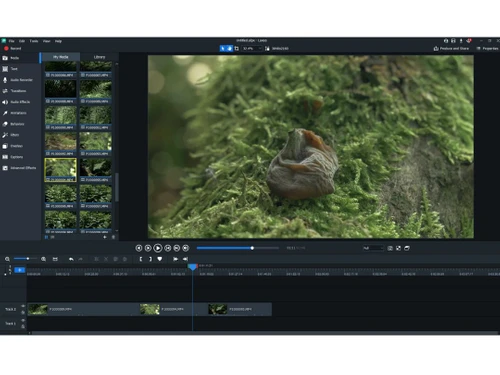
Luxea's interface is designed to be intuitive, allowing users to easily access its wide array of features. The software supports multiple video formats, making it versatile for different types of projects. Luxea is also known for its quick processing speeds, which help users complete their projects faster without compromising on quality. Whether you’re editing a short clip for social media or working on a longer project, Luxea’s tools and features make the process smooth and enjoyable.

Why Choose Luxea?

  • Reliable Video Editing: Luxea offers a dependable solution for all your video editing needs, ensuring consistent performance.
  • Comprehensive Toolset: Equipped with a full range of editing tools, Luxea caters to both basic and advanced video projects.
  • User-Friendly Interface: Designed for easy navigation, Luxea provides powerful features without the steep learning curve.
  • Creative Flexibility: Luxea allows you to create videos that truly reflect your vision, whether simple edits or complex projects.
  • Advanced Features: Includes motion graphics and visual effects to enhance your videos with professional-quality elements.
  • Regular Updates: Luxea is consistently updated with the latest editing technologies, keeping your tools cutting-edge.
  • Efficient Workflow: The software is designed to streamline the editing process, making video creation faster and more intuitive.
  • Trusted Product: Available on Techjockey, Luxea comes with the assurance of excellent support and reliability.
  • Seamless Experience: Luxea combines ease of use with powerful features, making it suitable for both beginners and professionals.
  • Versatile Application: Whether you need basic editing or advanced features, Luxea provides the tools necessary for any video project.

Benefits of Luxea Video Editing Software

  • User-Friendly Interface: Luxea is designed with an easy-to-navigate interface, making it accessible to all users.
  • Versatile Toolset: The software offers a comprehensive range of tools suitable for various video editing projects.
  • Fast Processing: Luxea's quick processing speeds allow you to complete your projects efficiently.
  • Regular Updates: Frequent updates ensure that you always have the latest features and tools.
  • Reliable Support: Luxea comes with dependable customer support to assist with any issues.

Pricing Of Luxea Software

Luxea Video Editor price starts from $ 49.99 at techjockey.com. The pricing model is based on different parameters, including extra features, deployment type, and the total number of users. For further queries related to the product, you can contact our product team and learn more about the pricing and offers.

Read more

ACD Systems Company Details

Founded Year:  1993

ACD Systems is one of the largest and most respected independent digital image editing and management companies in the world.

Director/Founders Doug Vandekerkhove
Company Size 101-500 Employees

LUXEA Pricing & Plans

INDIVIDUAL PLAN
Starting at $50
    • Licenses

      Licenses
      Licenses
    • Yearly

      Yearly
      Yearly

Key Features

  • Recording and Video Editing Software

  • Free Updates

  • Free Tech Support

  • Free Upgrades

365 HOME PLAN
Starting at $89
    • Licenses

      Licenses
      Licenses
    • Yearly

      Yearly
      Yearly

Key Features

  • Recording and Video Editing Software

  • Free Updates

  • Free Tech Support

  • Free Upgrades

  • Digital Asset Management, RAW Photo Editing, and L

  • 200GB Cloud Storage, Install on up to 5 devices, E

LIFETIME LICENSE
Starting at $100
    • Licenses (One time purchase)

      Licenses (One time purchase)
      Licenses (One time purchase)

Key Features

  • Recording and Video Editing Software

  • Free Updates

  • Free Tech Support

LUXEA Features

Basic Editing Tools / Timeline Editing

  • icon_check Trim, Crop & Resize
    Trimming adjusts the size of images and videos, cropping removes unnecessary sections, and resizing modifies dimensions to comply
  • icon_check Split & Merge
    Splitting involves dividing a video clip into two or more segments. Merging combines different parts of the same video clip.
  • icon_check Drag and Drop Functionality
    To edit a video by dragging and dropping elements and clips onto a timeline or storyboard.
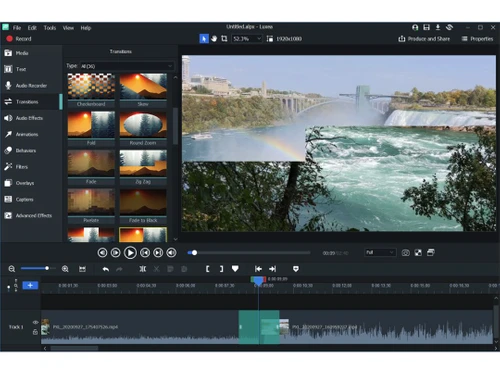
  • icon_check Transition Effects
    Post-production tools used in video editing to connect one shot or scene to another.
  • icon_check Video Masking
    Video Masking is selecting a specific piece of a video or use video overlays to hide, duplicate, reveal, or modify the footage.
  • icon_check Video Overlays
    A tool for layering multiple video clips or images on top of each other to create a single video.
  • icon_check Preview Functionality
    Viewing the final output of a video editing project before exporting the rendered file.
  • icon_check Speed Ramping and Speed Changing
    Speed ramping adjusts a clip's speed gradually, while speed changing makes a clip play faster or slower by altering the frame
  • icon_check Non-Linear Editing (NLE)
    A digital video editing method to edit a video or audio project without considering a linear timeline.
  • icon_check Scene Cut Detection
    A scene cut detection tool automatically gets the cut points in a video at the point where clip is changing, based on sudden

Color Correction & Enhancement

  • icon_check Color Grading and Correction
    Color grading enhances the visual aesthetics of video by adjusting brightness, contrast, saturation, and hue, while color
  • icon_check Color Blending and Filters
    Color blending combines two images in video editing, while filters adjust aspects like color balance, brightness, contrast, and
  • icon_check Color LUTs
    Color LUTs or Look up Tables contain an arrays of numbers that contain values for color input and output, used to change the
  • icon_check Video Enhancer
    Video enhancers improve the quality of videos by fixing common issues like low light and blurry video.

Advanced Editing Tools

  • icon_check Proxy Tools
    Creates lower-resolution copies of media files for faster editing and smoother playback.
  • icon_check Key Frames and Animations
    Keyframes in video editing signal when to start and end an animation or function. Transitioning a property or element between two
  • icon_check Background Removal
    A tool used in video editing to remove the background from a video and make it transparent.
  • icon_check Screen / Camera Recording
    Recording screen videos, camera footages, audios, and images directly on the application.
  • icon_check Auto Reframe
    Auto Reframe uses artificial intelligence to identify the main action in a video, keep it within the frame, and ensure important
  • icon_check Object Motion Tracking
    Object motion tracking is a video editing technique that detects and follows the movement of objects in a video or image sequence.
  • icon_check 3D Animations
    Using computer-generated imagery (CGI) to create and animate characters, objects, and props in 3D.
  • icon_check Video Stabilization
    A feature used to reduce shakiness and movement in video footage.
  • icon_check Nested Timelines
    This feature is to combine multiple timelines within a single sequence for more organized and complex editing.
  • icon_check Duplicate Detection
    A tool that identifies and highlights duplicate clips to prevent redundancy in the video project.

Visual Effects & Motion Graphics

  • icon_check Content Library and Elements
    A central location for storing, organizing, and accessing digital content like images, videos, audio files, and text.
  • icon_check Green Screen and Chroma Key / Luma Key
    A special effects technique that lets you remove a chosen color from a video clip and replace it with another video or image.
  • icon_check VFX
    Visual effects (VFX) are computer-generated or manipulated imagery blended with live-action footage to enhance reality onscreen.
  • icon_check SFX
    Sound effects (SFX) are used with special effects to influence the mood and reactions of the audience in a video.

Audio Editing Tools

  • icon_check Voiceovers, Subtitles and Transcripts
    Voiceover is off-screen narration, subtitles are auto-generated text of the audio, and transcripts are written records of a
  • icon_check Audio Denoise
    A tools to remove unwanted background noise from an audio signal in video editing
  • icon_check Audio Mixing
    A technique to combine individual tracks, audio, and sound effects by manipulating signal levels, frequency contents, dynamics,
  • icon_check Audio Waveforms
    Audio waveforms are two-dimensional graphs that represent how sound pressure changes in a video.
  • icon_check Silence Remover
    A tool to detect and remove silent parts or dead air in audio tracks
  • icon_check Audio Stretching
    A tool to adjust the length of an audio clip to match the duration of a video without changing the pitch of the audio.
  • icon_check Auto Synchronization
    A tool to automatically adjust the volume of audio tracks to make one sound more prominent than another, highlight a narrative,
  • icon_check Beat Synchronization
    A tool that syncs video clips, footage, and other elements to the rhythm of music.

Image Editing Tools

  • icon_check Image Stabilization
    A specialized tool for correcting shaky footage to produce smooth and stable videos.
  • icon_check Noise Removal
    A tool to reduce unwanted visual noise to enhance image clarity.

File Storage and Management

  • icon_check File Rendering
    Combining raw elements into a final video file that can be played on a display.
  • icon_check 4K and HD Export
    4K and HD refer to the number of pixels that make up an image on a screen. 4K and HD export allows users to download
  • icon_check Automatic Project Backup
    The process of automatically saving video project files at a specified intervals.
  • icon_check Audio / Video Conversion
    A tool used to change the format of an audio/video file.

AI Video Creator / Editor

  • icon_check AI Auto Face Blur
    AI Auto Face Blur is a technology that uses artificial intelligence to automatically detect and blur faces in images and videos.
  • icon_check AI Co-Pilot Editing
    AI Co-Pilot Editing refers to the use of artificial intelligence to assist and enhance the video or audio editing process.
  • icon_check AI Text to Speech
    AI Text-to-Speech (TTS) is a technology that converts written text into spoken voice output using artificial intelligence.
  • icon_check AI Voice Changer
    An AI Voice Changer is a technology that uses artificial intelligence to modify a person's voice in real-time or during
  • icon_check AI Speech / Dialogue Enhancer
    AI Speech/Dialogue Enhancer is a tool or technology that uses artificial intelligence to improve the quality of spoken audio.
  • icon_check AI Text-To-Video
    AI text-to-video technology involves converting text inputs into video content using artificial intelligence.
  • icon_check AI Text-Based Editing
    The use of artificial intelligence to streamline and enhance the video editing process using text commands or text-based

Collaboration & Sharing

  • icon_check Multi Format Compatibility
    Importing/exporting, combining, and editing media files, such as videos, images, and audio in different formats.
  • icon_check Real Time Collaboration
    Allowing multiple users to edit a video simultaneously, regardless of their location.
  • icon_check Social Media Integration
    Uploading video projects to social media directly from the video editing software.
  • icon_check Multi Device Compatibility
    Ability to use the video editing software on different devices and operating systems.
  • icon_check Video Brand Kit
    A toolkit in video editing software to store branding elements, such as fonts, logos, color schemes, etc.
LUXEA Demo Video play icon

Get LUXEA Demo

Watch the demo video to explore key features, real workflows, and how the software fits your business needs.

Understand
Key Features
Personal
Demo Insights
Interactive
Demo Support

LUXEA Specifications

Supported Platforms
Windows Windows
Devices
Desktop Desktop
Deployment
Perpetual Perpetual
Suitable For
All Industries
Business Specific
All Businesses
Business Size
Small Business Startups Medium Business Enterprises
Customer Support
Email Communities
Language
English français Deutsche Italiano 日本人 한국어 普通话 русский Español
Training Resources
Live Online Videos

Explore the Best Alternative Solutions Similar to Your Business Size and Needs

LUXEA Review

4.2

Out of 5

img

Overall Rating

Based on
5 Verified Ratings

Rating Breakdown

  • Features 4.1
  • Value for Money 4.6
  • Ease of Use 4.5
  • Customer Support 3.9

90% Recommend this Product

Add Review

Techjockey Trusted Reviews from Verified Users

No reviews are currently available for LUXEA. Discover similar Video Editing Software reviews

  • Wondershare Filmora

    4.3

    Whats great - It seemed to me all so familiar and straightforward, I easily processed various video files and made interesting titles and e... read more

  • Wisecut

    4.1

    Whats great - Wisecut AI is an AI video editing tool that works in a way where you just upload the video and it edits it for you. read more

  • KineMaster

    4.2

    Whats great - KineMaster is an excellent video editing application that has been developed with the user in mind. The application enables u... read more

Compare LUXEA With other Video Editing Software

Products
Ratings
Pricing
Device Supported
Deployment
Supported Platforms
  • img

    LUXEA

  • 4.2

  • Price On Request

  • Desktop

    Mobile

  • Web based

    On Premises

  • Windows

    Mac OS

  • img

    Final Cut Pro

  • 4.3

  • Price On Request

  • Desktop

    Mobile

  • Web based

    On Premises

  • Windows

    Mac OS

  • img

    Adobe Premiere Pro

  • 4.2

  • Price On Request

  • Desktop

    Mobile

  • Web based

    On Premises

  • Windows

    Mac OS

  • img

    Flixier

  • 4.1

  • ₹ 984

  • Desktop

    Mobile

  • Web based

    On Premises

  • Windows

    Mac OS

  • img

    DaVinci Resolve

  • 4.3

  • ₹ 29980

  • Desktop

    Mobile

  • Web based

    On Premises

  • Windows

    Mac OS

  • img

    InShot

  • 4.1

  • Price On Request

  • Desktop

    Mobile

  • Web based

    On Premises

  • Windows

    Mac OS

  • img

    KineMaster

  • 4.2

  • Price On Request

  • Desktop

    Mobile

  • Web based

    On Premises

  • Windows

    Mac OS

  • img

    FlexClip

  • 4.7

  • ₹ 1729

  • Desktop

    Mobile

  • Web based

    On Premises

  • Windows

    Mac OS

(0) Product(s) selected

LUXEA Alternatives

See All LUXEA Alternatives

Available

Price on Request

Starting Price:

$15 /Month

Starting Price:

$30 /Month

Starting Price:

$15 /Month

Starting Price:

$13 /Month

Starting Price:

$10 /Month

Articles for LUXEA

See All Related Articles

What is Luxea Video Editor?

Luxea is a comprehensive video editing software designed for creating high-quality videos easily.

Is Luxea suitable for beginners?

Yes, Luxea is user-friendly and ideal for beginners looking to create professional-quality videos.

Does Luxea support 4K video editing?

Yes, Luxea supports 4K video editing, allowing you to work with high-resolution content seamlessly.

Can I add music to my videos with Luxea?

Absolutely, Luxea provides tools for adding and editing background music and syncing it with your videos.

Does Luxea have built-in templates?

Yes, Luxea offers a variety of templates to simplify the video creation process, especially for beginners.

Is Luxea available on Mac?

Luxea is primarily designed for Windows, but you can check for compatibility options for Mac users.

How do I remove watermarks in Luxea?

Watermarks can be removed by upgrading to the full version of Luxea.

Does Luxea offer customer support?

Yes, Luxea offers reliable customer support to assist you with any technical issues or questions.

Is Luxea good for professional video editing?

Yes, Luxea’s advanced tools make it suitable for professional video editing projects.

How can I share my videos edited in Luxea?

You can easily share your videos directly from Luxea to social media platforms or export them to your device.

20,000+ Software Listed

Best Price Guranteed

Free Expert Consultation

2M+ Happy Customers

Terms and Condtions

close

Users with registered businesses can purchase goods from merchants on the platform to satisfy their business needs. Users are not permitted to utilize any products acquired through the platform for resale, advertising, business, or further distribution.

For each purchase made, users will receive a Tax Invoice (or 'GST invoice') that includes specific details such as:

  • the GSTIN of the user associated with their registered business, and

  • the specified Entity Name for their business.

It should be noted that not all products are eligible for GST Invoice. Only the products displayed by participating sellers with the 'GST-based Invoice Available' callout on the product description page would qualify.

Certain goods and services are not eligible to get a GST Invoice, including items with VAS, i.e., Value Added Services (e.g., Total Mobile Protection/Assured Buyback) and those involving an exchange offer at the time of purchase.

Users must ensure the accuracy of the GSTIN, and business entity name provided for the GST Invoice. Requests for corrections into GST Invoice would not be accommodated by Techjockey.com or any Seller, and any issues arising from user-provided information are the sole responsibility of users.

Techjockey.com is not liable for the GST Invoice or any associated input tax credit. To efficiently claim an input tax credit, users should select the registered place of business address as per the GST authority's data and follow the provisions of the GST Act and rules.

To claim an input tax credit, the delivery and billing addresses must match. Furthermore, input tax credits will not be granted if the delivery address and GSTIN on the invoice are from different states. In case of incorrect GST details provided during the order placement, the order will be canceled automatically.