linkedin
ACDSee Photo Studio logo
play ACDSee Photo Studio 2024 - Feature Set Preview
ACDSee Photo Studio burger
ACDSee Photo Studio dashbaord

ACDSee Photo Studio

Brand: ACD Systems

  • 4.4

  • 5 Ratings & 1 Review

ACDSee Photo Studio is a photo editing software, offering a range of tools for organizing, editing, and sharing images efficiently. It provides intuitive features tailored for photographers and visual artists to enhance their workflow and creativity.

See More

Have you used ACDSee Photo Studio before?

Share your insights for better experience

Add a Review
Starting Price
$55

View plans

100% Genuine
Products
Best Price
Guaranteed
Safe & Secure
Payment
  • Description

  • Pricing

  • Features

  • Specification

  • Review

  • Compare

  • Alternatives

  • FAQ

Starting at $55

ACDSee Photo Studio Software Overview

What is ACDSee Photo Studio?

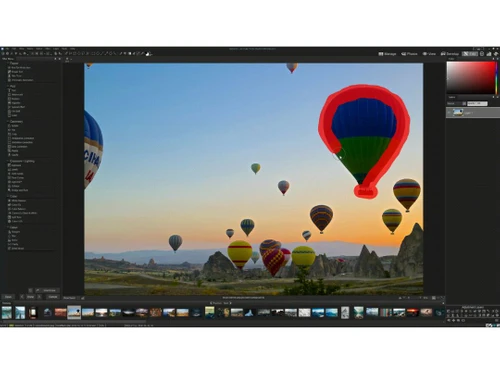
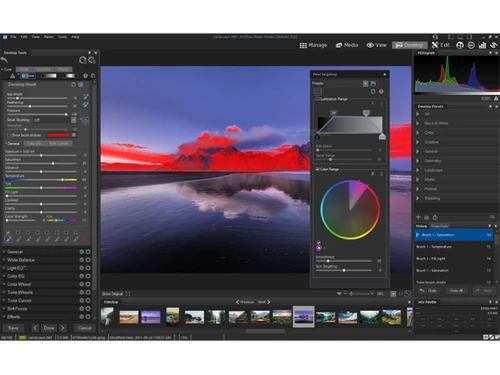
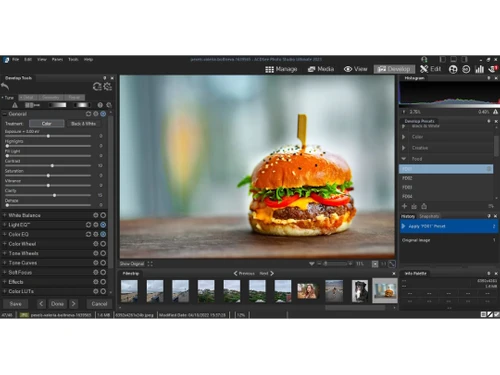
ACDSee Photo Studio is a photo editing software suite designed for photographers and visual artists to manage, edit, and share their images effectively. It offers a wide range of features including organizational tools, advanced editing capabilities, and seamless sharing options. With its intuitive interface and powerful editing tools, users can enhance their photos, correct imperfections, and apply creative effects effortlessly.

ACDSee Photo Studio provides a streamlined workflow, allowing users to organize their image collections efficiently and access them easily. It supports various file formats and offers features like batch processing and RAW image editing, catering to the diverse needs of photographers.

Why Choose ACDSee Photo Studio Software?

  • Comprehensive Features: It offers a wide range of tools for organizing, editing, and sharing photos, providing everything photographers need in a single platform.
  • Intuitive Interface: The software features an intuitive interface that is easy to navigate, making it accessible for users of all skill levels to enhance their photos effortlessly.
  • Efficient Workflow: With powerful organizational tools and batch processing capabilities, It streamlines the photo editing process, saving time and improving productivity.
  • Advanced Editing Capabilities: From basic adjustments to advanced editing techniques, It provides professional-grade editing tools to achieve stunning results in photos.
  • Compatibility and Flexibility: It supports various file formats and integrates seamlessly with other software and plugins, offering users flexibility in their workflow.
  • Regular Updates and Support: The software is regularly updated with new features and improvements, and users can rely on dedicated customer support for assistance with any issues or questions.

Benefits of ACDSee Photo Studio Software

  • Geotagging: Users can geotag their photos, aiding in organizing and searching images by location. The software also offers advanced face detection and recognition, simplifying the categorization of people in photos.
  • Non-Destructive Editing: It offers non-destructive editing capabilities, allowing users to make edits to their photos without altering the original image files, ensuring preservation of the original quality and details.
  • Customizable Workspace: Users can customize their workspace in It according to their preferences, arranging tools and panels to optimize their workflow and maximize efficiency.
  • RAW Processing: It provides robust RAW processing capabilities, allowing users to work with RAW image files from their digital cameras and achieve optimal image quality and detail in their edits.
  • Cloud Storage Integration: It integrates with cloud storage services, allowing users to easily backup, synchronize, and access their photo libraries from anywhere with an internet connection, ensuring data security and accessibility.

Pricing Of ACDSee

ACDSee Photo Studio price in India starts at $55 at techjockey.com.

The pricing model is based on different parameters, including extra features, deployment type, and the total number of users. For further queries related to the product, you can contact our product team and learn more about the pricing and offers.

Read more

ACD Systems Company Details

Founded Year:  1993

ACD Systems is one of the largest and most respected independent digital image editing and management companies in the world.

Director/Founders Doug Vandekerkhove
Company Size 101-500 Employees

ACDSee Photo Studio Pricing & Plans

ACDSee Gemstone Photo Editor 15
Key Features
  • Digital Asset Management, RAW Photo Editing, and L
  • Free Updates
  • Free Tech Support
  • 5 Device Installs per Product
  • Recording and Video Editing Software
  • Free Upgrades
  • 200GB Cloud Storage, Exclusive Tutorials
Starting at $55
    • Licenses (One Time)

      Licenses (One Time)
      Licenses (One Time)

Key Features

  • Digital Asset Management, RAW Photo Editing, and L

  • Free Updates

  • Free Tech Support

  • 5 Device Installs per Product

  • Recording and Video Editing Software

  • Free Upgrades

  • 200GB Cloud Storage, Exclusive Tutorials

ACDSee Photo Studio Features

  • icon_check AI Keywords
    AI technology generates relevant keywords for image organization.
  • icon_check Keyword Management
    Efficiently manage and organize keywords for better image searchability.
  • icon_check Digital Asset Management
    Comprehensive tools manage images, videos, and media files.
  • icon_check Quick Search
    Easily find images using keywords or metadata.
  • icon_check Location Data
    Utilize embedded location data for organizing images by geography.
  • icon_check Auto-Import
    Automatically import photos from devices or folders.
  • icon_check Media Mode
    Streamlined view for efficient browsing of images and videos.
  • icon_check Duplicate Finder
    Identify and remove duplicate images to optimize storage.
  • icon_check Batch Crop Tool
    Crop multiple images simultaneously for time-saving editing.
  • icon_check Customizable Appearance
    Customize interface to suit personal preferences and workflow.
  • icon_check Color Correction
    Fine-tune image colors using curves, color wheels, tone wheels, LUTs, white balance, and color adjustment tools.
  • icon_check Photo Sharing
    Share images through SendPix and other publishing options, including social services, FTP, printing, and online platforms.
  • icon_check Facial Recognition
    Detect and recognize faces in photographs, allowing users to assign names and quickly find images of specific people.
ACDSee Photo Studio Demo Video play icon

Get ACDSee Photo Studio Demo

Watch the demo video to explore key features, real workflows, and how the software fits your business needs.

Understand
Key Features
Personal
Demo Insights
Interactive
Demo Support

ACDSee Photo Studio Specifications

Supported Platforms
Ubuntu Ubuntu Windows Windows MacOS MacOS Linux Linux
Devices
Desktop Desktop Mobile Mobile Tablet Tablet iPad iPad
Deployment
Cloud-Based Cloud-Based Perpetual Perpetual
Suitable For
All Industries
Business Specific
All Businesses
Business Size
Small Business Startups Medium Business Enterprises
Customer Support
Email Communities
Language
Nederlands English français Italiano Español
Training Resources
Videos
AI Features
AI Integrated

Explore the Best Alternative Solutions Similar to Your Business Size and Needs

ACDSee Photo Studio Review

4.4

Out of 5

img

Overall Rating

Based on
1 Verified Review

Rating Breakdown

  • Features 4.4
  • Value for Money 4.4
  • Ease of Use 4.6
  • Customer Support 4.3

86% Recommend this Product

Add Review

ACDSee Photo Studio Video Review

youtubeVideoId

4.3

“The Best Photoshop Alternative | ACDSee Photo Studio Ultimate 2020 Review!”

Review by: Tech Summit

Compare ACDSee Photo Studio With other Photo Editing Software

Products
Ratings
Pricing
Device Supported
Deployment
Supported Platforms
  • img

    ACDSee Photo Studio

  • 4.4

  • Price On Request

  • Desktop

    Mobile

  • Web based

    On Premises

  • Windows

    Mac OS

  • img

    Adobe Photoshop

  • 4.5

  • Price On Request

  • Desktop

    Mobile

  • Web based

    On Premises

  • Windows

    Mac OS

  • img

    Karizma Album

  • 4.4

  • ₹ 3500

  • Desktop

    Mobile

  • Web based

    On Premises

  • Windows

    Mac OS

  • img

    Affinity Photo

  • 4.2

  • ₹ 619

  • Desktop

    Mobile

  • Web based

    On Premises

  • Windows

    Mac OS

  • img

    Luminar Neo

  • 4.7

  • ₹ 4999

  • Desktop

    Mobile

  • Web based

    On Premises

  • Windows

    Mac OS

  • img

    darktable

  • 4.0

  • Price On Request

  • Desktop

    Mobile

  • Web based

    On Premises

  • Windows

    Mac OS

  • img

    Cutout Pro

  • 4.8

  • ₹ 247

  • Desktop

    Mobile

  • Web based

    On Premises

  • Windows

    Mac OS

  • img

    Lensa AI

  • 4.1

  • Price On Request

  • Desktop

    Mobile

  • Web based

    On Premises

  • Windows

    Mac OS

  • img

    AfterShot Pro 3

  • 4.5

  • ₹ 5966

  • Desktop

    Mobile

  • Web based

    On Premises

  • Windows

    Mac OS

  • img

    Evoto AI

  • 4.6

  • Price On Request

  • Desktop

    Mobile

  • Web based

    On Premises

  • Windows

    Mac OS

(0) Product(s) selected

ACDSee Photo Studio Alternatives

See All ACDSee Photo Studio Alternatives

Available

Price on Request

Starting Price:

$36 /Year

Starting Price:

$80 /year

Starting Price:

$35 /Lifetime

Starting Price:

$10 /Month

Starting Price:

$8 /Month

Starting Price:

$15 /Month

Starting Price:

$810 /Year
Articles for ACDSee Photo Studio

See All Related Articles

Which operating system does ACDSee Photo Studio Software Support?

ACDSee Photo Studio Software is compatible with Ubuntu, Windows, Linux and MacOS.

Is there any ACDSee Photo Studio Software App?

Yes, ACDSee Photo Studio Software app is available for Android and iOS app users.

What is the deployment type of ACDSee Photo Studio Software?

ACDSee software supports web-based deployment.

How much does ACDSee Photo Studio Software Cost?

ACDSee Photo Studio price in India starts at $9 at techjockey.com.

Who are the potential users of ACDSee Photo Studio Software?

ACDSee Photo Studio Software is typically used by all industries for photographers and visual artists to manage, edit, and share their images effectively.

Is there any free demo for ACDSee Photo Studio Software?

Free demo of ACDSee Photo Studio is available at techjockey.com.

Is ACDSee Photo Studio Software Free?

ACDSee Photo Studio Software is not available for free. You can connect with our product experts to know more about the pricing plans.

Does this product offer a free trial?

Yes, ACDSee Photo Studio Software offers a free trial.

How can you download ACDSee Photo Studio Software?

ACDSee Photo Studio Software installation is not required, as it is web-based. Just open the Setup Wizard to get started.

How does ACDSee Photo Studio Software Work?

ACDSee Photo Studio software works by providing photographers with intuitive tools for organizing, editing, and sharing their photos efficiently.

20,000+ Software Listed

Best Price Guranteed

Free Expert Consultation

2M+ Happy Customers

Terms and Condtions

close

Users with registered businesses can purchase goods from merchants on the platform to satisfy their business needs. Users are not permitted to utilize any products acquired through the platform for resale, advertising, business, or further distribution.

For each purchase made, users will receive a Tax Invoice (or 'GST invoice') that includes specific details such as:

  • the GSTIN of the user associated with their registered business, and

  • the specified Entity Name for their business.

It should be noted that not all products are eligible for GST Invoice. Only the products displayed by participating sellers with the 'GST-based Invoice Available' callout on the product description page would qualify.

Certain goods and services are not eligible to get a GST Invoice, including items with VAS, i.e., Value Added Services (e.g., Total Mobile Protection/Assured Buyback) and those involving an exchange offer at the time of purchase.

Users must ensure the accuracy of the GSTIN, and business entity name provided for the GST Invoice. Requests for corrections into GST Invoice would not be accommodated by Techjockey.com or any Seller, and any issues arising from user-provided information are the sole responsibility of users.

Techjockey.com is not liable for the GST Invoice or any associated input tax credit. To efficiently claim an input tax credit, users should select the registered place of business address as per the GST authority's data and follow the provisions of the GST Act and rules.

To claim an input tax credit, the delivery and billing addresses must match. Furthermore, input tax credits will not be granted if the delivery address and GSTIN on the invoice are from different states. In case of incorrect GST details provided during the order placement, the order will be canceled automatically.