linkedin
Horizon logo
horizon-customization
horizon-lists
horizon-marketing

Horizon

Brand: Carson Dunlop

  • 4.2

  • 5 Ratings

An inspection management software that streamlines property inspections, reporting, and workflow management.

See More

Have you used Horizon before?

Share your insights for better experience

Add a Review
Starting Price
$79

View plans

100% Genuine
Products
Best Price
Guaranteed
Safe & Secure
Payment
  • Description

  • Pricing

  • Features

  • Specification

  • Review

  • FAQ

Starting at $79

Horizon Software Overview

What is Horizon?

Horizon is a real estate and inspection management software designed to streamline property inspections and reporting.

It helps inspectors capture data, photos, and notes digitally for faster, more accurate assessments. The platform automates report generation, scheduling, and client communication.

Horizon improves workflow efficiency, reduces manual errors, and provides a professional, easy-to-use interface for real estate and inspection professionals.

Why Choose Horizon Software?

  • Streamlined Inspections: Horizon simplifies property inspections by providing digital tools that make data collection faster and more accurate. Inspectors can easily capture all necessary information during visits.
  • Automated Report Generation: The software automatically creates professional inspection reports, eliminating manual formatting. This saves time and ensures consistency in every report.
  • Cloud-Based Access: All inspection data is stored securely in the cloud, allowing access anytime and anywhere. Teams can work remotely without losing important information.
  • Real-Time Data Capture: Capture property details, photos, and notes instantly during inspections. This ensures accurate and up-to-date information without the need for manual entry later.
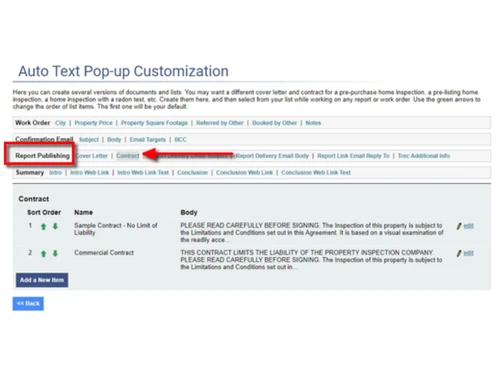
  • Customizable Templates: Horizon allows users to create or use pre-designed templates for various property types. This makes inspections faster and tailored to specific client needs.
  • Efficient Scheduling: Easily schedule inspections and manage multiple appointments through the platform. Automated reminders help reduce missed inspections and keep teams on track.
  • Improved Accuracy: Digital data entry minimizes manual errors, providing more precise inspection records. This improves reliability and trust in the inspection process.
  • Enhanced Client Communication: Inspection reports and updates can be shared instantly with clients via email or the client portal. This keeps clients informed and satisfied with timely communication.
  • Mobile-Friendly Interface: Inspectors can use smartphones or tablets to perform inspections and access reports. The mobile interface makes it convenient to work on the go.
  • Data Security: Horizon ensures sensitive property and client data is securely stored with encryption. Access controls protect information from unauthorized users.
  • Workflow Optimization: The platform streamlines team collaboration and task management. Inspectors, managers, and clients can coordinate efficiently without confusion.
  • Audit Trail & Tracking: Maintain a complete history of inspections, edits, and reports. This helps with accountability, compliance, and tracking performance over time.
  • Integration Capabilities: Horizon can integrate with other real estate or property management software. This ensures seamless workflow without data duplication or manual transfers.

Benefits of Horizon Software

  • Cost-Effective Solution: By reducing paperwork, manual labor, and administrative tasks, Horizon lowers operational costs. Teams save both time and resources.
  • Customizable Dashboards: Users can create dashboards that show key metrics, inspection statuses, and team performance. This helps managers make informed decisions quickly.
  • Multi-Property Management: Manage inspections for multiple properties from a single platform. This is ideal for agencies or inspectors handling several sites simultaneously.
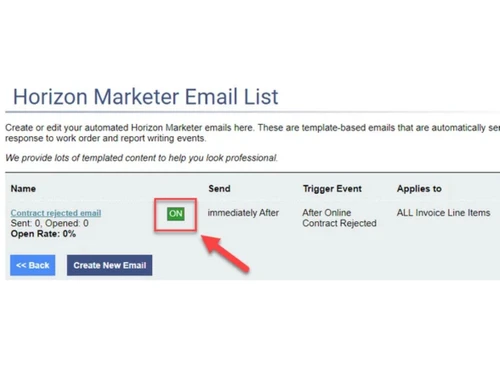
  • Time-Saving Automation: Horizon automates repetitive tasks such as reminders, notifications, and follow-ups. This allows inspectors to focus on core tasks rather than administrative work.
  • User-Friendly Design: The intuitive interface makes it easy for new users to adopt the software. Minimal training is required, helping teams get started quickly.
  • Scalable Solution: Whether for small teams or large enterprises, Horizon scales with your business. Additional users and properties can be managed without performance issues.
  • Regulatory Compliance: Horizon helps ensure inspections meet industry standards and legal requirements. This reduces risk and keeps your processes compliant.

Horizon Pricing

Horizon price starts at USD 79 at Techjockey.com. The pricing model is based on different parameters, including extra features, deployment type, and the total number of users. For further queries related to the product, you can contact our product team and learn more about the pricing and offers.

Read more

Carson Dunlop Company Details

Founded Year:  1978

Carson Dunlop's expertise in the home inspection field spans over four decades. We have played a significant role in the evolution of high-quality home inspection, and the concepts we developed continue to help our clients.

Director/Founders Alan Carson
Company Size 1-100 Employees

Horizon Pricing & Plans

Basic
Key Features
  • Web-report writer, mobile apps for Apple & Android
  • Automatic illustrations, articles and implications
  • Automated marketing and reminder emails
  • Scheduling, online booking, digital agreements
Starting at $79
    • Licenses

      Licenses
      Licenses
    • Monthly

      Monthly
      Monthly

Key Features

  • Web-report writer, mobile apps for Apple & Android

  • Automatic illustrations, articles and implications

  • Automated marketing and reminder emails

  • Scheduling, online booking, digital agreements

Horizon Features

  • icon_check Photo Archiving
    Stores unused photos automatically in archives, keeping image management clean and accessible.
  • icon_check Ancillary Reports
    Add 30+ specialized inspection reports (pool, radon, termite, etc.) to extend service offerings.
  • icon_check Multi-Device Sync
    Keeps inspection data and reports synchronized across devices for seamless accessibility.
  • icon_check Customizable Database
    Over 6000 inspection items, fully editable with options to add, hide, or tailor for any report.
  • icon_check Diagram Library
    Access 1700+ color illustrations that auto-insert into reports to visually support inspection findings.
  • icon_check Cross-Platform Support
    Use Horizon seamlessly on phone, tablet, or desktop with full offline and online functionality.
  • icon_check Power Search
    Instantly locate inspection items with quick navigation and speed-write functions for efficient entry.
  • icon_check Auto Context Capture
    Automatically logs location, task, time, and notes for every entry to improve inspection accuracy.
  • icon_check Templates
    Predefined templates and auto-appearing items streamline repeat tasks for faster report creation.
  • icon_check Report Customization
    Personalize reports with logos, footers, taglines, QR codes, and credential details on covers.
  • icon_check Knowledge Management
    Inserts relevant articles, diagrams, and implications automatically into inspection reports.
  • icon_check Auto-Numbering
    Recommendations and embedded photos are auto-numbered to improve organization and readability.

Horizon Specification

Supported Platforms
Windows Windows iOS iOS Android Android MacOS MacOS Linux Linux
Devices
Desktop Desktop Mobile Mobile
Deployment
Web-Based Web-Based
Suitable For
Property
Business Specific
Property
Business Size
Small Business Startups Medium Business Enterprises SMBs SMEs MSMBs MSMEs
Customer Support
Email Communities
Language
English
Training Resources
Videos

Horizon Review

4.2

Out of 5

img

Overall Rating

Based on
5 Verified Ratings

Rating Breakdown

  • Features 3.9
  • Value for Money 4.7
  • Ease of Use 4.1
  • Customer Support 4.3

80% Recommend this Product

Add Review

Be the First to Review

This product has no reviews yet. Be the first to leave your feedback.

Add Review
How much does Horizon cost?

Horizon Software pricing starts at USD 79, as listed on Techjockey.com.

Is there a mobile app available for Horizon Software?

Yes, Horizon offers an Android and iOS mobile-friendly app for inspections on the go.

Which operating systems are compatible with Horizon Software?

Horizon is compatible with Linux, Windows, macOS, Android, and iOS devices.

Does Horizon Software offer a free trial?

Yes, Horizon provides a free trial to explore its features.

How does Horizon Software function?

Horizon streamlines property inspections, data capture, reporting, and workflow management digitally.

Who uses Horizon Software?

Real estate professionals, property inspectors, and inspection agencies use Horizon.

Is a free demo available for Horizon Software?

Yes, Horizon free demo is available to showcase its features.

Is Horizon Software available for free?

No, Horizon is a paid software with pricing available on request.

20,000+ Software Listed

Best Price Guranteed

Free Expert Consultation

2M+ Happy Customers

Terms and Condtions

close

Users with registered businesses can purchase goods from merchants on the platform to satisfy their business needs. Users are not permitted to utilize any products acquired through the platform for resale, advertising, business, or further distribution.

For each purchase made, users will receive a Tax Invoice (or 'GST invoice') that includes specific details such as:

  • the GSTIN of the user associated with their registered business, and

  • the specified Entity Name for their business.

It should be noted that not all products are eligible for GST Invoice. Only the products displayed by participating sellers with the 'GST-based Invoice Available' callout on the product description page would qualify.

Certain goods and services are not eligible to get a GST Invoice, including items with VAS, i.e., Value Added Services (e.g., Total Mobile Protection/Assured Buyback) and those involving an exchange offer at the time of purchase.

Users must ensure the accuracy of the GSTIN, and business entity name provided for the GST Invoice. Requests for corrections into GST Invoice would not be accommodated by Techjockey.com or any Seller, and any issues arising from user-provided information are the sole responsibility of users.

Techjockey.com is not liable for the GST Invoice or any associated input tax credit. To efficiently claim an input tax credit, users should select the registered place of business address as per the GST authority's data and follow the provisions of the GST Act and rules.

To claim an input tax credit, the delivery and billing addresses must match. Furthermore, input tax credits will not be granted if the delivery address and GSTIN on the invoice are from different states. In case of incorrect GST details provided during the order placement, the order will be canceled automatically.