linkedin
InspectionSite logo
play InspectionSite is the innovative cloud based software for reporting inspections
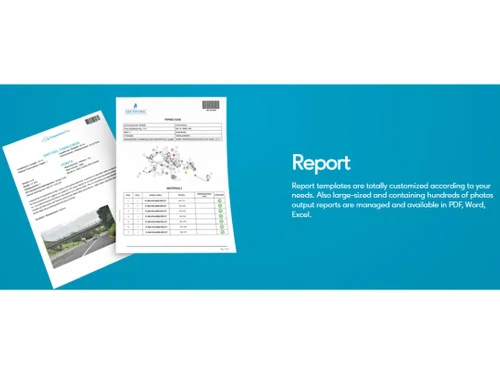
InspectionSite Report
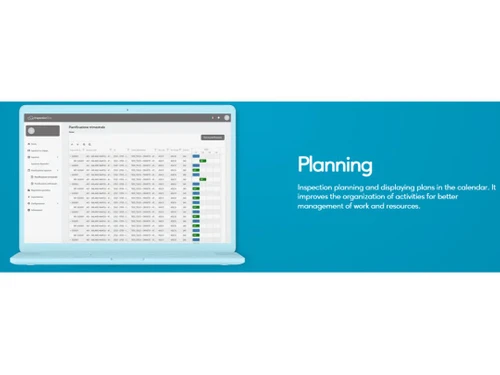
InspectionSite Planning

InspectionSite

Brand: Orangedev

  • 4

  • 3 Ratings

InspectionSite is a comprehensive inspection management software designed to streamline inspection processes for businesses and real estate professionals.

See More

Have you used InspectionSite before?

Share your insights for better experience

Add a Review

Price Available on Request

Questions about pricing or customization? We’re here to help, just a click away.

100% Genuine
Products
Best Price
Guaranteed
Safe & Secure
Payment
  • Description

  • Pricing

  • Features

  • Specification

  • Review

  • Compare

  • Alternatives

  • FAQ

InspectionSiteSoftware Overview

What is InspectionSite?

InspectionSite is the digital Swiss Army knife for inspectors across industries, transforming the often cumbersome inspection process into a streamlined, data-driven workflow. This versatile platform is like having a personal assistant that not only remembers every detail of your inspection checklist but also organises and analyses the data for you.

InspectionSite doesn't just digitise paper forms; it reimagines the entire inspection process, from initial data collection to final report generation. The software's real strength lies in its flexibility, adapting to various inspection scenarios with ease, whether you're checking a construction site or auditing a manufacturing process. With features like offline functionality and multimedia capture, InspectionSite ensures that no detail goes unrecorded, no matter where the inspection takes place. It's not just a tool; it's a complete inspection ecosystem in the cloud.

Why Choose InspectionSite?

By leveraging its intuitive interface and powerful functionality, you can enhance productivity, improve accuracy, and save valuable time.

  • Centralised Data Management: InspectionSite provides a central repository for all your inspection data, ensuring easy access and organisation. You can effortlessly store, retrieve, and manage inspection reports, images, and comments, eliminating the need for scattered spreadsheets or physical files.
  • Automated Reporting: With InspectionSite's automated reporting capabilities, you can generate polished inspection reports in a matter of seconds. Customise report templates to meet your specific requirements, ensuring that all relevant information is captured and presented in a clear and concise format.
  • Mobile Accessibility: InspectionSite's mobile app empowers you to conduct inspections anytime, anywhere. Capture images, record audio notes, and complete checklists using your smartphone or tablet. The data is then automatically synced with your online account, ensuring seamless integration.
  • Easy-to-Use Interface: InspectionSite is designed with usability in mind. Its intuitive interface and user-friendly navigation make it accessible to users of all skill levels. From novice inspectors to seasoned professionals, anyone can quickly master the software and start benefiting from its capabilities.

Benefits of InspectionSite

Choosing InspectionSite offers a multitude of benefits that can revolutionise your inspection workflows.

  • Enhanced Productivity: InspectionSite automates many time-consuming tasks, freeing up your time to focus on value-added activities. Its streamlined processes and mobile accessibility allow you to complete inspections faster and more efficiently.
  • Improved Accuracy: The software's structured checklists and standardised reporting formats help ensure consistency and accuracy in your inspections. By eliminating manual data entry and reducing human error, you can deliver more reliable results.
  • Reduced Costs: InspectionSite's cost-effective pricing model and subscription-based access make it an affordable solution for businesses of all sizes. By optimising your inspection processes, you can reduce operational expenses and improve your bottom line.
  • Broad Industry Applicability: InspectionSite is a versatile solution that can be tailored to a wide range of industries. From construction and engineering to manufacturing and healthcare, businesses across various sectors use InspectionSite to improve their inspection practices.

Pricing Of InspectionSite

InspectionSite pricing is available on request at techjockey.com. The pricing model is based on different parameters, including the amount of bandwidth you need, the number of servers you need, and the features you need. For further queries related to the product, you can contact our product team and learn more about the pricing and offers.

Read more

Orangedev Company Details

Founded Year:  2016

Orangedev is a software company that offers agile methodology, iOs, data management optimization, process analysis, and turnkey solutions.

Director/Founders N/A
Company Size 1-100 Employees

InspectionSite Pricing & Plans

Looking for The Right Pricing?

Share your requirements and get a plan built around your business.

  • Define your business needs
  • Get customised pricing
  • Choose features that fit your workflow

Price Available on Request

Get personalised InspectionSite pricing that fits your needs. Our team will connect with you.

InspectionSite Features

  • icon_check Customizable Templates
    Create and use custom templates to streamline data entry and ensure consistency.
  • icon_check Reporting
    Generate reports to analyse data, track progress, and make informed decisions.
  • icon_check Real Time Data Capture
    Capture data instantly, eliminating delays and ensuring accuracy.
  • icon_check Scheduling
    Schedule tasks, appointments, and reminders to stay organised and efficient.
  • icon_check Reminders & Notifications
    Receive automatic reminders and notifications to stay on top of important tasks.
  • icon_check Digital Signature
    Sign documents digitally to streamline processes and enhance security.
  • icon_check Compliance Management
    Comply with industry regulations and standards easily.
  • icon_check Multi-Language Support
    Use the software in multiple languages for global accessibility.
  • icon_check Audit Trail
    Track all user actions for transparency and accountability.
InspectionSite Demo Video play icon

Get InspectionSite Demo

Watch the demo video to explore key features, real workflows, and how the software fits your business needs.

Understand
Key Features
Personal
Demo Insights
Interactive
Demo Support

InspectionSite Specification

Supported Platforms
Ubuntu Ubuntu Windows Windows MacOS MacOS Linux Linux
Devices
Desktop Desktop
Deployment
Web-Based Web-Based
Suitable For
All Industries
Business Specific
All Businesses
Business Size
Small Business Startups Medium Business Enterprises
Customer Support
Email Communities
Language
English
Training Resources
Videos

Explore the Best Alternative Solutions Similar to Your Business Size and Needs

InspectionSite Review

4

Out of 5

img

Overall Rating

Based on
3 Verified Ratings

Rating Breakdown

  • Features 4
  • Value for Money 4
  • Ease of Use 4
  • Customer Support 4

93% Recommend this Product

Add Review

Be the First to Review

This product has no reviews yet. Be the first to leave your feedback.

Add Review

Compare InspectionSite With other Inspection Management Software

Products
Ratings
Pricing
Device Supported
Deployment
Supported Platforms
  • img

    InspectionSite

  • 4

  • Price On Request

  • Desktop

    Mobile

  • Web based

    On Premises

  • Windows

    Mac OS

  • img

    Inspection Manager

  • 4.4

  • Price On Request

  • Desktop

    Mobile

  • Web based

    On Premises

  • Windows

    Mac OS

  • img

    Inspector Toolbelt

  • 4.5

  • Price On Request

  • Desktop

    Mobile

  • Web based

    On Premises

  • Windows

    Mac OS

  • img

    Eneris

  • 4.2

  • Price On Request

  • Desktop

    Mobile

  • Web based

    On Premises

  • Windows

    Mac OS

  • img

    Property Inspect

  • 4.1

  • Price On Request

  • Desktop

    Mobile

  • Web based

    On Premises

  • Windows

    Mac OS

  • img

    Home Inspector Pro

  • 4.2

  • Price On Request

  • Desktop

    Mobile

  • Web based

    On Premises

  • Windows

    Mac OS

  • img

    HomeGauge

  • 4.2

  • Price On Request

  • Desktop

    Mobile

  • Web based

    On Premises

  • Windows

    Mac OS

  • img

    Spectora

  • 4.3

  • Price On Request

  • Desktop

    Mobile

  • Web based

    On Premises

  • Windows

    Mac OS

  • img

    Xenia Team

  • 4.6

  • Price On Request

  • Desktop

    Mobile

  • Web based

    On Premises

  • Windows

    Mac OS

  • img

    Horizon

  • 4.2

  • Price On Request

  • Desktop

    Mobile

  • Web based

    On Premises

  • Windows

    Mac OS

(0) Product(s) selected

InspectionSite Alternatives

See All InspectionSite Alternatives

Starting Price:

$57 /Month

Starting Price:

$89 /Month

Starting Price:

$99 /Month

Starting Price:

$79 /Month

Available

Price on Request

Available

Price on Request

How much does InspectionSite Software Platform Cost?

InspectionSite software pricing is available on request at techjockey.com. You can contact techjockey for further information about pricing plans.

Is there any InspectionSite Real Estate App?

InspectionSite is available as a web-based application, so you can access it through your web browser on any device with an internet connection.

Who are the potential users of InspectionSite Software?

InspectionSite is designed for businesses of all sizes, especially those in the real estate industry. It helps them streamline their inspection processes, improve data accuracy, and ensure compliance.

Does InspectionSite offer a free trial or available for free?

InspectionSite offers a free trial. but it is not available for free. You can contact techjockey.com for more information about pricing plans.

How does InspectionSite software Work?

InspectionSite provides customizable templates, real-time data capture, and digital signature features to help businesses conduct inspections efficiently. It also offers reporting and analytics capabilities for better decision-making.

Which operating system does InspectionSite Software Support?

InspectionSite is a web-based application, so it is compatible with all major operating systems, including Windows, macOS, Linux, and Ubuntu.

How does InspectionSite help businesses improve compliance?

InspectionSite provides compliance management tools that help businesses stay up-to-date with regulations and industry best practices. It also offers an audit trail feature for tracking changes and ensuring accountability.

How does InspectionSite support collaboration and communication?

InspectionSite allows multiple users to collaborate on inspections and share reports. It also provides reminders and notifications to keep team members informed and ensure timely completion of tasks.

20,000+ Software Listed

Best Price Guranteed

Free Expert Consultation

2M+ Happy Customers

Terms and Condtions

close

Users with registered businesses can purchase goods from merchants on the platform to satisfy their business needs. Users are not permitted to utilize any products acquired through the platform for resale, advertising, business, or further distribution.

For each purchase made, users will receive a Tax Invoice (or 'GST invoice') that includes specific details such as:

  • the GSTIN of the user associated with their registered business, and

  • the specified Entity Name for their business.

It should be noted that not all products are eligible for GST Invoice. Only the products displayed by participating sellers with the 'GST-based Invoice Available' callout on the product description page would qualify.

Certain goods and services are not eligible to get a GST Invoice, including items with VAS, i.e., Value Added Services (e.g., Total Mobile Protection/Assured Buyback) and those involving an exchange offer at the time of purchase.

Users must ensure the accuracy of the GSTIN, and business entity name provided for the GST Invoice. Requests for corrections into GST Invoice would not be accommodated by Techjockey.com or any Seller, and any issues arising from user-provided information are the sole responsibility of users.

Techjockey.com is not liable for the GST Invoice or any associated input tax credit. To efficiently claim an input tax credit, users should select the registered place of business address as per the GST authority's data and follow the provisions of the GST Act and rules.

To claim an input tax credit, the delivery and billing addresses must match. Furthermore, input tax credits will not be granted if the delivery address and GSTIN on the invoice are from different states. In case of incorrect GST details provided during the order placement, the order will be canceled automatically.