 USA
USA UAE
UAESmall Business
Designed for startups and growing businesses

See More





Brand: HubSpot
HubSpot CMS is a cloud-based platform for creating, managing, and optimizing websites with ease. It integrates with HubSpot's CRM and marketing tools, offering no-code customization, powerful analytics, and enhanced security. Ideal for businesses seeking an all-in-one solution.
See MoreHave you used HubSpot CMS before?
Share your insights for better experience
Brand: HubSpot
Founded Year: 2006
HubSpot is a leading CRM platform that provides software and support to help businesses grow better. Our platform includes marketing, sales, service, and website management products that start free and scale to meet our customers’ needs at any stage of growth.
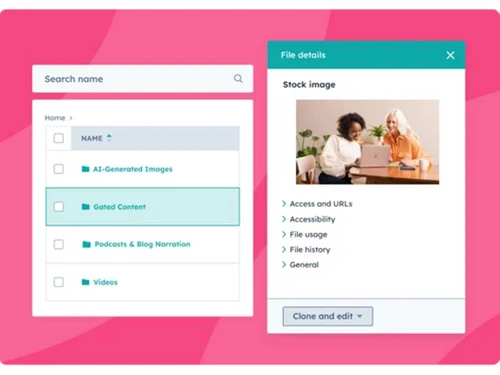
 Page Creation and Management Lead Generation Forms A/B Testing Analytics & Reporting SEO Recommendations Memberships Media Library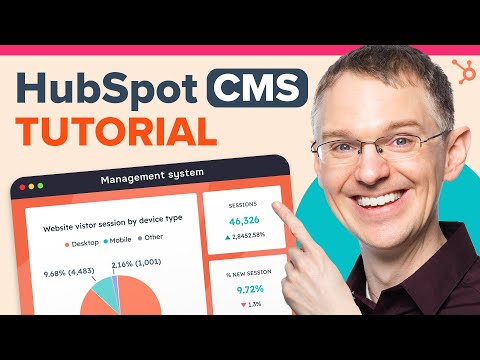

Watch the demo video to explore key features, real workflows, and how the software fits your business needs.
 Windows
  Desktop
  Cloud-Based

Small Business
Designed for startups and growing businesses
Medium Business
Built for business growth and flexibility
Enterprises
Designed for complex and large-scale business needs
3.8
Out of 5

Overall Rating
Based on
11 Verified Reviews
Rating Breakdown
81% Recommend this Product
Add ReviewCustomers generally appreciate HubSpot CMS for its user-friendly interface and integrated marketing tools, making it a solid choice for straightforward website creation and management. Many users highlight its ease of use, particularly for those without technical backgrounds. However, a common concern is the potential for costs to escalate with the addition of features or customizations, as well as limitations in design options for those seeking a more unique aesthetic. Overall, it is viewed as a practical solution for basic website needs.
Pros
"HubSpot CMS is effective for quickly setting up a website. The built-in marketing features are useful and help manage your site in one place. The interface is simple to use."
Cons
"The price can increase if you need more advanced features or additional help. Customization options are somewhat limited if you want a highly personalized design. "
"The price can rise if you want additional features or support. The customization options might not meet the needs of those looking for a unique design. "
"The pricing can become high if you need extra features. Additionally, the available templates may not offer enough variety for those wanting a unique website look. "


Jun 19, 2024
Techjockey Verified
“HubSpot CMS: Simple for Building and Managing Websites”
HubSpot CMS helps you create and manage a website with useful marketing tools. It’s easy to use, but the price can increase if you need additional features or more customization options.
Pros
HubSpot CMS is simple for creating and managing a website. The marketing tools are integrated well, and the editor is easy to use. It’s a good option if you need something that’s easy to handle.
Cons
The costs can add up if you need extra features or customizations. Some design options might be limited compared to other platforms.
Reason to switch
I switched to HubSpot CMS for its better marketing tools and easier management. Weebly didn’t provide the same level of support or integration.
Sep 2, 2024
Techjockey Verified
“HubSpot CMS: Efficient for Simple Website Creation with Marketing Tools”
HubSpot CMS provides an effective way to build and manage a website with built-in marketing tools. While it’s easy to use, it can become costly if you need more features or extensive customization.
Pros
HubSpot CMS is efficient for quickly setting up a website. The editor is easy to use, and it includes marketing tools that help manage promotion. It’s a solid choice for straightforward website needs.
Cons
The price can rise if you want additional features or support. The customization options might not meet the needs of those looking for a unique design.
Reason to switch
I chose HubSpot CMS because it’s easier to use and includes marketing tools. Magento was more difficult to manage and didn’t offer the same level of integration.
Jun 18, 2024
Techjockey Verified
“HubSpot CMS: A Option for Easy Website Building and Marketing”
HubSpot CMS offers a simple way to create and manage a website with helpful marketing features. It’s user-friendly, but costs can increase with more features or custom design needs.
Pros
HubSpot CMS makes building a website straightforward. The editor is simple to navigate, and the marketing tools are a useful addition. It’s ideal for anyone who wants to set up a website without much hassle.
Cons
Additional costs can arise if you need extra features. Also, the range of design options might be limited if you’re looking for something really unique.
Reason to switch
I switched to HubSpot CMS for its easier use and better marketing tools. Drupal was more complicated and didn’t provide the same level of convenience for my business.

HubSpot CMS
Price On Request
Desktop
Mobile
Web based
On Premises
Windows
Mac OS
Grav
Price On Request
Desktop
Mobile
Web based
On Premises
Windows
Mac OS

OpenText Web CMS
Price On Request
Desktop
Mobile
Web based
On Premises
Windows
Mac OS

Wix
Price On Request
Desktop
Mobile
Web based
On Premises
Windows
Mac OS
Cosmic AI
Price On Request
Desktop
Mobile
Web based
On Premises
Windows
Mac OS

Scrintal
Price On Request
Desktop
Mobile
Web based
On Premises
Windows
Mac OS

Contentful
Price On Request
Desktop
Mobile
Web based
On Premises
Windows
Mac OS

Wordable
Price On Request
Desktop
Mobile
Web based
On Premises
Windows
Mac OS
Bear CMS
Price On Request
Desktop
Mobile
Web based
On Premises
Windows
Mac OS

Genei
Price On Request
Desktop
Mobile
Web based
On Premises
Windows
Mac OS

Scalenut
Price On Request
Desktop
Mobile
Web based
On Premises
Windows
Mac OS
(0) Product(s) selected
Available
Price on Request
Available
Price on Request
Starting Price:
$99 /Month
Starting Price:
$5 /Month

Starting Price:
$149

Starting Price:
€29

Starting Price:
$5

Starting Price:
$99

Starting Price:
$170

Starting Price:
$18 /Month

Available
Price on Request




HubSpot CMS is an all-in-one platform that integrates with CRM, marketing automation, and customer service tools, offering seamless integration and advanced security. Unlike WordPress, HubSpot provides a unified solution with built-in features, reducing the need for additional plugins.
HubSpot CMS primarily uses HubL (HubSpot Markup Language) for template creation. It also supports HTML, CSS, and JavaScript, allowing users to create custom-coded content and templates.
Yes, HubSpot CMS is optimized for SEO with built-in tools for on-page SEO recommendations, blogging, and content optimization. It helps improve your website’s visibility on search engines and drive organic traffic.
HubSpot is ideal for businesses of all sizes looking for an all-in-one platform to manage their website, CRM, and marketing efforts. It's especially suitable for those who want to streamline their digital presence without needing extensive coding skills.
Yes, HubSpot CMS offers a free plan that supports up to 5 users. As your business grows, you can upgrade to paid plans with more advanced features and scalability options.
Creating a landing page in HubSpot is a great way to capture leads and drive conversions. Here’s how you can do it:
Steps to Create a Landing Page in HubSpot
0 0
While HubSpot CMS combines marketing and sales features, making it perfect for companies that prioritize inbound marketing, a standard CMS (Content Management System) lets you manage content on a website.
0 0
Smart content makes customization possible with HubSpot CMS. To give visitors personalized experiences, you can customize content according to user location, device, and lifecycle stage.
0 0
You can set the image preview for Facebook by using Open Graph tags. To do this follow the steps given below:
0 0
Yes, HubSpot CMS can integrate with Salesforce CRM using native integrations and third-party tools. Marketo forms can also be embedded into HubSpot pages, though direct integrations may require additional steps.
0 0
20,000+ Software Listed
Best Price Guranteed
Free Expert Consultation
2M+ Happy Customers
Terms and Condtions

Users with registered businesses can purchase goods from merchants on the platform to satisfy their business needs. Users are not permitted to utilize any products acquired through the platform for resale, advertising, business, or further distribution.
For each purchase made, users will receive a Tax Invoice (or 'GST invoice') that includes specific details such as:
the GSTIN of the user associated with their registered business, and
the specified Entity Name for their business.
It should be noted that not all products are eligible for GST Invoice. Only the products displayed by participating sellers with the 'GST-based Invoice Available' callout on the product description page would qualify.
Certain goods and services are not eligible to get a GST Invoice, including items with VAS, i.e., Value Added Services (e.g., Total Mobile Protection/Assured Buyback) and those involving an exchange offer at the time of purchase.
Users must ensure the accuracy of the GSTIN, and business entity name provided for the GST Invoice. Requests for corrections into GST Invoice would not be accommodated by Techjockey.com or any Seller, and any issues arising from user-provided information are the sole responsibility of users.
Techjockey.com is not liable for the GST Invoice or any associated input tax credit. To efficiently claim an input tax credit, users should select the registered place of business address as per the GST authority's data and follow the provisions of the GST Act and rules.
To claim an input tax credit, the delivery and billing addresses must match. Furthermore, input tax credits will not be granted if the delivery address and GSTIN on the invoice are from different states. In case of incorrect GST details provided during the order placement, the order will be canceled automatically.



