USA
USA UAE
UAESmall Business
Designed for startups and growing businesses

See More





Brand: HubSpot
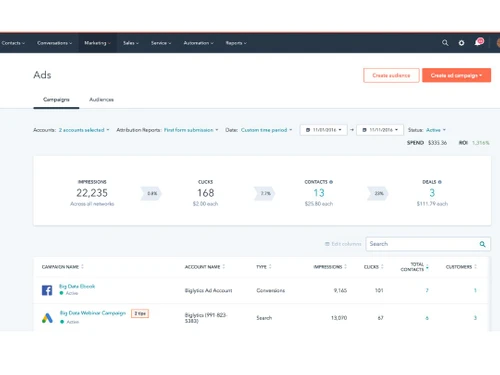
organizes customers' data, performs efficient marketing, and lets no lead go in vain.
See MoreHave you used Hubspot Marketing Hub before?
Share your insights for better experience
Brand: HubSpot
Founded Year: 2006
HubSpot is a leading CRM platform that provides software and support to help businesses grow better. Our platform includes marketing, sales, service, and website management products that start free and scale to meet our customers’ needs at any stage of growth.
Core Functionalities
 Templates Landing Page / Web Forms SMS Marketing Automated Workflow Optimization A/B Testing Dynamic Content Social Media Automation Contact Management Customer Journey Mapping Behavioral Targeting User Access Management Compliance Management Behaviour Management Visual Editor Custom Workflows Content Marketing Automation Progressive Profiling Cart Recovery Automation Loyalty Management Through Channel Marketing Automation (TCMA)
 Campaign Management
Campaign Optimization Omnichannel Performance Analytics Conversion Rate Optimization (CRO) Multichannel Channel Optimization Data Driven Optimization Landing Page Optimization Channel Management Advertising Management Lead Management
Lead Scoring Lead Generation Lead Nurturing Leads Conversion Segmentation List Management Lead Qualification Email Marketing
Auto - Responders Drip Campaigns Email Optimization Behavioral Targeting Cart Recovery Automation WhatsApp Marketing
Auto - Responders Drip Campaigns Segmentation Behavioral Targeting Bulk Messaging Cart Recovery Automation Integrations Supported
CRM Integration API Integration Third Party Integration Webhooks Event Marketing Barcode Integration Influencer Marketing Project Management Analytics and Reporting
Visitor Tracking Real-Time & Actionable Insights Web Form Tracking PDF Report Heatmaps Live View Predictive Analytics Session Recording Dashboards Alerts & Notifications
Email Notifications Desktop Notification Push Notifications In-App Notifications Real-Time Alerts SMS Notification AI Capabilities
Generative AI Smart Recommendations Subject Line Helper Customer Journey Mapping Predictive Analytics Others
Email reply tracking SEO recommendations and optimizations Conversational Marketing 

Watch the demo video to explore key features, real workflows, and how the software fits your business needs.
 Ubuntu
  Windows
  MacOS
MacOS  Linux
Linux  Desktop
  Cloud-Based
Small Business
Designed for startups and growing businesses
Medium Business
Built for business growth and flexibility
Enterprises
Designed for complex and large-scale business needs
4.1
Out of 5

Overall Rating
Based on
13 Verified Reviews
Rating Breakdown
87% Recommend this Product
Add ReviewUsers generally appreciate HubSpot Marketing Hub for its user-friendly interface, powerful email automation, and seamless integration of marketing and sales functions, which enhance productivity and organization. Many find its centralized data and insights invaluable for tracking customer interactions and managing marketing tasks. However, some users express frustration with frequent interface changes, challenges in merging duplicate records, and the complexity of the pricing model based on contact tiers, which can lead to unexpected costs. Overall, the sentiment is positive, with a strong recommendation rate.
Pros
"HubSpot makes managing tasks easy. It allows us to handle contacts, write blogs, host the website, create forms, manage social media, and host documents all in one place."
"HubSpot makes managing complex tasks easy with its automation features. Email marketing is both powerful and simple to use, which is a huge plus."
"HubSpot's flexibility and integration capabilities are perfect. We can segment our audience and customize follow-up communications easily."
Cons
"There's really nothing much I don't like about HubSpot. I wish they had some features like event attendance tracking built in. "
"Keeping track of the pricing model can be tough since it’s based on contacts. It's also challenging to ensure we're using all the features we're paying for. "
"It can be a bit difficult to learn all the CRM tools at first."


Jul 2, 2024
Techjockey Verified
“HubSpot is the best and top for Marketing”
HubSpot's insights and centralized data are incredibly helpful for our marketing efforts. It's a tool we rely on heavily every day.
Pros
The insights from HubSpot are amazing, and having everything in one place is ideal. All the emails, calls, and interactions show up on the contact, making it easy to keep track of everything.
Cons
It can be annoying when they change the interface and add new features often. Sometimes I struggle to do things I could do easily before because of these changes.
Reason to switch
HubSpot's user-friendly interface and powerful features were exactly what we needed to enhance our marketing strategies.
Jul 2, 2024
Techjockey Verified
“A powerful platform that has improved our organization”
HubSpot is a great tool that helps with sending invites, newsletters, and more.
Pros
HubSpot's interface is easy to understand. It's perfect for client events, tracking responses on event invites, and sending out newsletters. Further, it allows me to see how engaged our team is with the internal newsletters.
Cons
I haven't faced any issues so far.
Reason to switch
We wanted a more comprehensive tool that could handle more aspects of our marketing in one place, and HubSpot fit the bill.
Jul 10, 2024
Techjockey Verified
“HubSpot my go to platform”
HubSpot is user-friendly and lets us integrate all aspects of our marketing work easily.
Pros
HubSpot makes managing tasks easy. It allows us to handle contacts, write blogs, host the website, create forms, manage social media, and host documents all in one place.
Cons
There's really nothing much I don't like about HubSpot. I wish they had some features like event attendance tracking built in.
Reason to switch
We needed a more powerful platform to level up our organization, and HubSpot has delivered perfectly.

Hubspot Marketing Hub
Price On Request
Desktop
Mobile
Web based
On Premises
Windows
Mac OS

Retner
₹ 999
Desktop
Mobile
Web based
On Premises
Windows
Mac OS

Cronberry
₹ 2000
Desktop
Mobile
Web based
On Premises
Windows
Mac OS

ActiveCampaign
Price On Request
Desktop
Mobile
Web based
On Premises
Windows
Mac OS

Brevo
₹ 625
Desktop
Mobile
Web based
On Premises
Windows
Mac OS
Zoho Marketing Automation
₹ 1140
Desktop
Mobile
Web based
On Premises
Windows
Mac OS

Zepic
Price On Request
Desktop
Mobile
Web based
On Premises
Windows
Mac OS

InSider
Price On Request
Desktop
Mobile
Web based
On Premises
Windows
Mac OS

Dotdigital
Price On Request
Desktop
Mobile
Web based
On Premises
Windows
Mac OS

Freshmarketer
₹ 1499
Desktop
Mobile
Web based
On Premises
Windows
Mac OS

Adobe Marketo Engage
Price On Request
Desktop
Mobile
Web based
On Premises
Windows
Mac OS
(0) Product(s) selected
Available
Price on Request
Available
Price on Request
Available
Price on Request

Starting Price:
$20 /month

Starting Price:
₹770 /Month

Starting Price:
$1,250 /Month
Available
Price on Request

Starting Price:
$24 /Month

Available
Price on Request

Available
Price on Request

Starting Price:
$95 /Creator/Month








Hubspot Marketing Digital Marketing Tools is compatible with Windows operating systems.
Hubspot Marketing Digital Marketing Tools supports Web-Based.
Hubspot Marketing Digital Marketing Tools pricing starts at $20 .
Hubspot Marketing Digital Marketing Tools is typically used in All Industries.
Hubspot Marketing Digital Marketing Tools demo is available for free with Techjockey.com
Hubspot Marketing Digital Marketing Tools offers a free trial. However, the premium plan with advanced features available at Techjockey .
For Hubspot Marketing Digital Marketing Tools installation, insert the given CD/USB flash storage in your system and open the Setup Wizard to get started.
Hubspot Marketing Digital Marketing Tools helps with Build and Modify Your Website Without IT,Get Your Content,Drive More Traffic and Convert More Visitors Into Qualified Leads. It's a complete solution for Turn Leads Into Customers and Track Customers and Report.
Some of the top competitors of HubSpot marketing hub include Mailchimp, Klaviyo, Oracle Eloqua, and Intercom.
Yes, there is a mobile app for HubSpot that can be accessed on Android and iOS.
HubSpot Marketing Hub is complete marketing automation software that provides business growth management via both CRM (Customer Relationship Management) and CMS systems (Content Management System).
No, HubSpot marketing hub is not an ERP system. Instead, it is a marketing automation platform that allows businesses to attract new customers and help them grow via automation.
It takes somewhere between 4 to 8 weeks to complete setup and get HubSpot Marketing Hub implemented.
2 0
To maximize the content performance using HubSpot Marketing Tool, follow the tips given below:
1 5
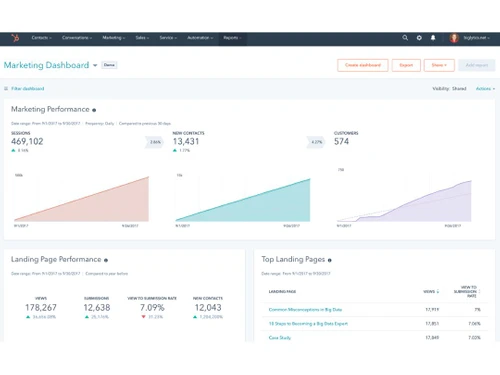
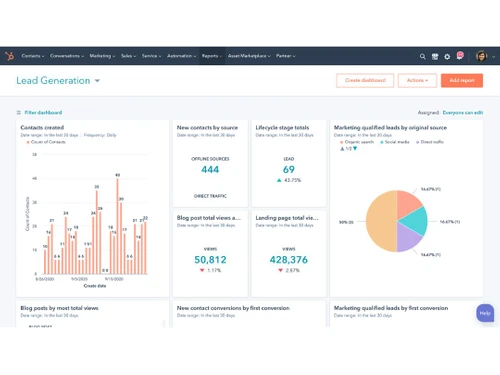
Some of the highlighting reporting capabilities are as follows:
1 0
To automate marketing and sales alignment using HubSpot Marketing Hub, follow the tips given below:
1 0
HubSpot's Marketing Hub provides users with a broad understanding of their customers with its integrated marketing automation platform, Smart CRM. It also helps users obtain contacts and draw attention to their business by interacting with leads and clients when it is most suitable.
1 0
20,000+ Software Listed
Best Price Guranteed
Free Expert Consultation
2M+ Happy Customers
Terms and Condtions

Users with registered businesses can purchase goods from merchants on the platform to satisfy their business needs. Users are not permitted to utilize any products acquired through the platform for resale, advertising, business, or further distribution.
For each purchase made, users will receive a Tax Invoice (or 'GST invoice') that includes specific details such as:
the GSTIN of the user associated with their registered business, and
the specified Entity Name for their business.
It should be noted that not all products are eligible for GST Invoice. Only the products displayed by participating sellers with the 'GST-based Invoice Available' callout on the product description page would qualify.
Certain goods and services are not eligible to get a GST Invoice, including items with VAS, i.e., Value Added Services (e.g., Total Mobile Protection/Assured Buyback) and those involving an exchange offer at the time of purchase.
Users must ensure the accuracy of the GSTIN, and business entity name provided for the GST Invoice. Requests for corrections into GST Invoice would not be accommodated by Techjockey.com or any Seller, and any issues arising from user-provided information are the sole responsibility of users.
Techjockey.com is not liable for the GST Invoice or any associated input tax credit. To efficiently claim an input tax credit, users should select the registered place of business address as per the GST authority's data and follow the provisions of the GST Act and rules.
To claim an input tax credit, the delivery and billing addresses must match. Furthermore, input tax credits will not be granted if the delivery address and GSTIN on the invoice are from different states. In case of incorrect GST details provided during the order placement, the order will be canceled automatically.