 USA
USA UAE
UAESmall Business
Designed for startups and growing businesses

See More





Brand: Knowmax
Powerful cloud-based management that helps in improving customer engagement.
See MoreHave you used Knowmax before?
Share your insights for better experience
Brand: Knowmax
Founded Year: 2017
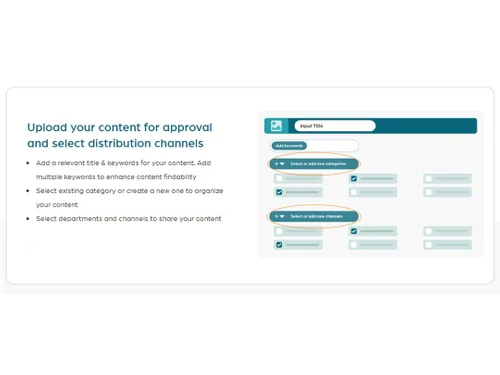
Knowmax is an AI-powered, full-suite Knowledge Management solution built by CX experts to help you deliver first-rate customer experience across touchpoints.
Looking for The Right Pricing?
Share your requirements and get a plan built around your business.
Price Available on Request
Get personalised Knowmax pricing that fits your needs. Our team will connect with you.
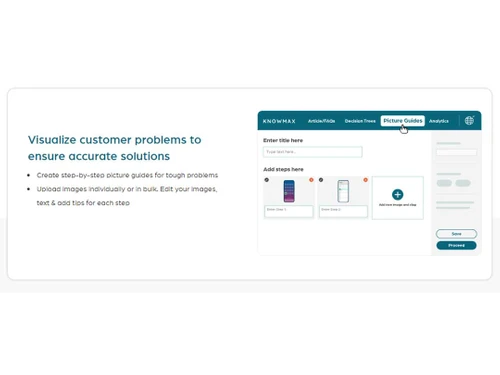
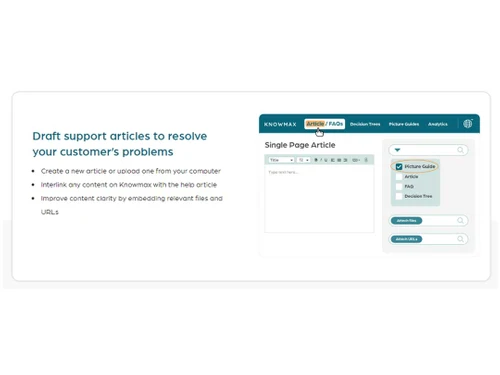
 Knowledge Base Content Management Self Service Portal Reporting & Analytics Employee Training Feedback Management Customizable Branding Customizable Templates AI-Powered Search Engine No-Code Cognitive Decision Trees Visual How-To Guides Creation Omnichannel Knowledge Distribution Agent Chrome Extension for Multi-Chats AI-Assisted Content Authoring & Translation Role-Based Access Control (RBAC)

Watch the demo video to explore key features, real workflows, and how the software fits your business needs.
 Windows
  MacOS
MacOS  Linux
Linux  Desktop
  Mobile
  Tablet
  iPad
iPad  Cloud-Based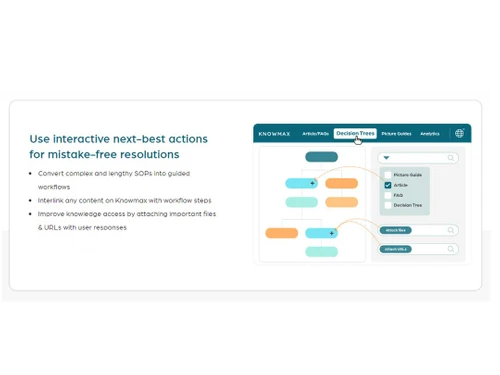
Small Business
Designed for startups and growing businesses
Medium Business
Built for business growth and flexibility
Enterprises
Designed for complex and large-scale business needs
4.5
Out of 5

Overall Rating
Based on
4 Verified Reviews
Rating Breakdown
95% Recommend this Product
Add ReviewUsers consistently praise Knowmax for its simplicity and user-friendly interface, which significantly enhances content creation and knowledge management. The platform's AI capabilities streamline processes, making it easier for teams to access information and improve self-service options. Many reviewers highlight the effectiveness of picture guides for troubleshooting and onboarding. However, some users note a desire for more tutorials on advanced features, and a few mention that the platform can initially feel feature-heavy. Overall, customer sentiment is highly positive, with strong recommendations for its use in various team settings.

Amrit Pal 
Chief Operating Officer
Mar 31, 2025
Techjockey Verified
“Makes content creation easy”
We’ve tried several tools for knowledge management, but Knowmax stands out because it genuinely focuses on simplicity and usability. With its AI features, our knowledge authors spend less time creating decision trees, picture guides, articles, etc.
Pros
Knowmax is a powerful knowledge management platform with a user-friendly interface. It simplifies workflow customization and offers insightful analytics for better decision-making. The platform makes onboarding new agents easy while ensuring consistent information across teams. Its interactive picture guides enhance customer and agent understanding, making it ideal for both internal and external use.
Cons
More tutorials would be helpful for advanced features
Feb 13, 2025
Techjockey Verified
“Makes content creation easy”
We started using Knowmax when our support team expanded, and we needed a scalable solution. It’s been the right choice. Agents have what they need at their fingertips, which has really cut down the time spent looking for answers. It also helps us provide better self-service across channels.
Pros
Knowmax simplifies onboarding for new agents and ensures consistent information across the team, improving efficiency and collaboration.
Cons
Can feel a bit feature-heavy at first
Reason to switch
Its smooth and Quick
Feb 13, 2025
Techjockey Verified
“Simplifies troubleshooting with picture guides”
Creating step-by-step picture guides has been a breeze with Knowmax. It’s especially helpful for troubleshooting processes that require visuals
Pros
Knowmax makes it easy to create and share picture guides, helping both agents and customers understand instructions better. It's great for both internal and external use.
Cons
We currently don’t have any complaints
Reason to switch
Better Options and View

Knowmax
Price On Request
Desktop
Mobile
Web based
On Premises
Windows
Mac OS

Slab
Price On Request
Desktop
Mobile
Web based
On Premises
Windows
Mac OS

XWiki
Price On Request
Desktop
Mobile
Web based
On Premises
Windows
Mac OS

Stonly
Price On Request
Desktop
Mobile
Web based
On Premises
Windows
Mac OS

KnowledgeBase
Price On Request
Desktop
Mobile
Web based
On Premises
Windows
Mac OS

Eureka
Price On Request
Desktop
Mobile
Web based
On Premises
Windows
Mac OS

Helpjuice
Price On Request
Desktop
Mobile
Web based
On Premises
Windows
Mac OS

Nuclino
Price On Request
Desktop
Mobile
Web based
On Premises
Windows
Mac OS

Albus
Price On Request
Desktop
Mobile
Web based
On Premises
Windows
Mac OS

WowTo
Price On Request
Desktop
Mobile
Web based
On Premises
Windows
Mac OS

Scalong AI
Price On Request
Desktop
Mobile
Web based
On Premises
Windows
Mac OS
(0) Product(s) selected
Starting Price:
$59 /Month
Available
Price on Request
Starting Price:
$249 /Month
Starting Price:
$8 /Month

Starting Price:
$10 /Month

Available
Price on Request
Starting Price:
$10 /Month

Starting Price:
$39

Available
Price on Request
Starting Price:
$79 /Month
Available
Price on Request
Knowmax is compatible with Windows, Linux, and MacOS operating systems.
Knowmax app is not available for mobile devices.
Knowmax supports cloud-based deployment.
For Knowmax in India, please request a call back for subscription-related details and to avail offers on premium packages.
Knowmax is typically used by call centers of all sizes.
Knowmax demo is available for free with techjockey.com.
Knowmax does not offer a free trial. Please request a call back for subscription-related details and to avail offers on premium packages.
For Knowmax installation, download the installation file on your system and open the Setup Wizard to get started.
A cutting-edge cloud-based knowledge management interface that helps organizations to deliver and manage knowledge across self-service portals, chatbots, and contact centers. Knowmax Upskill employees and keep them updated with relevant training material. Provides easily customized templates for articles, FAQs, forms, and other content types.
20,000+ Software Listed
Best Price Guranteed
Free Expert Consultation
2M+ Happy Customers
Terms and Condtions

Users with registered businesses can purchase goods from merchants on the platform to satisfy their business needs. Users are not permitted to utilize any products acquired through the platform for resale, advertising, business, or further distribution.
For each purchase made, users will receive a Tax Invoice (or 'GST invoice') that includes specific details such as:
the GSTIN of the user associated with their registered business, and
the specified Entity Name for their business.
It should be noted that not all products are eligible for GST Invoice. Only the products displayed by participating sellers with the 'GST-based Invoice Available' callout on the product description page would qualify.
Certain goods and services are not eligible to get a GST Invoice, including items with VAS, i.e., Value Added Services (e.g., Total Mobile Protection/Assured Buyback) and those involving an exchange offer at the time of purchase.
Users must ensure the accuracy of the GSTIN, and business entity name provided for the GST Invoice. Requests for corrections into GST Invoice would not be accommodated by Techjockey.com or any Seller, and any issues arising from user-provided information are the sole responsibility of users.
Techjockey.com is not liable for the GST Invoice or any associated input tax credit. To efficiently claim an input tax credit, users should select the registered place of business address as per the GST authority's data and follow the provisions of the GST Act and rules.
To claim an input tax credit, the delivery and billing addresses must match. Furthermore, input tax credits will not be granted if the delivery address and GSTIN on the invoice are from different states. In case of incorrect GST details provided during the order placement, the order will be canceled automatically.


