linkedin
Document360 logo
play How to create a knowledge base with Knowledge Management tool - Document360
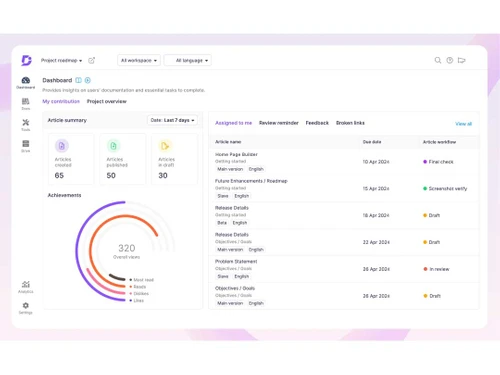
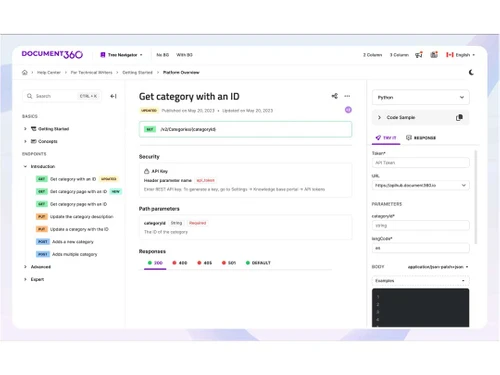
Document360 dashboard
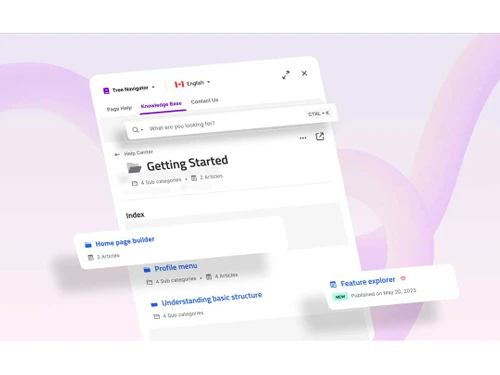
Document360 device

Document360

Brand: Kovai Limited

  • 4.5

  • 2 Ratings & 2 Reviews

Document360 is a knowledge management solution that has been developed for growing organizations to create knowledge bases for external and internal use. This knowledge base platform assists businesses in creating SOPs, product help docs, self-service tools, internal knowledge bases, etc. for their customers and employees, which can be accessed publicly and privately. Document360 integrates with ...

See More

Have you used Document360 before?

Share your insights for better experience

Add a Review

Price Available on Request

Questions about pricing or customization? We’re here to help, just a click away.

100% Genuine
Products
Best Price
Guaranteed
Safe & Secure
Payment
  • Description

  • Pricing

  • Features

  • Specification

  • Review

  • Compare

  • Alternatives

  • FAQ

Document360 Software Overview

What is Document360?

Document360 is a knowledge management solution that has been developed for growing organizations to create knowledge bases for external and internal use. This knowledge base platform assists businesses in creating SOPs, product help docs, self-service tools, internal knowledge bases, etc. for their customers and employees, which can be accessed publicly and privately.

Document360 integrates with your existing analytics, help desk, chat products, commenting module, and other tools to make your documentation process seamless.

Why Choose Document360 Knowledge Base Management Software?

  • Customer Support: Helps create a full-featured knowledge base to address common problems of your customers related to your product or service.
  • Integrations: Can be easily integrated with external systems like CRO tools, chat, analytics, commenting, etc. for data import.
  • Extensions: You can integrate your knowledge base with external systems like help desk, team collaboration, chat, etc.
  • Migration: You can use inbuilt tools to seamlessly import existing knowledge bases from other platforms.

Benefits of Document360 Software

  • Product-Help Docs: Allows you to design self-service, top-notch knowledge content for your SaaS offerings and products.
  • Technical Documentation: Using this platform, you can develop tutorials, how-to guides, reference docs, release notes, system docs, etc.
  • Online User-Guides: Replace static offline PDF user manuals with updated online guides.
  • FAQs: Create dynamic FAQ pages where you can regularly add/update questions and answers.
  • Knowledge Base: Allows you to build private, public and mixed knowledge base for your clients and employees.
  • SOPs: With the help of this software, design SOPs like sales/marketing playbooks, employee handbooks, etc.
  • Helpdesks: You can integrate the knowledge base of your organization with different ticketing systems like Freshdesk, Zendesk, etc. for helpdesk support.
  • Analytics Tools: Enables you to connect your knowledge base with different analytics platforms like Segment and Google Analytics.
  • Multilingual Support: Using a language translation platform like Crowdin, you can convert your knowledge base into different languages.
  • Ticket deflector: To reduce the volume of support ticket by encouraging the users to find answers in the knowledge base
  • Commenting: To put comments, you can embed advanced commenting platforms like Disqus in the knowledge base.
  • CRO Tools: You can connect your knowledge base with different CRO (conversion rate optimization) tools such as Freshmarketer and Hotjar.

Pricing of Document360

Document360 price details are available on request at techjockey.com. Please request a call back for subscription-related details and to avail yourself of the offers on premium packages.

Read more

Document360 Pricing & Plans

Looking for The Right Pricing?

Share your requirements and get a plan built around your business.

  • Define your business needs
  • Get customised pricing
  • Choose features that fit your workflow

Price Available on Request

Get personalised Document360 pricing that fits your needs. Our team will connect with you.

Document360 Features

  • icon_check Documentation
    Create and maintain knowledge-based articles using ‘out-of-the-box’ documentation functionality.
  • icon_check AI Powered Search
    Using the advanced search feature, you can search for any term and generate a listing of recommended articles.
  • icon_check Discussion Platform
    To write or evaluate published/drafted articles, it provides you with a discussion platform to work with authors in the team.
  • icon_check Automated Workflow Optimization
    Design as well as manage the ‘documentation workflow’ while assigning due dates and roles to individuals at every step.
  • icon_check Embed Images/Videos
    Allows you to upload screenshots and videos into your documents from platforms like Vimeo, YouTube, Wistia, etc.
  • icon_check Callouts
    Use callouts to draw readers' attention to key advice, cautions, mistakes, and facts.
  • icon_check File attachments
    Enables you to put attachments towards the end of articles to help users comprehend your content better.
  • icon_check Landing Pages
    Design a landing page that matches the look and feel of your brand and directs users to the appropriate category/topic.
  • icon_check Backup & Restore
    Use manual/auto-scheduled backups to overcome the issue of missing or deleted content.
  • icon_check Export & Import
    With just one click you can export your articles, which you can then import into a new project.
  • icon_check Performance
    Allows you to check the performance of your content based on views, reads, likes, dislikes, etc.
  • icon_check Feedbacks
    Get complete analytical data based on readers’ feedback, including their likes, dislikes, etc.
Document360 Demo Video play icon

Get Document360 Demo

Watch the demo video to explore key features, real workflows, and how the software fits your business needs.

Understand
Key Features
Personal
Demo Insights
Interactive
Demo Support

Document360 Specifications

Supported Platforms
Windows Windows
Devices
Desktop Desktop
Deployment
Cloud-Based Cloud-Based
Suitable For
All Industries
Business Specific
All Businesses
Business Size
Small Business Startups Medium Business SMBs SMEs MSMBs
Language
English
Compliance Regulation
GDPR SOC 2

Explore the Best Alternative Solutions Similar to Your Business Size and Needs

Small Business

Designed for startups and growing businesses
Albus

4.2

Stonly

4.0

Tettra

4.3

See More

Document360 Reviews

4.5

Out of 5

img

Overall Rating

Based on
2 Verified Reviews

Rating Breakdown

  • Features 4.5
  • Value for Money 4.7
  • Ease of Use 4.5
  • Customer Support 4.5

95% Recommend this Product

Add Review

Document360 Video Review

youtubeVideoId

4.1

“Document360 Review | Best AI Knowledge Base Software?”

Review by: Dani's Tutorials

Tiny Tom linkedin_verify

Lead

Industry: IT User since: 1-2 years

5

Reviewed on: Dec 16, 2022

Techjockey Verified

“Excellent knowledge base solution”

Pros

Even for someone who only has a basic understanding of markup, the markdown editor is a tremendously useful function. The built-in formatting tools enable easy creation of professional documents.

Cons

I wish there were more extensions available for other helpdesk products.

Reason to switch

Having an internal knowledge base solution where anyone within the Org can find answers reduces the need for someone to be present all of the time to answer questions.

Compare Document360 With other Knowledge Management Software

Products
Ratings
Pricing
Device Supported
Deployment
Supported Platforms
  • img

    Document360

  • 4.5

  • Price On Request

  • Desktop

    Mobile

  • Web based

    On Premises

  • Windows

    Mac OS

  • img

    Knowmax

  • 4.5

  • Price On Request

  • Desktop

    Mobile

  • Web based

    On Premises

  • Windows

    Mac OS

  • img

    Slab

  • 4.5

  • Price On Request

  • Desktop

    Mobile

  • Web based

    On Premises

  • Windows

    Mac OS

  • img

    XWiki

  • 4.4

  • Price On Request

  • Desktop

    Mobile

  • Web based

    On Premises

  • Windows

    Mac OS

  • img

    Stonly

  • 4.0

  • Price On Request

  • Desktop

    Mobile

  • Web based

    On Premises

  • Windows

    Mac OS

  • img

    KnowledgeBase

  • 4.2

  • Price On Request

  • Desktop

    Mobile

  • Web based

    On Premises

  • Windows

    Mac OS

  • img

    Eureka

  • 4.3

  • Price On Request

  • Desktop

    Mobile

  • Web based

    On Premises

  • Windows

    Mac OS

  • img

    Helpjuice

  • 4.1

  • Price On Request

  • Desktop

    Mobile

  • Web based

    On Premises

  • Windows

    Mac OS

  • img

    Nuclino

  • 4.0

  • Price On Request

  • Desktop

    Mobile

  • Web based

    On Premises

  • Windows

    Mac OS

  • img

    Albus

  • 4.2

  • Price On Request

  • Desktop

    Mobile

  • Web based

    On Premises

  • Windows

    Mac OS

  • img

    WowTo

  • 4.5

  • Price On Request

  • Desktop

    Mobile

  • Web based

    On Premises

  • Windows

    Mac OS

(0) Product(s) selected

Document360 Alternatives

See All Document360 Alternatives

Available

Price on Request

Starting Price:

$249 /Month

Starting Price:

$8 /Month

Starting Price:

$8 /Month

Starting Price:

$10 /Month

Available

Price on Request

Starting Price:

$10 /Month

Available

Price on Request

Starting Price:

$79 /Month

Articles for Document360

See All Related Articles

Which operating system does Document360 support?

Document360 knowledge management software is compatible with Linux, Windows, and macOS operating systems.

Is Document360 free?

Document360 knowledge management solution offers a free trial. A freemium option is also available with limited features. However, the premium plan with advanced features is available at techjockey.com with exciting deals..

Is there any Document360 app?

Document360 app is not available.

What is the deployment type of Document360?

Document360 knowledge base software supports web-based deployment. The on-premises plan is also available in the Enterprise Plus tier.

How much does Document360 cost?

Document360 knowledge base platform’s pricing is available on request at techjockey.com.

Who are the potential users of Document360?

Document360 knowledge management system is typically used by organizations to create an online, self-service knowledge base for customers and employees.

Is there any free trial or demo for Document360?

Document360 knowledge base system’s demo is available for free with techjockey.com.

How does Document360 work?

Document360 knowledge base solution helps in creating a knowledge base online within minutes. This SaaS-based platform enables you to build a ‘self-service’ knowledge base for your internal users and customers.

20,000+ Software Listed

Best Price Guranteed

Free Expert Consultation

2M+ Happy Customers

Terms and Condtions

close

Users with registered businesses can purchase goods from merchants on the platform to satisfy their business needs. Users are not permitted to utilize any products acquired through the platform for resale, advertising, business, or further distribution.

For each purchase made, users will receive a Tax Invoice (or 'GST invoice') that includes specific details such as:

  • the GSTIN of the user associated with their registered business, and

  • the specified Entity Name for their business.

It should be noted that not all products are eligible for GST Invoice. Only the products displayed by participating sellers with the 'GST-based Invoice Available' callout on the product description page would qualify.

Certain goods and services are not eligible to get a GST Invoice, including items with VAS, i.e., Value Added Services (e.g., Total Mobile Protection/Assured Buyback) and those involving an exchange offer at the time of purchase.

Users must ensure the accuracy of the GSTIN, and business entity name provided for the GST Invoice. Requests for corrections into GST Invoice would not be accommodated by Techjockey.com or any Seller, and any issues arising from user-provided information are the sole responsibility of users.

Techjockey.com is not liable for the GST Invoice or any associated input tax credit. To efficiently claim an input tax credit, users should select the registered place of business address as per the GST authority's data and follow the provisions of the GST Act and rules.

To claim an input tax credit, the delivery and billing addresses must match. Furthermore, input tax credits will not be granted if the delivery address and GSTIN on the invoice are from different states. In case of incorrect GST details provided during the order placement, the order will be canceled automatically.