linkedin
ManageEngine Patch Manager Plus logo
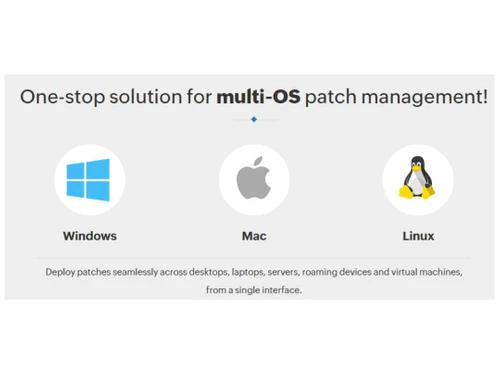
ManageEngine Patch Manager Plus-Multi-OS patch management
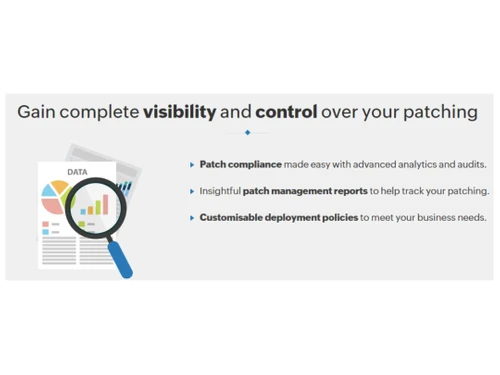
ManageEngine Patch Manager Plus-Visibilty and control
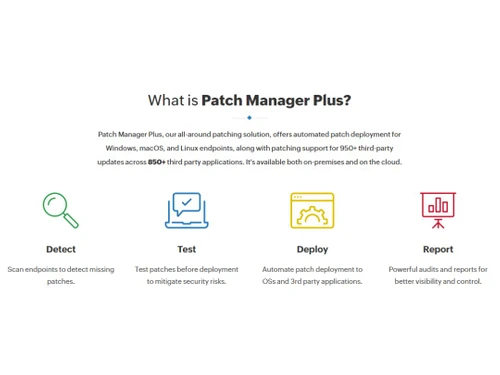
ManageEngine Patch Manager Plus-What is it

ManageEngine Patch Manager Plus

Brand: Zoho Corporation

  • 4.3

  • 5 Ratings

ManageEngine Patch Manager Plus helps organizations automate patch management across Windows, macOS, Linux, and hundreds of third-party applications from a single console.

See More

Have you used ManageEngine Patch Manager Plus before?

Share your insights for better experience

Add a Review

Price Available on Request

Questions about pricing or customization? We’re here to help, just a click away.

100% Genuine
Products
Best Price
Guaranteed
Safe & Secure
Payment
  • Description

  • Pricing

  • Features

  • Specification

  • Review

  • Compare

  • Alternatives

  • FAQ

ManageEngine Patch Manager Plus Software Overview

What is ManageEngine Patch Manager Plus?

ManageEngine Patch Manager Plus is a comprehensive, all-in-one patch management software designed to automate the entire patching process for enterprises of all sizes. Available as both a cloud-based and on-premises solution, it provides a single console to manage and deploy patches for servers, workstations, and laptops. The platform offers robust support for multiple operating systems, including Windows, macOS, and Linux, as well as over 1,100 third-party applications.

As a key component of the Endpoint Central suite, Patch Manager Plus focuses on bolstering network security by addressing critical vulnerabilities, ensuring system stability, and maintaining patch compliance. It automates every stage of the patching lifecyclefrom scanning and detection to testing, deployment, and reportingthereby minimizing manual effort and reducing the attack surface for cyber threats.

Why Choose ManageEngine Patch Manager Plus?

  • Effortless Automation: The platform automates the end-to-end patching process, freeing up valuable IT resources. It periodically scans for missing patches, tests them for stability, and deploys them according to predefined policies, significantly reducing administrative overhead.
  • Enhanced Security Posture: By enabling swift deployment of security updates, driver patches, and critical hotfixes, it helps organizations remediate vulnerabilities in real-time. This proactive approach minimizes the window of exposure and protects business-critical systems from potential exploits.
  • Centralized Cross-Platform Management: Manage patches for Windows, macOS, and Linux environments, along with a vast library of third-party applications, all from a unified dashboard. This capability extends to endpoints across LAN, WAN, and even remote work-from-home setups without requiring a VPN.
  • Guaranteed Compliance: With advanced analytics and holistic, real-time reporting, administrators can easily monitor patch compliance status across the entire network. This simplifies audit preparations and ensures adherence to internal and external security policies.
  • Minimal Business Disruption: Flexible deployment and reboot policies, combined with a Self-Service Portal for users, ensure that patching activities cause minimal disruption to employee productivity and business operations.

Advanced Features of ManageEngine Patch Manager Plus

  • Automated Patch Testing & Approval: Mitigate the risk of deploying faulty patches by automatically testing them on a pilot group of systems. Once validated, patches can be automatically approved for a network-wide rollout, preventing system downtime caused by defective updates.
  • Customizable Deployment Policies: Tailor patch deployment to fit specific business needs. Configure deployment windows, set reboot and shutdown policies, and allow users to postpone deployments via the Self-Service Portal to maximize end-user experience.
  • Decline & Rollback Functionality: Maintain complete control over the patching process. Administrators can decline specific patches to support legacy applications or easily roll back problematic patches that cause system anomalies with a single click.
  • Bandwidth Optimization: Effectively manage network traffic during patch distribution, especially in low-bandwidth or distributed environments. This ensures that patching activities do not negatively impact network performance.
  • Comprehensive Reporting: Gain deep visibility into your patching environment with a wide range of pre-built and customizable reports. Track patch status, system vulnerabilities, and compliance levels to make informed security decisions.

Key Capabilities of ManageEngine Patch Manager Plus

  • Patch Scanning and Assessment: Automatically scans all managed endpoints to detect missing patches for operating systems and third-party applications, providing a clear view of the network's vulnerability status.
  • Third-Party Application Patching: Extends patching support beyond the OS to over 1,100 common business applications, closing security gaps often exploited by attackers.
  • Server Application Patch Management: Ensures business-critical servers remain secure and stable by automating the patching process for server applications with minimal downtime.
  • Driver and BIOS Updates: Goes beyond software patching to include firmware, driver, and BIOS updates, providing a holistic approach to endpoint security and performance.
  • Endpoint Health and Compliance Auditing: Continuously monitors and reports on the patch compliance of every endpoint, helping organizations meet security standards and pass audits effortlessly.

How to Use ManageEngine Patch Manager Plus?

  1. System Discovery: Begin by deploying lightweight agents to all target endpoints. The system will automatically discover and register all manageable computers across the network.
  2. Scan for Missing Patches: Configure automated scanning schedules or initiate on-demand scans to identify missing patches for operating systems and installed applications on all managed devices.
  3. Test and Approve: Create test groups to automatically deploy new patches to a small set of non-critical systems. Based on the stability and success of the test, configure policies to auto-approve these patches for broader deployment.
  4. Automate Deployment: Define Automated Patch Deployment (APD) tasks. Specify the applications, patch severity, deployment schedule, and reboot policies to fully automate the remediation process.
  5. Monitor and Report: Utilize the central dashboard to monitor deployment status in real-time. Generate detailed reports on patch compliance, system health, and vulnerabilities to track progress and share insights with stakeholders.

ManageEngine Patch Manager Plus Pricing

ManageEngine Patch Manager Plus pricing details are available on request on techjockey.com.

The pricing model is based on different parameters, including extra features, deployment type, and the total number of users. For further queries related to the product, you can contact our product team and learn more about the pricing and offers.

Read more

Zoho Corporation Company Details

Founded Year:  1996

Zoho Corporation is an Indian multinational company that specialises in software development, cloud computing, and web-based business tools. It is best known for Zoho Office suite and its enterprise IT management division, ManageEngine

Director/Founders Sridhar Vembu / Tony Thomas
Company Size 1000+ Employees

ManageEngine Patch Manager Plus Pricing & Plans

Looking for The Right Pricing?

Share your requirements and get a plan built around your business.

  • Define your business needs
  • Get customised pricing
  • Choose features that fit your workflow

Price Available on Request

Get personalised ManageEngine Patch Manager Plus pricing that fits your needs. Our team will connect with you.

ManageEngine Patch Manager Plus Features

  • icon_check Third party applications patching
  • icon_check Insightful Reports
  • icon_check Test & approve patches
  • icon_check Automated Patch Management
  • icon_check Cross-Platform Support
  • icon_check Customized Deployments Policies
  • icon_check User Friendly Interface
  • icon_check Achieve Compliance
  • icon_check Dynamic Monitoring
  • icon_check Reporting

ManageEngine Patch Manager Plus Specifications

Supported Platforms
Windows Windows MacOS MacOS Linux Linux
Devices
Desktop Desktop
Deployment
Cloud-Based Cloud-Based Perpetual Perpetual
Suitable For
All Industries
Business Specific
All Businesses
Business Size
Small Business Startups Medium Business Enterprises SMBs
Customer Support
Phone Email Live Chat
Language
English
Integration
API Integration
Training Resources
Live Online Documentation

ManageEngine Patch Manager Plus Review

4.3

Out of 5

img

Overall Rating

Based on
5 Verified Ratings

Rating Breakdown

  • Features 4.2
  • Value for Money 4.3
  • Ease of Use 4.2
  • Customer Support 4.5

86% Recommend this Product

Add Review

Be the First to Review

This product has no reviews yet. Be the first to leave your feedback.

Add Review

Compare ManageEngine Patch Manager Plus With other Patch Software

Products
Ratings
Pricing
Device Supported
Deployment
Supported Platforms
  • img

    ManageEngine Patch Manager Plus

  • 4.3

  • Price On Request

  • Desktop

    Mobile

  • Web based

    On Premises

  • Windows

    Mac OS

  • img

    ITarian

  • 4.2

  • Price On Request

  • Desktop

    Mobile

  • Web based

    On Premises

  • Windows

    Mac OS

  • img

    Pdq Deploy

  • 4.5

  • Price On Request

  • Desktop

    Mobile

  • Web based

    On Premises

  • Windows

    Mac OS

  • img

    Ninite Pro

  • 4.2

  • Price On Request

  • Desktop

    Mobile

  • Web based

    On Premises

  • Windows

    Mac OS

(0) Product(s) selected

ManageEngine Patch Manager Plus Alternatives

See All ManageEngine Patch Manager Plus Alternatives

Available

Price on Request

Starting Price:

$1,500 /Year

Available

Price on Request

Which operating system does ManageEngine Patch Manager Plus support?

ManageEngine Patch Manager Plus Password Management Software is compatible with Ubuntu, Windows, MacOS operating systems.

Is there any ManageEngine Patch Manager Plus app?

ManageEngine Patch Manager Plus Password Management Software app is not available.

What is the deployment type of ManageEngine Patch Manager Plus ?

ManageEngine Patch Manager Plus Password Management Software supports Web-Based, Perpetual.

Who are the potential users of ManageEngine Patch Manager Plus ?

ManageEngine Patch Manager Plus Password Management Software is typically used in All Industries.

Is there any free trial or demo for ManageEngine Patch Manager Plus ?

ManageEngine Patch Manager Plus Password Management Software demo is available for free with techjockey.com

Is ManageEngine Patch Manager Plus free?

ManageEngine Patch Manager Plus Password Management Software offers a free trial. However, the premium plan with advanced features available at Techjockey .

How can you download ManageEngine Patch Manager Plus ?

For ManageEngine Patch Manager Plus Password Management Software installation, insert the given CD/USB flash storage in your system and open the Setup Wizard to get started.

How does ManageEngine Patch Manager Plus work?

ManageEngine Patch Manager Plus Password Management Software helps with Automated Patch Management,Cross-Platform Support,Customized Deployments Policies,User friendly interface. It's a complete solution for Achieve Compliance,Dynamic Monitoring,Reporting.

What is ManageEngine Patch Manager Plus used for?

ManageEngine Patch Manager Plus is used to automate the entire patch management lifecycle, from scanning and detecting missing patches to testing and deploying them across Windows, macOS, Linux, and third-party applications.

Is ManageEngine Patch Manager Plus free?

ManageEngine Patch Manager Plus is a commercial software that offers a fully functional 30-day free trial, after which a paid subscription is required for continued use.

What is the difference between Patch Manager Plus and Endpoint Central?

Patch Manager Plus is the dedicated automated patching component of Endpoint Central, whereas Endpoint Central is a more comprehensive suite that includes all patching features plus broader endpoint security and management capabilities.

How do I deploy patches using Patch Manager Plus?

Patch Manager Plus automates patch deployment by scanning systems for vulnerabilities, allowing you to test patches on a pilot group, and then deploying them to all managed systems based on customizable policies and schedules.

What operating systems and applications does Patch Manager Plus support?

The software provides patching support for Windows, macOS, and Linux operating systems, as well as for over 850 third-party applications from various vendors.

Can Patch Manager Plus test patches before deploying them to all systems?

Yes, it includes a feature to automatically test and approve patches in a controlled environment or on a pilot group of systems to prevent defective patches from causing widespread issues.

What if a deployed patch causes problems on our systems?

The software gives you the ability to decline patches for legacy applications or roll back faulty patches that are causing anomalies or disruptions in the managed systems.

Does this software support patching for remote employees?

Yes, Patch Manager Plus can patch systems regardless of their location, including work-from-home devices across LAN and WAN, without requiring a VPN connection.

How much does ManageEngine Patch Manager Plus cost?

ManageEngine Patch Manager Plus pricing details are available on request on techjockey.com.

Who can use ManageEngine Patch Manager Plus?

ManageEngine Patch Manager Plus is ideal for IT administrators, system managers, security teams, SMBs, large enterprises, and managed service providers (MSPs) that need centralized, automated patch management.

20,000+ Software Listed

Best Price Guranteed

Free Expert Consultation

2M+ Happy Customers

Terms and Condtions

close

Users with registered businesses can purchase goods from merchants on the platform to satisfy their business needs. Users are not permitted to utilize any products acquired through the platform for resale, advertising, business, or further distribution.

For each purchase made, users will receive a Tax Invoice (or 'GST invoice') that includes specific details such as:

  • the GSTIN of the user associated with their registered business, and

  • the specified Entity Name for their business.

It should be noted that not all products are eligible for GST Invoice. Only the products displayed by participating sellers with the 'GST-based Invoice Available' callout on the product description page would qualify.

Certain goods and services are not eligible to get a GST Invoice, including items with VAS, i.e., Value Added Services (e.g., Total Mobile Protection/Assured Buyback) and those involving an exchange offer at the time of purchase.

Users must ensure the accuracy of the GSTIN, and business entity name provided for the GST Invoice. Requests for corrections into GST Invoice would not be accommodated by Techjockey.com or any Seller, and any issues arising from user-provided information are the sole responsibility of users.

Techjockey.com is not liable for the GST Invoice or any associated input tax credit. To efficiently claim an input tax credit, users should select the registered place of business address as per the GST authority's data and follow the provisions of the GST Act and rules.

To claim an input tax credit, the delivery and billing addresses must match. Furthermore, input tax credits will not be granted if the delivery address and GSTIN on the invoice are from different states. In case of incorrect GST details provided during the order placement, the order will be canceled automatically.