USA
USA UAE
UAESmall Business
Designed for startups and growing businesses

See More





Brand: Microsoft Corporation
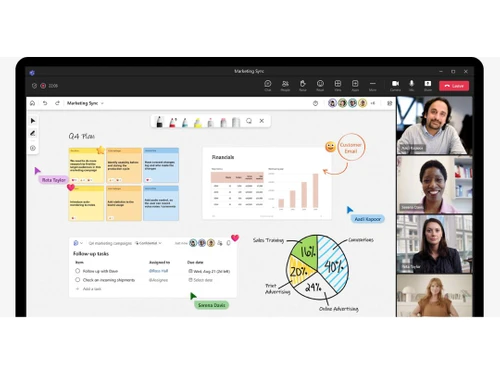
Microsoft Whiteboard is an innovative digital canvas designed to foster creativity and collaboration. Whether brainstorming, planning, or working on team projects, this versatile tool enhances engagement and simplifies communication across devices.
See MoreHave you used Microsoft Whiteboard before?
Share your insights for better experience
Brand: Microsoft Corporation
Founded Year: 1975
Microsoft Corporation is an American multinational technology company with headquarters in Redmond, Washington.
Looking for The Right Pricing?
Share your requirements and get a plan built around your business.
Price Available on Request
Get personalised Microsoft Whiteboard pricing that fits your needs. Our team will connect with you.
 Collaboration Engagement Mobile App AI-Powered Premium Templates Technical Support Communication Compliance Device Management

Watch the demo video to explore key features, real workflows, and how the software fits your business needs.
 Windows
  iOS
iOS  Android MacOS
  Desktop
  Mobile
  Tablet
  iPad
iPad  Cloud-Based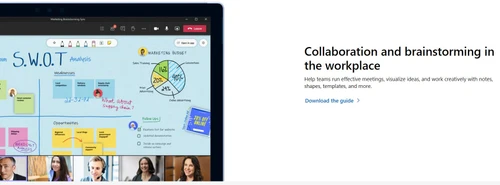
Small Business
Designed for startups and growing businesses
Medium Business
Built for business growth and flexibility
Enterprises
Designed for complex and large-scale business needs
4.8
Out of 5

Overall Rating
Based on
3 Verified Reviews
Rating Breakdown
96% Recommend this Product
Add ReviewUsers appreciate Microsoft Whiteboard for its simplicity and effectiveness in facilitating collaboration, with many highlighting its ability to share ideas and create visual content seamlessly. The tool is particularly valued for its ease of use, whether in-office or remote, making it suitable for teams of various sizes. However, some users may desire additional features or functionalities to enhance their experience further. Overall, the sentiment is positive, with high recommendation rates reflecting user satisfaction.

Jul 16, 2021
Techjockey Verified
“Microsoft Whiteboard is a simple to use collaboration tool”
Pros
Microsoft Whiteboard allows you to share ideas with other people. The app allows you and your team to draw or write as if you are using a pen and paper. You can also use the app to create sticky notes and reminders.
Cons
NO CONS
Reason to switch
This app is great for brainstorming and planning out projects with your team members.
Feb 21, 2021
Techjockey Verified
“Microsoft Whiteboard is a simple and easy way to collaborate with your team.”
Pros
Whether you're in the office or not, this app will allow you to take notes, draw concepts and share ideas with your team. In addition, the app allows you to draw something, take a picture, and share it with others who can also draw on it and create a new image.
Cons
NO CONS
Reason to switch
This app is a great way to have meetings, brainstorm, and simply work more efficiently.
Nov 4, 2020
Techjockey Verified
“Microsoft Whiteboard is a great tool for collaboration.”
Pros
I usually use this app for sharing presentation ideas with my team. All I need to do is to share a link with my team and they can view my presentation in the app.
Cons
NO CONS
Reason to switch
I love this app because it allows me to share ideas with my team in no time. I do not have to go through the painful process of sharing heavy presentation files.

Microsoft Whiteboard
Price On Request
Desktop
Mobile
Web based
On Premises
Windows
Mac OS

Epic Pen
₹ 1200
Desktop
Mobile
Web based
On Premises
Windows
Mac OS

Doodly
Price On Request
Desktop
Mobile
Web based
On Premises
Windows
Mac OS
Whimsical
Price On Request
Desktop
Mobile
Web based
On Premises
Windows
Mac OS

Milanote
Price On Request
Desktop
Mobile
Web based
On Premises
Windows
Mac OS

FigJam
Price On Request
Desktop
Mobile
Web based
On Premises
Windows
Mac OS

Miro
Price On Request
Desktop
Mobile
Web based
On Premises
Windows
Mac OS
Mural
Price On Request
Desktop
Mobile
Web based
On Premises
Windows
Mac OS

Ziteboard
Price On Request
Desktop
Mobile
Web based
On Premises
Windows
Mac OS

Excalidraw
Price On Request
Desktop
Mobile
Web based
On Premises
Windows
Mac OS

Collaboard
Price On Request
Desktop
Mobile
Web based
On Premises
Windows
Mac OS
(0) Product(s) selected
Starting Price:
$12 /Editor/Month
Starting Price:
$5 /Month
Starting Price:
$7 /Month
Available
Price on Request
Microsoft Whiteboard allows team members to work together in real time, regardless of location, fostering creativity and teamwork on a shared canvas.
Yes, it integrates seamlessly with Microsoft Teams, Office 365, and OneNote, providing a unified platform for productivity.
Yes, Microsoft Whiteboard offers a mobile app, making it easy for users to collaborate and contribute ideas from any location.
It includes compliance controls, secure access management, and device management to protect sensitive data.
Yes, AI-powered premium templates are available to streamline various processes, such as brainstorming and project planning.
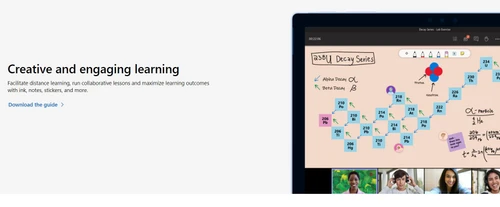
Absolutely! Its interactive features and real-time collaboration tools make it ideal for teaching and interactive learning sessions.
Microsoft Whiteboard provides robust technical support to address any issues promptly and keep operations running smoothly.
While some features may require internet connectivity, certain functionalities are available offline, depending on prior setup.
Yes, you can embed images, sticky notes, and other media to make projects more interactive and engaging.
Administrators can control access and usage across devices, ensuring secure and efficient management of team activities.
20,000+ Software Listed
Best Price Guranteed
Free Expert Consultation
2M+ Happy Customers
Terms and Condtions

Users with registered businesses can purchase goods from merchants on the platform to satisfy their business needs. Users are not permitted to utilize any products acquired through the platform for resale, advertising, business, or further distribution.
For each purchase made, users will receive a Tax Invoice (or 'GST invoice') that includes specific details such as:
the GSTIN of the user associated with their registered business, and
the specified Entity Name for their business.
It should be noted that not all products are eligible for GST Invoice. Only the products displayed by participating sellers with the 'GST-based Invoice Available' callout on the product description page would qualify.
Certain goods and services are not eligible to get a GST Invoice, including items with VAS, i.e., Value Added Services (e.g., Total Mobile Protection/Assured Buyback) and those involving an exchange offer at the time of purchase.
Users must ensure the accuracy of the GSTIN, and business entity name provided for the GST Invoice. Requests for corrections into GST Invoice would not be accommodated by Techjockey.com or any Seller, and any issues arising from user-provided information are the sole responsibility of users.
Techjockey.com is not liable for the GST Invoice or any associated input tax credit. To efficiently claim an input tax credit, users should select the registered place of business address as per the GST authority's data and follow the provisions of the GST Act and rules.
To claim an input tax credit, the delivery and billing addresses must match. Furthermore, input tax credits will not be granted if the delivery address and GSTIN on the invoice are from different states. In case of incorrect GST details provided during the order placement, the order will be canceled automatically.