linkedin
MongoDB Compass logo
play An Introduction to MongoDB Compass
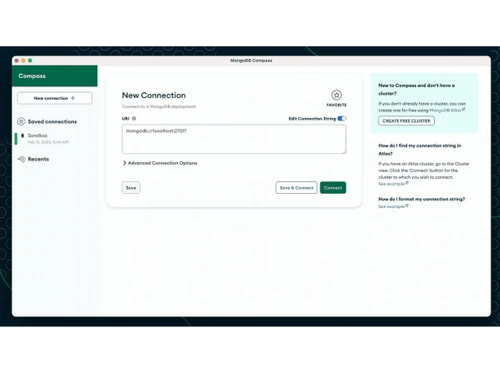
mongodb compass-connection
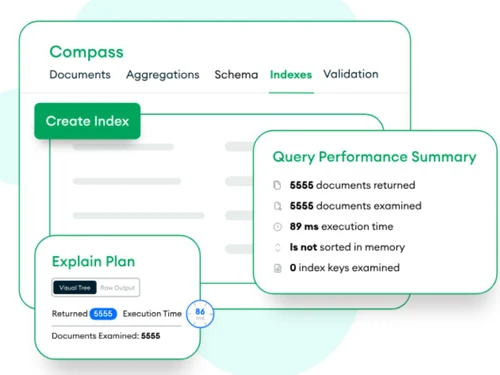
mongodb compass-indexing

MongoDB Compass

Brand: MongoDB

  • 4.0

  • 5 Ratings

A database management software that turns raw data into clear visual stories! Every detail becomes visible without technical struggle.

See More

Have you used MongoDB Compass before?

Share your insights for better experience

Add a Review

Price Available on Request

Questions about pricing or customization? We’re here to help, just a click away.

100% Genuine
Products
Best Price
Guaranteed
Safe & Secure
Payment
  • Description

  • Pricing

  • Features

  • Specification

  • Review

  • FAQ

MongoDB Compass Software Overview

What is MongoDB Compass?

MongoDB Compass is a desktop database management software that provides a visual way to explore and work with stored data. Users can understand complex datasets without writing technical commands.

The interface presents information in an organized and easily readable structure. It supports a smoother approach to handling large collections of data. Professionals may use it to simplify daily database interactions. The tool reduces reliance on traditional coding-based database access methods.

It creates a more user-friendly environment for data exploration tasks. Many users prefer it for clear visibility into database content. The trusted database management platform supports efficient handling of database tasks. It improves overall clarity during data operations.

Why Choose MongoDB Compass Software?

  • Clear Data View: Data appears in a clean visual layout for easy understanding. Large datasets become easier to read during everyday work.
  • Simple Query Handling: Queries run through a graphical interface without complex syntax barriers. Everyday tasks appear less technical to most users.
  • Better Data Insight: Patterns appear clearly within structured data views during analysis. Information becomes easier to interpret across datasets.
  • Quick Data Access: Information opens quickly without long navigation steps in between. Time usage improves during regular database tasks.
  • Clean Interface Design: Layout presents data in a neat and readable structure. Navigation feels smooth across different sections.
  • Efficient Data Editing: Changes to records come about through direct and simple actions. Editing work feels accurate and well-managed.

Benefits of MongoDB Compass Software

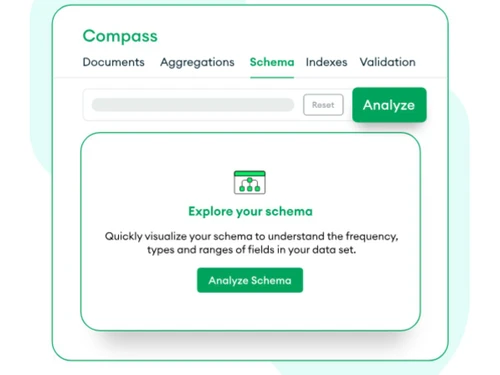
  • Schema Understanding Help: Data structure appears clearly through organized visual mapping tools. Complex relationships look easier to understand during analysis work.
  • Aggregation Building Ease: Data pipelines form step by step through guided visual interaction. Processing flows look simpler without deep technical effort.
  • Performance Monitoring Support: Query performance appears through visual execution details and insights. Slow operations get identified during regular database usage.
  • Geospatial Data View: Location-based data appears through visual map-style presentation. Spatial patterns look clearer during dataset exploration tasks.
  • Connection Handling Ease: Database connections appear organized within a clear management view. Switching between sources feels simple during everyday work.
  • Data Import Support: External data enters the system through guided import processes. Large datasets integrate smoothly without heavy complications.
  • Validation Rule Setup: Data rules apply through structured configuration settings within the interface. Data consistency improves during regular usage cycles.

MongoDB Compass Pricing

MongoDB Compass price is available on request at Techjockey. The pricing model is based on different parameters, including extra features, deployment type, and the total number of users. For further queries related to the product, you can contact our product team and learn more about the pricing and offers.

Read more

MongoDB Company Details

Founded Year:  2007

MongoDB is a next-generation database that helps businesses transform their industries by harnessing the power of data.

Director/Founders Dwight Merriman, Eliot Horowitz, Kevin Ryan
Company Size 1000+ Employees

MongoDB Compass Pricing & Plans

Looking for The Right Pricing?

Share your requirements and get a plan built around your business.

  • Define your business needs
  • Get customised pricing
  • Choose features that fit your workflow

Price Available on Request

Get personalised MongoDB Compass pricing that fits your needs. Our team will connect with you.

MongoDB Compass Features

  • icon_check Schema Analysis
    Visualize your data structure and find outliers or missing fields by sampling documents within any specific MongoDB collection.
  • icon_check Query Bar
    Build complex filters using a dedicated input area that supports MongoDB Query Language operators for precise data transitions.
  • icon_check Index Management
    List all available indexes for a collection and create or drop them directly from the interface to improve query response times.
  • icon_check Pipeline Builder
    Construct aggregation pipelines step-by-step with an interface that provides real-time previews for every stage of the process.
  • icon_check Document Editor
    Modify individual documents using a visual editor that supports adding, deleting, or updating fields without writing CLI code.
  • icon_check Data Validation
    Define and enforce data validation rules at the collection level to ensure that all incoming data adheres to a specific format.
  • icon_check Natural Language Processing
    Generate structured MongoDB queries from natural language prompts using the built-in AI assistant to simplify data exploration.
  • icon_check Data Modeling
    Refactor and collaborate on data models through a dedicated workspace designed to visualize relationships between your entities.
  • icon_check Data Import
    Upload external data into your collections by importing local CSV or JSON files with an intuitive field mapping configuration.
  • icon_check GeoJSON Map View
    Visualize geospatial data on an interactive map to understand the physical location of stored points, lines, or multi-polygons.
  • icon_check Plugin Framework
    Extend the core functionality of the GUI by installing or building custom plugins tailored to specific development requirements.
  • icon_check Connection Manager
    Store and organize multiple connection strings for different environments like local, staging, and production in one interface.
  • icon_check Read Preferences
    Configure specific read preference tags when connecting to replica sets to control which nodes serve your data requests now.
MongoDB Compass Demo Video play icon

Get MongoDB Compass Demo

Watch the demo video to explore key features, real workflows, and how the software fits your business needs.

Understand
Key Features
Personal
Demo Insights
Interactive
Demo Support

MongoDB Compass Specifications

Supported Platforms
Ubuntu Ubuntu Windows Windows MacOS MacOS Linux Linux
Devices
Desktop Desktop
Deployment
Perpetual Perpetual
Suitable For
ITES
Business Specific
All Businesses
Business Size
Individual Small Business Startups Medium Business Enterprises SMBs SMEs MSMBs MSMEs Freelancers
Customer Support
Email Communities
Language
English
Training Resources
Documentation Videos
AI Features
AI Integrated

MongoDB Compass Review

4.0

Out of 5

img

Overall Rating

Based on
5 Verified Ratings

Rating Breakdown

  • Features 4
  • Value for Money 4.1
  • Ease of Use 3.7
  • Customer Support 4.4

80% Recommend this Product

Add Review

Techjockey Trusted Reviews from Verified Users

No reviews are currently available for MongoDB Compass. Discover similar Database Management Software reviews

  • EDB Postgres

    4.8

    Whats great - Excellent experience, staff prepared and available a problem solved during the installation and activation of the software. I... read more

  • Simego Data Synchronisation Studio

    4.5

    Whats great - Easily exports to flat files, connects library with drag and drop system, provides user active directory. read more

  • MySQL enterprise Edition

    4.5

    Whats great - easy to use read more
Articles for MongoDB Compass

See All Related Articles

How much does MongoDB Compass cost?

The price is available on request at techjockey.com. Pricing mostly depends on feature selection, deployment type, and total number of users.

Who uses MongoDB Compass Software?

Developers and analysts use MongoDB Compass for managing and exploring databases. Database administrators may also use it for monitoring and tuning performance.

Is there a mobile app available for MongoDB Compass Software?

No, there is no official mobile app for this software.

Which operating systems are compatible with MongoDB Compass Software?

MongoDB Compass works on Windows, macOS, and Linux systems. It also supports Ubuntu for database management tasks.

Does MongoDB Compass Software offer a free trial?

Yes, MongoDB Compass software does offer a free trial.

How does MongoDB Compass Software function?

It works as a visual interface for managing MongoDB databases. Users can explore data, run queries, and analyze performance without coding.

20,000+ Software Listed

Best Price Guranteed

Free Expert Consultation

2M+ Happy Customers

Terms and Condtions

close

Users with registered businesses can purchase goods from merchants on the platform to satisfy their business needs. Users are not permitted to utilize any products acquired through the platform for resale, advertising, business, or further distribution.

For each purchase made, users will receive a Tax Invoice (or 'GST invoice') that includes specific details such as:

  • the GSTIN of the user associated with their registered business, and

  • the specified Entity Name for their business.

It should be noted that not all products are eligible for GST Invoice. Only the products displayed by participating sellers with the 'GST-based Invoice Available' callout on the product description page would qualify.

Certain goods and services are not eligible to get a GST Invoice, including items with VAS, i.e., Value Added Services (e.g., Total Mobile Protection/Assured Buyback) and those involving an exchange offer at the time of purchase.

Users must ensure the accuracy of the GSTIN, and business entity name provided for the GST Invoice. Requests for corrections into GST Invoice would not be accommodated by Techjockey.com or any Seller, and any issues arising from user-provided information are the sole responsibility of users.

Techjockey.com is not liable for the GST Invoice or any associated input tax credit. To efficiently claim an input tax credit, users should select the registered place of business address as per the GST authority's data and follow the provisions of the GST Act and rules.

To claim an input tax credit, the delivery and billing addresses must match. Furthermore, input tax credits will not be granted if the delivery address and GSTIN on the invoice are from different states. In case of incorrect GST details provided during the order placement, the order will be canceled automatically.