linkedin
MySQL enterprise Edition logo
play MySQL Enterprise Edition Demo
MySQL enterprise Edition database
MySQL enterprise Edition overview

MySQL enterprise Edition

Brand: Oracle

  • 4.5

  • 1 Rating & 1 Review

MySQL Enterprise Edition helps ensure high availability and protect sensitive data with advanced security features, data encryption, and an in-built firewall.

See More

Have you used MySQL enterprise Edition before?

Share your insights for better experience

Add a Review

Price Available on Request

Questions about pricing or customization? We’re here to help, just a click away.

100% Genuine
Products
Best Price
Guaranteed
Safe & Secure
Payment
  • Description

  • Pricing

  • Features

  • Specification

  • Review

  • Compare

  • Alternatives

  • FAQ

MySQL enterprise Edition Software Overview

What is MySQL enterprise Edition?

MySQL Enterprise Edition is the premier commercial version of the world's most popular open-source database management software (DBMS), developed and backed by Oracle. It extends the capabilities of the free Community Edition by providing a comprehensive set of advanced features, enterprise-grade management tools, and 24/7 technical support. This edition is specifically designed for organizations that require the highest levels of performance, security, and uptime for their business-critical applications. Key differentiators include an integrated database firewall, advanced data encryption, and high-availability solutions that protect against data loss and service interruptions, ensuring a robust and secure data environment.

Why Choose MySQL enterprise Edition?

  • Comprehensive Oracle Support: Gain access to Oracle's world-class, 24/7 technical support, including consultations, bug fixes, and security patches directly from the MySQL engineering team.
  • Enhanced Security and Compliance: The software includes advanced security features not found in the community version. An in-built firewall blocks database-specific attacks, while enterprise-grade encryption and auditing tools help protect sensitive data and meet stringent regulatory compliance standards like GDPR, PCI, and HIPAA. It also supports DISA STIG and CIS Benchmark compliance standards for organizations with strict government or industry security requirements.
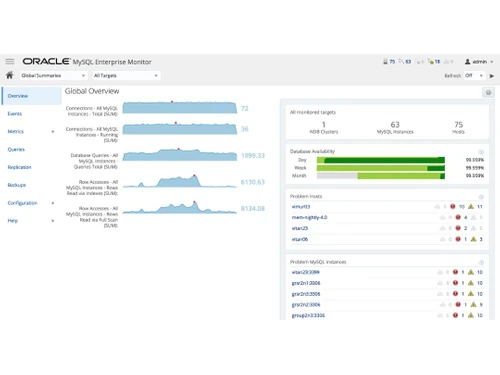
  • Superior Performance and Scalability: With tools like the MySQL Enterprise Monitor and Query Analyzer, administrators can proactively identify and resolve performance bottlenecks, ensuring applications run at peak efficiency and can scale to meet exponential growth in data and user traffic.
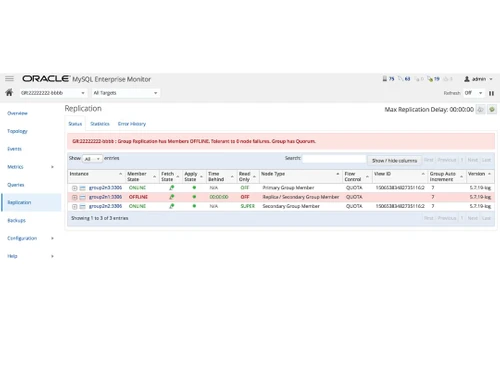
  • High Availability and Disaster Recovery: It provides a certified, integrated high-availability solution with MySQL InnoDB Cluster, which delivers automated failover and data replication to minimize downtime and prevent data loss, ensuring business continuity.

Advanced Features of MySQL enterprise Edition

  • MySQL Enterprise Security: Provides a multi-layered security architecture. This includes the MySQL Enterprise Firewall to guard against cyber threats, Enterprise Encryption and Transparent Data Encryption (TDE) for data-at-rest protection, Enterprise Audit for policy-based activity logging, and Enterprise Masking and Dynamic Data Masking to hide or substitute sensitive data at query time based on user or role, without requiring application changes.
  • MySQL Enterprise High Availability: Delivers an all-in-one solution for maintaining service continuity. It leverages MySQL Group Replication, Router, and Shell to create and manage highly available database clusters with near-zero downtime for maintenance or failures.
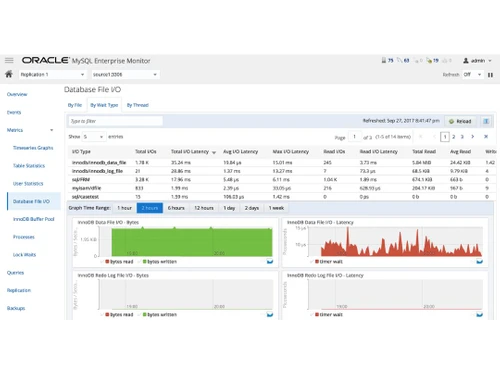
  • MySQL Enterprise Performance: A suite of tools that offers deep visibility into database performance. The Enterprise Monitor continuously checks your databases and advises on best practices, while the Query Analyzer helps optimize SQL code by highlighting inefficient queries.
  • MySQL Enterprise Backup: Enables fast and reliable online hot backups of your databases without interrupting operations. It supports full, incremental, and partial backups, along with point-in-time recovery to quickly restore data in case of corruption or accidental deletion.
  • MySQL Enterprise Scalability: Ensures your database can grow with your business. It includes the MySQL Thread Pool, which provides sustained performance and scalability by efficiently managing high volumes of client connections.
  • MySQL Enterprise Stored Programs: Allows DBAs and developers to write JavaScript-based stored programs and functions directly inside MySQL Enterprise, bringing the power of a widely-used language to database-level logic.

Key Capabilities of MySQL enterprise Edition

  • Database Management & Monitoring: Offers a unified visual dashboard for managing, monitoring, and optimizing all MySQL environments. Administrators can easily view server health, manage user security, and perform administrative tasks.
  • Security & Compliance Enforcement: Provides robust tools to implement and enforce security policies. This includes user authentication against existing infrastructures via PAM (Pluggable Authentication Modules) and Windows Active Directory, transparent data encryption (TDE), and detailed audit trails for compliance reporting.
  • Backup & Disaster Recovery: Delivers a comprehensive strategy for data protection. It allows for the creation of consistent, non-disruptive backups and provides flexible recovery options to meet specific Recovery Time Objectives (RTO) and Recovery Point Objectives (RPO).
  • Development & Schema Management: Includes MySQL Workbench Enterprise Edition, a powerful visual tool that helps developers and DBAs with data modeling, SQL development, and comprehensive server administration.

How to Use MySQL enterprise Edition?

  1. Assess Requirements: Begin by evaluating your application's needs regarding performance, availability, security, and scalability to determine the right configuration.
  2. Acquire a Subscription: Contact an Oracle sales representative or an authorized reseller to purchase a subscription. Licensing is typically based on the number of server sockets or annual server deployments.
  3. Install and Deploy: Install the MySQL Enterprise server and its components on your preferred platform, whether on-premises, in a private cloud, or on a certified public cloud provider.
  4. Configure and Secure: Configure the advanced features such as the Enterprise Firewall, encryption, and high-availability clusters. Migrate data from existing systems using tools like MySQL Shell's dump and load utilities.
  5. Manage and Optimize: Use the MySQL Enterprise Monitor to continuously track database health and performance. Regularly apply patches and updates provided through your Oracle support subscription to maintain a secure and efficient environment.

MySQL enterprise Edition Pricing

MySQL Enterprise Edition pricing details are available on request on techjockey.com.

The pricing model is based on different parameters, including extra features, deployment type, and the total number of users. For further queries related to the product, you can contact our product team and learn more about the pricing and offers.

Read more

Oracle Company Details

Founded Year:  1977

Oracle is an integrated cloud application and platform services that sells a range of enterprise information technology solutions.

Director/Founders Arnold Silverman, Bob Miner, Brian Cassidy, Ed Oates, Larry Ellison
Company Size 1000+ Employees

MySQL enterprise Edition Pricing & Plans

Looking for The Right Pricing?

Share your requirements and get a plan built around your business.

  • Define your business needs
  • Get customised pricing
  • Choose features that fit your workflow

Price Available on Request

Get personalised MySQL enterprise Edition pricing that fits your needs. Our team will connect with you.

MySQL enterprise Edition Features

  • icon_check Database High Availability
  • icon_check Meet Exponential Growth
  • icon_check Data Loss Prevention
  • icon_check Leverage Existing Security Infrastructures
  • icon_check Protect Sensitive Data
  • icon_check High Confidential Data
  • icon_check Block Database Attack
  • icon_check Improve Database Performance & Availability
  • icon_check Migrate Database to MySQL
MySQL enterprise Edition Demo Video play icon

Get MySQL enterprise Edition Demo

Watch the demo video to explore key features, real workflows, and how the software fits your business needs.

Understand
Key Features
Personal
Demo Insights
Interactive
Demo Support

MySQL enterprise Edition Specifications

Supported Platforms
Windows Windows
Devices
Desktop Desktop
Deployment
Cloud-Based Cloud-Based
Suitable For
All Industries
Business Specific
All Businesses
Language
English

Explore the Best Alternative Solutions Similar to Your Business Size and Needs

MySQL enterprise Edition Review

4.5

Out of 5

img

Overall Rating

Based on
1 Verified Review

Rating Breakdown

  • Features 4.5
  • Value for Money 4.5
  • Ease of Use 4.5
  • Customer Support 4.5

90% Recommend this Product

Add Review

Kalpritam Paul

User

4.5

Reviewed on: Jan 14, 2021

Techjockey Verified

“Very useful for smbs”

Pros

easy to use

Cons

NO CONS

Compare MySQL enterprise Edition With other Database Management Software

Products
Ratings
Pricing
Device Supported
Deployment
Supported Platforms
  • img

    MySQL enterprise Edition

  • 4.5

  • Price On Request

  • Desktop

    Mobile

  • Web based

    On Premises

  • Windows

    Mac OS

  • img

    Oracle Database

  • Price On Request

  • Desktop

    Mobile

  • Web based

    On Premises

  • Windows

    Mac OS

  • img

    ClickHouse

  • 4.2

  • Price On Request

  • Desktop

    Mobile

  • Web based

    On Premises

  • Windows

    Mac OS

  • img

    Supabase

  • 4.5

  • Price On Request

  • Desktop

    Mobile

  • Web based

    On Premises

  • Windows

    Mac OS

  • img

    EDB Postgres

  • 4.8

  • Price On Request

  • Desktop

    Mobile

  • Web based

    On Premises

  • Windows

    Mac OS

  • img

    Lio

  • 4.8

  • Price On Request

  • Desktop

    Mobile

  • Web based

    On Premises

  • Windows

    Mac OS

  • img

    MongoDB Compass

  • 4.0

  • Price On Request

  • Desktop

    Mobile

  • Web based

    On Premises

  • Windows

    Mac OS

  • img

    Beekeeper Studio

  • 4.4

  • Price On Request

  • Desktop

    Mobile

  • Web based

    On Premises

  • Windows

    Mac OS

  • img

    Akkio

  • 4.5

  • Price On Request

  • Desktop

    Mobile

  • Web based

    On Premises

  • Windows

    Mac OS

  • img

    ArangoDB

  • 4.4

  • Price On Request

  • Desktop

    Mobile

  • Web based

    On Premises

  • Windows

    Mac OS

(2) Product(s) selected

MySQL enterprise Edition Alternatives

See All MySQL enterprise Edition Alternatives

Starting Price:

$28 /Month

Starting Price:

$25 /Monthly

Starting Price:

$49 /user/month

Available

Price on Request

Available

Price on Request

Available

Price on Request

Available

Price on Request

Available

Price on Request

Articles for MySQL enterprise Edition

See All Related Articles

Does it provide data recovery options?

Yes, MySQL Enterprise Edition does provide data security as well as data recovery options. It is meant to provide optimum data security to all its users.

Can I get a free demo or trial of the software I am going to purchase?

Yes. Techjockey provides free demo of all the services it provides to help you give a glimpse of what you are going to get. It greatly helps customers make the right choice and open avenues to make businesses grow.

How will I choose a plan for myself?

Techjockey provides all the information you need and an in-depth description of all the plans to help you choose the best product for yourself. Its selection depends can upon the strength of the users and other requirements.

What is the difference between MySQL Community and Enterprise?

MySQL Enterprise Edition includes advanced commercial features not found in the Community version, such as an in-built firewall, comprehensive data encryption, and tools for high availability to improve database performance.

Is MySQL Enterprise Edition free?

No, MySQL Enterprise Edition is a commercial software product and is not free; its pricing is available on request on techjockey.com.

What is included in MySQL Enterprise Edition?

MySQL Enterprise Edition includes a suite of advanced features such as data encryption to protect sensitive data, a built-in firewall to block database attacks, data loss prevention, and tools for high availability.

How much does a MySQL Enterprise license cost?

MySQL Enterprise Edition pricing details are available on request on techjockey.com.

Who can use MySQL Enterprise Edition?

MySQL Enterprise Edition is ideal for enterprises, regulated organizations, web and SaaS companies, and IT teams that need secure, scalable, high-availability database management.

How does MySQL Enterprise Edition protect against database attacks?

MySQL Enterprise Edition helps protect against database attacks by providing an in-built firewall facility that adds an additional layer of safety to your data.

Can MySQL Enterprise Edition protect sensitive and confidential data?

Yes, the software includes a data encryption facility specifically designed to protect sensitive and high-confidentiality data from unauthorized access.

What features does MySQL Enterprise Edition possess to ensure database uptime?

MySQL Enterprise Edition includes features for database high availability, which helps improve overall database performance and ensures continuous operation for critical applications.

Does MySQL Enterprise Edition assist with database migration?

Yes, MySQL Enterprise Edition provides features and capabilities designed to help users migrate their existing databases to the MySQL platform.

20,000+ Software Listed

Best Price Guranteed

Free Expert Consultation

2M+ Happy Customers

Terms and Condtions

close

Users with registered businesses can purchase goods from merchants on the platform to satisfy their business needs. Users are not permitted to utilize any products acquired through the platform for resale, advertising, business, or further distribution.

For each purchase made, users will receive a Tax Invoice (or 'GST invoice') that includes specific details such as:

  • the GSTIN of the user associated with their registered business, and

  • the specified Entity Name for their business.

It should be noted that not all products are eligible for GST Invoice. Only the products displayed by participating sellers with the 'GST-based Invoice Available' callout on the product description page would qualify.

Certain goods and services are not eligible to get a GST Invoice, including items with VAS, i.e., Value Added Services (e.g., Total Mobile Protection/Assured Buyback) and those involving an exchange offer at the time of purchase.

Users must ensure the accuracy of the GSTIN, and business entity name provided for the GST Invoice. Requests for corrections into GST Invoice would not be accommodated by Techjockey.com or any Seller, and any issues arising from user-provided information are the sole responsibility of users.

Techjockey.com is not liable for the GST Invoice or any associated input tax credit. To efficiently claim an input tax credit, users should select the registered place of business address as per the GST authority's data and follow the provisions of the GST Act and rules.

To claim an input tax credit, the delivery and billing addresses must match. Furthermore, input tax credits will not be granted if the delivery address and GSTIN on the invoice are from different states. In case of incorrect GST details provided during the order placement, the order will be canceled automatically.