 USA
USA UAE
UAE


Kylas CRM
Whats great - Allowed me to track everything I needed to succeed. With Kylas, I now have all the information at hand and can use that data ... read more


Brand: CHL (Communities Heritage Limited)
MyCo CRM is a cloud-based customer relationship management system that integrates deeply with MyCo’s broader HRMS and business-automation suite.
See MoreHave you used MyCo CRM before?
Share your insights for better experience
Brand: CHL (Communities Heritage Limited)
Founded Year: 2010
Bringing an innovative way for company management where a business owner, team leaders and HR Managers can perform their day-to-day operations of the company effortlessly and effectively.
Looking for The Right Pricing?
Share your requirements and get a plan built around your business.
Price Available on Request
Get personalised MyCo CRM pricing that fits your needs. Our team will connect with you.
Customer Data Management (CDM)
 Contact Management Account Management Customer Profiles Activity History Contact Segmentation
 Sales Management
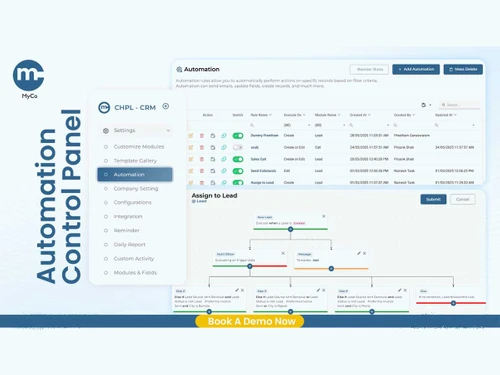
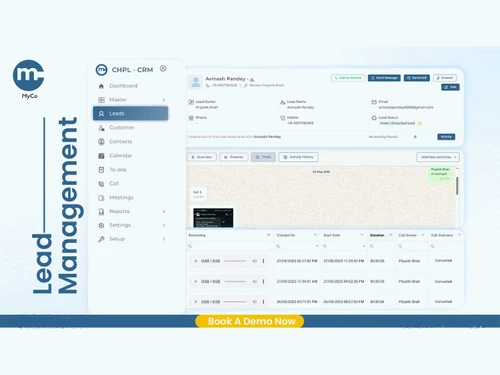
Lead Management Sales Automation Workflow Automation and Management Opportunity & Pipeline Management Quote Management Order Management Contract Management Sales Forecasting Territory Management Deal Management Marketing Automation
Email Marketing Campaign Management Lead Nurturing Event-Triggered Workflows Automated Campaigns Customer Journey Tracking Customer Segmentation Data Sourcing / Integrations
Data Import/Export Interactive Voice Response (IVR) Integration Social Media Integration Calendar Integration Email Marketing Tools Integration Marketing Tools Integration Third Party Integrations API Access eCommerce Integrations Collaboration Tools
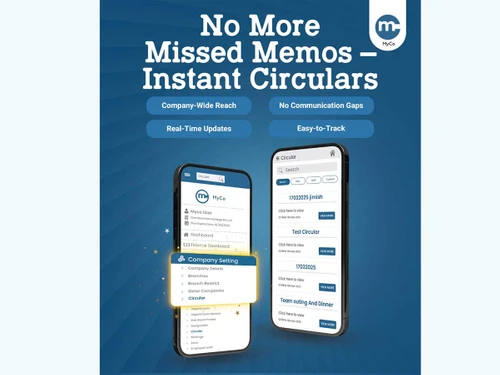
Team Communication Task / Activity Management Omnichannel Support & Engagement Document Sharing & File Storage Security & Compliance
Audit Trail Data Encryption Role-Based Access Control (RBAC) Backup & Disaster Recovery GDPR & Data Privacy AI & Machine Learning
Lead Scoring Predictive Analytics Chatbots Reporting & Analytics
Real Time Analytics Campaign Performance Custom Dashboards Sales Performance Reports Customer Insights Performance Tracking Predictive Analytics Forecasting & Trends Alerts & Notifications
Event-Triggered Notifications Custom Workflow Alerts System Errors/Failures Customer Interaction Alerts Workflow Trigger Alerts SLA Violations Lead Activity Alerts  Windows
  iOS
iOS  Android
  Linux
Linux  Desktop
  Mobile
  Tablet
  iPad
iPad  Cloud-Based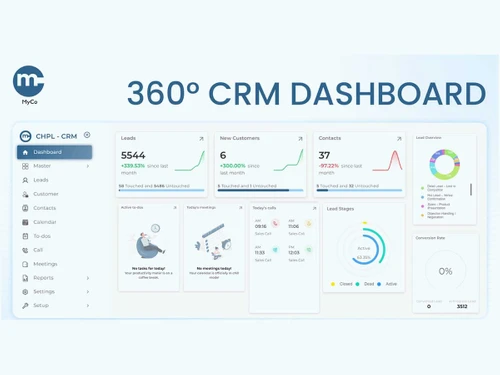
4.2
Out of 5

Overall Rating
Based on
5 Verified Ratings
Rating Breakdown
80% Recommend this Product
Add ReviewTechjockey Trusted Reviews from Verified Users
No reviews are currently available for MyCo CRM. Discover similar CRM Software reviews
Kylas CRM
Whats great - Allowed me to track everything I needed to succeed. With Kylas, I now have all the information at hand and can use that data ... read more

NCH Reflect CRM
Whats great - The fields you require can be modified by adding additional fields and can customize them. read more

Salesforce CRM
Whats great - Salesforce CRM’s beat notification feature ensures timely updates, helping sales teams stay on top of their schedules and cli... read more






MyCo CRM pricing can be requested at techjockey.com. Pricing is customised based on specific business needs.
MyCo CRM is cloud-based, so it works on any operating system, including Windows, macOS, and Linux. You only need a web browser to access it.
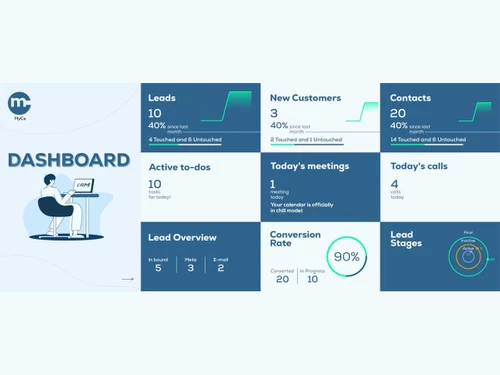
MyCo CRM centralizes leads, communications, and customer interactions into one dashboard. It automates workflows, tracks performance, and syncs data across channels like calls, WhatsApp, and email.
Yes, it is designed to support both small and growing businesses with easy-to-use tools, automation, and cost-efficient features that streamline sales and support.
MyCo CRM typically provides demos or product walkthroughs upon request to help businesses understand its features before onboarding.
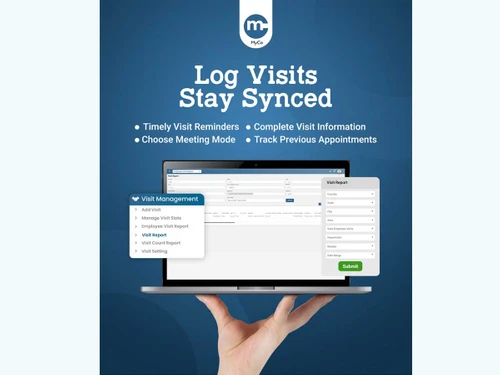
It includes account management, workflow automation, omnichannel support, IVR call tracking, automated campaigns, lead scoring, data encryption, and comprehensive performance analytics.
MyCo CRM can be accessed through mobile browsers and may offer app-based calling or communication modules depending on the plan and setup.
Sales teams, support teams, marketing teams, SMEs, call centers, and businesses that manage leads across calls, WhatsApp, and email benefit the most.
MyCo CRM uses encrypted data storage, secure access controls, and protected recordings/logs to ensure customer and business data remains safe.
It's used to manage customer relationships, streamline lead follow-ups, automate campaigns, track calls and interactions, and monitor team performance across multiple channels.
20,000+ Software Listed
Best Price Guranteed
Free Expert Consultation
2M+ Happy Customers
Terms and Condtions

Users with registered businesses can purchase goods from merchants on the platform to satisfy their business needs. Users are not permitted to utilize any products acquired through the platform for resale, advertising, business, or further distribution.
For each purchase made, users will receive a Tax Invoice (or 'GST invoice') that includes specific details such as:
the GSTIN of the user associated with their registered business, and
the specified Entity Name for their business.
It should be noted that not all products are eligible for GST Invoice. Only the products displayed by participating sellers with the 'GST-based Invoice Available' callout on the product description page would qualify.
Certain goods and services are not eligible to get a GST Invoice, including items with VAS, i.e., Value Added Services (e.g., Total Mobile Protection/Assured Buyback) and those involving an exchange offer at the time of purchase.
Users must ensure the accuracy of the GSTIN, and business entity name provided for the GST Invoice. Requests for corrections into GST Invoice would not be accommodated by Techjockey.com or any Seller, and any issues arising from user-provided information are the sole responsibility of users.
Techjockey.com is not liable for the GST Invoice or any associated input tax credit. To efficiently claim an input tax credit, users should select the registered place of business address as per the GST authority's data and follow the provisions of the GST Act and rules.
To claim an input tax credit, the delivery and billing addresses must match. Furthermore, input tax credits will not be granted if the delivery address and GSTIN on the invoice are from different states. In case of incorrect GST details provided during the order placement, the order will be canceled automatically.