USA
USA UAE
UAESmall Business
Designed for startups and growing businesses

See More


Brand: HearTinz Technologies
Have you used Nego Digital Menu before?
Share your insights for better experience
View plans
 Save upto 18%, Get GST Invoice on your business purchase T&C Buy Now & Pay Later, Check offer on payment page.
 Brand: HearTinz Technologies
Founded Year: 2019
Heartinz provides a QR-code based online store creation solution. It offers a platform that provides customizable web page functions and controls that allows creating and designing business themes
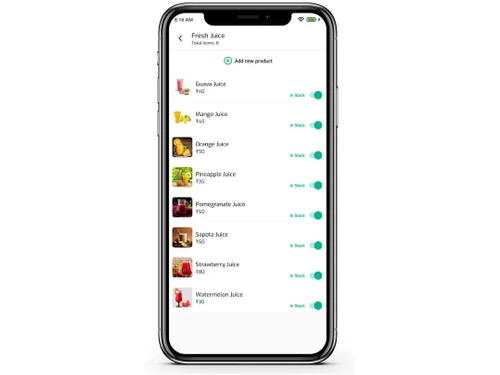
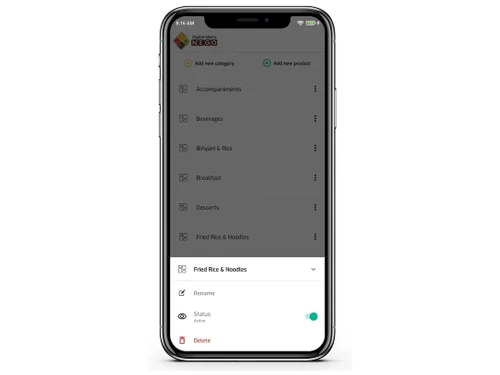
 Android Menu Management QR Code Unlimited Categories Unlimited Products Discount & Scheme Order Form
  Android
  Mobile
  Tablet
  Cloud-Based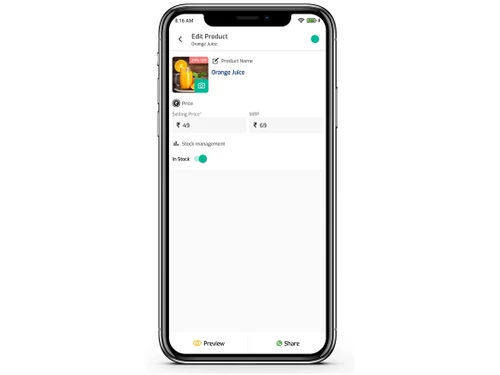
Small Business
Designed for startups and growing businesses
Medium Business
Built for business growth and flexibility
Enterprises
Designed for complex and large-scale business needs
4.4
Out of 5

Overall Rating
Based on
3 Verified Ratings
Rating Breakdown
90% Recommend this Product
Add ReviewTechjockey Trusted Reviews from Verified Users
No reviews are currently available for Nego Digital Menu. Discover similar Restaurant Management Software reviews

Microtech POS
Whats great - Access to real-time data allows for better decision-making. Many billing software solutions offer mobile apps for on-the-go ... read more

Limetray
Whats great - Limetray has proved to be very profitable for us. It offers multiple user login facilities, which saves huge operational cost... read more

POSist
Whats great - It was one of the best investments we made. POSist helped us analyse all the loopholes and barriers in our operations and cut... read more

Nego Digital Menu
₹ 7499.00 excl. GST
Desktop
Mobile
Web based
On Premises
Windows
Mac OS
POSist
₹ 36800
Desktop
Mobile
Web based
On Premises
Windows
Mac OS
Limetray
Price On Request
Desktop
Mobile
Web based
On Premises
Windows
Mac OS
Etable Restro Manager
₹ 5988
Desktop
Mobile
Web based
On Premises
Windows
Mac OS

eRe4u
₹ 4000
Desktop
Mobile
Web based
On Premises
Windows
Mac OS

Eatlot
Price On Request
Desktop
Mobile
Web based
On Premises
Windows
Mac OS
OrderSeva
₹ 2000
Desktop
Mobile
Web based
On Premises
Windows
Mac OS

HDRestaurant
Price On Request
Desktop
Mobile
Web based
On Premises
Windows
Mac OS
ALLPOS Restaurant HUB
₹ 10000
Desktop
Mobile
Web based
On Premises
Windows
Mac OS

FoodBox
₹ 61654
Desktop
Mobile
Web based
On Premises
Windows
Mac OS

Sudish POS
₹ 12500
Desktop
Mobile
Web based
On Premises
Windows
Mac OS
(0) Product(s) selected
Available
Price on Request
Available
Price on Request
Starting Price:
₹10,000 /Outlet/Year
Starting Price:
₹12,500

Starting Price:
₹2,990 /Month
Starting Price:
$349 /Month

Starting Price:
₹5,500 /Yearly

Starting Price:
₹10,000 /yearly
Available
Price on Request

Starting Price:
$330 /Month/Location
Steps to follow: 1. Install Nego Android App. 2. Login with Your Phone Number. 3. Create Your Profile by Entering your Business name . 4. Go to Menu and Add your Products. 5. Download the QR Code from DashBoard, Print It and Your Menu is Ready. For More Details on detailed tutorial Contact Us
All Nego QR Codes are permanent and need not to be changed. You can update the menu as you need.
Yes, You can Share the Menu on WhatsApp as a Link. Share Demo Menu on WhatsApp. Go To Nego Digital Menu App > On Dashboard Click Share to Whatsapp.
Launch your QR Code Food Menu in Just 30 Seconds. QR Code Stands takes about 2 days to Manufacture and Delivery depends on your Location.
Yes, You can add your Staff as Admin Role and Waiter Role. Admin: Can Manage the Entire Store. Waiter: Can Take Order from Table on Android Phone and Tablet
You can add any number of Staffs to Manage your Restaurant
Yes, you can Add or Remove any user accounts from your Digital Menu at any time.
Yes, you can Turn On and Off your Menu at any time. But, You need not worry about Turning off as Nego Digital Menu is Designed in Such a way that Users can access the Menu via QR Code for a Short Period of Time. And for Menu shared as Link through whatsapp can be accessed any time.However Table Order can only be done through QR Menu.
Yes, you can promote products with offers to Top of the menu.
Yes, we have Data Entry Service for your Menu.
No, as Nego Digital Menu Does not Affect your Billing system, as Nego Menu is Only for Order Taking and displaying Digital Menu.
You can View the Order on Android Phone, or Android Tablet in your Kitchen. If you need Printing of Order for Easy Delivery of Food, We have Android Prinitng Terminals. On, request we will setup this , so that Orders can be Printed
You Can Install Nego Digital Menu App on Your Device and Start the Process by Yourself. Support will be Provided over Phone. Its easy than you think. Contact us through chat or Phone and we will Guide you through the process.
20,000+ Software Listed
Best Price Guranteed
Free Expert Consultation
2M+ Happy Customers
Terms and Condtions

Users with registered businesses can purchase goods from merchants on the platform to satisfy their business needs. Users are not permitted to utilize any products acquired through the platform for resale, advertising, business, or further distribution.
For each purchase made, users will receive a Tax Invoice (or 'GST invoice') that includes specific details such as:
the GSTIN of the user associated with their registered business, and
the specified Entity Name for their business.
It should be noted that not all products are eligible for GST Invoice. Only the products displayed by participating sellers with the 'GST-based Invoice Available' callout on the product description page would qualify.
Certain goods and services are not eligible to get a GST Invoice, including items with VAS, i.e., Value Added Services (e.g., Total Mobile Protection/Assured Buyback) and those involving an exchange offer at the time of purchase.
Users must ensure the accuracy of the GSTIN, and business entity name provided for the GST Invoice. Requests for corrections into GST Invoice would not be accommodated by Techjockey.com or any Seller, and any issues arising from user-provided information are the sole responsibility of users.
Techjockey.com is not liable for the GST Invoice or any associated input tax credit. To efficiently claim an input tax credit, users should select the registered place of business address as per the GST authority's data and follow the provisions of the GST Act and rules.
To claim an input tax credit, the delivery and billing addresses must match. Furthermore, input tax credits will not be granted if the delivery address and GSTIN on the invoice are from different states. In case of incorrect GST details provided during the order placement, the order will be canceled automatically.