linkedin
Netstock logo
play Netstock demo overview
netstock
netstock effective formulas

Netstock

Brand: NETSTOCK

  • 4.4

  • 6 Ratings

Minimize stock-outs and reduce excess inventory with Netstock, your AI-powered solution for smarter supply and demand planning to unlock cash and drive growth.

See More

Have you used Netstock before?

Share your insights for better experience

Add a Review

Price Available on Request

Questions about pricing or customization? We’re here to help, just a click away.

100% Genuine
Products
Best Price
Guaranteed
Safe & Secure
Payment
  • Description

  • Pricing

  • Features

  • Specification

  • Review

  • Compare

  • Alternatives

  • FAQ

NetstockSoftware Overview

What is Netstock?

Netstock is an advanced, AI-powered inventory management software designed for comprehensive supply and demand planning. As a web-based solution, it provides an end-to-end platform that helps businesses accurately forecast demand, minimize stock-outs, and reduce excess inventory. By integrating seamlessly with your existing ERP system, Netstock enhances your data to deliver intelligent, actionable insights.

The software is engineered to simplify complex inventory challenges. It uses artificial intelligence to identify critical issues and opportunities that are often missed, allowing planning teams to make confident, data-driven decisions. Key functionalities include a centralized dashboard, inventory forecasting, item classification, streamlined ordering and receiving, and tools for manufacturing and distribution management. Netstock serves as a smart layer on top of your ERP, transforming raw data into a clear path for inventory optimization and business growth.

Why Choose Netstock?

Key advantages of implementing Netstock include:

  • Unlock Operating Cash: By identifying and reducing excess stock, the software helps release cash tied up in surplus inventory, improving your company's liquidity.
  • Minimize Stock-Outs: Proactive forecasting and ordering recommendations ensure optimal stock levels, helping you retain customers and maximize sales revenue. For example, customer B&G Ltd. reduced stock-outs by 61%.
  • Increase Efficiency: Automate and streamline time-consuming tasks related to planning, forecasting, and ordering, freeing up your team to focus on strategic growth initiatives.
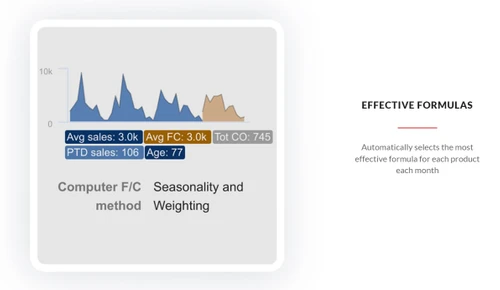
  • Improve Forecast Accuracy: Leverage AI and flexible demand planning tools to create highly accurate forecasts that account for seasonality, trends, and promotions.
  • Proven Global Leader: Netstock is trusted by over 2,400 customers across 67 countries, managing more than $25 billion in inventory. Success stories, such as Hartland Controls reducing its inventory value by $1 million, demonstrate its real-world impact.

Advanced Features of Netstock

  • AI-Powered Recommendations: At its core, Netstock uses artificial intelligence to analyze your inventory data and surface the most critical 10% of issues. It provides clear, prioritized recommendations to address potential stock-outs, excess inventory, and supplier issues.
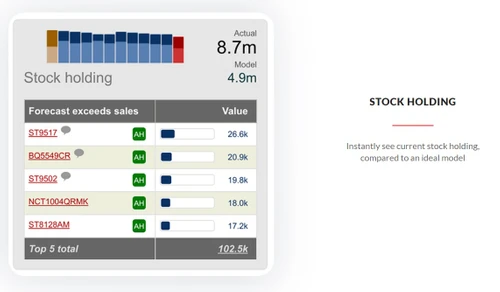
  • Intuitive Dashboards: Gain complete visibility into your supply and demand landscape with easy-to-navigate dashboards. These visual tools highlight key performance indicators, inventory status, and urgent actions required, all in real-time.
  • Extensive ERP Integration: Netstock offers the widest range of ERP integrations on the market. It automatically connects to and processes data from your system, enriching it to provide smarter planning capabilities without manual data entry.
  • Supplier Performance Tracking: Monitor and measure supplier reliability with dedicated tools. This feature helps you track lead times and order fulfillment, enabling you to collaborate more effectively with suppliers and mitigate supply chain risks.
  • Container Builder Module: This new feature allows users to build optimized, container-ready purchase orders in minutes, ensuring you make the most of shipping capacity and reduce freight costs.

Modules of Netstock

  1. Inventory Optimization: The central module focused on balancing investment in inventory with desired fill rates to ensure capital is used effectively.
  2. Inventory Forecasting: Utilizes AI and historical data to generate accurate demand forecasts, forming the foundation for all planning decisions.
  3. Inventory Ordering: Provides ideal order recommendations to streamline the procurement process, ensuring you order the right amount of stock at the right time.
  4. Demand Planning: Offers a collaborative platform for teams to adjust forecasts and plan for promotions, seasonality, and other market factors.
  5. Supplier Performance: A dedicated module for tracking and evaluating supplier lead times and on-time delivery performance.
  6. Sales & Operations (S&OP): Helps align inventory planning with broader business objectives, ensuring that supply chain strategy supports overall company growth.

How to Use Netstock?

  1. Connect Your Data: The first step is to integrate Netstock with your ERP system. The platform connects seamlessly and automatically processes your inventory, sales, and procurement data.
  2. Analyze with AI: Once connected, Netstock's AI engine analyzes your data to identify risks and opportunities. It classifies items, calculates optimal stock levels, and flags potential issues.
  3. Act on Insights: Using the intuitive dashboard, your team can view prioritized recommendations. This includes what to order, potential stock-outs to address, and surplus orders to delay or cancel.
  4. Optimize and Grow: By consistently following the software's recommendations, your business can reduce excess inventory, improve fill rates, and free up cash. The platform facilitates continuous improvement in your supply chain health.

Netstock Price

Netstock software price is available on request at Techjockey. The pricing model is based on different parameters, including extra features, deployment type, and the total number of users. For further queries related to the product, you can contact our product team and learn more about the pricing and offers.

Read more

NETSTOCK Company Details

Founded Year:  2009

Netstock is a vision of delivering cloud-based inventory optimization solutions to small and medium sized businesses around the world.

Director/Founders Andy Hiscox, Barry Kukkuk, Craig Kock, Tony Sinton
Company Size 1-100 Employees

Netstock Pricing & Plans

Looking for The Right Pricing?

Share your requirements and get a plan built around your business.

  • Define your business needs
  • Get customised pricing
  • Choose features that fit your workflow

Price Available on Request

Get personalised Netstock pricing that fits your needs. Our team will connect with you.

Netstock Features

  • icon_check Demand Forecasting
    Predict future sales using historical trends, seasonality, promotions and external variables.
  • icon_check Automated reordering
    Trigger replenishment orders automatically when stock hits a threshold to avoid manual order errors.
  • icon_check Inventory Tracking
    Monitor live stock levels across all locations to maintain accurate inventory status.
  • icon_check Reporting & Analytics
    Provide dashboards, KPIs, custom reports showing turnover, stock-outs, excess, trends.
  • icon_check Supplier performance monitoring
    Track metrics like lead time, fill rate, reliability to adjust safety stock.
  • icon_check ERP Integration
    Seamlessly connect with ERP systems so data flows and planning is aligned.
  • icon_check Automatic stock classification
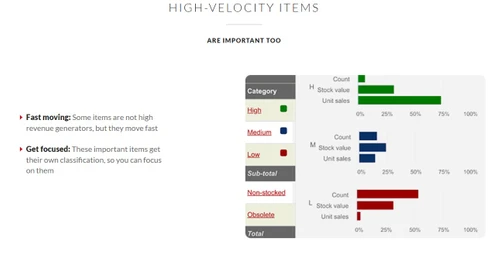
    Classify SKUs (ABC, volatility) to focus on high-impact items.
  • icon_check Scenario planning
    Simulate demand spikes, promotions, supply disruptions to test plans.
  • icon_check Multi-location optimization
    Balance inventories across warehouses, stores, and channels to reduce waste.
  • icon_check Excess stock redistribution
    Suggest moving surplus stock from one location to another where demand exists.
  • icon_check Custom Reporting
    Build or use templates for daily, weekly, monthly, or ad hoc reports.
  • icon_check Extended lead time planning
    Forecast further ahead (e.g. 24 months) accounting for long lead times.
  • icon_check Bill Of Materials (BOM)
    Use BOM data to plan component requirements and material availability.
  • icon_check Monitor forecast performance
    Track forecast error, bias, and adjust models over time
Netstock Demo Video play icon

Get Netstock Demo

Watch the demo video to explore key features, real workflows, and how the software fits your business needs.

Understand
Key Features
Personal
Demo Insights
Interactive
Demo Support

Netstock Specification

Supported Platforms
Windows Windows
Devices
Desktop Desktop Mobile Mobile
Deployment
Web-Based Web-Based
Suitable For
All Industries
Business Specific
All Businesses
Business Size
Small Business Startups Medium Business Enterprises SMEs
Language
English
Training Resources
Live Online Documentation Videos
AI Features
AI Integrated

Explore the Best Alternative Solutions Similar to Your Business Size and Needs

Netstock Review

4.4

Out of 5

img

Overall Rating

Based on
6 Verified Ratings

Rating Breakdown

  • Features 4.4
  • Value for Money 4.5
  • Ease of Use 4.2
  • Customer Support 4.5

91% Recommend this Product

Add Review

Techjockey Trusted Reviews from Verified Users

No reviews are currently available for Netstock. Discover similar Inventory Management Software reviews

  • Fishbowl Inventory

    4.0

    Whats great - Fishbowl has improved our inventory visibility and management. read more

  • aStock ERP

    4.4

    Whats great - Supports large inventories, dynamic categories, excellent data export options. read more

  • Pro-Biz

    4.9

    Whats great - User-Friendly Interface.Easy navigation for users of all skill levels, reducing training time. Real-Time Tracking. Keeps accu... read more

Compare Netstock With other Inventory Management Software

Products
Ratings
Pricing
Device Supported
Deployment
Supported Platforms
  • img

    Netstock

  • 4.4

  • Price On Request

  • Desktop

    Mobile

  • Web based

    On Premises

  • Windows

    Mac OS

  • img

    Pro-Biz

  • 4.8

  • ₹ 5999

  • Desktop

    Mobile

  • Web based

    On Premises

  • Windows

    Mac OS

  • img

    Megaventory

  • 4.1

  • Price On Request

  • Desktop

    Mobile

  • Web based

    On Premises

  • Windows

    Mac OS

  • img

    Stock It

  • 4.4

  • ₹ 620

  • Desktop

    Mobile

  • Web based

    On Premises

  • Windows

    Mac OS

  • img

    EaseMargin

  • 4.4

  • ₹ 7188

  • Desktop

    Mobile

  • Web based

    On Premises

  • Windows

    Mac OS

  • img

    Finale Inventory

  • 4.3

  • Price On Request

  • Desktop

    Mobile

  • Web based

    On Premises

  • Windows

    Mac OS

  • img

    Quartzy

  • 4.1

  • Price On Request

  • Desktop

    Mobile

  • Web based

    On Premises

  • Windows

    Mac OS

  • img

    Zoho Inventory

  • 4.3

  • ₹ 2299

  • Desktop

    Mobile

  • Web based

    On Premises

  • Windows

    Mac OS

  • img

    Prediko

  • 4.1

  • Price On Request

  • Desktop

    Mobile

  • Web based

    On Premises

  • Windows

    Mac OS

  • img

    aStock ERP

  • 4.3

  • ₹ 7499

  • Desktop

    Mobile

  • Web based

    On Premises

  • Windows

    Mac OS

(2) Product(s) selected

Netstock Alternatives

See All Netstock Alternatives

Starting Price:

$249 /Month

Starting Price:

$49 /Month
Starting Price:

₹350,000 /OneTime

Articles for Netstock

See All Related Articles

Which operating system does Netstock support?

Netstock Inventory Management Software is compatible with Windows operating systems.

Is there any Netstock app?

Netstock Inventory Management Software app is not available.

What is deployment type of Netstock?

Netstock Inventory Management Software supports Web-Based.

Who are the potential users of Netstock?

Netstock Inventory Management Software is typically used in All Industries.

Is there any Netstock demo or free trial?

Netstock demo is available for free at Techjockey. Please request a call back.

Is Netstock free?

Netstock Inventory Management Software offers a free trial. However, the premium plan with advanced features available at Techjockey.

How can you download Netstock?

For Netstock installation, insert the given CD/USB flash storage in your system and open the Setup Wizard to get started. The web-based version can be accessed directly through Netstock portal.

How does Netstock work?

Netstock Inventory Management Software helps with Dashboard,Inventory Forecasting,Item classification (size and color. It's a complete solution for and price),Ordering and Receiving,Manufacturing and Distribution.

Are there any hidden charges for Netstock updates?

Netstock regular updates are available free of cost. There are no hidden software update charges.

What is Netstock used for?

Netstock Inventory Management Software used for Dashboard,Inventory Forecasting,Item classification (size and color).

How do I contact Netstock support?

You can directly visit Netstock portal and get in touch with Netstock customer support for any software-related query.

How to get Netstock lifetime deal?

Please contact our product experts to get Netstock lifetime deal with exclusive offers.

What is Netstock used for?

Netstock is a supply and demand planning software used to help businesses accurately forecast demand, minimize stock-outs, and reduce excess inventory through intelligent optimization.

How much does Netstock cost?

Netstock software price is available on request at Techjockey.com.

What ERP does Netstock integrate with?

Netstock integrates with a wide range of leading global ERPs, automatically processing data to deliver smart supply and demand planning recommendations.

Who uses Netstock?

Netstock is used by over 2,400 global customers, including startups, SMBs, SMEs, and agencies, to manage their inventory and supply chain planning processes.

How does Netstock use AI in its software?

Netstock uses an AI-powered expert to identify critical inventory issues and provide clear, actionable recommendations that help teams optimize their stock levels and make smarter decisions.

What are the main benefits of using Netstock?

The main benefits include minimizing stock-outs to retain customers, reducing excess stock to release cash, and placing optimized purchase orders more quickly and efficiently.

How long does it take to implement Netstock?

Netstock is designed for rapid deployment, allowing businesses to become fully operational with the software in 90 days or less.

20,000+ Software Listed

Best Price Guranteed

Free Expert Consultation

2M+ Happy Customers

Terms and Condtions

close

Users with registered businesses can purchase goods from merchants on the platform to satisfy their business needs. Users are not permitted to utilize any products acquired through the platform for resale, advertising, business, or further distribution.

For each purchase made, users will receive a Tax Invoice (or 'GST invoice') that includes specific details such as:

  • the GSTIN of the user associated with their registered business, and

  • the specified Entity Name for their business.

It should be noted that not all products are eligible for GST Invoice. Only the products displayed by participating sellers with the 'GST-based Invoice Available' callout on the product description page would qualify.

Certain goods and services are not eligible to get a GST Invoice, including items with VAS, i.e., Value Added Services (e.g., Total Mobile Protection/Assured Buyback) and those involving an exchange offer at the time of purchase.

Users must ensure the accuracy of the GSTIN, and business entity name provided for the GST Invoice. Requests for corrections into GST Invoice would not be accommodated by Techjockey.com or any Seller, and any issues arising from user-provided information are the sole responsibility of users.

Techjockey.com is not liable for the GST Invoice or any associated input tax credit. To efficiently claim an input tax credit, users should select the registered place of business address as per the GST authority's data and follow the provisions of the GST Act and rules.

To claim an input tax credit, the delivery and billing addresses must match. Furthermore, input tax credits will not be granted if the delivery address and GSTIN on the invoice are from different states. In case of incorrect GST details provided during the order placement, the order will be canceled automatically.