linkedin
Nitso Payroll Software logo
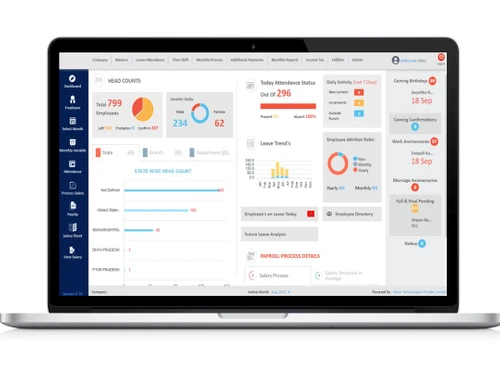
nitso payroll management dashboard
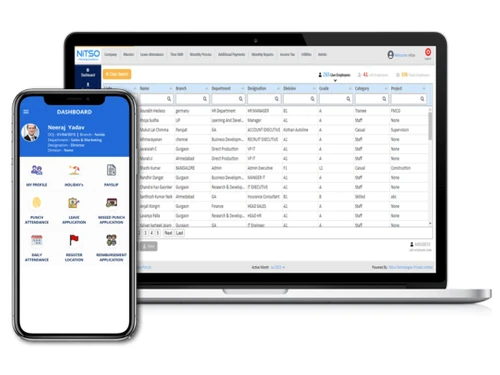
nitso payroll management mobile
nitso payroll management desktop

Nitso Payroll Software

Brand: Nitso

  • 4.1

  • 5 Ratings

Nitso Payroll software is the best payroll software offering user-defined deductions, earnings, component masters and loan heads. The payroll management software covers all kinds of statutory requirements such as ESIC, PF, TDS corporate tax etc. Organizations can add unlimited employees and process their monthly salaries in an appropriate manner. They can also generate PF summary and pull out mul...

See More

Have you used Nitso Payroll Software before?

Share your insights for better experience

Add a Review

Price Available on Request

Questions about pricing or customization? We’re here to help, just a click away.

100% Genuine
Products
Best Price
Guaranteed
Safe & Secure
Payment
  • Description

  • Pricing

  • Features

  • Specification

  • Review

  • Compare

  • Alternatives

  • FAQ

Nitso Payroll Software Overview

What is Nitso Payroll Software?

Nitso Payroll software is the best payroll software offering user-defined deductions, earnings, component masters and loan heads. The payroll management software covers all kinds of statutory requirements such as ESIC, PF, TDS corporate tax etc. Organizations can add unlimited employees and process their monthly salaries in an appropriate manner. They can also generate PF summary and pull out multiple PF forms like Form-5, Form-10 and Form-12A by a single click. HRs can also add in the supplementary payment lists and calculate the particulars on a daily or monthly basis.

How does Nitso Payroll software enhance HR services?

  1. HRs get access to complete information about individual employees, including their personal information, bank details, passport credentials, and more.
  2. HRs can maintain employee-related documents in an organized manner, inquire about their previous job experience and more.
  3. Managers can also avail reports on the retired, left, and terminated employees, to streamline their leave encashments, reimbursements, and more.
  4. The software can also be used to take care of the company assets which are assigned to individual employees.

Benefits of Nitso Payroll Software

  1. Leave Encashment - HRs can define individual formulas for leave calculation as per their business needs. Employees can encash leaves with their salary or other supplementary payments. The leave encashments also get calculated in an automated manner during the full and final settlements.
  2. Role-based Access - Admins can set role-based access rights within Nitso Payroll Software. They can set multiple security levels as per their company policies and also depending on the importance of the data saved within the system. It enables admins to the lock month option to restrict further changes within the processed data.

Pricing of Nitso Payroll Software

The pricing of Nitso Payroll Software is available on request. You can request a callback to get more information on this product. Our executives will get back to you as per the date and time requested by you.

Read more

Nitso Company Details

Founded Year:  2009

Nitso Technologies provides quality software in line with payroll software and fixed assets management software.

Director/Founders Nitso Technologies
Company Size 1-100 Employees

Nitso Payroll Software Pricing & Plans

Looking for The Right Pricing?

Share your requirements and get a plan built around your business.

  • Define your business needs
  • Get customised pricing
  • Choose features that fit your workflow

Price Available on Request

Get personalised Nitso Payroll Software pricing that fits your needs. Our team will connect with you.

Nitso Payroll Software Features

Payroll Management

  • icon_check Overtime Management
    Tracks and calculates employee overtime hours.
  • icon_check Gratuity Calculation
    Calculates gratuity as per Indian statutory requirements.
  • icon_check Automated Payroll
    Streamlined payroll calculations for timely processing.
  • icon_check Direct Bank Transfers
    Automated salary deposits directly to bank accounts.
  • icon_check Off-Cycle Payroll Processing
    Process unscheduled payrolls for bonuses or adjustments.
  • icon_check Multiple Pay Rates and Schedules
    Supports varied pay rates and custom pay cycles.
  • icon_check Bonus and Incentive Management
    Configures and manages employee bonuses and incentives.
  • icon_check Expense Reimbursements
    Automates employee expense reimbursement processing.
  • icon_check Tax Deductions
    Calculates pre-tax and post-tax deductions for compliance.
  • icon_check Employee Benefits Management
    Administers employee health, retirement, and other benefits.
  • icon_check Variable Pay & Commission Management
    Manages variable pay and commissions accurately.

Compliance Management

  • icon_check Income Tax (TDS) Management
    Automates TDS calculations and deductions.
  • icon_check Provident Fund (PF) Compliance
    Ensures timely PF contributions and reporting.
  • icon_check Professional Tax (PT) Compliance
    Manages PT deductions per state regulations.
  • icon_check Labour Welfare Fund (LWF) Management
    Manages LWF deductions for eligible employees.
  • icon_check Employee State Insurance (ESI) Compliance
    Tracks and manages ESI contributions.

Time, Attendance & Leave Management

  • icon_check Leave & Absence Management
    Tracks leave balances and employee absences.
  • icon_check Sick Leave and Vacation Tracking
    Manages sick and vacation leave with accruals.
  • icon_check Attendance Tracking
    Monitors employee attendance for accurate payroll.
  • icon_check Leave Policy Customization
    Customizable leave policies to suit company rules.
  • icon_check Holiday & Leave Calendar
    Manages holiday schedules and leave tracking.

Employee Self-Service (ESS)

  • icon_check Payslip Access
    Provides digital payslips for employee download.
  • icon_check Expense Claims
    Employees submit and track expense reimbursements.
  • icon_check Income Tax Planner
    Allows employees to plan and declare tax exemptions.

Employee Lifecycle Management

  • icon_check Employee Database
    Centralized repository for all employee information.
  • icon_check Document Management
    Stores important employee documents securely.
  • icon_check Employee Shift Scheduling
    Schedules shifts for diverse work hour needs.
  • icon_check F&F Settlement
    Automates final settlements upon employee exit.

Banking Integration & Payment Processing

  • icon_check Direct Deposit Scheduling
    Schedules direct salary deposits on paydays.
  • icon_check Bank Transfer Files
    Generates files for seamless bank transfers.
  • icon_check Cheque Processing
    Supports cheque payments for payroll processing.
  • icon_check Multi-Bank Support
    Integrates with multiple banks for payroll.

Automation and Customization

  • icon_check Alerts & Notifications
    Sends automated notifications for payroll events.
  • icon_check API Access
    Provides API for integrations with other systems.
  • icon_check Scheduled Payroll Processing
    Automates scheduled payroll cycles.
  • icon_check Custom Payroll Rules and Policies
    Customizable payroll rules for flexibility.
  • icon_check Configurable Workflows & Approvals
    Set workflows for approvals in payroll.

Security and Data Privacy

  • icon_check User Access Management
    Manages access permissions to secure payroll data.
  • icon_check Two-Factor Authentication (2FA)
    Enhances security with 2FA for logins.
  • icon_check Data Backup and Recovery
    Ensures secure data backup and easy recovery.
  • icon_check Encrypted Data Transmission
    Protects payroll data during transfers.
  • icon_check Audit Logs and Monitoring
    Tracks and logs activities for audit compliance.

Integrations

  • icon_check API Integration
    Connects to external systems for data exchange.
  • icon_check Performance Management
    Connects with PMS for performance-linked pay.
  • icon_check Third Party Integration
    Integrates with third-party software solutions.
  • icon_check Biometric Integration
    Links with biometric systems for attendance.
  • icon_check HRMS
    Syncs with HRMS for unified employee data.
  • icon_check Accounting Software
    Integrates with accounting systems for seamless data.
  • icon_check Payment Gateway
    Integrates with gateways for payment processing.

Reporting and Analytics

  • icon_check Payroll Reports
    Detailed reports on payroll processing and expenses.
  • icon_check Compliance Reports
    Provides reports on statutory compliance.
  • icon_check Leave and Attendance Reports
    Tracks leave and attendance records.
  • icon_check Employee Master Report
    Comprehensive report on employee details.

Nitso Payroll Software Specifications

Supported Platforms
Ubuntu Ubuntu Windows Windows MacOS MacOS Linux Linux
Devices
Desktop Desktop Mobile Mobile Tablet Tablet iPad iPad
Deployment
Cloud-Based Cloud-Based
Suitable For
All Industries
Business Specific
All Businesses
Business Size
Small Business Startups Medium Business Enterprises
Customer Support
Email Communities
Language
English
Training Resources
Videos

Explore the Best Alternative Solutions Similar to Your Business Size and Needs

Nitso Payroll Software Review

4.1

Out of 5

img

Overall Rating

Based on
5 Verified Ratings

Rating Breakdown

  • Features 4.6
  • Value for Money 4.3
  • Ease of Use 3.7
  • Customer Support 3.9

84% Recommend this Product

Add Review

Techjockey Trusted Reviews from Verified Users

No reviews are currently available for Nitso Payroll Software. Discover similar Payroll Software reviews

  • Spine Payroll Software

    4.4

    Whats great - Pay Slip Employee Muster read more

  • UnboxPayroll

    4.9

    Whats great - Easy to use and understand. read more

  • Paysquare

    4.3

    Whats great - I’ve been very happy with Paysquare because it takes care of payroll in a reliable way. read more

Compare Nitso Payroll Software With other Payroll Software

Products
Ratings
Pricing
Device Supported
Deployment
Supported Platforms
  • img

    Nitso Payroll Software

  • 4.1

  • Price On Request

  • Desktop

    Mobile

  • Web based

    On Premises

  • Windows

    Mac OS

  • img

    PagarBook

  • 4.2

  • ₹ 499

  • Desktop

    Mobile

  • Web based

    On Premises

  • Windows

    Mac OS

  • img

    TankhaPay

  • 4.9

  • ₹ 40

  • Desktop

    Mobile

  • Web based

    On Premises

  • Windows

    Mac OS

  • img

    PayWise

  • 4.5

  • ₹ 300

  • Desktop

    Mobile

  • Web based

    On Premises

  • Windows

    Mac OS

  • img

    Zoho Payroll

  • 3.8

  • ₹ 1250

  • Desktop

    Mobile

  • Web based

    On Premises

  • Windows

    Mac OS

  • img

    ADP Vista

  • 4.2

  • Price On Request

  • Desktop

    Mobile

  • Web based

    On Premises

  • Windows

    Mac OS

  • img

    RazorpayX Payroll

  • 3.9

  • ₹ 29988

  • Desktop

    Mobile

  • Web based

    On Premises

  • Windows

    Mac OS

  • img

    QuickBooks Payroll

  • 4.2

  • Price On Request

  • Desktop

    Mobile

  • Web based

    On Premises

  • Windows

    Mac OS

  • img

    Papaya Global

  • 4.6

  • Price On Request

  • Desktop

    Mobile

  • Web based

    On Premises

  • Windows

    Mac OS

  • img

    UnboxPayroll

  • 4.8

  • ₹ 2000

  • Desktop

    Mobile

  • Web based

    On Premises

  • Windows

    Mac OS

  • img

    HivePayroll

  • 4.9

  • ₹ 1499

  • Desktop

    Mobile

  • Web based

    On Premises

  • Windows

    Mac OS

(0) Product(s) selected

Nitso Payroll Software Alternatives

See All Nitso Payroll Software Alternatives

Available

Price on Request

Available

Price on Request
Starting Price:

₹10 /Month

Warp

4.3

Starting Price:

$25 /Employee/Month
Articles for Nitso Payroll Software

See All Related Articles

How useful is the filter option offered by Nitso Payroll Software?

The advanced filter function can be used to choose individual employees or groups to generate detailed reports for the same.

Can you export the reports offered by Nitso Payroll Software?

Yes, you can export the reports offered by Nitso Payroll Software in Excel, Word or PDF format.

Is it possible to get an online demo of Nitso Payroll Software?

Yes, you can request an online demo of Nitso Payroll Software. Our executives will get back to you as per your preferred date and time.

Does Nitso Payroll Software send occasion-specific reminders to the HRs?

Yes, the software sends on-time reminders about birthdays, retirement and anniversaries of individual employees.

Does Nitso Payroll Software come with a dedicated mobile app?

No, the software does not have a dedicated mobile app as of now.

20,000+ Software Listed

Best Price Guranteed

Free Expert Consultation

2M+ Happy Customers

Terms and Condtions

close

Users with registered businesses can purchase goods from merchants on the platform to satisfy their business needs. Users are not permitted to utilize any products acquired through the platform for resale, advertising, business, or further distribution.

For each purchase made, users will receive a Tax Invoice (or 'GST invoice') that includes specific details such as:

  • the GSTIN of the user associated with their registered business, and

  • the specified Entity Name for their business.

It should be noted that not all products are eligible for GST Invoice. Only the products displayed by participating sellers with the 'GST-based Invoice Available' callout on the product description page would qualify.

Certain goods and services are not eligible to get a GST Invoice, including items with VAS, i.e., Value Added Services (e.g., Total Mobile Protection/Assured Buyback) and those involving an exchange offer at the time of purchase.

Users must ensure the accuracy of the GSTIN, and business entity name provided for the GST Invoice. Requests for corrections into GST Invoice would not be accommodated by Techjockey.com or any Seller, and any issues arising from user-provided information are the sole responsibility of users.

Techjockey.com is not liable for the GST Invoice or any associated input tax credit. To efficiently claim an input tax credit, users should select the registered place of business address as per the GST authority's data and follow the provisions of the GST Act and rules.

To claim an input tax credit, the delivery and billing addresses must match. Furthermore, input tax credits will not be granted if the delivery address and GSTIN on the invoice are from different states. In case of incorrect GST details provided during the order placement, the order will be canceled automatically.