linkedin
Notevibes logo
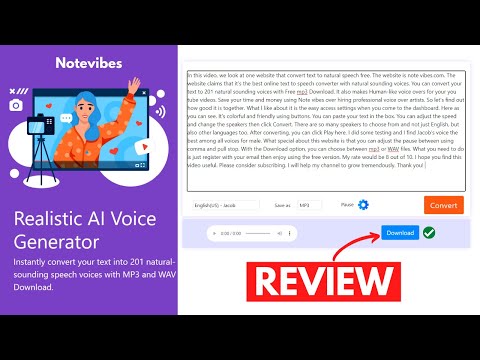
play Best Text To Speech Software | Notevibes Review
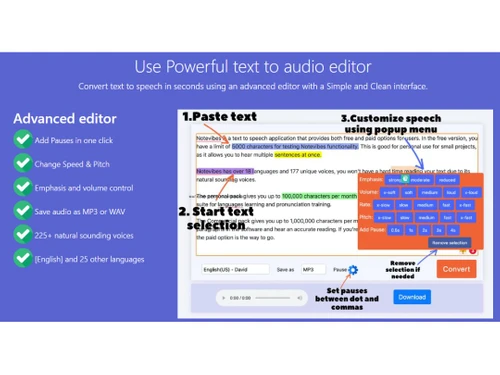
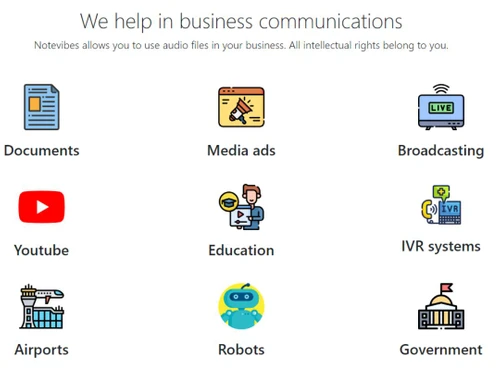
Notevibes-Text to audio editor
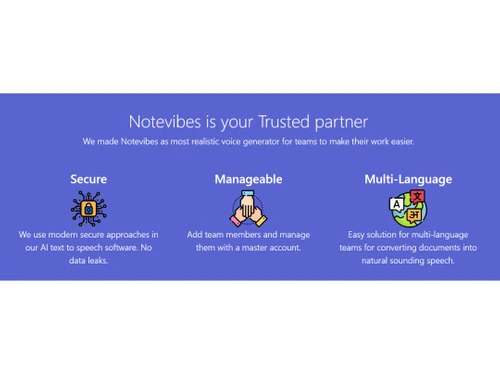
Notevibes-Trusted partner

Notevibes

Brand: Notevibes

  • 4.5

  • 4 Ratings

Elevate your content with Notevibes, the premier Text-to-Speech Converter Platform, turning text into lifelike, engaging audio in seconds.

See More

Have you used Notevibes before?

Share your insights for better experience

Add a Review
Starting Price
$19

View plans

100% Genuine
Products
Best Price
Guaranteed
Safe & Secure
Payment
  • Description

  • Pricing

  • Features

  • Specification

  • Review

  • Compare

  • Alternatives

  • FAQ

Starting at $19

Notevibes Software Overview

What is Notevibes Software?

Notevibes is a cutting-edge text-to-speech software that harnesses the power of artificial intelligence to transform written content into engaging, lifelike audio. With Notevibes, you can effortlessly convert your text into speech using high-quality voices that sound remarkably human. This versatile tool offers a multitude of features designed to enhance your audio content creation experience.

It supports multiple languages, ensuring that your content can reach a global audience. You can also fine-tune your audio creations by adjusting speed, pitch, emphasis, and volume to achieve the perfect voiceover. Whether you're creating audiobooks, podcasts, or interactive voice responses, Notevibes gives you full control over your audio projects.

In addition to its rich feature set, Notevibes offers a secure and modern approach to text-to-speech conversion, prioritizing data protection and user privacy. With over 225 natural-sounding voices to choose from, you have the freedom to select the voice that best suits your content. Best of all, Notevibes is a cost-effective and time-saving solution, allowing you to generate audio content efficiently and without breaking the bank. Notevibes provides all the necessary tools you need to deliver engaging and accessible audio experiences to your audience while saving both time and money.

Why Choose Notevibes Software?

Notevibes is an essential tool for content creators and marketers looking to enhance their online presence and engage their audience more effectively. It's particularly valuable for those who produce video content, e-learning materials, podcasts, and audiobooks. By using Notevibes, these professionals can easily convert written content into high-quality voiceovers with human-like voices, thereby making their content more accessible and engaging. Additionally, businesses seeking to reach a broader international audience can benefit from Notevibes' multi-language support, ensuring their message resonates with diverse demographics.

Educators and e-learning platforms can also leverage Notevibes to provide students with an enriched learning experience. The software's ability to convert text into natural-sounding voices aids comprehension and engagement, making complex subjects more accessible. Furthermore, Notevibes helps save time and effort by automating the process of generating audio content, allowing educators to focus on delivering high-quality lessons and materials. That's not all, as Notevibes is an excellent tool for individuals with visual impairments or reading difficulties, as it enables them to access written content through audio. By catering to diverse needs, this software promotes inclusivity and accessibility across various digital platforms, ultimately benefiting both content creators and their audiences.

Benefits of Notevibes Text-to-Speech Converter Tool

  • Transform text into engaging audio content that captivates your audience.
  • Speak to a global audience by converting text into multiple languages.
  • Create authentic voiceovers that sound remarkably natural and relatable.
  • Customize your audio with precision, adjusting speed, pitch, emphasis, and volume.
  • Export your audio creations as MP3 or WAV files for flexible use across platforms.
  • Rest easy knowing your data is protected with state-of-the-art security measures.

Notevibes Pricing

Notevibes pricing starts from $19 at techjockey.com.

The pricing model is based on different parameters, including extra features, deployment type, and total users. For further queries related to the product, you can contact our product team and learn more about the pricing and offers.

Read more

Notevibes Company Details

Founded Year:  2023

Notevibes is text to speech converter with 225+ natural- sounding voices.

Director/Founders Notevibes
Company Size 1-100 Employees

Notevibes Pricing & Plans

Personal
Starting at $19
    • Licenses

      Licenses
      Licenses
    • Monthly

      Monthly
      Monthly

Key Features

  • 500K credits for AI text to speech

  • AI voice generation 40+ languages 300+ voices

  • Smart Voice Dialogs

  • AI podcast generation

  • MP3/WAV download

Pro
Starting at $99
    • Licenses

      Licenses
      Licenses
    • Monthly

      Monthly
      Monthly

Key Features

  • Everything in Personal

  • 3M credits for AI text to speech

  • 550+ voices including 50+ languages

  • AI extraction from videos, images, PDFs, web

  • 18+ emotions for natural podcast dialogues

Organization
Starting at $4999
    • Licenses

      Licenses
      Licenses
    • Monthly

      Monthly
      Monthly

Key Features

  • Everything in Pro

  • 100M credits for AI text to speech

  • Enterprise AI podcast generation

  • All audio formats + custom exports

  • Batch audio processing

Notevibes Features

  • icon_check AI powered Text-to-Speech
    Harness the strength of artificial intelligence for seamless text-to-speech conversion.
  • icon_check High quality voices
    Enjoy lifelike and crystal-clear audio with top-notch voice quality.
  • icon_check Multi-Language
    Reach a global audience with support for multiple languages.
  • icon_check Human-like voiceovers
    Create engaging content with voiceovers that sound remarkably natural.
  • icon_check Change Speed & Pitch
    Customize your audio with adjustable speed and pitch controls.
  • icon_check Emphasis & volume control
    Fine-tune your voiceovers with precise emphasis and volume adjustments.
  • icon_check Save audio as MP3 or WAV
    Easily export your audio creations in popular formats for versatile use.
  • icon_check Modern secure approach
    Ensure data protection and privacy with state-of-the-art security measures.
  • icon_check 225+ natural sounding voices
    Choose from a vast selection of lifelike voices to suit your content needs.
  • icon_check Cost Effective & Time Saving
    Streamline your audio content creation process while staying budget friendly.
Notevibes Demo Video play icon

Get Notevibes Demo

Watch the demo video to explore key features, real workflows, and how the software fits your business needs.

Understand
Key Features
Personal
Demo Insights
Interactive
Demo Support

Notevibes Specifications

Supported Platforms
Ubuntu Ubuntu Windows Windows MacOS MacOS Linux Linux
Devices
Desktop Desktop Mobile Mobile Tablet Tablet iPad iPad
Deployment
Cloud-Based Cloud-Based
Suitable For
All Industries
Business Specific
All Businesses
Business Size
Small Business Startups Medium Business Enterprises SMBs SMEs MSMBs MSMEs
Customer Support
Email Communities
Language
Nederlands English français Italiano 日本人 普通话 Polskie Português Español
Training Resources
Documentation Videos
AI Features
AI Integrated

Explore the Best Alternative Solutions Similar to Your Business Size and Needs

Notevibes Review

4.5

Out of 5

img

Overall Rating

Based on
4 Verified Ratings

Rating Breakdown

  • Features 4.2
  • Value for Money 4.6
  • Ease of Use 4.3
  • Customer Support 5

90% Recommend this Product

Add Review

Be the First to Review

This product has no reviews yet. Be the first to leave your feedback.

Add Review
Compare Notevibes With other Text to Speech Software

Products
Ratings
Pricing
Device Supported
Deployment
Supported Platforms
  • img

    Notevibes

  • 4.5

  • Price On Request

  • Desktop

    Mobile

  • Web based

    On Premises

  • Windows

    Mac OS

  • img

    Voicemaker

  • 4.4

  • ₹ 450

  • Desktop

    Mobile

  • Web based

    On Premises

  • Windows

    Mac OS

  • img

    Murf AI

  • 4.5

  • Price On Request

  • Desktop

    Mobile

  • Web based

    On Premises

  • Windows

    Mac OS

  • img

    Cartesia Sonic

  • 4.3

  • Price On Request

  • Desktop

    Mobile

  • Web based

    On Premises

  • Windows

    Mac OS

  • img

    Play ht

  • 4.5

  • Price On Request

  • Desktop

    Mobile

  • Web based

    On Premises

  • Windows

    Mac OS

  • img

    SPEECHACTORS

  • 4.5

  • ₹ 199

  • Desktop

    Mobile

  • Web based

    On Premises

  • Windows

    Mac OS

  • img

    Amazon Polly

  • 4.3

  • Price On Request

  • Desktop

    Mobile

  • Web based

    On Premises

  • Windows

    Mac OS

  • img

    Vbee

  • 4.5

  • Price On Request

  • Desktop

    Mobile

  • Web based

    On Premises

  • Windows

    Mac OS

(0) Product(s) selected

Notevibes Alternatives

See All Notevibes Alternatives

Available

Price on Request

Starting Price:

$19 /Month

Starting Price:

$19 /month

Starting Price:

$15 /Month

Starting Price:

$55 /Month
Starting Price:

$3 /Month

Starting Price:

$9 /Month

Articles for Notevibes

See All Related Articles

Which operating system does the Notevibes Software Support?

Notevibes software is compatible with Windows and macOS operating systems.

Is there any Notevibes Text-to-Speech Converter App?

Notevibes text-to-speech converter app is not available on Android and iOS devices.

What is the deployment type of the Notevibes System?

Notevibes system supports web-based deployment.

How Much Does the Notevibes Text-to-Speech Converter Software Cost?

Notevibes text-to-speech converter software pricing starts from $19 at techjockey.com.

Who are the potential users of the Notevibes Software?

Notevibes text-to-speech converter system can be used by content creators, marketers, and content creators seeking engaging audio narration for individuals who need a text to speech software.

Is there any free trial or demo for Notevibes Software?

Notevibes software demo is available for free with techjockey.com.

Is the Notevibes Text-to-Speech Converter Software Free?

Notevibes text-to-speech converter system does not offer a free trial.

How can you download the Notevibes Platform?

Notevibes is a web-based platform. So, you need not download any software. Just open the wizard and get started.

How does the Notevibes Text-to-Speech Converter Software Work?

Notevibes is a text-to-speech tool that converts written text into spoken words. It offers a range of high-quality, natural-sounding voices, making it suitable for various applications, with a diverse selection of voice options available for users to choose from.

20,000+ Software Listed

Best Price Guranteed

Free Expert Consultation

2M+ Happy Customers

Terms and Condtions

close

Users with registered businesses can purchase goods from merchants on the platform to satisfy their business needs. Users are not permitted to utilize any products acquired through the platform for resale, advertising, business, or further distribution.

For each purchase made, users will receive a Tax Invoice (or 'GST invoice') that includes specific details such as:

  • the GSTIN of the user associated with their registered business, and

  • the specified Entity Name for their business.

It should be noted that not all products are eligible for GST Invoice. Only the products displayed by participating sellers with the 'GST-based Invoice Available' callout on the product description page would qualify.

Certain goods and services are not eligible to get a GST Invoice, including items with VAS, i.e., Value Added Services (e.g., Total Mobile Protection/Assured Buyback) and those involving an exchange offer at the time of purchase.

Users must ensure the accuracy of the GSTIN, and business entity name provided for the GST Invoice. Requests for corrections into GST Invoice would not be accommodated by Techjockey.com or any Seller, and any issues arising from user-provided information are the sole responsibility of users.

Techjockey.com is not liable for the GST Invoice or any associated input tax credit. To efficiently claim an input tax credit, users should select the registered place of business address as per the GST authority's data and follow the provisions of the GST Act and rules.

To claim an input tax credit, the delivery and billing addresses must match. Furthermore, input tax credits will not be granted if the delivery address and GSTIN on the invoice are from different states. In case of incorrect GST details provided during the order placement, the order will be canceled automatically.