linkedin
Voicemaker logo
play Free Text To Speech Website | How To Use Voice Maker | Text to Speech Converter - FREE & No Limits
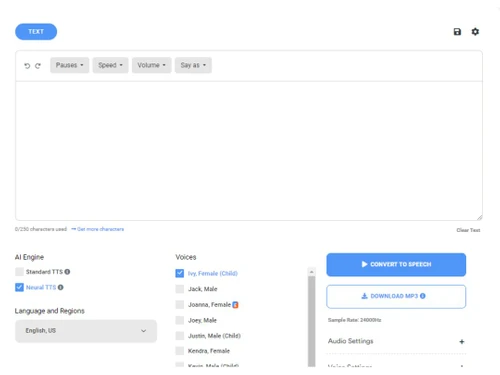
Voicemaker Dashboard
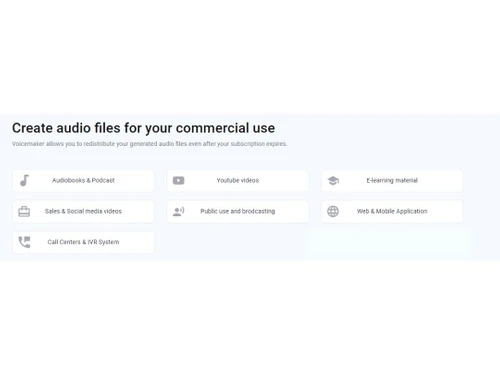
Voicemaker Use commercially

Voicemaker

Brand: Voicemaker Technologies

  • 4.4

  • 5 Ratings

Voicemaker is a versatile text-to-speech converter, seamlessly transforming written content into natural-sounding audio with customizable voices and advanced speech modulation.

See More

Have you used Voicemaker before?

Share your insights for better experience

Add a Review
Starting Price
₹450 excl.GST
₹ 450 incl. GST

View plans

offer Save upto 18%, Get GST Invoice on your business purchase T&C
offer Buy Now & Pay Later, Check offer on payment page.
Buy Now
100% Genuine
Products
Best Price
Guaranteed
Safe & Secure
Payment
  • Description

  • Pricing

  • Features

  • Specification

  • Review

  • Compare

  • Alternatives

  • FAQ

Starting at ₹450
Buy Now

Voicemaker Software Overview

What is Voicemaker Software?

Voicemaker text-to-speech converter is a powerful tool for creating commercial audio files. With Voicemaker, you can create audio files efficiently, saving valuable time and resources. Whether you need voiceovers for videos, advertisements, podcasts, or any other content, Voicemaker empowers you to bring your ideas to life with high-quality audio production. Voicemaker will help you redistribute your generated audio files even after your subscription expires, giving you flexibility and control over your content. Share your audio across multiple platforms worldwide, expanding your reach and engaging with a global audience.

This text-to-speech converter platform allows you to convert written text into lifelike audio. It supports multiple languages, ensuring you can cater to diverse audiences and localization needs. The platform's multi-platform sharing feature makes it easy to distribute your audio files across various platforms, maximizing your content's visibility and impact.

Enhance your audio with built-in audio effects and leverage the audio editing capabilities to refine and customize your content according to your requirements. Take full control of your voiceovers with voice volume and speed management features, ensuring a seamless and professional listening experience.

Why Choose Voicemaker AI?

Voicemaker is a valuable tool for content creators, marketers, e-learning professionals, podcasters, and more. Whether you need voiceovers for commercial projects, audio content for multilingual audiences, or efficient text-to-speech conversion, Voicemaker has you covered. By leveraging its AI-driven technology and versatile features, users can save time and effort in creating high-quality audio files. With its ability to customize voice parameters, manage volume and speed, and apply audio effects, Voicemaker empowers users to produce professional-grade audio content that resonates with their target audience.

Benefits of Voicemaker Text-to-Speech Converter Software

  • Voicemaker allows you to create audio files for commercial purposes, giving you the flexibility to use them in various projects and applications.
  • With support for multiple languages, this tool enables you to generate audio content in different languages, broadening your audience reach and localization efforts.
  • Share your converted audio files effortlessly across different platforms, ensuring audiences can access and enjoy your content worldwide.
  • It delivers high-quality text-to-speech conversion, easily and accurately transforming written content into natural-sounding speech.
  • It provides features allowing you to customize and refine your audio files to match your requirements. This enhances your productivity and efficiency in creating professional-grade audio content.

Voicemaker Pricing

Voicemaker pricing starts at INR 450 per month for a starter plan at techjockey.com.

The overall pricing model is based on different factors such as personalization, extra features required, total users, and the deployment type. Please feel free to request a call from our product experts if you want to learn more about our subscription plans or premium package deals.

Read more

Voicemaker Technologies Company Details

Founded Year:  2020

AI-based text-to-speech converter supports 800+ standard & natural-sounding voices in 130+ languages worldwide.

Director/Founders Abhishek Bajarang Mane and Sujit Sunil Jadhav
Company Size 1-100 Employees

Voicemaker Pricing & Plans

Starter

Calculated Price

450 Exclusive of all taxes
    • Licenses

      Licenses
      Licenses
    • Monthly

      Monthly
      Monthly

Key Features

  • 200,000 Characters per month

  • 4 Hours Audio

  • Upto 3,000 characters per convert

  • Custom Voice Cloning

  • 1000+ Default Voices

  • Subtitle (.SRT)

Premium

Calculated Price

900 Exclusive of all taxes
    • Licenses

      Licenses
      Licenses
    • Monthly

      Monthly
      Monthly

Key Features

  • 500,000 Characters per month

  • 9 Hours Audio

  • Upto 5,000 characters per convert

  • Everything in Starter, plus

  • Voicemaker VoxFX™

  • Cloud Storage (10GB)

Business

Calculated Price

1800 Exclusive of all taxes
    • Licenses

      Licenses
      Licenses
    • Monthly

      Monthly
      Monthly

Key Features

  • 1 million Characters per month

  • 18 Hours Audio

  • Upto 10,000 characters per convert

  • Everything in Premium, plus

  • Enterprise SSO

  • Cloud Storage (20GB)

Voicemaker Features

  • icon_check Ultra-Realistic AI Voices
    Access over 1,500 lifelike human-sounding voices that feature various expressive emotions and unique speaking styles.
  • icon_check Global Language Support
    Convert your written text into professional audio in over 130 languages and regional accents from across the entire globe.
  • icon_check Customizable Voice Effects
    Enhance your audio projects with specialized vocal effects like FM radio, news broadcasting, or even robotic voice tones.
  • icon_check AI Voice Cloning
    Create a perfect digital replica of your own voice or any other specific voice talent using the platform's advanced AI engine.
  • icon_check Precise Pitch Adjustment
    Manually fine-tune the pitch of your selected AI voice to achieve the perfect tone for your specific brand or project.
  • icon_check Dynamic Volume Control
    Easily adjust the output volume levels of your generated audio files to ensure consistency across all your media clips.
  • icon_check Granular Speed Settings
    Control the narration pace by speeding up or slowing down the voice output to match the timing of your video content.
  • icon_check High-Resolution Export
    Download your finished voiceovers in high-quality audio formats like MP3, WAV, OGG, AAC, and even the professional OPUS.
  • icon_check Multi-platform sharing
    Seamlessly share your converted audio files across various platforms worldwide.
  • icon_check AI Driven
    Powered by artificial intelligence, Voicemaker utilizes advanced algorithms to deliver high-quality audio generation.
  • icon_check Text-to-Speech
    Transform written text into natural-sounding speech with Voicemaker's text-to-speech functionality.
  • icon_check Multilingual
    Create audio files in multiple languages, catering to diverse audiences and localization needs.
  • icon_check Use commercially
    Enjoy the freedom to utilize the audio files you create for commercial purposes.
  • icon_check Audio effects
    Enhance your audio with built-in effects, adding depth and richness to your voiceovers.
  • icon_check Audio Editing
    Refine and customize your audio files using Voicemaker's editing tools.
  • icon_check Voice volume management
    Take control of voice volume, ensuring optimal audio balance and clarity.
  • icon_check Voice speed management
    Adjust the speed of the generated voice to match your desired pace and style.
  • icon_check Efficient
    Voicemaker streamlines the audio creation process, saving time and resources.
Voicemaker Demo Video play icon

Get Voicemaker Demo

Watch the demo video to explore key features, real workflows, and how the software fits your business needs.

Understand
Key Features
Personal
Demo Insights
Interactive
Demo Support

Voicemaker Specifications

Supported Platforms
Ubuntu Ubuntu Windows Windows MacOS MacOS Linux Linux
Devices
Desktop Desktop Mobile Mobile Tablet Tablet iPad iPad
Deployment
Cloud-Based Cloud-Based
Suitable For
All Industries
Business Specific
All Businesses
Business Size
Small Business Startups Medium Business Enterprises
Customer Support
Email
Language
English
Integration
API Integration
Training Resources
Documentation
AI Features
AI Integrated

Explore the Best Alternative Solutions Similar to Your Business Size and Needs

Voicemaker Review

4.4

Out of 5

img

Overall Rating

Based on
5 Verified Ratings

Rating Breakdown

  • Features 4.2
  • Value for Money 4.3
  • Ease of Use 4.4
  • Customer Support 4.8

90% Recommend this Product

Add Review

Be the First to Review

This product has no reviews yet. Be the first to leave your feedback.

Add Review

Compare Voicemaker With other Text to Speech Software

Products
Ratings
Pricing
Device Supported
Deployment
Supported Platforms
  • img

    Voicemaker

  • 4.4

  • ₹ 450.00 excl. GST

  • Desktop

    Mobile

  • Web based

    On Premises

  • Windows

    Mac OS

  • img

    Murf AI

  • 4.5

  • Price On Request

  • Desktop

    Mobile

  • Web based

    On Premises

  • Windows

    Mac OS

  • img

    Cartesia Sonic

  • 4.3

  • Price On Request

  • Desktop

    Mobile

  • Web based

    On Premises

  • Windows

    Mac OS

  • img

    Play ht

  • 4.5

  • Price On Request

  • Desktop

    Mobile

  • Web based

    On Premises

  • Windows

    Mac OS

  • img

    SPEECHACTORS

  • 4.5

  • ₹ 199

  • Desktop

    Mobile

  • Web based

    On Premises

  • Windows

    Mac OS

  • img

    Voicely

  • 4.0

  • Price On Request

  • Desktop

    Mobile

  • Web based

    On Premises

  • Windows

    Mac OS

  • img

    Amazon Polly

  • 4.3

  • Price On Request

  • Desktop

    Mobile

  • Web based

    On Premises

  • Windows

    Mac OS

  • img

    Vbee

  • 4.5

  • Price On Request

  • Desktop

    Mobile

  • Web based

    On Premises

  • Windows

    Mac OS

(2) Product(s) selected

Voicemaker Alternatives

See All Voicemaker Alternatives

Available

Price on Request

Starting Price:

$19 /Month

Starting Price:

$19 /month
Starting Price:

$19 /month

Starting Price:

$3 /Month

Starting Price:

$55 /Month

Starting Price:

$9 /Month

Articles for Voicemaker

See All Related Articles

Which operating system does the Voicemaker Software Support?

Voicemaker software is compatible with Windows and macOS operating systems.

Is there any Voicemaker App?

Voicemaker app is unavailable on Android and iOS devices.

What is the deployment type of the Voicemaker?

Voicemaker supports web-based deployment.

How much does the Voicemaker Cost?

Voicemaker pricing starts at INR 450 per month for a starter plan at techjockey.com.

Who uses Voicemaker?

Voicemaker text-to-speech converter can be used by content creators, marketers, and content creators seeking engaging audio narration for individuals with visual impairments needing accessible information.

Is there any free trial or demo for Voicemaker?

Voicemaker demo is available for free with techjockey.com.

Is the Voicemaker free?

Voicemaker does not offer a free trial.

How can you download Voicemaker?

Voicemaker is a web-based platform. So, you need not download any software or app to use it.

How does the Voicemaker work?

Voicemaker is an innovative software that utilizes artificial intelligence to transform the written text into lifelike spoken audio. By leveraging advanced algorithms, it generates high-quality voices that accurately mimic human speech.

20,000+ Software Listed

Best Price Guranteed

Free Expert Consultation

2M+ Happy Customers

Terms and Condtions

close

Users with registered businesses can purchase goods from merchants on the platform to satisfy their business needs. Users are not permitted to utilize any products acquired through the platform for resale, advertising, business, or further distribution.

For each purchase made, users will receive a Tax Invoice (or 'GST invoice') that includes specific details such as:

  • the GSTIN of the user associated with their registered business, and

  • the specified Entity Name for their business.

It should be noted that not all products are eligible for GST Invoice. Only the products displayed by participating sellers with the 'GST-based Invoice Available' callout on the product description page would qualify.

Certain goods and services are not eligible to get a GST Invoice, including items with VAS, i.e., Value Added Services (e.g., Total Mobile Protection/Assured Buyback) and those involving an exchange offer at the time of purchase.

Users must ensure the accuracy of the GSTIN, and business entity name provided for the GST Invoice. Requests for corrections into GST Invoice would not be accommodated by Techjockey.com or any Seller, and any issues arising from user-provided information are the sole responsibility of users.

Techjockey.com is not liable for the GST Invoice or any associated input tax credit. To efficiently claim an input tax credit, users should select the registered place of business address as per the GST authority's data and follow the provisions of the GST Act and rules.

To claim an input tax credit, the delivery and billing addresses must match. Furthermore, input tax credits will not be granted if the delivery address and GSTIN on the invoice are from different states. In case of incorrect GST details provided during the order placement, the order will be canceled automatically.