linkedin
Microsoft Azure Text to Speech logo
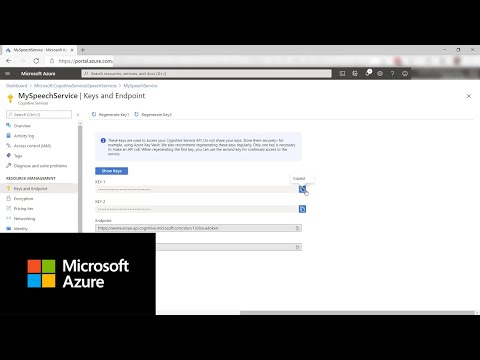
play How to get started with neural text to speech in Azure | Azure Tips and Tricks
microsoft azure text to speech comprehensive technology
microsoft azure text to speech get access

Microsoft Azure Text to Speech

Brand: Microsoft Corporation

  • 3.9

  • 5 Ratings

Microsoft Azure Text-to-Speech Converter software seamlessly transforms written text into lifelike, natural-sounding audio, offering a vast range of voice options and languages.

See More

Have you used Microsoft Azure Text to Speech before?

Share your insights for better experience

Add a Review

Price Available on Request

Questions about pricing or customization? We’re here to help, just a click away.

100% Genuine
Products
Best Price
Guaranteed
Safe & Secure
Payment
  • Description

  • Pricing

  • Features

  • Specification

  • Review

  • Compare

  • Alternatives

  • FAQ

Microsoft Azure Text to Speech Software Overview

What is Microsoft Azure Text-to-Speech Software?

Microsoft Azure Text to Speech is a cloud-based service that brings lifelike synthesized speech to applications and services. It allows developers to enable fluid and natural-sounding text-to-speech capabilities that closely resemble human voices, matching their intonation and emotions. It allows businesses to improve accessibility by making their applications more inclusive for individuals with visual impairments or reading difficulties.

The advanced algorithms and machine learning models used in the service enable it to replicate human-like intonation, emphasizing the right words and conveying emotions effectively. This creates a more engaging and immersive experience for users interacting with speech synthesis applications. Synthesized speech can be used to convert written content into spoken words.

It offers extensive customization options to suit specific requirements. Developers can modify parameters such as pitch, speaking rate, and volume to achieve the desired effect and adapt the synthesized speech to their application's unique context. Additionally, the service supports the inclusion of SSML (Speech Synthesis Markup Language), allowing developers to control aspects like pronunciation, emphasis, and pauses for enhanced expressiveness.

Why Choose Microsoft Azure Text-to-Speech System?

  • Neural TTS Technology: The service leverages advanced neural network models to deliver high-quality and natural-sounding speech.
  • Pronunciation Adjustment: Developers can fine-tune the pronunciation of specific words or phrases to ensure accurate and contextually appropriate speech output.
  • Speech Markup Language (SSML) Support: The Text to Speech service controls speech synthesis by specifying aspects such as emphasis, pauses, and audio effects.
  • Dynamic Voice Switching: The service seamlessly switches between different voices within a single speech synthesis session.
  • Speech Customization: Developers can create custom voice models by training the system with specific voice samples to generate unique, personalized voices.
  • Pronunciation Dictionary: The Text to Speech service provides a pronunciation dictionary that developers can customize to correctly handle specific words or acronyms.

Benefits of Microsoft Azure Text-to-Speech Platform

  • The service allows developers to dynamically adjust the prosody of the speech, including pitch, volume, and speaking rate, to convey different emotions or emphasis.
  • Developers can adjust the speaking rate to control the speed of the synthesized speech to ensure optimal comprehension and delivery.
  • It allows developers to control the volume of the synthesized speech to ensure clarity and audibility in different environments.
  • The Text to Speech service integrates with various platforms and frameworks, including mobile, web, and desktop applications.
  • The service allows developers to apply formatting options to synthesized speech, such as emphasizing specific words or adjusting the pitch.
  • It includes noise suppression capabilities to enhance the clarity and intelligibility of synthesized speech in noisy environments.

Pricing of Microsoft Azure Text-to-Speech Solution

Microsoft Azure text-to-speech Software pricing is available on request at techjockey.com.

The overall pricing model is based on different factors such as personalization, extra features required, total users, and the deployment type. Please feel free to request a call from our product experts if you want to learn more about our subscription plans or premium package deals.

Read more

Microsoft Corporation Company Details

Founded Year:  1975

Microsoft Corporation is an American multinational technology company with headquarters in Redmond, Washington.

Director/Founders Paul Allen , Bill Gates
Company Size 1000+ Employees

Microsoft Azure Text to Speech Pricing & Plans

Looking for The Right Pricing?

Share your requirements and get a plan built around your business.

  • Define your business needs
  • Get customised pricing
  • Choose features that fit your workflow

Price Available on Request

Get personalised Microsoft Azure Text to Speech pricing that fits your needs. Our team will connect with you.

Microsoft Azure Text to Speech Features

  • icon_check Speech to Text
    Convert spoken audio into written text, live or from recordings, across many languages.
  • icon_check Text to Speech Neural Voices
    Generate natural sounding voices from text using advanced neural models, with multiple styles.
  • icon_check Speech to Speech Translation
    Translate spoken audio in one language into speech in another, in real time or asynchronously.
  • icon_check Custom Neural Voice
    Create a brand-specific voice by training a custom voice model with your own data.
  • icon_check Speech Analytics
    Use speech data (calls, meetings) for analytics: sentiment, topics, keywords, post-call insights.
  • icon_check Multi-Language Support & Availability
    Supports a growing number of languages and dialects for both transcription and voice generation.
  • icon_check Pronunciation, SSML & voice tuning
    Use Speech Synthesis Markup Language to control pitch, rate, emphasis, pauses and pronunciation.
  • icon_check Speaker recognition & identification
    Recognize or verify speakers in audio via identity or voice biometrics.
  • icon_check Integration with Azure Ecosystem
    Works seamlessly with Azure SDKs, Azure OpenAI, and broader Microsoft cloud services.
  • icon_check Real-Time API
    Support for streaming audio (microphone or live feed) for real-time transcription or voice interaction.
  • icon_check Multi Format Audio Export
    Output speech in various audio formats and sampling rates for different use cases.
  • icon_check Batch Transcription
    Process large volumes of audio asynchronously in batches for low-cost high-volume use.
Microsoft Azure Text to Speech Demo Video play icon

Get Microsoft Azure Text to Speech Demo

Watch the demo video to explore key features, real workflows, and how the software fits your business needs.

Understand
Key Features
Personal
Demo Insights
Interactive
Demo Support

Microsoft Azure Text to Speech Specifications

Supported Platforms
Windows Windows iOS iOS Android Android
Devices
Desktop Desktop Mobile Mobile
Deployment
Cloud-Based Cloud-Based
Suitable For
All Industries
Business Specific
All Businesses
Business Size
Small Business Startups Medium Business MSMBs MSMEs
Customer Support
Email
Language
English
Training Resources
Videos

Explore the Best Alternative Solutions Similar to Your Business Size and Needs

Microsoft Azure Text to Speech Review

3.9

Out of 5

img

Overall Rating

Based on
5 Verified Ratings

Rating Breakdown

  • Features 4.1
  • Value for Money 3.9
  • Ease of Use 4
  • Customer Support 3.9

90% Recommend this Product

Add Review

Be the First to Review

This product has no reviews yet. Be the first to leave your feedback.

Add Review
Compare Microsoft Azure Text to Speech With other Text to Speech Software

Products
Ratings
Pricing
Device Supported
Deployment
Supported Platforms
  • img

    Microsoft Azure Text to Speech

  • 3.9

  • Price On Request

  • Desktop

    Mobile

  • Web based

    On Premises

  • Windows

    Mac OS

  • img

    Voicemaker

  • 4.4

  • ₹ 450

  • Desktop

    Mobile

  • Web based

    On Premises

  • Windows

    Mac OS

  • img

    Murf AI

  • 4.5

  • Price On Request

  • Desktop

    Mobile

  • Web based

    On Premises

  • Windows

    Mac OS

  • img

    Cartesia Sonic

  • 4.3

  • Price On Request

  • Desktop

    Mobile

  • Web based

    On Premises

  • Windows

    Mac OS

  • img

    Play ht

  • 4.5

  • Price On Request

  • Desktop

    Mobile

  • Web based

    On Premises

  • Windows

    Mac OS

  • img

    SPEECHACTORS

  • 4.5

  • ₹ 199

  • Desktop

    Mobile

  • Web based

    On Premises

  • Windows

    Mac OS

  • img

    Amazon Polly

  • 4.3

  • Price On Request

  • Desktop

    Mobile

  • Web based

    On Premises

  • Windows

    Mac OS

  • img

    Vbee

  • 4.5

  • Price On Request

  • Desktop

    Mobile

  • Web based

    On Premises

  • Windows

    Mac OS

  • img

    Voicely

  • 4.0

  • Price On Request

  • Desktop

    Mobile

  • Web based

    On Premises

  • Windows

    Mac OS

(0) Product(s) selected

Microsoft Azure Text to Speech Alternatives

See All Microsoft Azure Text to Speech Alternatives

Available

Price on Request

Starting Price:

$19 /Month

Starting Price:

$19 /month
Starting Price:

$19 /month

Starting Price:

$55 /Month

Starting Price:

$3 /Month

Starting Price:

$9 /Month

Articles for Microsoft Azure Text to Speech

See All Related Articles

Which operating system does the Microsoft Azure Text-to-speech Converting Software support?

Microsoft Azure Text-to-speech Converting Software is compatible with Windows and macOS operating systems.

Is there any Microsoft Azure Text-to-speech Converter app?

The Microsoft Azure Text-to-speech Converter app is unavailable on Android and iOS devices.

What is the deployment type of the Microsoft Azure Text-to-speech Converting System?

Microsoft Azure Text-to-speech system supports web-based deployment.

How much does the Microsoft Azure Text-to-speech Software Cost?

Microsoft Azure Text-to-speech software pricing is available on request at techjockey.com.

Who are the potential users of the Microsoft Azure Text-to-speech Software?

Microsoft Azure Text-to-speech Converting software can be used by content creators, businesses, marketing companies, and individuals who need assisted professionals in producing high-quality audio content.

Is there any free trial or demo for Microsoft Azure Text-to-speech Converting Solution?

Microsoft Azure Text-to-speech Converting solution demo is available for free with techjockey.com.

Is Microsoft Azure Text-to-speech Converting System free?

Microsoft Azure Text-to-speech Converting System does not offer a free trial.

How can you download the Microsoft Azure Text-to-speech Converting software?

Microsoft Azure is a web-based platform. So, you need not download any software to use it.

How does Microsoft Azure work?

Microsoft Azure's text-to-speech generator is a powerful software that produces lifelike speech. By leveraging advanced technology, it creates natural-sounding audio that mimics human voices, capturing the subtle nuances of intonation and emotion, resulting in a highly authentic and engaging experience.

20,000+ Software Listed

Best Price Guranteed

Free Expert Consultation

2M+ Happy Customers

Terms and Condtions

close

Users with registered businesses can purchase goods from merchants on the platform to satisfy their business needs. Users are not permitted to utilize any products acquired through the platform for resale, advertising, business, or further distribution.

For each purchase made, users will receive a Tax Invoice (or 'GST invoice') that includes specific details such as:

  • the GSTIN of the user associated with their registered business, and

  • the specified Entity Name for their business.

It should be noted that not all products are eligible for GST Invoice. Only the products displayed by participating sellers with the 'GST-based Invoice Available' callout on the product description page would qualify.

Certain goods and services are not eligible to get a GST Invoice, including items with VAS, i.e., Value Added Services (e.g., Total Mobile Protection/Assured Buyback) and those involving an exchange offer at the time of purchase.

Users must ensure the accuracy of the GSTIN, and business entity name provided for the GST Invoice. Requests for corrections into GST Invoice would not be accommodated by Techjockey.com or any Seller, and any issues arising from user-provided information are the sole responsibility of users.

Techjockey.com is not liable for the GST Invoice or any associated input tax credit. To efficiently claim an input tax credit, users should select the registered place of business address as per the GST authority's data and follow the provisions of the GST Act and rules.

To claim an input tax credit, the delivery and billing addresses must match. Furthermore, input tax credits will not be granted if the delivery address and GSTIN on the invoice are from different states. In case of incorrect GST details provided during the order placement, the order will be canceled automatically.