linkedin
Voicera logo
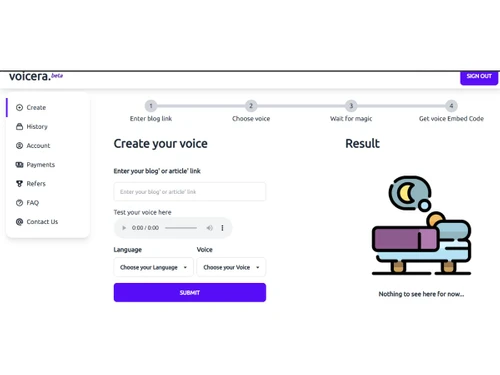
Voicera-dashboard
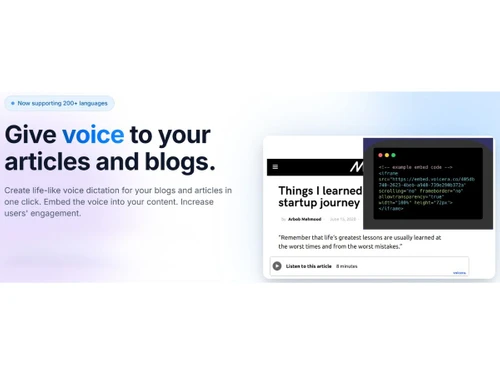
Voicera-languages
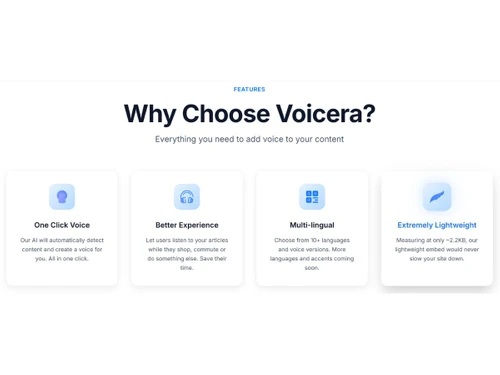
Voicera-features

Voicera

Brand: Voicera

  • No Ratings & Reviews

A text-to-speech software that gives your content a voice that feels authentic and attractive, and it turns your text into clear spoken experiences.

See More

Have you used Voicera before?

Share your insights for better experience

Add a Review
Starting Price
$9

View plans

100% Genuine
Products
Best Price
Guaranteed
Safe & Secure
Payment
  • Description

  • Pricing

  • Features

  • Specification

  • Review

  • FAQ

Starting at $9

Voicera Software Overview

What is Voicera?

Voicera is a text-to-speech software that gives real voice to written content. It can convert articles and blog posts into spoken audio in almost no time. The trusted text-to-speech system supports an easier way to access information. It is well-suited for users who prefer listening over reading. The use of Voicera continues to grow alongside rising audio consumption.

The platform is popular among creators and content publishers far and wide. It certainly helps make written ideas easier to share and understand. A large number of users count on it for better audience engagement. It continues to gain relevance in modern digital spaces. In short, it redefines and improves how your content is consumed.

Why Choose Voicera Software?

  • Built-In Listening Option: Audio plays directly within the same page. There is no need to switch any tabs or tools.
  • Global Audience Reach: Multiple languages open content to wider regions. Reach grows without rewriting everything.
  • Different Voice Styles: Tone can match the mood of the content. Serious pieces and light stories both feel rightly recorded.
  • Useful During Busy Hours: Listening naturally fits into travel or routine tasks. Reading is not required at all times.
  • Simple Setup Process: The workflow stays straightforward during regular use. No steep learning curve gets in the way.
  • Quick Turnaround Time: Audio appears shortly after adding text. Work keeps moving without long pauses or interruptions.
  • Stronger Content Presence: It's needless to say that spoken words carry more weight than silent text. The message lands more clearly.

Benefits of Voicera Software

  • Better Multitasking Support: Content can run (in the background) while doing other small tasks. Time feels more efficiently used.
  • Enhanced User Retention: Visitors tend to stay longer on pages with audio. Content feels more captivating and harder to skip.
  • Accessible Content Format: Audio helps people who struggle with heavy reading. It makes content easier to follow.
  • Flexible Learning Style: Some people absorb information better through sound. It supports different learning habits.
  • Reduced Screen Fatigue: Less reading time certainly means less strain on eyes. This feels helpful during long sessions.
  • Natural Content Experience: Hearing words feels closer to real communication. It creates a relaxed experience overall.

Voicera Pricing

Voicera price starts at USD 9.00 per month at techjockey.com. The pricing model is based on different parameters, including extra features, deployment type, and the total number of users. For further queries related to the product, you can contact our product team and learn more about the pricing and offers.

Read more

Voicera Company Details

Founded Year:  2016

Voicera is a software company that fixates to meet businesses engagement challenges with enterprise voice assistant services.

Director/Founders Krishnakant Manojkumar Singh
Company Size 1-100 Employees

Voicera Pricing & Plans

Pro
Key Features
  • Up to 50 articles
  • Priority support
  • Early feature access
  • Custom embed styling
  • Analytics dashboard
Starting at $9
    • Licenses

      Licenses
      Licenses
    • Monthly

      Monthly
      Monthly

Key Features

  • Up to 50 articles

  • Priority support

  • Early feature access

  • Custom embed styling

  • Analytics dashboard

Voicera Features

  • icon_check Text-to-Speech
    Converts written content into natural-sounding audio using AI, enabling users to listen instead of read.
  • icon_check Natural Voice Output
    Generates human-like speech with realistic tone, pacing, and pronunciation for improved listener experience.
  • icon_check Audio Generation
    Instantly turns articles into audio with minimal setup, reducing manual effort in content transformation.
  • icon_check Website Audio Embedding
    Allows easy embedding of audio players into web pages for seamless playback within content.
  • icon_check Multilingual Support
    Supports multiple languages and accents, helping content creators reach a broader global audience.
  • icon_check Accessibility support
    Enhances accessibility by enabling visually impaired or busy users to consume content via audio.
  • icon_check Cloud-Based
    Operates entirely in the cloud, eliminating the need for installation and ensuring quick scalability.
  • icon_check Real-Time Processing
    Converts text into audio quickly with minimal delay, enabling faster publishing workflows.
  • icon_check Voice Customization
    Offers various voice styles, tones, and accents to align with brand identity and audience preferences.
  • icon_check Audio Streaming
    Enables direct streaming of generated audio without requiring downloads or external tools.
  • icon_check Easy Integration
    Integrates with websites using simple scripts or APIs, ensuring quick and hassle-free implementation.
  • icon_check Scalable Infrastructure
    Handles growing content demands efficiently, making it suitable for individuals and large platforms.
  • icon_check API Access
    Provides API support for developers to automate audio generation and integrate into custom workflows.
  • icon_check SEO Enhancement
    Improves dwell time and user interaction, indirectly supporting better search engine optimization results.

Voicera Specifications

Supported Platforms
Windows Windows MacOS MacOS
Devices
Desktop Desktop
Deployment
Cloud-Based Cloud-Based
Suitable For
All Industries
Business Specific
All Businesses
Business Size
Small Business Startups Medium Business Enterprises
Customer Support
Email Communities
Language
English
Training Resources
Videos

Voicera Review

Be the First to Review

This product has no reviews yet. Be the first to leave your feedback.

Add Review

Articles for Voicera

See All Related Articles

How much does Voicera cost?

The software price starts at USD 9.00 per month at techjockey.com. The final cost may depend on different factors, such as features, usage, and number of users.

Who uses Voicera Software?

The widely trusted text-to-speech solution is mostly used by content creators, bloggers, and publishers. Many use it to make written content more engaging.

Is there a mobile app available for Voicera Software?

No, there is no mobile app available currently. The platform is mainly accessed through web-based use.

Which operating systems are compatible with Voicera Software?

The program works smoothly on Windows and macOS systems. This makes it suitable for most desktop users.

Does Voicera Software offer a free trial?

Yes, a free trial is available for new or interested users. It allows thorough testing before making any purchase decision.

How does Voicera Software function?

Voicera converts written content into spoken audio using artificial intelligence. This helps turn articles into easy-to-listen-to formats.

20,000+ Software Listed

Best Price Guranteed

Free Expert Consultation

2M+ Happy Customers

Terms and Condtions

close

Users with registered businesses can purchase goods from merchants on the platform to satisfy their business needs. Users are not permitted to utilize any products acquired through the platform for resale, advertising, business, or further distribution.

For each purchase made, users will receive a Tax Invoice (or 'GST invoice') that includes specific details such as:

  • the GSTIN of the user associated with their registered business, and

  • the specified Entity Name for their business.

It should be noted that not all products are eligible for GST Invoice. Only the products displayed by participating sellers with the 'GST-based Invoice Available' callout on the product description page would qualify.

Certain goods and services are not eligible to get a GST Invoice, including items with VAS, i.e., Value Added Services (e.g., Total Mobile Protection/Assured Buyback) and those involving an exchange offer at the time of purchase.

Users must ensure the accuracy of the GSTIN, and business entity name provided for the GST Invoice. Requests for corrections into GST Invoice would not be accommodated by Techjockey.com or any Seller, and any issues arising from user-provided information are the sole responsibility of users.

Techjockey.com is not liable for the GST Invoice or any associated input tax credit. To efficiently claim an input tax credit, users should select the registered place of business address as per the GST authority's data and follow the provisions of the GST Act and rules.

To claim an input tax credit, the delivery and billing addresses must match. Furthermore, input tax credits will not be granted if the delivery address and GSTIN on the invoice are from different states. In case of incorrect GST details provided during the order placement, the order will be canceled automatically.