USA
USA UAE
UAESmall Business
Designed for startups and growing businesses

See More


Brand: MMI SOFTWARES PVT. LTD.
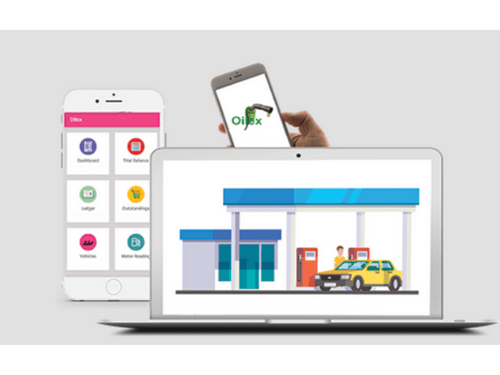
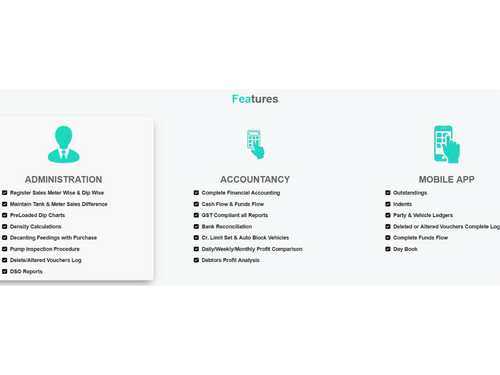
Oilex Petrol Pump is a petrol pump management software that supervises all your regular activities. The petrol pump management software offers modules that cover accounting & bookkeeping, inventory supervision, billing, and taxation. It is an exclusive software that also offers a mobile application. Petrol Pump owners can effectively create a path to monitor your refueling stations. Oilex Pet...
See MoreHave you used Oilex Petrol Pumps before?
Share your insights for better experience
Brand: MMI SOFTWARES PVT. LTD.
Founded Year: 1997
MMI Softwares Pvt. Ltd. was established in Jan-1997 by a team of core software professionals endeavoring to provide best IT solutions to the industry.
Looking for The Right Pricing?
Share your requirements and get a plan built around your business.
Price Available on Request
Get personalised Oilex Petrol Pumps pricing that fits your needs. Our team will connect with you.
 Sales Management Point of Sale (POS) Billing & Invoicing Stock Management Accounting & Taxation CRM & Loyalty Alerts Role-based access
  Windows
  Desktop
  Perpetual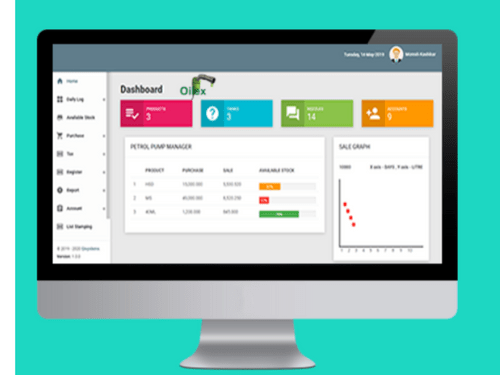
Small Business
Designed for startups and growing businesses
Medium Business
Built for business growth and flexibility
Enterprises
Designed for complex and large-scale business needs
4.5
Out of 5

Overall Rating
Based on
3 Verified Reviews
Rating Breakdown
90% Recommend this Product
Add ReviewUsers generally appreciate Oilex Petrol Pumps for its user-friendly interface and efficient management features, which facilitate business development and streamline operations such as inventory control and financial reporting. Many highlight the prompt customer support and ease of installation, contributing to a positive overall experience. However, the reviews do not indicate any significant drawbacks or limitations, suggesting a strong satisfaction among users with their daily usage of the software.

Aug 22, 2018
Techjockey Verified
“User friendly”
Pros
Clients Friendly programming to upgrade my business development, Good help work from organization.
Cons
NO CONS
Jan 14, 2019
Techjockey Verified
“Print Check”
Pros
It is a far reaching petroleum siphon the executives programming which aides in charging, simple sustaining of information, stock control, sending SMS and messages, getting ready money related reports, transport the board, check printing, and considerably more.
Cons
NO CONS
Jun 19, 2018
Techjockey Verified
“great experience”
Pros
Really quick and easy transaction. Received email with code and clear instructions to install immediately. Been using the software every day since purchasing and installing without any issues. Very good experience. Thank you!
Cons
N/A

Oilex Petrol Pumps
Price On Request
Desktop
Mobile
Web based
On Premises
Windows
Mac OS

PetroPulse360
₹ 999
Desktop
Mobile
Web based
On Premises
Windows
Mac OS

My Lucky Meter
₹ 10000
Desktop
Mobile
Web based
On Premises
Windows
Mac OS

Petro Genius
₹ 13500
Desktop
Mobile
Web based
On Premises
Windows
Mac OS

MuePetro
₹ 16000
Desktop
Mobile
Web based
On Premises
Windows
Mac OS

PetroMeter
Price On Request
Desktop
Mobile
Web based
On Premises
Windows
Mac OS

Accord Fuel Management System
₹ 500000
Desktop
Mobile
Web based
On Premises
Windows
Mac OS

PumpCount
₹ 15000
Desktop
Mobile
Web based
On Premises
Windows
Mac OS

SOFTGUN Petrol Pump Software
Price On Request
Desktop
Mobile
Web based
On Premises
Windows
Mac OS

PetroTally
Price On Request
Desktop
Mobile
Web based
On Premises
Windows
Mac OS

PetroSoft India
₹ 8000
Desktop
Mobile
Web based
On Premises
Windows
Mac OS
(0) Product(s) selected
Starting Price:
₹999 /Month
Starting Price:
₹10,000
Available
Price on Request
Starting Price:
₹8,000

Starting Price:
₹25,000 /Quantity

Available
Price on Request

Available
Price on Request

Available
Price on Request

Available
Price on Request

Available
Price on Request

Available
Price on Request
Yes, Oilex is an entirely GST compliant software. It even allows you to change the GST rates to keep updated with the current regulations.
Yes, Oilex can be used for tax calculation. You can check for your past transactions and create a comprehensive tax sheet for yourself.
Monthly or yearly subscription of the software includes updates. For single purchasers, updates have to be bought separately.
Oilex Petrol Pump software utilizes a hybrid way of data storage where, it saves most of the data on PC and creates a cloud backup whenever you need.
Yes, Oilex petrol pump software offers a free trial for interested customers. Please request a call to avail it, our sales team will contact you.
20,000+ Software Listed
Best Price Guranteed
Free Expert Consultation
2M+ Happy Customers
Terms and Condtions

Users with registered businesses can purchase goods from merchants on the platform to satisfy their business needs. Users are not permitted to utilize any products acquired through the platform for resale, advertising, business, or further distribution.
For each purchase made, users will receive a Tax Invoice (or 'GST invoice') that includes specific details such as:
the GSTIN of the user associated with their registered business, and
the specified Entity Name for their business.
It should be noted that not all products are eligible for GST Invoice. Only the products displayed by participating sellers with the 'GST-based Invoice Available' callout on the product description page would qualify.
Certain goods and services are not eligible to get a GST Invoice, including items with VAS, i.e., Value Added Services (e.g., Total Mobile Protection/Assured Buyback) and those involving an exchange offer at the time of purchase.
Users must ensure the accuracy of the GSTIN, and business entity name provided for the GST Invoice. Requests for corrections into GST Invoice would not be accommodated by Techjockey.com or any Seller, and any issues arising from user-provided information are the sole responsibility of users.
Techjockey.com is not liable for the GST Invoice or any associated input tax credit. To efficiently claim an input tax credit, users should select the registered place of business address as per the GST authority's data and follow the provisions of the GST Act and rules.
To claim an input tax credit, the delivery and billing addresses must match. Furthermore, input tax credits will not be granted if the delivery address and GSTIN on the invoice are from different states. In case of incorrect GST details provided during the order placement, the order will be canceled automatically.