 USA
USA UAE
UAESmall Business
Designed for startups and growing businesses
See More





Brand: Okta
Okta is a leading identity and access management software to secure every identity - from customers to employees. Its vision is to create a world where everyone can safely access any technology. It helps add authentication and authorization factors to business applications and ensures secure access. They promise to not only protect the identity of the customers but also welcome suggestions by ...
See MoreHave you used Okta before?
Share your insights for better experience
Brand: Okta
Founded Year: 2009
Okta is The World’s Identity Company™. We secure Identity, so everyone is free to safely use any technology. Our customer and workforce solutions empower businesses and developers to use the power of Identity to drive security, efficiencies, and success — all while protecting their users, employees,
 Seamless Security User Access Control Identity store Integration One Central Control Point User Access Auditing Lifecycle Management

Watch the demo video to explore key features, real workflows, and how the software fits your business needs.
 Windows
  iOS
iOS  Android MacOS
  Linux
Linux  Desktop
  Mobile
  Tablet
  iPad
iPad  Cloud-Based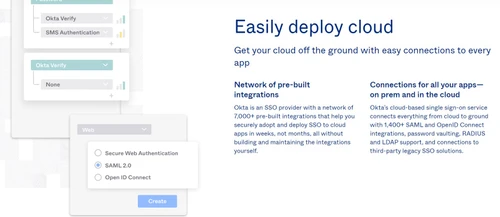
Small Business
Designed for startups and growing businesses
Medium Business
Built for business growth and flexibility
Enterprises
Designed for complex and large-scale business needs
4.4
Out of 5

Overall Rating
Based on
11 Verified Reviews
Rating Breakdown
86% Recommend this Product
Add ReviewOverall, users appreciate Okta for its strong reputation, extensive integration capabilities, and reliable security features, which contribute to improved user management and compliance. Many find the self-service options beneficial in reducing helpdesk workload. However, there are recurring concerns about hidden costs associated with additional modules, complexities in configuring legacy systems, and challenges with multi-factor authentication that can hinder user experience. Smaller teams may struggle with the platform's extensive features and associated costs, making it less ideal for them.
Pros
"Okta has a strong reputation, large community, many integrations, support resources, docs, marketplace. The reliability, uptime, and trust in the vendor give me confidence."
"Okta works well when integrating on-prem Active Directory, LDAP, etc., with cloud apps, letting us manage hybrid identity."
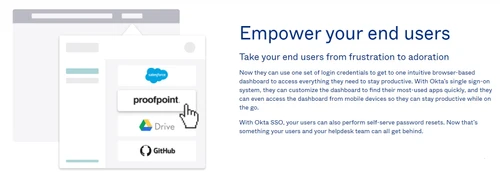
"Self-service password reset, user profile management, etc., reduce helpdesk load. Users like being able to fix minor pain points themselves."
Cons
"When MFA device is lost or unavailable, recovery can be more painful; also, some users complain about too many forced password resets or strict password policy causing friction. "
"Setting up correct audit policies, log retention, fine-grained permissions often requires deep expertise or consulting. Mistakes at configuration become security risk."
"For smaller teams, some features feel overkill; the cost and overhead (training, admin) might not justify full usage of all capabilities. "


Oct 13, 2025
Techjockey Verified
“Strong Brand, Community & Ecosystem; But Watch Out for Hidden Costs”
I chose Okta partly because I trusted the brand, knew many others using it, and integration with my ecosystem was easier. But during budgeting I discovered we needed more modules than we initially thought, which bumped up cost.
Pros
Okta has a strong reputation, large community, many integrations, support resources, docs, marketplace. The reliability, uptime, and trust in the vendor give me confidence.
Cons
But “base cost” often doesn’t include all modules you’ll need. Add-ons for advanced security, custom policies, governance, etc., increase cost. Some customers complain about unclear licensing or expensive mandatory features.
Reason to switch
I switched from Hexnode that lacked mature support or ecosystem. Okta cost more but gave me more integrations, trust, and fewer surprises—though financial planning had to adapt.
Sep 9, 2025
Techjockey Verified
“Good for Hybrid Environments, but On-Prem Sync and Legacy Apps Are Tricky”
We have a mix of on-prem Windows servers, old line-of-business apps, and cloud services. Okta helped unify identity but integrating legacy apps or syncing attributes between local AD and Okta required custom work.
Pros
Okta works well when integrating on-prem Active Directory, LDAP, etc., with cloud apps, letting us manage hybrid identity.
Cons
Some legacy apps or internal tools don’t support modern auth (SAML/OIDC), require custom connectors. Sync issues or latency between on-prem directory changes and Okta reflect. Also, sometimes attribute mapping (DNs, manager fields etc.) is inconsistent.
Reason to switch
I switched because our previous system forced us to maintain separate identity systems for cloud vs on-prem. With Okta, we hoped to unify everything, though not all legacy systems play nicely.
Aug 28, 2025
Techjockey Verified
“Useful for User Self-Service, But Occasional Frustrations with MFA & Recovery”
I used to spend time helping users when they forgot passwords or couldn’t access apps. Okta’s self-service features cut down those tickets. But there have been scenarios where someone lost their phone and backup options were not obvious, which delayed access.
Pros
Self-service password reset, user profile management, etc., reduce helpdesk load. Users like being able to fix minor pain points themselves.
Cons
When MFA device is lost or unavailable, recovery can be more painful; also, some users complain about too many forced password resets or strict password policy causing friction.
Reason to switch
I switched from our old SSO which had no self-service options, so helpdesk was overwhelmed. Okta improved that.

Okta
Price On Request
Desktop
Mobile
Web based
On Premises
Windows
Mac OS

Microsoft Azure Active Directory
₹ 696
Desktop
Mobile
Web based
On Premises
Windows
Mac OS

Avatier
Price On Request
Desktop
Mobile
Web based
On Premises
Windows
Mac OS

JumpCloud SSO
Price On Request
Desktop
Mobile
Web based
On Premises
Windows
Mac OS

miniOrange
Price On Request
Desktop
Mobile
Web based
On Premises
Windows
Mac OS

Atlassian Crowd
Price On Request
Desktop
Mobile
Web based
On Premises
Windows
Mac OS

Rublon
Price On Request
Desktop
Mobile
Web based
On Premises
Windows
Mac OS

OneLogin
Price On Request
Desktop
Mobile
Web based
On Premises
Windows
Mac OS

Forgerock SSO
Price On Request
Desktop
Mobile
Web based
On Premises
Windows
Mac OS

Imprivata SSO
Price On Request
Desktop
Mobile
Web based
On Premises
Windows
Mac OS

SecureAuth IDP
Price On Request
Desktop
Mobile
Web based
On Premises
Windows
Mac OS
(2) Product(s) selected
Available
Price on Request

Available
Price on Request

Available
Price on Request
Okta identity access management software is compatible with Windows, Android and iOS operating systems.
Okta identity access management software app is available for Android and iOS mobile devices.
Okta identity access management software pricing is available on request at techjockey.com.
Okta identity access management software is typically used in all industry types.
Okta identity access management software demo is available for free with TechJockey.com.
Okta free plan supports up to 100 monthly active users and there is no limit in terms of features.
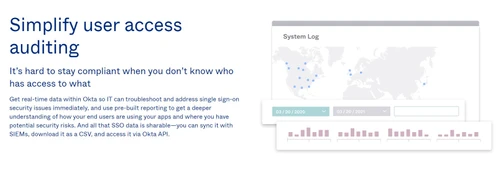
Okta identity access management software helps with user access auditing and user access control. It's a complete solution for anyone looking for lifecycle management and identity store integration.
Yes, Okta is safe to use. It protects your personal information with extensive security measures that are audited by third parties.
No, Okta isn't OAuth.
0 0
Okta is a SaaS (Software-as-a-Service) provider that delivers cloud-based identity and access management solutions, enabling secure and simplified user authentication across applications and devices.
0 0
Yes. Okta acts as the SAML Identity Provider (IdP), handling Single Sign-On (SSO) and Multi-Factor Authentication (MFA) to authenticate users. After authentication, Okta issues a SAML assertion, which is passed back to the client applications through the user’s browser.
0 0
No, Okta is not the same as SSO.
0 0
Okta is a customizable and secure platform to get scalable authentication right into the platform.
0 0
20,000+ Software Listed
Best Price Guranteed
Free Expert Consultation
2M+ Happy Customers
Terms and Condtions

Users with registered businesses can purchase goods from merchants on the platform to satisfy their business needs. Users are not permitted to utilize any products acquired through the platform for resale, advertising, business, or further distribution.
For each purchase made, users will receive a Tax Invoice (or 'GST invoice') that includes specific details such as:
the GSTIN of the user associated with their registered business, and
the specified Entity Name for their business.
It should be noted that not all products are eligible for GST Invoice. Only the products displayed by participating sellers with the 'GST-based Invoice Available' callout on the product description page would qualify.
Certain goods and services are not eligible to get a GST Invoice, including items with VAS, i.e., Value Added Services (e.g., Total Mobile Protection/Assured Buyback) and those involving an exchange offer at the time of purchase.
Users must ensure the accuracy of the GSTIN, and business entity name provided for the GST Invoice. Requests for corrections into GST Invoice would not be accommodated by Techjockey.com or any Seller, and any issues arising from user-provided information are the sole responsibility of users.
Techjockey.com is not liable for the GST Invoice or any associated input tax credit. To efficiently claim an input tax credit, users should select the registered place of business address as per the GST authority's data and follow the provisions of the GST Act and rules.
To claim an input tax credit, the delivery and billing addresses must match. Furthermore, input tax credits will not be granted if the delivery address and GSTIN on the invoice are from different states. In case of incorrect GST details provided during the order placement, the order will be canceled automatically.

