linkedin
Microsoft Azure Active Directory logo
Microsoft Entra ID
Microsoft-Entra ID features
Microsoft-Entra-ID identity

Microsoft Azure Active Directory

Brand: Microsoft Corporation

  • 4.4

  • 5 Ratings

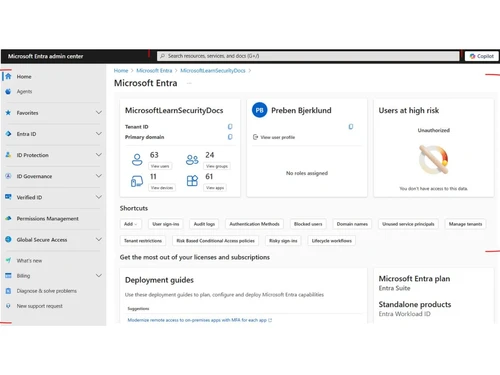
Microsoft Azure Active Directory (Azure AD) is a cloud-based identity and access management service that provides identity and access management for employees and external resources.

See More

Have you used Microsoft Azure Active Directory before?

Share your insights for better experience

Add a Review
Starting Price 7% OFF
₹696 excl.GST  ₹752
₹ 821 incl. GST

View plans

offer Save upto 18%, Get GST Invoice on your business purchase T&C
offer Buy Now & Pay Later, Check offer on payment page.
Buy Now
100% Genuine
Products
Best Price
Guaranteed
Safe & Secure
Payment
  • Description

  • Pricing

  • Features

  • Specification

  • Review

  • Compare

  • Alternatives

  • FAQ

Starting at ₹696
Buy Now

Microsoft Azure Active Directory Software Overview

What is Microsoft Azure Active Directory?

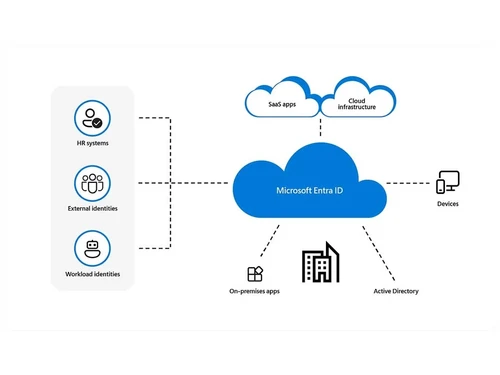
Microsoft Azure Active Directory (Azure AD) is a cloud-based identity and access management service that provides identity and access management for employees and external resources. It enables single sign-on, multifactor authentication, and conditional access to protect against cybersecurity attacks. It is also the backbone of Office 365 and syncs with on-premise Active Directory and other cloud-based systems.

How is Azure Active Directory Integration helpful for enterprises?

Enterprises can deploy applications and streamline the entire sign-in process in an efficient manner. They can also automate user provisions and enable the sign-on as per their requirements. Here is a list of actions, focusing on how Azure Active Directory integration is helpful for enterprises:

  1. Data Security: Companies get to extend the features of Azure AD within their in-house applications, helping their customers in self-protecting their valuable data and resources in an efficient manner. 
  2. Reduction of Support Cost: The overall cost related to maintenance and administration of access and identity management is taken care of by Azure AD.
  3. More Focus Time: Managers can focus more on designing innovative features for their applications and devote less time to build up solutions for access and identity management.    

Pricing of Microsoft Azure Active Directory

The pricing of Microsoft Azure Active Directory starts at INR 696 at techjockey.com.

Benefits of Microsoft Azure Active Directory

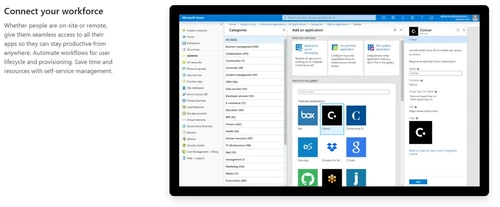
  1. Supports 1000+ Saas applications: Microsoft Azure Active Directory supports multiple pre-integrated SaaS-based applications like Ingram Micro, LeadTax, Adobe Connect, Zoom and more. Thus, it enables organizations to simplify their single sign-on.
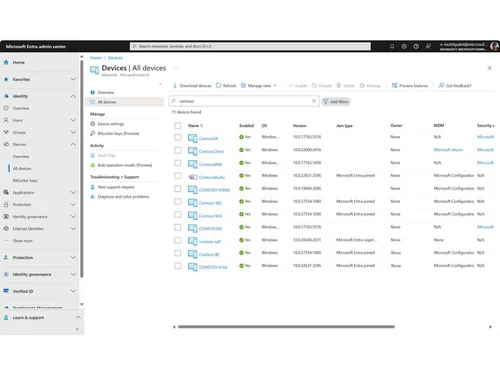
  2. Device Management: With Microsoft Azure Active Directory, enterprises can manage their on-premise or cloud devices. Thus limiting the access levels of individual devices to critical data as per their role or requirement. 
Read more

Microsoft Corporation Company Details

Founded Year:  1975

Microsoft Corporation is an American multinational technology company with headquarters in Redmond, Washington.

Director/Founders Paul Allen , Bill Gates
Company Size 1000+ Employees

Microsoft Azure Active Directory Pricing & Plans

Microsoft Entra ID P1

Calculated Price

696 ₹752
SAVE UPTO 7%
Exclusive of all taxes
  • Options

    • Quantity

      Quantity
      Quantity
    • Monthly

      Monthly
      Monthly

Key Features

  • Conditional Access

  • Role-based access control (RBAC)

  • Advanced group management

  • Cross-tenant user synchronization

  • Session lifetime management

Microsoft Entra ID P2

Calculated Price

996 ₹1300
SAVE UPTO 23%
Exclusive of all taxes
  • Options

    • Quantity

      Quantity
      Quantity
    • Monthly

      Monthly
      Monthly

Key Features

  • All Features of Microsoft Entra ID P1

  • Risk-based Conditional Access

  • Real-time dynamic sign-in assessment

  • Real-time dynamic user assessment

Microsoft Azure Active Directory Features

  • icon_check Advanced Group Access Management
    Organisations can generate dynamic groups, create usage guidelines, delegate permissions to individual members and set fixed
  • icon_check Conditional Access
    Enterprises can apply conditional access depending on the accurate location, group and current status of a particular device. The
  • icon_check Vulnerabilities & Risky Accounts Detection
    Microsoft Azure Active Directory detects potential risks to the data saved within its portal. Enterprises can even export the
  • icon_check Risk Events Investigation
    The software conducts detailed searches to identify suspicious events related to its user accounts. It also offers a wide variety
  • icon_check Risk Based Conditional Access policies
     Organisations can generate condition-based access policies by incorporating Identity Protection user risk detections offered by
  • icon_check Privileged Identity Management (PIM)
    The particular feature can be used to control, monitor and manage the access rights to critical resources within an organization
  • icon_check Access Reviews
    Organisations can monitor the access rights to their in-house applications and review the user’s list at regular intervals to
  • icon_check Entitlement Management
     The identity governance module helps enterprises in monitoring the access lifecycles and their on scale identities by
  • icon_check Core Identity and Access Management
    Admins can control the access right to on-premise solutions and cloud services for individual employees without compromising on
  • icon_check External Identities
    With the self-service external identity feature offered by the software, companies can allow their clients to sign up in a
  • icon_check Identity and Access Management for Office 365 Apps
    With Microsoft Azure Active Directory, companies get access to Service Level Agreements and can also allow their cloud users to
  • icon_check Premium Features
    The software offers premium features like access management of individual groups, updated usage and security reports, discovery
  • icon_check Hybrid Identities
    Microsoft Azure Active Directory offers on-cloud and on-premises based capabilities, generating a single user identity for

Microsoft Azure Active Directory Specifications

Supported Platforms
Windows Windows
Devices
Desktop Desktop
Deployment
Cloud-Based Cloud-Based
Suitable For
All Industries
Business Specific
All Businesses
Language
English

Explore the Best Alternative Solutions Similar to Your Business Size and Needs

Microsoft Azure Active Directory Review

4.4

Out of 5

img

Overall Rating

Based on
5 Verified Ratings

Rating Breakdown

  • Features 4.6
  • Value for Money 4.2
  • Ease of Use 4.4
  • Customer Support 4.6

94% Recommend this Product

Add Review

Techjockey Trusted Reviews from Verified Users

No reviews are currently available for Microsoft Azure Active Directory. Discover similar Single Sign-On (SSO) Software reviews

  • Okta

    4.5

    Whats great - Okta has a strong reputation, large community, many integrations, support resources, docs, marketplace. The reliability, upti... read more

  • miniOrange

    4.4

    Whats great - Lightweight SaaS/IAM, affordable for small teams, easy implementation read more

  • Hexnode

    4.4

    Whats great - Hexnode has all the features that we require. Excellent for using kiosk mode. A really good MDM solution for small to medium ... read more

Compare Microsoft Azure Active Directory With other Single Sign-On (SSO) Software

Products
Ratings
Pricing
Device Supported
Deployment
Supported Platforms
  • img

    Microsoft Azure Active Directory

  • 4.4

  • ₹ 696.00 excl. GST

  • Desktop

    Mobile

  • Web based

    On Premises

  • Windows

    Mac OS

  • img

    miniOrange

  • 4.4

  • Price On Request

  • Desktop

    Mobile

  • Web based

    On Premises

  • Windows

    Mac OS

  • img

    JumpCloud SSO

  • 4.6

  • Price On Request

  • Desktop

    Mobile

  • Web based

    On Premises

  • Windows

    Mac OS

  • img

    OneLogin

  • 4.4

  • Price On Request

  • Desktop

    Mobile

  • Web based

    On Premises

  • Windows

    Mac OS

  • img

    Atlassian Crowd

  • 4.4

  • Price On Request

  • Desktop

    Mobile

  • Web based

    On Premises

  • Windows

    Mac OS

  • img

    Avatier

  • 4.5

  • Price On Request

  • Desktop

    Mobile

  • Web based

    On Premises

  • Windows

    Mac OS

  • img

    Rublon

  • 4.5

  • Price On Request

  • Desktop

    Mobile

  • Web based

    On Premises

  • Windows

    Mac OS

  • img

    Forgerock SSO

  • 4.4

  • Price On Request

  • Desktop

    Mobile

  • Web based

    On Premises

  • Windows

    Mac OS

  • img

    Imprivata SSO

  • 3.7

  • Price On Request

  • Desktop

    Mobile

  • Web based

    On Premises

  • Windows

    Mac OS

  • img

    SecureAuth IDP

  • 4.0

  • Price On Request

  • Desktop

    Mobile

  • Web based

    On Premises

  • Windows

    Mac OS

  • img

    Okta

  • 4.4

  • Price On Request

  • Desktop

    Mobile

  • Web based

    On Premises

  • Windows

    Mac OS

(0) Product(s) selected

Microsoft Azure Active Directory Alternatives

See All Microsoft Azure Active Directory Alternatives

What type of compliance offerings are available with Microsoft Azure Active Directory?

Microsoft Azure Active Directory is compliant with CIS Benchmark, DFARS, NIST CFS, FedRAMP, SOC, ISO 27701 and more enabling companies to comply with regional, national and international requirements in an efficient manner.

Does Microsoft Azure Active Directory offer identity protection-related notifications?

The software sends users at a risk detected emails and weekly digest emails, helping out organizations in managing all the detected risks in an efficient manner.

Can I get a demo of Microsoft Azure Active Directory?

Yes, you can request an online demo of Microsoft Azure Active Directory. Our experts will reach you out as per the time and date mentioned within your demo schedule.

What type of open industry standards are supported by Microsoft Azure Active Directory?

The software supports open industry standards like SAML, OAuth 2.0 and SCIM, enabling hassle-free integration.

Does Microsoft Azure Active Directory have a mobile app?

No, Microsoft Active Directory does not have a mobile app as of now.

How much does Microsoft Azure Active Directory cost?

The pricing of Microsoft Azure Active Directory starts at INR 696 at techjockey.com.

How much does Microsoft Azure Active Directory cost?

The pricing of Microsoft Azure Active Directory starts at INR 500 at techjockey.com.

20,000+ Software Listed

Best Price Guranteed

Free Expert Consultation

2M+ Happy Customers

Terms and Condtions

close

Users with registered businesses can purchase goods from merchants on the platform to satisfy their business needs. Users are not permitted to utilize any products acquired through the platform for resale, advertising, business, or further distribution.

For each purchase made, users will receive a Tax Invoice (or 'GST invoice') that includes specific details such as:

  • the GSTIN of the user associated with their registered business, and

  • the specified Entity Name for their business.

It should be noted that not all products are eligible for GST Invoice. Only the products displayed by participating sellers with the 'GST-based Invoice Available' callout on the product description page would qualify.

Certain goods and services are not eligible to get a GST Invoice, including items with VAS, i.e., Value Added Services (e.g., Total Mobile Protection/Assured Buyback) and those involving an exchange offer at the time of purchase.

Users must ensure the accuracy of the GSTIN, and business entity name provided for the GST Invoice. Requests for corrections into GST Invoice would not be accommodated by Techjockey.com or any Seller, and any issues arising from user-provided information are the sole responsibility of users.

Techjockey.com is not liable for the GST Invoice or any associated input tax credit. To efficiently claim an input tax credit, users should select the registered place of business address as per the GST authority's data and follow the provisions of the GST Act and rules.

To claim an input tax credit, the delivery and billing addresses must match. Furthermore, input tax credits will not be granted if the delivery address and GSTIN on the invoice are from different states. In case of incorrect GST details provided during the order placement, the order will be canceled automatically.