linkedin

Get Free Advice

Get Quote

ONES com logo
Gallery ONES Product Overview | ONES.com
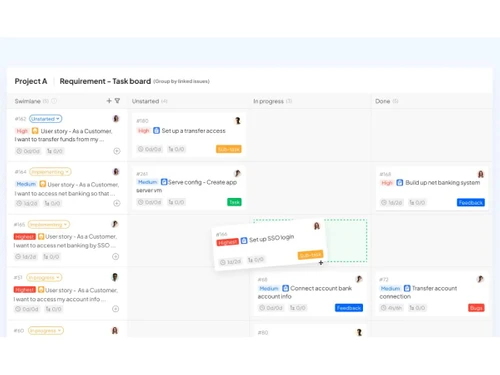
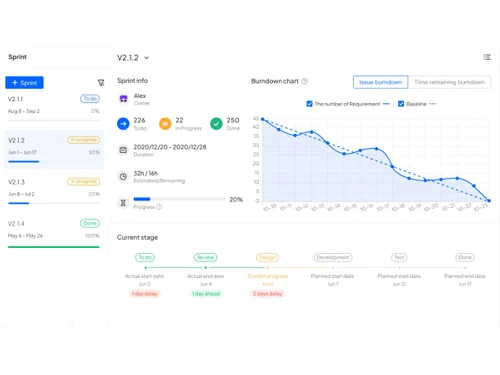
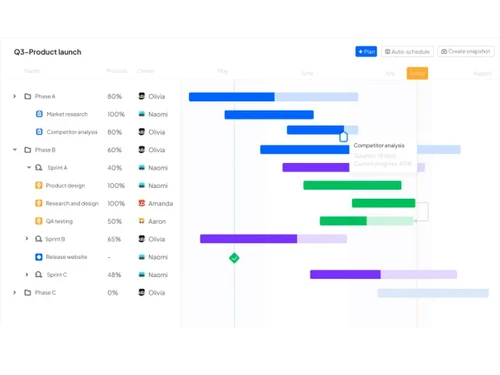
ones-board ones-charts ones-launch
play ONES Product Overview | ONES.com
ones-board
ones-charts
ones-launch

ONES com

Brand : ONES

Starting at

$ 10

Save Extra with 2 Offers

  • offer_icon Save upto 18%, Get GST Invoice on your business purchase |
  • offer_icon Buy Now & Pay Later, Check offer on payment page.

ONES com helps teams plan, track, and manage projects efficiently. ...Read more

  • AdviceGet Instant Expert
    Advice
  • PaymentSafe & Secure
    Payment
  • GuaranteedAssured Best Price
    Guaranteed

ONES com Software Pricing, Features & Reviews

What is ONES com?

ONES.com is an all-in-one project management software that helps teams plan, track, and deliver work efficiently.

It supports agile and waterfall workflows, integrates issue tracking, documentation (wiki), testing, release management, and more, all in one tool. It offers AI-powered insights, flexible views like Kanban, Gantt, list, calendar, and is suitable for both startups and enterprises.

It includes enterprise-grade security, role-based access, cloud or on-premises deployment, and has tools for collaboration, knowledge sharing, and workflow automation.

The platform aims to turn software development into a more standardized, assembly-line process rather than a fragmented one.

Why Choose ONES com Software?

  • All-in-One Platform: Combines project planning, task management, bug tracking, documentation, and reporting in one system.
  • Supports Multiple Workflows: Adapts easily to Agile, Waterfall, hybrid, or custom workflows.
  • Multiple Viewing Options: Offers Gantt, Kanban, List, Calendar, and Tree views for flexibility.
  • Built-in Wiki Integration: Provides an internal knowledge base for documentation and sharing.
  • Enterprise-Grade Security: Ensures data safety with SOC2, ISO27001, and ISO9001 compliance.
  • Easy Migration: Enables smooth transfer from Jira, Confluence, and other tools.

Benefits of ONES com Software

  • Resource Management: Tracks workloads, capacity, and performance with advanced analytics.
  • Unified Knowledge and Work Management: Merges documentation and project execution in one place.
  • Flexible Deployment Options: Available for both cloud and on-premises deployment.
  • Advanced Reporting Tools: Provides real-time dashboards and portfolio-level insights.
  • Global Enterprise Adoption: Trusted by 200,000+ businesses worldwide.
  • Cross-Team Collaboration: Connects developers, QA, HR, and operations on one unified platform.

ONES com Pricing

ONES com price starts at USD 10 at techjockey.com.The pricing model is based on different parameters, including extra features, deployment type, and the total number of users. For further queries related to the product, you can contact our product team and learn more about the pricing and offers.

ONES com Pricing & Plans

Standard
  • Team size-3
  • Maximum number of seats-Unlimited
  • Unlimited storage
  • Issues, sprints and projects-Unlimited
  • Project templates
  • Backlog
  • Public and private view
    • Seat
    • Monthly
Starting at $ 10
Business
  • Team size-3
  • Maximum number of seats-Unlimited
  • Unlimited storage
  • Issues, sprints and projects-Unlimited
  • Project templates
  • Backlog
  • Project portfolio management
  • Public and private view
    • Seat
    • Monthly
Starting at $ 24

Get ONES com Demo

We make it happen! Get your hands on the best solution based on your needs.

Interacted

ONES com Features

Core Functionalities

  • icon_check Pipeline Management Streamlines project flow from start to finish.
  • icon_check Workflow Management Automates and standardizes work processes
  • icon_check Resource Management Allocates and monitors team resources efficiently.
  • icon_check Risk Management Identifies, tracks, and mitigates project risks
  • icon_check Task Management Organizes tasks with priority and deadlines.
  • icon_check Sprint Management Manages Agile sprints for faster delivery.
  • icon_check Backlog Management Manage the product and sprint backlogs with prioritized tasks
  • icon_check Workforce Management Involves managing and optimizing team member workloads, schedules, and productivity?
  • icon_check Incident Management Manages unforeseen incidents or disruptions within a project, often found in industries requiring high reliability, such as IT or
  • icon_check Issue Management Identifies, tracks, and resolves problems or issues that arise during project execution

Task & Workflow Management

  • icon_check Workflow Automation Reduces manual work through automated steps.
  • icon_check Task Dependencies Links related tasks to maintain sequence.
  • icon_check Notifications/Reminders Keeps teams updated on deadlines and changes.
  • icon_check Task Creation & Assignment Create, assign, and manage tasks.
  • icon_check Task Prioritization Assign priority levels to tasks to ensure the most critical activities are addressed first.
  • icon_check Sub-Task Creation Break down complex tasks into smaller, manageable sub-tasks for better tracking and execution.
  • icon_check Recurring Tasks Schedule tasks to repeat at regular intervals to streamline ongoing project activities.
  • icon_check Automated Task Assignment Automatically assigns tasks to team members based on workload, availability, and skill sets, helping to distribute work evenly as

Task Views

  • icon_check Gantt Chart Visualizes project timelines and dependencies.
  • icon_check Kanban Boards Displays tasks in columns for easy tracking.
  • icon_check Timeline View Shows project schedules in a linear format
  • icon_check Mind Map Helps in brainstorming and structuring ideas visually
  • icon_check Task List A simple list view of all tasks, including details such as due dates, assignees, and statuses.
  • icon_check Calendar View Displays tasks and deadlines on a calendar.
  • icon_check Spreadsheet View Tasks are displayed in a table format similar to a spreadsheet.

Progress & Performance Tracking

  • icon_check Time Tracking Monitors time spent on tasks and projects
  • icon_check Milestone Tracking Tracks key project achievements
  • icon_check Team Capacity Tracking Shows the distribution of tasks among team members for balancing workload and avoiding overburdening

Resource & Budget Management

  • icon_check Automated Resource Allocation Automatically adjusts resource allocation, such as server capacity, storage, or bandwidth, based on current project needs during
  • icon_check Budget Planning Set a spending plan for your project based on data insights.
  • icon_check Dynamic Budgeting Tracks project expenses and scales budget management features dynamically based on the project's financial requirements.
  • icon_check Risk Scoring System Quantify and score potential project risks based on severity.
  • icon_check Workload Distribution Distributes tasks and processes across team members or systems to prevent overloading any resource, ensuring balanced workloads
  • icon_check Auto Scaling Dynamically scale resources (e.g., team size, server resources) based on project requirements.

Collaboration & Communication

  • icon_check Real-Time Collaboration Enables instant teamwork across departments
  • icon_check File Sharing & Document Collaboration Allows co-editing and file access.
  • icon_check Integrated Chat & Messaging Real-time communication with team members.
  • icon_check Version Control Track changes made to documents and files.

Access Control & Security

  • icon_check Multi-Factor Authentication (MFA) Adds an extra layer of login security.
  • icon_check User Access Management Controls who can access what data.
  • icon_check Activity Logs Track user activity within the project management software
  • icon_check Data Backup and Disaster Recovery Ensure data security with regular backups and recovery plans.
  • icon_check Compliance Tracking Ensure adherence to relevant data and security compliance (e.g., GDPR, CCPA).

Customization

  • icon_check Custom Fields Add specific data fields as per project needs
  • icon_check Custom Views Personalize data display formats
  • icon_check Templates Use pre-defined project and timeline structures to save time.
  • icon_check Task Customization Modify tasks to include custom fields, tags, and properties to fit specific project needs.
  • icon_check Custom Layouts Design the software interface to fit your workflow.

Integrations

  • icon_check Communication and Collaboration Tools Connects with platforms like Slack or Teams.
  • icon_check File Storage and Sharing Integrates with tools like Google Drive or Dropbox.
  • icon_check Time Tracking Tools Syncs with popular time-tracking apps.
  • icon_check Automation Tools Links with workflow automation systems.
  • icon_check AI-Based Integrations Uses AI for predictive analytics and automation.
  • icon_check Third Paty Integration Integration with external tools via third party applications
  • icon_check CRM Integration Sync with CRM systems to align customer relationships and sales data with project tasks and deliverables.
  • icon_check Issue Tracking Tools Link issue tracking software to manage and resolve bugs and issues alongside your project management processes.
  • icon_check API Integration Allow for custom integrations through APIs
  • icon_check ERP Integration Connect ERP systems to unify project management with broader business operations, including finance, HR, and procurement.

Reporting & Analytics

  • icon_check Dashboards Offers real-time visual insights into projects
  • icon_check Project Progress Reports Provides detailed performance summaries.
  • icon_check Benchmarking Compare project performance against industry standards or internal benchmarks.
  • icon_check Resource Reports Allocation and utilization of resources (people, equipment, materials).
  • icon_check Risk Reports Identify, assess, and propose mitigation strategies for potential project risks.
  • icon_check Workload Reports Analyze workload distribution among team members, identify potential imbalances.
  • icon_check Timesheet Reports Track time spent on tasks by team members, assess project efficiency and billing accuracy.
  • icon_check Sprint Reports Track progress within development sprints.
  • icon_check Burndown & Burnup Charts Track progress towards sprint goals to manage progress and respond accordingly.
  • icon_check Bottleneck Reports Identification of task dependencies and potential bottlenecks.
  • icon_check Predictive Analytics Forecasting tools to predict future project outcomes based on historical data.
  • icon_check Real-Time Reporting Live dashboards that update as data changes.
  • icon_check Automated Reports Scheduling and automatic generation of regular reports. Email notifications with report summaries.
  • icon_check Report Customization Ability to create and customize reports based on specific project needs.

ONES com Specifications

  • Supported Platforms :
  • Device:
  • Deployment :
  • Suitable For :
  • Business Specific:
  • Business Size:
  • Customer Support:
  • Integration:
  • Training:
  • Language:
  • AI Features:
  • Ubuntu Windows MacOS Linux
  • Desktop
  • Web-Based
  • All Industries
  • All Businesses
  • Small Business, Startups, Medium Business, Enterprises, SMBs, SMEs, MSMBs, MSMEs
  • Email, Communities
  • API Integration
  • Documentation, Videos
  • English
  • AI Integrated

ONES com Reviews and Ratings

banner

Would you like to review this product?

Submit Reviews

ONES Company Details

Brand Name ONES
Information ONES.com is an all-in-one project management platform that helps teams enhance development efficiency, ensure delivery quality, and foster seamless collaboration.
Founded Year 2015
Director/Founders Yingqi Wang
Company Size 1-100 Employees

ONES com FAQ

A ONES.com Software price starts at USD 10 at techjockey.com.
A No, ONES com does not offer a mobile app.
A ONES com is compatible with Ubuntu, Windows, MacOS and Linux.
A Yes, ONES com provides a free trial for new users to explore its features.
A ONES com functions as an all-in-one project management and collaboration platform with tools for planning, tracking, and reporting.
A ONES com is used by startups, enterprises, developers, and project management teams across industries.
A Yes, ONES com offers a free demo on request through its official site.
A No, ONES com is a paid software, though it offers a free trial for evaluation.

ONES com Alternatives

See All
Why Choose Techjockey?

Software icon representing 20,000+ Software Listed 20,000+ Software Listed

Price tag icon for best price guarantee Best Price Guaranteed

Expert consultation icon Free Expert Consultation

Happy customer icon representing 2 million+ customers 2M+ Happy Customers