linkedin
Peppar logo
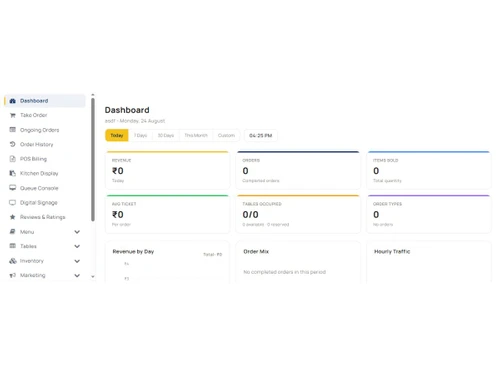
Peppar dashboard
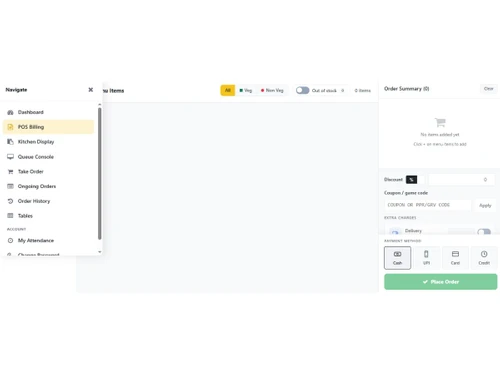
Peppar pos billing
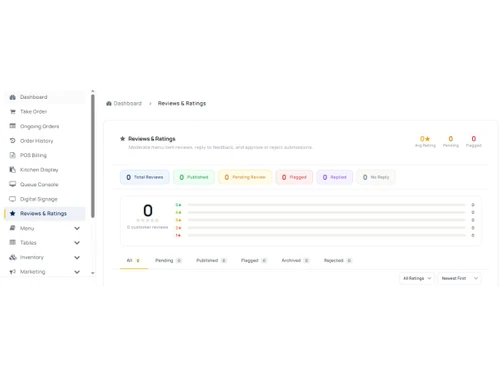
Peppar reviews

Peppar

Brand: Peppar

  • No Ratings & Reviews

Transform your restaurant with AI-first guest experience Peppar is a modern, cloud-based restaurant POS and operations platform built for India. It helps restaurants run billing, kitchen, inventory, guest ordering, CRM, and analytics from one unified system — with Peppy AI, an intelligent gues...

See More

Have you used Peppar before?

Share your insights for better experience

Add a Review
Starting Price
₹599 excl.GST
₹ 707 incl. GST

View plans

offer Save upto 18%, Get GST Invoice on your business purchase T&C
offer Buy Now & Pay Later, Check offer on payment page.
Buy Now
100% Genuine
Products
Best Price
Guaranteed
Safe & Secure
Payment
  • Description

  • Pricing

  • Features

  • Specification

  • Review

  • Compare

  • Alternatives

Starting at ₹599
Buy Now

Peppar Software Overview

Transform your restaurant with AI-first guest experience

Peppar is a modern, cloud-based restaurant POS and operations platform built for India. It helps restaurants run billing, kitchen, inventory, guest ordering, CRM, and analytics from one unified system — with Peppy AI, an intelligent guest assistant that guides diners through menu discovery, ordering, and real-time order updates via chat and voice.

Unlike traditional POS systems that bolt on QR menus and charge extra for every feature, Peppar is designed guest-first: your customers get a beautiful mobile ordering experience (no app download), while your staff gets a full merchant console for day-to-day operations.

Website: https://www.peppar.in
Partner signup & free trial: https://partners.peppar.in

Meet Peppy AI — your digital restaurant captain

Peppy AI is Peppar’s standout differentiator. It acts as a virtual captain on every table, available on the guest’s phone the moment they scan your QR code.

What Peppy AI does:

  • Welcomes guests and guides them through the digital menu
  • Answers menu-related questions via an interactive chat interface
  • Narrates the order journey in real time — from order placed → confirmed → preparing → ready → complete
  • Offers optional voice updates (text-to-speech) so guests stay informed without repeatedly asking staff
  • Reduces waiter load during peak hours while improving guest satisfaction

Peppy AI is included in the Pro plan and turns every dine-in table into a self-service, AI-assisted experience — something most legacy POS vendors only offer as a costly add-on or not at all.

All-in-one restaurant operations — not just billing

Peppar replaces the need for separate QR menu vendors, print utilities, and disconnected guest apps. Everything runs on one cloud platform:

Front-of-house & billing

  • Fast POS billing with split bills, discounts, and draft bills
  • GST-compliant invoicing (CGST, SGST, service tax, packing & delivery charges)
  • Takeaway counter ordering, dine-in, and delivery workflows
  • Cash, UPI, card, and COD payment tracking
  • Multi-outlet switching for restaurant chains

Guest digital experience

  • Branded QR code menus — guests order from their phone browser, no app install
  • Live order tracking with real-time status updates
  • Table request & approval workflow for QR dine-in
  • Group / shared ordering — multiple guests join one table bill via PIN (Pro)
  • Table booking from the customer app (Pro)
  • Online payments via PayU — UPI & cards (Pro)
  • Wishlist, item reviews, and feedback surveys

Kitchen & printing

  • Web-based Kitchen Display System (KDS) with live order board
  • Physical KOT (Kitchen Order Ticket) printing on any standard ESC/POS thermal printer — Epson, TVS, Everycom, Rugtek, Posiflex, and more
  • No proprietary hardware lock-in — network, USB, and Bluetooth printing supported
  • Multi-station routing (Grill, Bar, Dessert → separate printers)
  • Delta KOT — only changed items reprint on order modifications
  • Dedicated Print Agent desktop app for LAN/USB printers
  • Peppar Merchant App (Android) for counter tablets with Bluetooth KOT printing

Back-office & growth (Pro)

  • Full inventory management — ingredients, stock movements, purchase orders, wastage, low-stock alerts
  • CRM — customer profiles, segmentation, Excel export
  • Coupons, promotions, and SMS/email marketing campaigns
  • Reports & analytics — sales, menu performance, payment mix, GST reports, chain comparison
  • Chain menu master — define menu centrally and push to multiple outlets
  • Bulk menu import/export via Excel

Who is Peppar for?

Restaurant typeHow Peppar helps

Independent cafés & restaurants

QR dine-in + billing + kitchen printing from ₹599/month

Dine-in & QR-first venues

Branded guest app + Peppy AI reduces staff dependency

Growing chains (2–10 outlets)

Central menu control, multi-outlet reporting, outlet switching

Cloud kitchens

Takeaway/delivery order management with KDS & KOT

Restaurants switching from Petpooja / legacy POS

Transparent all-inclusive pricing, no per-transaction SaaS fees

Transparent pricing — no hidden add-on surprises

PlanPrice (excl. GST)Best for

Starter

₹599/month

Single outlet — POS, QR ordering, KDS, KOT printing

Pro

₹1,299/month (1 outlet)

Full platform + Peppy AI, CRM, inventory, reports, chain tools

Enterprise

Custom

10+ outlets, API access, white-label, custom SLA

  • No per-transaction SaaS fees — unlike competitors charging 1.5–2% on payments
  • Monthly, quarterly, and yearly billing available
  • 18% GST added at checkout
  • Free trial available — start at partners.peppar.in

Why restaurants choose Peppar over legacy POS

  1. AI-powered guest experience — Peppy AI guides diners; competitors rely on static PDF menus or basic QR pages
  2. All-in-one platform — POS, KDS, QR ordering, inventory, CRM, and reports in one subscription
  3. Hardware flexibility — works with any ESC/POS thermal printer; no vendor-locked devices
  4. Guest-first design — modern React mobile ordering app, not a bolt-on afterthought
  5. Transparent pricing — Starter at ₹599/month includes KOT printing; Pro at ₹1,299 includes AI, CRM, and inventory
  6. Built for India — GST billing, INR pricing, UPI/card payments, India-focused support
  7. Chain-ready — menu master push, multi-outlet dashboards, outlet-level reporting

How to get started

  1. Visit https://partners.peppar.in and sign up for a free trial
  2. Complete the guided onboarding — restaurant name, URL, menu setup
  3. Generate table QR codes and configure your kitchen printers
  4. Go live — guests scan, order, and Peppy AI assists them through the journey
  5. Upgrade to Starter or Pro when ready for KOT printing, AI, and advanced features

Support: Email support on Starter; priority support on Pro
Headquarters: Bangalore, India
Founded: 2024

Read more

Peppar Company Details

Founded Year:  2021

Peppar brings AI to restaurant operations. Peppy AI assists guests with menu questions, QR ordering & order tracking via chat + voice. Owners get cloud POS, GST billing, kitchen display, inventory & reports — all in one. From ?599/month.

Director/Founders Mr Shankar Gupta
Company Size 1-100 Employees

Peppar Pricing & Plans

Starter
Key Features
  • Menu Management
  • Reports & Export
  • Table & Location Management
  • Order Management
  • KOT Thermal Printing
  • Bulk Menu Import
  • Coupons & Promotions

Calculated Price

599 Exclusive of all taxes
    • Quantity

      Quantity
      Quantity
    • Monthly

      Monthly
      Monthly

Key Features

  • Menu Management

  • Reports & Export

  • Table & Location Management

  • Order Management

  • KOT Thermal Printing

  • Bulk Menu Import

  • Coupons & Promotions

Peppar Features

  • icon_check Restaurant POS
    Manage restaurant billing, orders, payments, kitchen operations and reporting from one platform.
  • icon_check Menu Management
    Create photo-rich digital menus with categories, variants, modifiers and live availability.
  • icon_check QR Code Ordering
    Let guests scan table QR codes, browse menus and order without installing an app.
  • icon_check Kitchen Display
    Send orders to the kitchen with live status tracking for faster service.
  • icon_check KOT Thermal Printing
    Print kitchen order tickets on compatible ESC/POS thermal printers.
  • icon_check GST Invoicing & Billing
    Generate GST-compliant invoices as part of the restaurant billing workflow.
  • icon_check Table Management
    Manage tables, floor plans, occupancy and table turnover from a visual interface.
  • icon_check Token & Queue Management
    Manage customer tokens and queues to streamline restaurant service.
  • icon_check Order Tracking
    Provide guests with real-time order status from kitchen preparation to serving.
  • icon_check Coupons & Promotions
    Create BOGO, percentage, flat discounts and targeted coupon campaigns.
  • icon_check Customer Management
    Maintain customer profiles and order history for personalized restaurant engagement.
  • icon_check Loyalty Rewards Wallet
    Reward returning customers and manage loyalty benefits through a rewards wallet.
  • icon_check Inventory Management
    Track ingredients, recipes, consumption, stock levels and restaurant inventory.
  • icon_check Supplier Management
    Manage suppliers and support restaurant purchasing and inventory workflows.
  • icon_check Reports & Analytics
    Analyze sales, menu performance, inventory and operational data through reports.
  • icon_check Multi-Outlet Management
    Manage multiple restaurant outlets and support chain-level operations.

Peppar Specification

Supported Platforms
Windows Windows MacOS MacOS
Devices
Desktop Desktop Mobile Mobile
Deployment
Web-Based Web-Based
Suitable For
Retail Restaurant
Business Specific
All Businesses
Business Size
Small Business Startups Medium Business SMBs SMEs
Customer Support
Phone Email Communities
Language
English
Training Resources
Live Online Documentation Videos

Explore the Best Alternative Solutions Similar to Your Business Size and Needs

Peppar Review

Techjockey Trusted Reviews from Verified Users

No reviews are currently available for Peppar. Discover similar Restaurant Management Software reviews

  • Microtech POS

    4.5

    Whats great - Access to real-time data allows for better decision-making. Many billing software solutions offer mobile apps for on-the-go ... read more

  • Limetray

    4.5

    Whats great - Limetray has proved to be very profitable for us. It offers multiple user login facilities, which saves huge operational cost... read more

  • POSist

    4.5

    Whats great - It was one of the best investments we made. POSist helped us analyse all the loopholes and barriers in our operations and cut... read more

Compare Peppar With other Restaurant Management Software

Products
Ratings
Pricing
Device Supported
Deployment
Supported Platforms
  • img

    Peppar

  • ₹ 599.00 excl. GST

  • Desktop

    Mobile

  • Web based

    On Premises

  • Windows

    Mac OS

  • img

    POSist

  • 4.4

  • ₹ 36800

  • Desktop

    Mobile

  • Web based

    On Premises

  • Windows

    Mac OS

  • img

    Limetray

  • 4.6

  • Price On Request

  • Desktop

    Mobile

  • Web based

    On Premises

  • Windows

    Mac OS

  • img

    eRe4u

  • 4.6

  • ₹ 4000

  • Desktop

    Mobile

  • Web based

    On Premises

  • Windows

    Mac OS

  • img

    Eatlot

  • 4.1

  • Price On Request

  • Desktop

    Mobile

  • Web based

    On Premises

  • Windows

    Mac OS

  • img

    OrderSeva

  • 4.1

  • ₹ 2000

  • Desktop

    Mobile

  • Web based

    On Premises

  • Windows

    Mac OS

  • img

    HDRestaurant

  • 4.4

  • Price On Request

  • Desktop

    Mobile

  • Web based

    On Premises

  • Windows

    Mac OS

  • img

    FoodBox

  • 4.5

  • ₹ 61654

  • Desktop

    Mobile

  • Web based

    On Premises

  • Windows

    Mac OS

  • img

    Smart Dine-in

  • 4.2

  • Price On Request

  • Desktop

    Mobile

  • Web based

    On Premises

  • Windows

    Mac OS

(0) Product(s) selected

Peppar Alternatives

See All Peppar Alternatives

Available

Price on Request

Available

Price on Request

SAVE UPTO 40%

Available

Price on Request

Starting Price:

$330 /Month/Location

Articles for Peppar

See All Related Articles

20,000+ Software Listed

Best Price Guranteed

Free Expert Consultation

2M+ Happy Customers

Terms and Condtions

close

Users with registered businesses can purchase goods from merchants on the platform to satisfy their business needs. Users are not permitted to utilize any products acquired through the platform for resale, advertising, business, or further distribution.

For each purchase made, users will receive a Tax Invoice (or 'GST invoice') that includes specific details such as:

  • the GSTIN of the user associated with their registered business, and

  • the specified Entity Name for their business.

It should be noted that not all products are eligible for GST Invoice. Only the products displayed by participating sellers with the 'GST-based Invoice Available' callout on the product description page would qualify.

Certain goods and services are not eligible to get a GST Invoice, including items with VAS, i.e., Value Added Services (e.g., Total Mobile Protection/Assured Buyback) and those involving an exchange offer at the time of purchase.

Users must ensure the accuracy of the GSTIN, and business entity name provided for the GST Invoice. Requests for corrections into GST Invoice would not be accommodated by Techjockey.com or any Seller, and any issues arising from user-provided information are the sole responsibility of users.

Techjockey.com is not liable for the GST Invoice or any associated input tax credit. To efficiently claim an input tax credit, users should select the registered place of business address as per the GST authority's data and follow the provisions of the GST Act and rules.

To claim an input tax credit, the delivery and billing addresses must match. Furthermore, input tax credits will not be granted if the delivery address and GSTIN on the invoice are from different states. In case of incorrect GST details provided during the order placement, the order will be canceled automatically.