linkedin
Posify logo
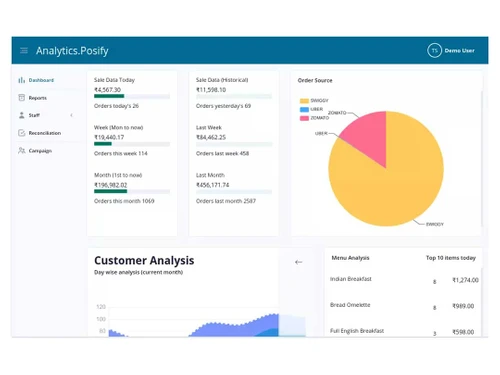
Posify Analytics
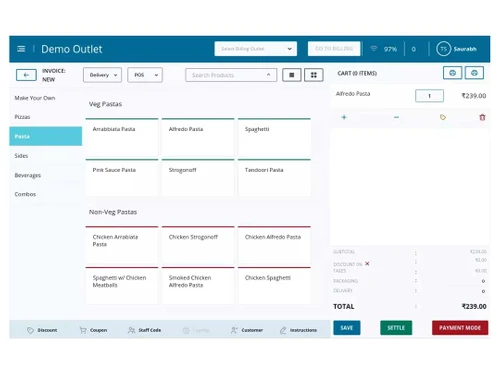
posify billing
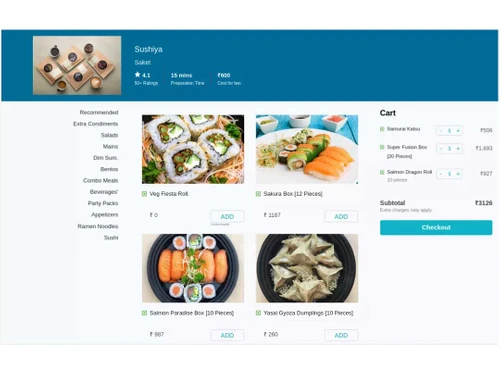
posify-menu

Posify

Brand: Adcount Technologies Pvt. Ltd.

  • 4.0

  • 4 Ratings

Posify is designed to manage orders, billing, table management, kitchen displays, customer databases, and more for restaurants, with features like anti-theft measures and real-time reporting.

See More

Have you used Posify before?

Share your insights for better experience

Add a Review

Price Available on Request

Questions about pricing or customization? We’re here to help, just a click away.

100% Genuine
Products
Best Price
Guaranteed
Safe & Secure
Payment
  • Description

  • Pricing

  • Features

  • Specification

  • Review

  • Compare

  • Alternatives

  • FAQ

Posify Software Overview

What is Posify?

Posify, by BillNote, is a cloud-based restaurant POS software designed for restaurants and similar businesses. It offers comprehensive tools for managing orders, billing, table management, and kitchen displays, all accessible through a user-friendly interface.

It also helps to manage customer databases and features anti-theft measures to track and prevent internal pilferage. The system supports real-time reporting, providing actionable insights on mobile devices to inform business decisions. It integrates seamlessly with delivery aggregators, streamlining online orders and payout reconciliations. Posify also offers inventory and vendor management features, making it suitable for businesses with multiple outlets or franchises.

Why Choose Posify Software?

  • Theft Detection: Helps track and prevent internal pilferage, reducing losses.
  • Comprehensive POS: Manages orders, prints KOTs and receipts, and tracks orders efficiently.
  • Table Management: This simplifies table handling for restaurants.
  • Integrated KDS: Streamlines kitchen operations with a Kitchen Display System.
  • Customer Loyalty: Enhances customer retention through a built-in loyalty program.
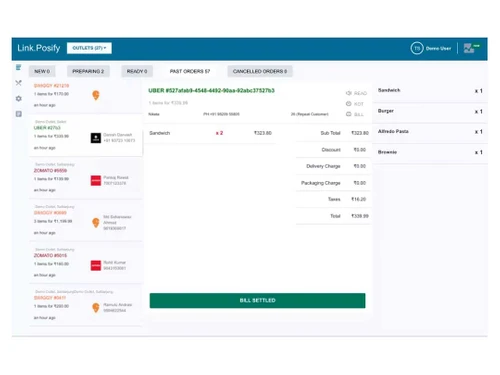
  • Aggregator Management: Integrates and manages orders from multiple delivery aggregators in one dashboard.
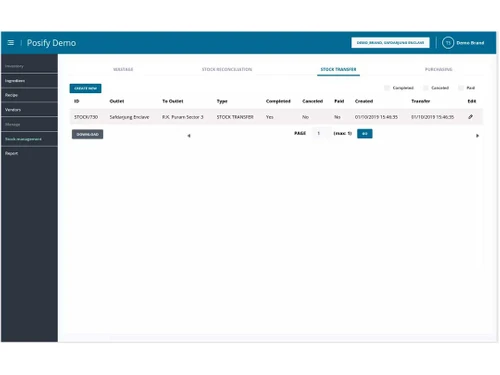
  • Stock Management: This simplifies stock and inventory management across multiple outlets.
  • Real-Time Reports: Provides simple, actionable reports on mobile devices for informed decision-making.
  • Fraud Analysis: Easy fraud analysis to prevent internal pilferage.
  • Customer Feedback: Customer feedback and reviews are in the application.

Benefits of Posify Restaurant POS Software

  • Subscription Management: Manages all aspects of subscriptions within the POS system.
  • Logs: Keeps detailed logs of activities for auditing and tracking purposes.
  • Pending Orders: Efficiently manage and track pending orders.
  • Trigger Points: Sets trigger points for various actions within the system.
  • Contact-Less Operation: Supports contact-less operations with a mobile-friendly UI.
  • Rider Tracking: Allows real-time tracking of delivery riders.
  • Inbuilt Marketing Tool: Includes a built-in marketing tool for promotions.
  • Product Status Management: Manages and updates the status of products efficiently.
  • Product Availability Scheduling: Schedules product availability for different times.
  • Stock Requesting: This simplifies stock requests from central warehouses.
  • Order Cancellation Analysis (%): Analyzes the percentage of order cancellations.
  • Average Order Preparation Time: Tracks the average time for order preparation.
  • Average Order Dispatch Time: Monitors the average time for order dispatch.
  • Mini Website: Includes a mini website to run your own delivery operations.

Posify Pricing

Posify price details are available on request at Techjockey.com.

The pricing model is based on different parameters, including extra features, deployment type, and the total number of users. For further queries related to the product, you can contact our product team and learn more about the pricing and offers.

Read more

Posify Pricing & Plans

Looking for The Right Pricing?

Share your requirements and get a plan built around your business.

  • Define your business needs
  • Get customised pricing
  • Choose features that fit your workflow

Price Available on Request

Get personalised Posify pricing that fits your needs. Our team will connect with you.

Posify Features

  • icon_check Billing & Invoicing
    Quickly generate accurate bills with automated tax and discount calculations.
  • icon_check Table Management
    Manage table reservations, availability, and seating plans efficiently.
  • icon_check Kitchen Display
    Send orders directly to the kitchen screen, reducing manual errors and delays.
  • icon_check Order Management
    Track dine-in, takeaway, and online orders seamlessly from a single interface.
  • icon_check Rider Tracking
    Monitor delivery riders in real time for faster and more reliable service.
  • icon_check Customer Loyalty
    Create and manage rewards programs to boost repeat visits and engagement.
  • icon_check Customer Feedback
    Collect and analyze guest feedback to improve service and food quality.
  • icon_check Stock Management
    Keep real-time track of ingredients and supplies to avoid shortages or wastage.
  • icon_check Vendor Management
    Maintain and manage vendor details, purchases, and supply schedules.
  • icon_check Realtime Reports
    Access up-to-the-minute sales, inventory, and performance data.
  • icon_check Multiple Dashboards
    View and manage various aspects of your business from personalized dashboards.
  • icon_check Notification
    Get instant alerts for low stock, pending orders, or other critical activities.

Posify Specifications

Supported Platforms
Windows Windows Android Android
Devices
Desktop Desktop Mobile Mobile
Deployment
Cloud-Based Cloud-Based
Suitable For
Restaurant Cafe & Restaurants
Business Specific
Restaurants Coffee Shops
Business Size
Small Business Startups Medium Business SMBs SMEs MSMBs
Language
English

Explore the Best Alternative Solutions Similar to Your Business Size and Needs

Posify Review

4.0

Out of 5

img

Overall Rating

Based on
4 Verified Ratings

Rating Breakdown

  • Features 3.7
  • Value for Money 4.2
  • Ease of Use 3.8
  • Customer Support 4.2

90% Recommend this Product

Add Review

Techjockey Trusted Reviews from Verified Users

No reviews are currently available for Posify. Discover similar Restaurant POS Software reviews
  • Petpooja

    4.1

    Whats great - The software is easy to use and understand. Currently, it has all the features required to run a restaurant efficiently. read more

  • Mink Foodiee Restaurant POS

    4.8

    Whats great - Works with almost all devices, Very easy to setup and use with many services like crm, loyalty programs, inventory managemen... read more

  • TMBill POS

    4.2

    Whats great - No expertise and solution offered, only duping people. read more

Compare Posify With other Restaurant POS Software

Products
Ratings
Pricing
Device Supported
Deployment
Supported Platforms
  • img

    Posify

  • 4.0

  • Price On Request

  • Desktop

    Mobile

  • Web based

    On Premises

  • Windows

    Mac OS

  • img

    Petpooja

  • 4.2

  • ₹ 10000

  • Desktop

    Mobile

  • Web based

    On Premises

  • Windows

    Mac OS

  • img

    Feedo

  • 4.7

  • ₹ 899

  • Desktop

    Mobile

  • Web based

    On Premises

  • Windows

    Mac OS

  • img

    SpotOn

  • 4.3

  • Price On Request

  • Desktop

    Mobile

  • Web based

    On Premises

  • Windows

    Mac OS

  • img

    SpeedLine POS

  • 4.5

  • Price On Request

  • Desktop

    Mobile

  • Web based

    On Premises

  • Windows

    Mac OS

  • img

    Rezku POS

  • 4.4

  • Price On Request

  • Desktop

    Mobile

  • Web based

    On Premises

  • Windows

    Mac OS

  • img

    Track My Table

  • 4.2

  • ₹ 399

  • Desktop

    Mobile

  • Web based

    On Premises

  • Windows

    Mac OS

  • img

    RestoMPOS

  • 4.3

  • Price On Request

  • Desktop

    Mobile

  • Web based

    On Premises

  • Windows

    Mac OS

  • img

    Solo Billing

  • 4.1

  • ₹ 8000

  • Desktop

    Mobile

  • Web based

    On Premises

  • Windows

    Mac OS

  • img

    TMBill POS

  • 4.4

  • ₹ 5999

  • Desktop

    Mobile

  • Web based

    On Premises

  • Windows

    Mac OS

  • img

    FoodyQueen

  • 4.1

  • ₹ 4188

  • Desktop

    Mobile

  • Web based

    On Premises

  • Windows

    Mac OS

(0) Product(s) selected

Posify Alternatives

See All Posify Alternatives

Starting Price:

$55 /Month

Starting Price:

$49 /Month

Available

Price on Request

Lavu

4.1

Available

Price on Request

Starting Price:

$49 /Month

Available

Price on Request

How much does Posify cost?

Posify pricing details are available upon request on Techjockey.com.

Is there a mobile app available for Posify Software?

Yes, Posify provides an Android mobile app for easy access and management on the go.

Which operating systems are compatible with Posify Software?

Posify works seamlessly on Windows and Android devices.

Does Posify Software offer a free trial?

No, a Posify free trial is not available.

How does Posify Software function?

Posify manages orders, billing, tables, kitchen displays, and customer data through a cloud-based POS system.

Who uses Posify Software?

Restaurants, cafes, and similar businesses can benefit from Posify.

Is a free demo available for Posify Software?

Yes, a Posify free demo is available on request to understand its capabilities.

Is Posify Software available for free?

No, Posify is a paid software.

Can Posify handle multiple outlets or branches?

Yes, Posify supports multi-outlet management from a centralized dashboard.

Is the internet required to use Posify Software?

Posify can work both online and offline, syncing data when the internet is available.

Can I customize the menu in Posify Software?

Yes, you can fully customize your menu, including categories, pricing, and modifiers.

20,000+ Software Listed

Best Price Guranteed

Free Expert Consultation

2M+ Happy Customers

Terms and Condtions

close

Users with registered businesses can purchase goods from merchants on the platform to satisfy their business needs. Users are not permitted to utilize any products acquired through the platform for resale, advertising, business, or further distribution.

For each purchase made, users will receive a Tax Invoice (or 'GST invoice') that includes specific details such as:

  • the GSTIN of the user associated with their registered business, and

  • the specified Entity Name for their business.

It should be noted that not all products are eligible for GST Invoice. Only the products displayed by participating sellers with the 'GST-based Invoice Available' callout on the product description page would qualify.

Certain goods and services are not eligible to get a GST Invoice, including items with VAS, i.e., Value Added Services (e.g., Total Mobile Protection/Assured Buyback) and those involving an exchange offer at the time of purchase.

Users must ensure the accuracy of the GSTIN, and business entity name provided for the GST Invoice. Requests for corrections into GST Invoice would not be accommodated by Techjockey.com or any Seller, and any issues arising from user-provided information are the sole responsibility of users.

Techjockey.com is not liable for the GST Invoice or any associated input tax credit. To efficiently claim an input tax credit, users should select the registered place of business address as per the GST authority's data and follow the provisions of the GST Act and rules.

To claim an input tax credit, the delivery and billing addresses must match. Furthermore, input tax credits will not be granted if the delivery address and GSTIN on the invoice are from different states. In case of incorrect GST details provided during the order placement, the order will be canceled automatically.