linkedin
PPMScope logo
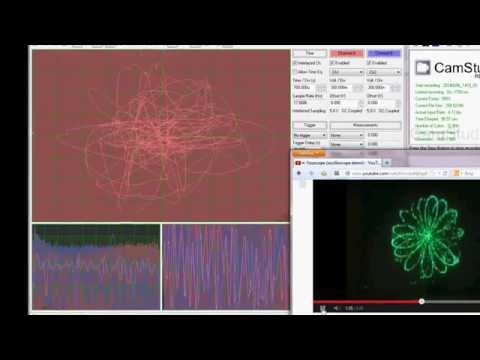
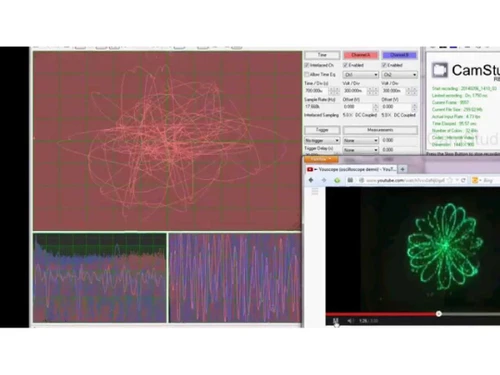
play PPMScope displaying the YouScope Demo
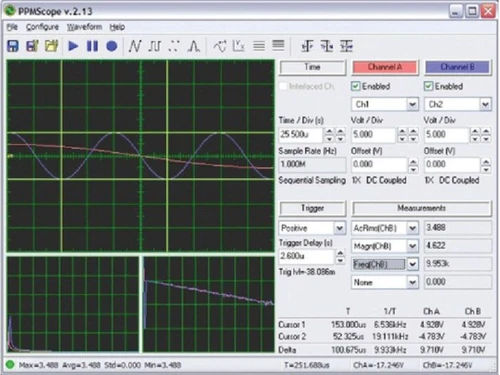
PPMScope Waveform
PPMScope XY mode

PPMScope

Brand: PPMScope

  • 4.0

  • 4 Ratings

PPMScope is a microcontroller-based PC oscilloscope that displays waveforms in the time and frequency domain to test signals and debug designs.

See More

Have you used PPMScope before?

Share your insights for better experience

Add a Review

Price Available on Request

Questions about pricing or customization? We’re here to help, just a click away.

100% Genuine
Products
Best Price
Guaranteed
Safe & Secure
Payment
  • Description

  • Pricing

  • Features

  • Specification

  • Review

  • Compare

  • Alternatives

  • FAQ

PPMScope Software Overview

What is PPMScope?

PPMScope is a microcontroller-based PC oscilloscope that connects Windows computers to display the captured waveform in both time and frequency domains. Researchers and electronics hobbyists use it to debug their designs or test signals.

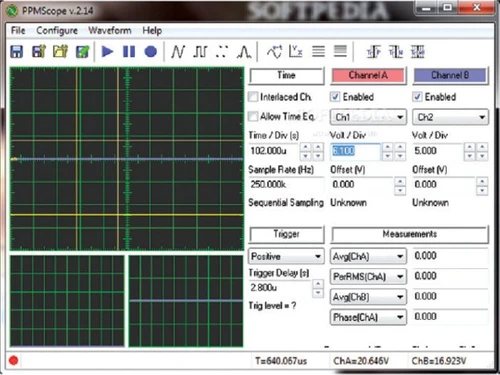
It connects to a Windows computer via USB, serial, or parallel ports. It uses a PIC16F877A microcontroller, which gives a 5 MHz analogue bandwidth, two channels, and a variable 1 MHz sample rate. The interface provides a waveform display, simple buttons, readings with time or frequency domains, channel A and channel B details, trigger settings, and measurement values. The user-friendly interface helps debug electronic designs, visualize, and analyze signals, and test.

It helps in waveform visualization with spline, triangle, square, point, and sine wave reconstructions, along with XY view and cursor measurements. It also supports features like math functions, waveform export, and logging. It makes default settings configuration to be saved for future use. It is compatible with any parallel, serial, or USB port using Serial over USB. In this way, it helps analyze the waveform, test signals, and debug designs to be used for communication.

Why Choose PPMScope Software?

  • Debugging design:Verify signal integrity, debug circuits, and analyze waveforms for accurate development and troubleshooting in electronics projects.
  • Signal Analysis:Examine audio waveforms, frequency spectrums, and signal distortions for fine-tuning and optimizing audio systems and circuits.
  • Troubleshooting:Utilize the oscilloscope for precise measurement of voltage and current waveforms, ensuring accurate analysis and troubleshooting in electrical circuits.
  • Educational Tool:Ideal for teaching electronics principles, illustrating signal behaviour, and providing hands-on experience in a classroom or DIY learning environment.
  • DIY Test Equipment:Affordable solution for hobbyists needing a compact oscilloscope to test and analyze various electronic components and circuits.

Benefits of PPMScope Platform

  • Simple Interface:User-friendly design enhances ease of use, making waveform analysis and troubleshooting accessible to all skill levels.
  • Versatile Options for Analysis:Diverse features provide flexibility, allowing users to tailor analyses and improve accuracy and efficiency in troubleshooting tasks.
  • Cost-Effective Learning:Affordable tool for students and enthusiasts to grasp oscilloscope functionality without significant financial investment.
  • Customizable Design:Open-source nature allows modification and enhancement, fostering creativity and tailored adaptations for specific project requirements.
  • Accessible Debugging:Enables real-time signal monitoring, aiding in identifying and rectifying issues promptly during electronic system development.
  • Compact Portable Solution:Lightweight and portable design facilitates on-the-go troubleshooting and analysis for field engineers, technicians, and hobbyists.

Pricing of PPMScope Oscilloscope Software

PPMScope pricing details are available on request at techjockey.com.

Its pricing in India may vary based on factors like customization, additional features required, the number of users, and the deployment type. Please request a call back for subscription-related details and to avail offers on premium packages.

Read more

PPMScope Company Details

Founded Year:  2015

PPMScope is a do-it-yourself oscilloscope design with a maximum sample rate of 1 MHz (bandwidth of 500 kHz).

Director/Founders Jonathan Weaver
Company Size 1-100 Employees

PPMScope Pricing & Plans

Looking for The Right Pricing?

Share your requirements and get a plan built around your business.

  • Define your business needs
  • Get customised pricing
  • Choose features that fit your workflow

Price Available on Request

Get personalised PPMScope pricing that fits your needs. Our team will connect with you.

PPMScope Features

  • icon_check Waveform Logging
    Record and analyze waveform data over time, aiding in long-term signal monitoring and trend analysis.
  • icon_check Waveform Export
    Easily transfer captured waveforms for documentation, further analysis, or sharing with other devices or applications.
  • icon_check Math Functions
    Perform mathematical operations on captured waveforms, facilitating advanced signal analysis and computation within the tool.
  • icon_check Cursors
    Utilize cursor functionality to measure specific points on the waveform, enhancing precision in waveform analysis.
  • icon_check Volt per Division Settings
    Adjust voltage scaling for accurate visualization, & customize the display based on specific voltage requirements.
  • icon_check XY View
    Explore relationships between two signals in XY mode, enabling visualization of complex patterns and phase differences.
  • icon_check Waveform Reconstruction
    Choose from various reconstruction methods to accurately represent and visualize waveforms.
  • icon_check Frequency Spectrum
    Display the frequency components of a signal, providing insights into signal composition.
  • icon_check Coupling
    Opt for AC or DC coupling to focus on specific signal components, ensuring the oscilloscope adapts to various circuit conditions.
  • icon_check Hardware Connection
    Interface with a computer through parallel, serial, or USB ports, establishing a reliable connection for data transfer.
PPMScope Demo Video play icon

Get PPMScope Demo

Watch the demo video to explore key features, real workflows, and how the software fits your business needs.

Understand
Key Features
Personal
Demo Insights
Interactive
Demo Support

PPMScope Specifications

Supported Platforms
Windows Windows
Devices
Desktop Desktop
Deployment
Perpetual Perpetual
Suitable For
Healthcare
Business Specific
Hospitals
Business Size
Small Business Startups Medium Business Enterprises
Customer Support
Email Communities
Language
English
Training Resources
Documentation Videos

Explore the Best Alternative Solutions Similar to Your Business Size and Needs

PPMScope Review

4.0

Out of 5

img

Overall Rating

Based on
4 Verified Ratings

Rating Breakdown

  • Features 4.1
  • Value for Money 4.1
  • Ease of Use 4.3
  • Customer Support 3.7

92% Recommend this Product

Add Review

Be the First to Review

This product has no reviews yet. Be the first to leave your feedback.

Add Review

Compare PPMScope With other Oscilloscope Software

Products
Ratings
Pricing
Device Supported
Deployment
Supported Platforms
  • img

    PPMScope

  • 4.0

  • Price On Request

  • Desktop

    Mobile

  • Web based

    On Premises

  • Windows

    Mac OS

  • img

    Zelscope

  • 4.5

  • Price On Request

  • Desktop

    Mobile

  • Web based

    On Premises

  • Windows

    Mac OS

  • img

    Visual Analyser

  • 4.2

  • Price On Request

  • Desktop

    Mobile

  • Web based

    On Premises

  • Windows

    Mac OS

  • img

    PicoScope

  • 4.2

  • Price On Request

  • Desktop

    Mobile

  • Web based

    On Premises

  • Windows

    Mac OS

  • img

    Digilent WaveForms

  • 4.2

  • Price On Request

  • Desktop

    Mobile

  • Web based

    On Premises

  • Windows

    Mac OS

  • img

    BitScope DSO

  • 4

  • Price On Request

  • Desktop

    Mobile

  • Web based

    On Premises

  • Windows

    Mac OS

  • img

    RTSPECT

  • 4.3

  • Price On Request

  • Desktop

    Mobile

  • Web based

    On Premises

  • Windows

    Mac OS

(0) Product(s) selected

PPMScope Alternatives

See All PPMScope Alternatives

Available

Price on Request

Starting Price:

$228 /Year

Which operating system does PPMScope support?

PPMScope is compatible with Windows operating systems.

Is there any PPMScope app?

PPMScope app is not available for mobile devices.

What is the deployment type of PPMScope?

PPMScope supports web-based deployment.

How much does PPMScope cost?

PPMScope software is available for free at techjockey.com.

Who are the potential users of PPMScope?

PPMScope is typically used in educational and research scenarios by students, researchers, and electronics hobbyists who require an oscilloscope to debug their designs or test signals.

Is there any free trial or demo for PPMScope?

PPMScope oscillation software demo is available for free at techjockey.com.

Is PPMScope free?

PPMScope does not offer a free trial. However, the premium plan with advanced features is available at techjockey.com with exciting deals.

How can you download PPMScope?

There is no need for software installation since PPMScope supports web-based deployment. Just open the setup wizard and get started.

How does PPMScope work?

PPMScope helps with microcontroller-based PC oscilloscope that can be used for waveform logging, waveform export, math functions, cursors, volt per division settings, XY view, waveform reconstruction, frequency spectrum, coupling, and hardware connection. Its USP is its low-cost and open-source design.

20,000+ Software Listed

Best Price Guranteed

Free Expert Consultation

2M+ Happy Customers

Terms and Condtions

close

Users with registered businesses can purchase goods from merchants on the platform to satisfy their business needs. Users are not permitted to utilize any products acquired through the platform for resale, advertising, business, or further distribution.

For each purchase made, users will receive a Tax Invoice (or 'GST invoice') that includes specific details such as:

  • the GSTIN of the user associated with their registered business, and

  • the specified Entity Name for their business.

It should be noted that not all products are eligible for GST Invoice. Only the products displayed by participating sellers with the 'GST-based Invoice Available' callout on the product description page would qualify.

Certain goods and services are not eligible to get a GST Invoice, including items with VAS, i.e., Value Added Services (e.g., Total Mobile Protection/Assured Buyback) and those involving an exchange offer at the time of purchase.

Users must ensure the accuracy of the GSTIN, and business entity name provided for the GST Invoice. Requests for corrections into GST Invoice would not be accommodated by Techjockey.com or any Seller, and any issues arising from user-provided information are the sole responsibility of users.

Techjockey.com is not liable for the GST Invoice or any associated input tax credit. To efficiently claim an input tax credit, users should select the registered place of business address as per the GST authority's data and follow the provisions of the GST Act and rules.

To claim an input tax credit, the delivery and billing addresses must match. Furthermore, input tax credits will not be granted if the delivery address and GSTIN on the invoice are from different states. In case of incorrect GST details provided during the order placement, the order will be canceled automatically.