linkedin
TiePie Oscilloscope Software logo
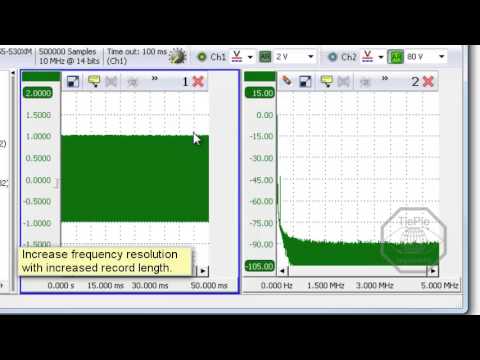
play Using the Spectrum Analyzer - Multi Channel oscilloscope software
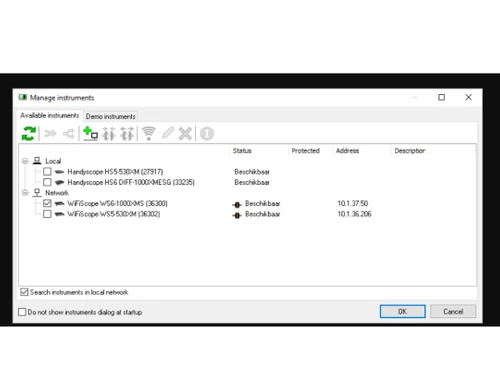
Multichannel oscilloscope software Manage
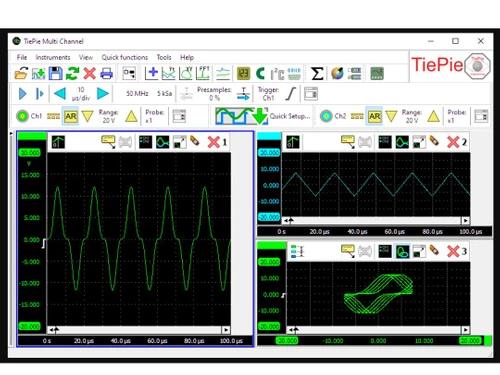
Multichannel oscilloscope software Channel

TiePie Oscilloscope Software

Brand: TiePie engineering

  • 4.3

  • 4 Ratings

TiePie Engineering's Multi-Channel Oscilloscope Software is a Windows application designed for signal analysis, troubleshooting, and measurement.

See More

Have you used TiePie Oscilloscope Software before?

Share your insights for better experience

Add a Review

Price Available on Request

Questions about pricing or customization? We’re here to help, just a click away.

100% Genuine
Products
Best Price
Guaranteed
Safe & Secure
Payment
  • Description

  • Pricing

  • Features

  • Specification

  • Review

  • Compare

  • Alternatives

  • FAQ

TiePie Oscilloscope Software Overview

What is TiePie Oscilloscope Software?

TiePie Engineering's Multi-Channel Oscilloscope Software is a Windows-based measuring software package. It uses various engineering instruments to function as an oscilloscope, spectrum analyzer, data logger, multimeter, arbitrary waveform generator, and protocol analyzer. Its purpose is to provide a PC-based solution for analyzing and visualizing various signals in real-time across different applications.

It offers mathematical functions like adding, subtracting, integrating, and differentiating for in-depth signal analysis. It has a user-friendly interface that allows for quick setup through various pre-configured settings. The interface supports multiple languages for global accessibility and user preference. The interface is touchscreen friendly with toolbars for convenient operation and configuration. It also contains customizable instruments and channel toolbars, settings windows, popup menus, and hotkeys that make controlling, navigation, and usage easier.

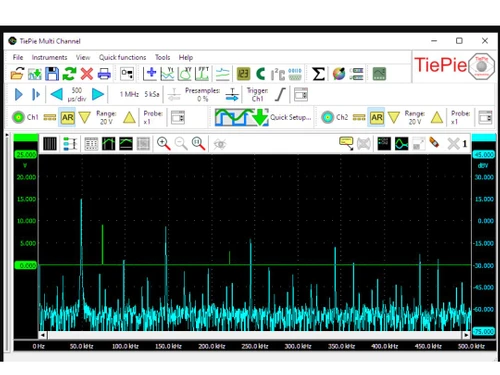
The software offers support for network plug-and-measure functionality by connecting various instruments with WiFi, USB LAN, or WAN. It helps the combination and synchronization of multiple oscilloscopes for increasing input channels. It also includes a spectrum analyzer for graphically displaying signal amplitude against frequency in the frequency domain. As a data logger, it captures changing signals over time and helps measure long non-repetitive signals.

It also acts as a multimeter, measuring specific properties of a signal and displaying them as numeric values. It can be used as an arbitrary waveform generator that generates repetitive or single-shot signals with predefined standard shapes or arbitrary shapes. It can function as a protocol analyzer for CAN bus, J1939, I2C, UART/Serial, and SPI, helping in hardware and software development and debugging. It allows measurement data to be saved in various formats, printed with customizable layouts, and stored as image files.

Why Choose TiePie Oscilloscope Platform?

  • Oscilloscope function:Helps visualize signal voltages over time, helps troubleshoot circuits, and analyzes electrical waveforms.
  • Spectrum analyzer:Identifies signal frequency components, giving harmonic distortions and RF analysis for signal quality assessment.
  • Data logger:It can capture and display slowly changing signals for monitoring temperature variations or analyzing long, non-repetitive signals in real-time.
  • Multimeter capability:Measure and display specific signal properties numerically to help adjust circuits and performance based on numeric values.
  • Arbitrary waveform generator:Generate diverse signals for circuit testing, simulate external conditions, and assess systems relying on serial communication.

Benefits of TiePie Oscilloscope System

  • Diverse use: It can function as multiple instruments in one software, saving costs and giving a complete measurement solution.
  • Remote accessibility: Enables remote measurements with different network support, like USB, WI-FI, etc, for accessibility of various applications.
  • Efficient troubleshooting: Helps in quick setup and provides detailed graphical insights for efficient troubleshooting.
  • Mathematical analysis: Supports advanced mathematical functions that help in in-depth signal analysis and better data interpretation.
  • User-friendly interface: It has a touchscreen-friendly interface with customizable toolbars, making it an easier application to use and control for users.

Pricing of TiePie Engineering's Multi-Channel Oscilloscope Software

TiePie Engineering's Multi-Channel Oscilloscope, Software price details, are available on request at techjockey.com.

TiePie Engineering's Multi-Channel Oscilloscope Software price in India may vary based on factors like customization, additional features required, number of users, and the deployment type. Please request a call back for subscription-related details and to avail offers on premium packages.

Read more

TiePie engineering Company Details

Founded Year:  1987

TiePie engineering has become a recognized manufacturer of high quality computer controlled test and measurement equipment, such as USB oscilloscopes, arbitrary waveform generators, spectrum analyzers, protocol analyzers.

Director/Founders TiePie engineering
Company Size 1-100 Employees

TiePie Oscilloscope Software Pricing & Plans

Looking for The Right Pricing?

Share your requirements and get a plan built around your business.

  • Define your business needs
  • Get customised pricing
  • Choose features that fit your workflow

Price Available on Request

Get personalised TiePie Oscilloscope Software pricing that fits your needs. Our team will connect with you.

TiePie Oscilloscope Software Features

  • icon_check Quick setup
    Streamlines measurements with pre-configured setups, decreasing preparation time for various applications.
  • icon_check Network support
    Enables transparent remote measurements over LAN, WiFi, or WAN for instrument access.
  • icon_check Oscilloscope
    Displays signal voltages over time and helps in troubleshooting circuits and waveform analysis.
  • icon_check Synchronizing multiple instruments
    Combines and syncs multiple oscilloscopes for increased input channels and control as one application.
  • icon_check Mathematical functions
    Helps in advanced signal analysis with diverse mathematical operations for in-depth data interpretation.
  • icon_check Spectrum analyzer
    Graphically displays signal amplitude against frequency for harmonic distortions and RF analysis.
  • icon_check Data logger
    Captures and displays slowly changing signals over time for real-time monitoring of variations and signal analysis.
  • icon_check Multimeter
    Measures and displays specific signal properties numerically for adjustment and optimization of circuits.
  • icon_check Arbitrary Waveform Generator
    Creates diverse signals for circuit testing and simulates external conditions for proper assessment.
  • icon_check Protocol analyzers
    Decodes and analyzes signals in accordance with specific protocols for hardware and software development and debugging.
TiePie Oscilloscope Software Demo Video play icon

Get TiePie Oscilloscope Software Demo

Watch the demo video to explore key features, real workflows, and how the software fits your business needs.

Understand
Key Features
Personal
Demo Insights
Interactive
Demo Support

TiePie Oscilloscope Software Specifications

Supported Platforms
Windows Windows
Devices
Desktop Desktop
Deployment
Perpetual Perpetual
Suitable For
Healthcare
Business Specific
Hospitals
Business Size
Small Business Startups Medium Business Enterprises
Customer Support
Phone Email Communities
Language
English
Training Resources
Videos

Explore the Best Alternative Solutions Similar to Your Business Size and Needs

TiePie Oscilloscope Software Review

4.3

Out of 5

img

Overall Rating

Based on
4 Verified Ratings

Rating Breakdown

  • Features 4
  • Value for Money 4.2
  • Ease of Use 4.7
  • Customer Support 4.2

90% Recommend this Product

Add Review

Be the First to Review

This product has no reviews yet. Be the first to leave your feedback.

Add Review

Compare TiePie Oscilloscope Software With other Oscilloscope Software

Products
Ratings
Pricing
Device Supported
Deployment
Supported Platforms
  • img

    TiePie Oscilloscope Software

  • 4.3

  • Price On Request

  • Desktop

    Mobile

  • Web based

    On Premises

  • Windows

    Mac OS

  • img

    Zelscope

  • 4.5

  • Price On Request

  • Desktop

    Mobile

  • Web based

    On Premises

  • Windows

    Mac OS

  • img

    Visual Analyser

  • 4.2

  • Price On Request

  • Desktop

    Mobile

  • Web based

    On Premises

  • Windows

    Mac OS

  • img

    PicoScope

  • 4.2

  • Price On Request

  • Desktop

    Mobile

  • Web based

    On Premises

  • Windows

    Mac OS

  • img

    Digilent WaveForms

  • 4.2

  • Price On Request

  • Desktop

    Mobile

  • Web based

    On Premises

  • Windows

    Mac OS

  • img

    BitScope DSO

  • 4

  • Price On Request

  • Desktop

    Mobile

  • Web based

    On Premises

  • Windows

    Mac OS

  • img

    RTSPECT

  • 4.3

  • Price On Request

  • Desktop

    Mobile

  • Web based

    On Premises

  • Windows

    Mac OS

  • img

    PPMScope

  • 4.0

  • Price On Request

  • Desktop

    Mobile

  • Web based

    On Premises

  • Windows

    Mac OS

(2) Product(s) selected

TiePie Oscilloscope Software Alternatives

See All TiePie Oscilloscope Software Alternatives

Available

Price on Request

Available

Price on Request

Starting Price:

$228 /Year

Which operating system does TiePie Oscilloscope Software support?

TiePie Oscilloscope Software is compatible with Windows operating systems.

Is there any TiePie Oscilloscope Software app?

The TiePie Oscilloscope Software app is not available for mobile devices.

What is the deployment type of TiePie Oscilloscope Software?

TiePie Oscilloscope Software supports on-premises deployment.

How much does TiePie Oscilloscope Software Cost?

TiePie Oscilloscope Software pricing is available on request at techjockey.com.

Who are the potential users of TiePie Oscilloscope Software?

TiePie Oscilloscope Software is utilized in electronics, automotive, and research industries by engineers, technicians, and scientists for tasks such as circuit analysis, automotive diagnostics, and experimental research, ensuring precise measurements and analysis.

Is there any free trial or demo for TiePie Oscilloscope Software?

The TiePie Oscilloscope Software demo is available for free on techjockey.com.

Is TiePie Oscilloscope Platform free?

TiePie Oscilloscope Software does not offer a free trial. However, the premium plan with advanced features and exciting deals is available at techjockey.com.

How can you download the TiePie Oscilloscope Platform?

For TiePie Oscilloscope software installation, you can go directly to Techjockey's official website and buy this solution. Once purchased, you will receive a key to download the same via email.

How does TiePie Oscilloscope Software Work?

TiePie Engineering's Multi-Channel Oscilloscope Software helps with precise signal analysis and measurement tasks with its different features, including oscilloscope functions, mathematical operations, spectrum analysis, and protocol analyzers, for comprehensive and accurate data interpretation.

20,000+ Software Listed

Best Price Guranteed

Free Expert Consultation

2M+ Happy Customers

Terms and Condtions

close

Users with registered businesses can purchase goods from merchants on the platform to satisfy their business needs. Users are not permitted to utilize any products acquired through the platform for resale, advertising, business, or further distribution.

For each purchase made, users will receive a Tax Invoice (or 'GST invoice') that includes specific details such as:

  • the GSTIN of the user associated with their registered business, and

  • the specified Entity Name for their business.

It should be noted that not all products are eligible for GST Invoice. Only the products displayed by participating sellers with the 'GST-based Invoice Available' callout on the product description page would qualify.

Certain goods and services are not eligible to get a GST Invoice, including items with VAS, i.e., Value Added Services (e.g., Total Mobile Protection/Assured Buyback) and those involving an exchange offer at the time of purchase.

Users must ensure the accuracy of the GSTIN, and business entity name provided for the GST Invoice. Requests for corrections into GST Invoice would not be accommodated by Techjockey.com or any Seller, and any issues arising from user-provided information are the sole responsibility of users.

Techjockey.com is not liable for the GST Invoice or any associated input tax credit. To efficiently claim an input tax credit, users should select the registered place of business address as per the GST authority's data and follow the provisions of the GST Act and rules.

To claim an input tax credit, the delivery and billing addresses must match. Furthermore, input tax credits will not be granted if the delivery address and GSTIN on the invoice are from different states. In case of incorrect GST details provided during the order placement, the order will be canceled automatically.