linkedin
RapidWorks Restaurant POS logo
rapidworks restaurant pos
rapidworks-order
rapidworks sales

RapidWorks Restaurant POS

Brand: Rapid Works Technologies

  • 4.1

  • 6 Ratings

RapidWorks Restaurant POS is a restaurant billing software that streamlines orders, payments, and inventory management.

See More

Have you used RapidWorks Restaurant POS before?

Share your insights for better experience

Add a Review

Price Available on Request

Questions about pricing or customization? We’re here to help, just a click away.

100% Genuine
Products
Best Price
Guaranteed
Safe & Secure
Payment
  • Description

  • Pricing

  • Features

  • Specification

  • Review

  • Compare

  • Alternatives

  • FAQ

RapidWorks Restaurant POS Software Overview

What is RapidWorks Restaurant POS Software?

RapidWorks Restaurant POS Software is a restaurant billing software designed to streamline and enhance the operations of restaurants. From table reservations to material management, kitchen display systems, billing systems, and more, it provides a range of features that cover all aspects of restaurant management.

The software allows restaurants to efficiently manage and organize their table bookings to ensure a seamless dining experience for customers. It enables precise control over inventory and supplies to reduce waste and optimize stock levels. The kitchen display system enhances communication between the front-of-house and kitchen staff, resulting in faster order processing and improved coordination.

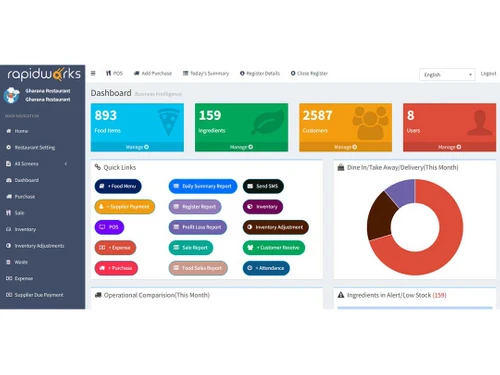
The billing system provides a user-friendly interface for generating accurate bills and processing payments to minimize errors. It enables restaurant owners and managers to gain insights into their business performance, track sales trends, and identify areas for improvement.

Why Choose RapidWorks Restaurant POS?

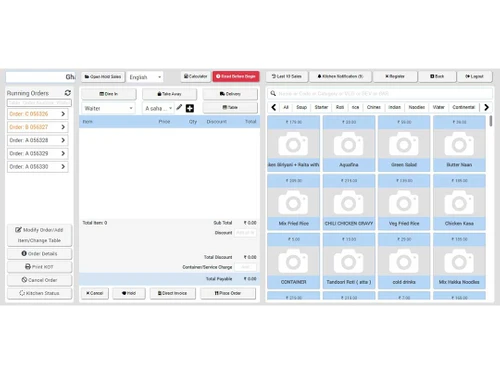
RapidWorks provides insights into the consumption of ingredients to help restaurants monitor usage and plan restocking effectively. It generates waste reports for minimizing wastage and optimizing stock management. The billing software offers a real-time list of running orders to facilitate order tracking, monitoring progress, and ensuring timely service.

The POS software allows restaurants to maintain a customer information database for personalized service and targeted marketing efforts. Restaurants can easily customize their menus, add new items, modify prices, and update offerings to reflect seasonal changes or promotions. It allows managers to create shifts, assign roles, and ensure adequate coverage during peak hours. The billing tool allows restaurants to set up promotions, discounts, and loyalty programs to attract and retain customers.

Benefits of RapidWorks Restaurant POS

  • The billing software automates the deduction of stock items based on recipes used in orders to ensure accurate inventory management.
  • It offers dedicated panels for kitchen staff, bartenders, and waitstaff to manage orders efficiently and enhance coordination.
  • The software provides customer relationship management tools, SMS notifications for order updates, and filters to categorize items as vegetarian or bar items.
  • Restaurants can choose between post-payment and pre-payment options to enable flexibility in accepting payments before or after the meal.
  • The POS system supports various order types, including dine-in, takeaway, and delivery, to handle customer preferences.

RapidWorks Restaurant POS Price

RapidWorks Restaurant POS price details are available on request at techjockey.com.

RapidWorks Restaurant POS price in India may vary based on factors like customization, additional features required, number of users, and the deployment type. Please request a call back for subscription-related details and to avail offers on premium packages.

Read more

RapidWorks Restaurant POS Pricing & Plans

Looking for The Right Pricing?

Share your requirements and get a plan built around your business.

  • Define your business needs
  • Get customised pricing
  • Choose features that fit your workflow

Price Available on Request

Get personalised RapidWorks Restaurant POS pricing that fits your needs. Our team will connect with you.

RapidWorks Restaurant POS Features

  • icon_check Restaurant POS
    Offers a comprehensive Point of Sale system designed specifically for restaurants.
  • icon_check Recipe Management
    Allows restaurants to manage and track recipes to ensure consistency in menu offerings.
  • icon_check Kitchen Management
    Facilitates smooth communication between the front-of-house and kitchen staff.
  • icon_check Inventory & Stock
    Helps restaurants monitor stock levels, reduce wastage, and control costs.
  • icon_check Faster Payments
    Ensures quick and accurate payment processing to improve the customer checkout experience.
  • icon_check Dashboards
    Provides insights into the restaurant's key operational metrics and data at a glance.
  • icon_check Reports
    Offers insights into sales, expenses, inventory, and other critical aspects of the restaurant's operations.
  • icon_check Purchases
    Ensures a steady supply of ingredients and materials for the restaurant's operations.
  • icon_check Sales
    Allows restaurants to monitor revenue, track sales trends, and make informed business decisions.

RapidWorks Restaurant POS Specifications

Supported Platforms
Ubuntu Ubuntu Windows Windows MacOS MacOS
Devices
Desktop Desktop
Deployment
Cloud-Based Cloud-Based
Suitable For
Restaurant Cafe & Restaurants Resort
Business Specific
Restaurants
Business Size
Small Business Startups Medium Business SMBs SMEs
Customer Support
Email
Language
English

Explore the Best Alternative Solutions Similar to Your Business Size and Needs

RapidWorks Restaurant POS Review

4.1

Out of 5

img

Overall Rating

Based on
6 Verified Ratings

Rating Breakdown

  • Features 4.0
  • Value for Money 4
  • Ease of Use 3.9
  • Customer Support 4.4

85% Recommend this Product

Add Review

Techjockey Trusted Reviews from Verified Users

No reviews are currently available for RapidWorks Restaurant POS. Discover similar Restaurant Management Software reviews

  • Microtech POS

    4.5

    Whats great - Access to real-time data allows for better decision-making. Many billing software solutions offer mobile apps for on-the-go ... read more

  • Limetray

    4.5

    Whats great - Limetray has proved to be very profitable for us. It offers multiple user login facilities, which saves huge operational cost... read more

  • POSist

    4.5

    Whats great - It was one of the best investments we made. POSist helped us analyse all the loopholes and barriers in our operations and cut... read more

Compare RapidWorks Restaurant POS With other Restaurant Management Software

Products
Ratings
Pricing
Device Supported
Deployment
Supported Platforms
  • img

    RapidWorks Restaurant POS

  • 4.1

  • Price On Request

  • Desktop

    Mobile

  • Web based

    On Premises

  • Windows

    Mac OS

  • img

    POSist

  • 4.4

  • ₹ 36800

  • Desktop

    Mobile

  • Web based

    On Premises

  • Windows

    Mac OS

  • img

    Limetray

  • 4.6

  • Price On Request

  • Desktop

    Mobile

  • Web based

    On Premises

  • Windows

    Mac OS

  • img

    eRe4u

  • 4.6

  • ₹ 4000

  • Desktop

    Mobile

  • Web based

    On Premises

  • Windows

    Mac OS

  • img

    Eatlot

  • 4.1

  • Price On Request

  • Desktop

    Mobile

  • Web based

    On Premises

  • Windows

    Mac OS

  • img

    OrderSeva

  • 4.1

  • ₹ 2000

  • Desktop

    Mobile

  • Web based

    On Premises

  • Windows

    Mac OS

  • img

    HDRestaurant

  • 4.4

  • Price On Request

  • Desktop

    Mobile

  • Web based

    On Premises

  • Windows

    Mac OS

  • img

    FoodBox

  • 4.5

  • ₹ 61654

  • Desktop

    Mobile

  • Web based

    On Premises

  • Windows

    Mac OS

  • img

    Smart Dine-in

  • 4.2

  • Price On Request

  • Desktop

    Mobile

  • Web based

    On Premises

  • Windows

    Mac OS

(0) Product(s) selected

RapidWorks Restaurant POS Alternatives

See All RapidWorks Restaurant POS Alternatives

Available

Price on Request

Available

Price on Request

SAVE UPTO 40%

Available

Price on Request

Starting Price:

$330 /Month/Location

Articles for RapidWorks Restaurant POS

See All Related Articles

Which operating system does RapidWorks Restaurant POS support?

RapidWorks Restaurant POS is compatible with Windows, Ubuntu, and MacOS operating systems.

Is there any RapidWorks Restaurant POS app?

RapidWorks Restaurant POS is unavailable for android and iOS app users.

What is the deployment type of RapidWorks Restaurant POS software?

RapidWorks Restaurant POS supports web-based deployment.

How much does RapidWorks Restaurant POS cost?

RapidWorks Restaurant POS price is available on request at techjockey.com

Who are the potential users of RapidWorks Restaurant POS?

RapidWorks Restaurant POS serves restaurants seeking efficient POS solutions.

Is there any free trial or demo for RapidWorks Restaurant POS?

RapidWorks Restaurant POS free demo is available at techjockey.com

Is RapidWorks Restaurant POS free?

RapidWorks Restaurant POS is not available for free. Price is available on request at techjockey.com

How can you access RapidWorks Restaurant POS software?

RapidWorks Restaurant POS software is a web-based platform. So, installation is not required. Just open the Setup Wizard to get started.

How does RapidWorks Restaurant POS work?

RapidWorks Restaurant POS streamlines orders, payments, and inventory management for restaurants.

20,000+ Software Listed

Best Price Guranteed

Free Expert Consultation

2M+ Happy Customers

Terms and Condtions

close

Users with registered businesses can purchase goods from merchants on the platform to satisfy their business needs. Users are not permitted to utilize any products acquired through the platform for resale, advertising, business, or further distribution.

For each purchase made, users will receive a Tax Invoice (or 'GST invoice') that includes specific details such as:

  • the GSTIN of the user associated with their registered business, and

  • the specified Entity Name for their business.

It should be noted that not all products are eligible for GST Invoice. Only the products displayed by participating sellers with the 'GST-based Invoice Available' callout on the product description page would qualify.

Certain goods and services are not eligible to get a GST Invoice, including items with VAS, i.e., Value Added Services (e.g., Total Mobile Protection/Assured Buyback) and those involving an exchange offer at the time of purchase.

Users must ensure the accuracy of the GSTIN, and business entity name provided for the GST Invoice. Requests for corrections into GST Invoice would not be accommodated by Techjockey.com or any Seller, and any issues arising from user-provided information are the sole responsibility of users.

Techjockey.com is not liable for the GST Invoice or any associated input tax credit. To efficiently claim an input tax credit, users should select the registered place of business address as per the GST authority's data and follow the provisions of the GST Act and rules.

To claim an input tax credit, the delivery and billing addresses must match. Furthermore, input tax credits will not be granted if the delivery address and GSTIN on the invoice are from different states. In case of incorrect GST details provided during the order placement, the order will be canceled automatically.