linkedin
Rattle logo
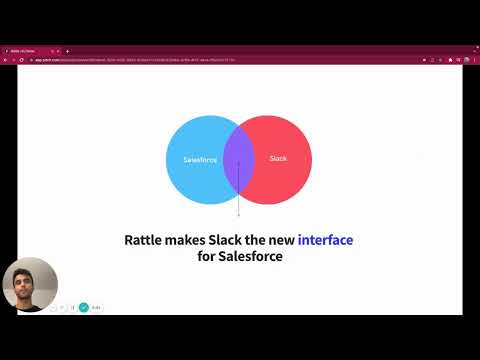
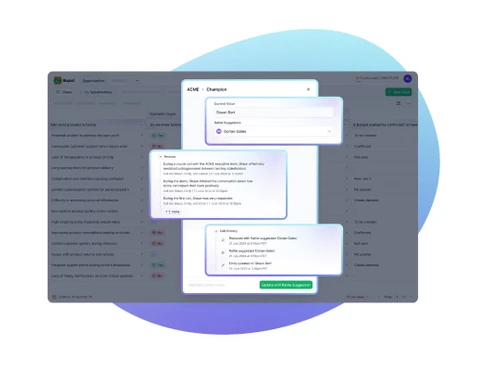
play How Rattle works - Rattle Demo
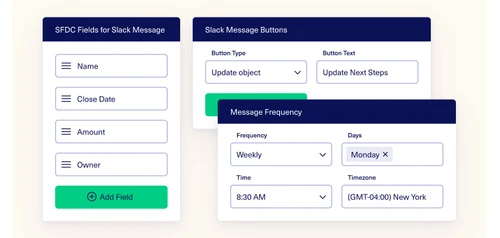
rattle-scheduing
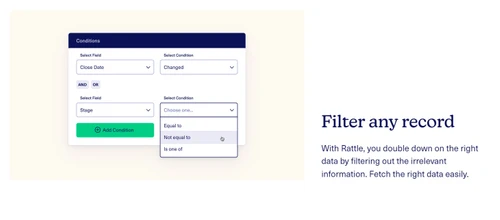
rattle-filter-any-record

Rattle

Brand: Rattle Software

  • 4.5

  • 5 Ratings

Rattle helps businesses streamline sales processes by integrating with CRM platforms like Salesforce. It provides real-time alerts, insights, and automation to improve sales team productivity.

See More

Have you used Rattle before?

Share your insights for better experience

Add a Review
Starting Price
$34

View plans

100% Genuine
Products
Best Price
Guaranteed
Safe & Secure
Payment
  • Description

  • Pricing

  • Features

  • Specification

  • Review

  • Compare

  • Alternatives

  • FAQ

Starting at $34

Rattle Software Overview

What is Rattle?

Rattle is a Sales Force Automation (SFA) software that enhances your revenue operations by connecting Salesforce and Slack. It helps in keeping CRM data accurate by validating and updating key fields effortlessly, stopping inconsistencies in processes that could lead to revenue loss. The software brings crucial conversations into context with Deal Rooms, providing real-time signals, next steps, coaching, and AI summaries. Rattle improves team collaboration and turns sales teams into efficient machines. It’s designed to make CRM a full-scale engagement platform, improving data hygiene, response times, and win ratios.

With this sales force automation software, sales teams can save time by directly updating Salesforce from Slack, making it easier to manage deals and improve visibility. The tool automates workflows, helping teams manage various tasks quickly and intuitively, ultimately improving forecasting accuracy and streamlining the sales process. It supports bi-directional communication and is user-friendly, making it a great solution for businesses using Salesforce and Slack.

Why Choose Rattle Sales Force Automation Software?

  • Improves CRM Data Accuracy: It ensures your Salesforce data remains accurate by validating and updating key fields effortlessly, preventing revenue loss from inconsistencies.
  • Enhances Sales Team Efficiency: By automating workflows and enabling direct Salesforce updates from Slack, Rattle saves reps up to 30 minutes a day.
  • Facilitates Team Collaboration: Deal Rooms bring critical conversations into context with real-time signals, coaching, and AI summaries, fostering a united sales front.
  • Increases Forecasting Accuracy: It flags data hygiene issues promptly, allowing teams to fix them quickly and improve forecasting accuracy by 30%.
  • Simplifies Use and Implementation: Rattle is intuitive and easy to implement, as users have mentioned, making it a straightforward solution to get up and running.
  • Provides Better Visibility into Deals: It also offers improved visibility into data and deals, helping managers and reps stay informed about key opportunities.
  • Enables Bi-Directional Communication: The software supports bi-directional communication between Slack and Salesforce, enhancing collaboration and data flow.
  • Offers a Force Multiplier: Teams can achieve more with less, as Rattle acts as a force multiplier, potentially reducing the need for additional team members.
  • Turns CRM into an Engagement Platform: It transforms your CRM into a full-scale engagement platform, making it easier to manage relationships and drive sales.
  • Streamlines Salesforce Alerts: It improves on Salesforce's native Slack alerts, providing a more effective and user-friendly notification system.
  • Integrates Seamlessly: If you're using Salesforce and Slack, Rattle integrates seamlessly, maximizing the value of both platforms.
  • Offers Versatile Use Cases: It also has a wide array of use cases, from automating call notes to managing deals, and its utility expands as you grow.
  • Streamlines Workflow: The auto disposition buttons streamline workflow and improves efficiency.

Benefits of Rattle Software

  • Acts as an Automated Backstop: It provides an automated backstop everywhere your revenue team may stray, ensuring consistently followed processes and preventing potential revenue loss.
  • Super-Powered Deal Rooms: These rooms are equipped with real-time signals, next steps, coaching, enablement, and AI summaries to enable exceptional team execution.
  • Transforms Team Dynamics: It helps teams execute in ways you've only dreamed, fostering a united front.
  • Enables Proactive Problem Solving: Instead of asking ‘How do we solve this?’, teams start asking ‘How do we solve this with Rattle?’, leading to innovative solutions.
  • Simplifies Implementation: The technology is top-notch, and the simplicity behind the UI is amazing.
  • Increases Team Adaptability: As you grow, your critical thinking also grows, and you start being creative.

Rattle Pricing

Rattle price in India starts at $34 at techjockey.com.

The pricing model is based on different parameters, including extra features, deployment type, and the total number of users. For further queries related to the product, you can contact our product team and learn more about the pricing and offers.

Read more

Rattle Software Company Details

Founded Year:  2020

Rattle develops Salesforce integration technology allowing systems and people to interact with each other natively.

Director/Founders Apoorva Verma, Milan Singh, Sahil Aggarwal
Company Size 1-100 Employees

Rattle Pricing & Plans

Pro
Key Features
  • Automate key workflows for peak efficiency—from o
  • Gain insights with robust analytics that help meas
  • Sync real-time workflow data in Atlas to pinpoint
  • Simplify and secure access through Single Sign-On
Starting at $34
    • Users

      Users
      Users
    • Monthly

      Monthly
      Monthly

Key Features

  • Automate key workflows for peak efficiency—from o

  • Gain insights with robust analytics that help meas

  • Sync real-time workflow data in Atlas to pinpoint

  • Simplify and secure access through Single Sign-On

Rattle Features

  • icon_check CRM
    Rattle helps manage customer relationships efficiently.
  • icon_check Integration
    Easily integrates with various tools and platforms.
  • icon_check Productivity
    Enhances team productivity by automating tasks.
  • icon_check Automated Workflow Optimization
    Streamlines workflows to save time and effort.
  • icon_check Reports
    Provides detailed reports for better decision-making.
  • icon_check Meeting
    Helps schedule and manage meetings seamlessly.
  • icon_check Approval
    Simplifies approval processes within the system.
Rattle Demo Video play icon

Get Rattle Demo

Watch the demo video to explore key features, real workflows, and how the software fits your business needs.

Understand
Key Features
Personal
Demo Insights
Interactive
Demo Support

Rattle Specifications

Supported Platforms
Windows Windows
Devices
Desktop Desktop
Deployment
Cloud-Based Cloud-Based
Suitable For
All Industries
Business Specific
All Businesses
Business Size
Small Business Startups Medium Business Enterprises SMBs SMEs MSMBs MSMEs
Customer Support
Forums
Language
English
Training Resources
Videos

Explore the Best Alternative Solutions Similar to Your Business Size and Needs

Rattle Review

4.5

Out of 5

img

Overall Rating

Based on
5 Verified Ratings

Rating Breakdown

  • Features 4.4
  • Value for Money 4.2
  • Ease of Use 4.9
  • Customer Support 4.6

90% Recommend this Product

Add Review

Techjockey Trusted Reviews from Verified Users

No reviews are currently available for Rattle. Discover similar Sales Force Automation Software reviews

  • Delta Sales Force Automation

    4.5

    Whats great - It has made it quite simple to use and enables me to directly customise to my business. The ability to attach emails to users... read more

  • OmniAssist

    5.0

    Whats great - OmniAssist offers a clear digital trail that enhances transparency and reduces the need for phone-based follow-ups. This stre... read more

  • Clickback

    4.4

    Whats great - Planning next campaigns may benefit greatly from the extremely precise tracking of opens and clicks, as well as tracking for ... read more

Compare Rattle With other Sales Force Automation Software

Products
Ratings
Pricing
Device Supported
Deployment
Supported Platforms
  • img

    Rattle

  • 4.5

  • Price On Request

  • Desktop

    Mobile

  • Web based

    On Premises

  • Windows

    Mac OS

  • img

    OmniAssist

  • 4.8

  • Price On Request

  • Desktop

    Mobile

  • Web based

    On Premises

  • Windows

    Mac OS

  • img

    SalesJump SFA

  • 4.3

  • ₹ 300

  • Desktop

    Mobile

  • Web based

    On Premises

  • Windows

    Mac OS

  • img

    Peri CRM

  • 4.4

  • ₹ 800

  • Desktop

    Mobile

  • Web based

    On Premises

  • Windows

    Mac OS

  • img

    GogreenSFA 360

  • 4.6

  • Price On Request

  • Desktop

    Mobile

  • Web based

    On Premises

  • Windows

    Mac OS

  • img

    InstaCX

  • 4.1

  • Price On Request

  • Desktop

    Mobile

  • Web based

    On Premises

  • Windows

    Mac OS

  • img

    Zams

  • 4.4

  • Price On Request

  • Desktop

    Mobile

  • Web based

    On Premises

  • Windows

    Mac OS

  • img

    Instantly

  • 4.4

  • Price On Request

  • Desktop

    Mobile

  • Web based

    On Premises

  • Windows

    Mac OS

  • img

    FieldMI

  • 5

  • ₹ 5988

  • Desktop

    Mobile

  • Web based

    On Premises

  • Windows

    Mac OS

(0) Product(s) selected

Rattle Alternatives

See All Rattle Alternatives

Zams

4.4

Starting Price:

$1,000 /Month

Starting Price:

$47 /Month

Starting Price:

₹449 /Month

Starting Price:

₹250 /Month

Starting Price:

$49 /Month
Starting Price:

$39 /Month

Available

Price on Request

Available

Price on Request

Articles for Rattle

See All Related Articles

How much does Rattle Software cost?

The starting price of Rattle in India is $34 on Techjockey.com.

Does Rattle Software have a mobile app?

No, Rattle Software does not offer a mobile app.

Which operating systems support Rattle Sales Force Automation Software?

Rattle Software is compatible with Windows only.

Is a free trial available for Rattle Software?

No, Rattle Software does not offer a free trial.

How does Rattle Sales Force Automation Software work?

Rattle automates sales processes, integrates with CRMs, and provides real-time alerts and insights.

Who uses Rattle Software?

Sales teams, managers, and businesses looking to optimize their sales workflow can benefit from Rattle.

Is a free demo offered for Rattle Software?

Yes, Rattle Sales Force Automation Software provides a free demo to help users understand its functionalities.

Is Rattle Software available for free?

No, Rattle is a paid software.

Does Rattle integrate with messaging apps like Slack or Microsoft Teams?

Yes, Rattle Sales Force Automation Software seamlessly integrates with Slack and Microsoft Teams for real-time notifications and collaboration.

Can Rattle automate follow-ups and reminders?

Yes, Rattle automates follow-ups, reminders, and notifications to ensure timely sales actions.

20,000+ Software Listed

Best Price Guranteed

Free Expert Consultation

2M+ Happy Customers

Terms and Condtions

close

Users with registered businesses can purchase goods from merchants on the platform to satisfy their business needs. Users are not permitted to utilize any products acquired through the platform for resale, advertising, business, or further distribution.

For each purchase made, users will receive a Tax Invoice (or 'GST invoice') that includes specific details such as:

  • the GSTIN of the user associated with their registered business, and

  • the specified Entity Name for their business.

It should be noted that not all products are eligible for GST Invoice. Only the products displayed by participating sellers with the 'GST-based Invoice Available' callout on the product description page would qualify.

Certain goods and services are not eligible to get a GST Invoice, including items with VAS, i.e., Value Added Services (e.g., Total Mobile Protection/Assured Buyback) and those involving an exchange offer at the time of purchase.

Users must ensure the accuracy of the GSTIN, and business entity name provided for the GST Invoice. Requests for corrections into GST Invoice would not be accommodated by Techjockey.com or any Seller, and any issues arising from user-provided information are the sole responsibility of users.

Techjockey.com is not liable for the GST Invoice or any associated input tax credit. To efficiently claim an input tax credit, users should select the registered place of business address as per the GST authority's data and follow the provisions of the GST Act and rules.

To claim an input tax credit, the delivery and billing addresses must match. Furthermore, input tax credits will not be granted if the delivery address and GSTIN on the invoice are from different states. In case of incorrect GST details provided during the order placement, the order will be canceled automatically.