linkedin
Restream logo
play How to Get Started with Restream | 2021 Tutorial
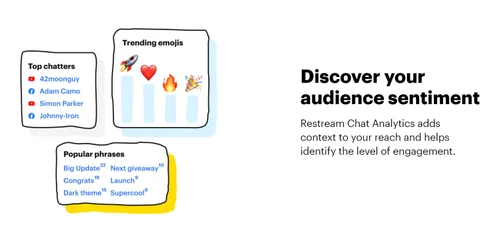
restream audience sentiment
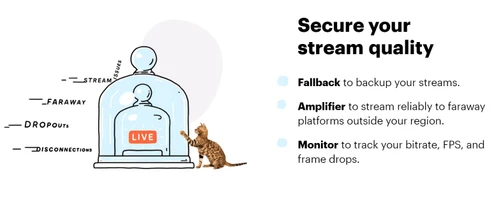
restream secure your stream-quality

Restream

Brand: Restream

  • 4.4

  • 5 Ratings

Restream is a live streaming platform that allows users to simultaneously broadcast to multiple platforms, engage with their audience, and analyze performance.

See More

Have you used Restream before?

Share your insights for better experience

Add a Review
Starting Price
$19

View plans

100% Genuine
Products
Best Price
Guaranteed
Safe & Secure
Payment
  • Description

  • Pricing

  • Features

  • Specification

  • Review

  • Compare

  • Alternatives

  • FAQ

Starting at $19

Restream Software Overview

What is Restream?

Restream is a cloud-based multistreaming platform designed for individuals and businesses to broadcast live video content across various social media platforms and online channels concurrently. It simplifies the process of reaching a wider audience by eliminating the need for separate broadcasts on each platform.

This user-friendly software offers a range of features including custom branding, real-time chat, and analytics to track stream performance. It's a powerful tool for content creators, marketers, and businesses seeking to maximize their online presence and engage with their audience in real-time across multiple platforms.

Why Choose Restream Live Streaming Software?

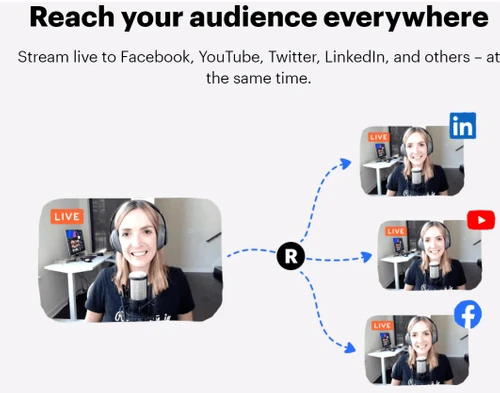
  • Expand Your Reach Like a Spider Web: Don't limit yourself to a single platform! Restream empowers you to broadcast simultaneously to a multitude of destinations—think Twitch, YouTube, Facebook, LinkedIn, and more—maximizing your audience reach and online visibility. It's like casting a net across the internet, catching a wider audience with every stream.
  • Simplify Your Streaming Workflow: Imagine managing all your streams from a single, intuitive dashboard. No more switching between tabs and applications – Restream centralizes everything, streamlining your workflow and freeing you to focus on creating engaging content. It's like having a mission control center for your live streams.
  • Real-time Engagement, Real Connections: Interact with your viewers across all platforms in one unified chat. Restream brings all the conversations together, making it easy to respond to questions, acknowledge comments, and build a thriving community around your content. It's like hosting a virtual meet-and-greet with your entire audience, no matter where they're watching.
  • Data-Driven Decisions for Streaming Success: Knowledge is power. Restream provides detailed analytics on your stream performance, giving you the insights you need to optimize your content strategy and maximize your impact. See what's working, what's not, and fine-tune your approach for optimal engagement. It's like having a personal streaming coach guiding you to success.
  • User-Friendly Interface, Even for Technophobes: You don't need to be a tech wizard to use Restream. Its intuitive interface is designed for ease of use, allowing anyone, regardless of technical expertise, to navigate the platform and start streaming like a pro. It's as simple as clicking a button.

Benefits of Restream:

  • Boost Audience Engagement and Build a Thriving Community: Connect with a broader audience across numerous platforms simultaneously. This fosters a sense of community and allows you to cultivate deeper relationships with your viewers, turning casual watchers into loyal fans. It's like hosting a global watch party, bringing people together through shared experiences.
  • Streamline Your Workflow and Reclaim Your Time: Consolidating your streaming efforts onto a single platform saves valuable time and resources. No more tedious setup processes and platform switching – Restream simplifies everything, giving you back precious hours to focus on what you do best: creating compelling content. It's like having a personal assistant for your streaming needs.
  • Data-Driven Optimization for Maximum Impact: Harness the power of analytics to refine your content strategy and improve your streaming performance. Restream provides the data you need to understand your audience, identify trends, and tailor your content for maximum engagement and reach. It's like having a crystal ball that reveals the secrets to streaming success.
  • Enhanced Brand Visibility and Recognition: Expand your brand's reach and solidify its online presence by broadcasting to multiple platforms. Restream helps you reach new audiences and establish a stronger brand identity in the digital landscape. It's like putting your brand on a billboard for the world to see.
  • Effortless Multistreaming Without the Tech Headaches: Say goodbye to complicated technical setups and hello to seamless multistreaming. Restream simplifies the process, allowing you to manage simultaneous broadcasts without the need for extensive technical expertise. It's like having a magic wand that makes multistreaming a breeze.

Pricing of Restream

Restream pricing starts at $19 at techjockey.com.

The pricing model is based on different parameters, including the amount of bandwidth you need, the number of servers you need, and the features you need. For further queries related to the product, you can contact our product team and learn more about the pricing and offers.

Read more

Restream Company Details

Founded Year:  2015

Restream makes it easy to create high-quality live videos on LinkedIn, X, YouTube, and Facebook at the same time and grow the community around your business.

Director/Founders Andrew Surzhynskyi and Alexander Khuda
Company Size 101-500 Employees

Restream Pricing & Plans

Standard
Starting at $19
    • Licenses

      Licenses
      Licenses
    • Monthly

      Monthly
      Monthly

Key Features

  • Multistream on 3 channels

  • No watermark in Studio

  • Unlimited cloud recordings

Professional
Starting at $49
    • Licenses

      Licenses
      Licenses
    • Monthly

      Monthly
      Monthly

Key Features

  • Standard features plus

  • Multistream on 5 channels

  • Split audio/video downloads

  • Starts at 2 team seats

  • Unlock team workspaces

Business
Starting at $239
    • Licenses

      Licenses
      Licenses
    • Monthly

      Monthly
      Monthly

Key Features

  • Professional features plus

  • Multistream on 8 channels

  • 30-day recording storage

  • Web player, 1,000 viewers

  • SRT ingest

  • Priority Support

Restream Features

  • icon_check Multi Streaming
    Simultaneously broadcast to multiple platforms.
  • icon_check Studio
    Access a professional, virtual broadcasting studio.
  • icon_check Chat Integration
    Manage messages from all platforms.
  • icon_check Analytics
    Gain valuable audience insights.
  • icon_check Scheduler
    Easily schedule your broadcasts.
  • icon_check Live Video Recording
    Record your live streams for later use.
  • icon_check Screen Sharing
    Share your screen effortlessly.
  • icon_check No Watermark
    Broadcast without watermarks.
  • icon_check Priority Support
    Enjoy prioritized customer support.
Restream Demo Video play icon

Get Restream Demo

Watch the demo video to explore key features, real workflows, and how the software fits your business needs.

Understand
Key Features
Personal
Demo Insights
Interactive
Demo Support

Restream Specifications

Supported Platforms
Windows Windows iOS iOS Android Android MacOS MacOS Linux Linux
Devices
Desktop Desktop Mobile Mobile Tablet Tablet iPad iPad
Deployment
Cloud-Based Cloud-Based
Suitable For
All Industries
Business Specific
All Businesses
Business Size
Small Business Startups Medium Business SMBs
Customer Support
Email Live Chat Communities Forums
Language
English
Training Resources
Live Online Webinars Videos

Explore the Best Alternative Solutions Similar to Your Business Size and Needs

Restream Review

4.4

Out of 5

img

Overall Rating

Based on
5 Verified Ratings

Rating Breakdown

  • Features 4.2
  • Value for Money 4.7
  • Ease of Use 4
  • Customer Support 4.8

90% Recommend this Product

Add Review

Techjockey Trusted Reviews from Verified Users

No reviews are currently available for Restream. Discover similar Live Streaming Software reviews

  • GudSho

    4.3

    Whats great - I can create branded channels for each subject, allowing me to organize my content and cater to different learning styles. read more

  • Yostream

    4.8

    Whats great - We had to organize a virtual event at very short notice. Yostream was perfect for our case, in a couple of minutes we were re... read more

  • OBS Studio

    4.2

    Whats great - Highly customizable, supports multiple sources (webcams, screen capture, images, etc.), excellent for live streaming on vario... read more

Compare Restream With other Live Streaming Software

Products
Ratings
Pricing
Device Supported
Deployment
Supported Platforms
  • img

    Restream

  • 4.4

  • Price On Request

  • Desktop

    Mobile

  • Web based

    On Premises

  • Windows

    Mac OS

  • img

    Livebox

  • 4.4

  • ₹ 1170

  • Desktop

    Mobile

  • Web based

    On Premises

  • Windows

    Mac OS

  • img

    Castr

  • 4.3

  • Price On Request

  • Desktop

    Mobile

  • Web based

    On Premises

  • Windows

    Mac OS

  • img

    Grabyo

  • 4.3

  • Price On Request

  • Desktop

    Mobile

  • Web based

    On Premises

  • Windows

    Mac OS

  • img

    Riverside

  • 4.1

  • Price On Request

  • Desktop

    Mobile

  • Web based

    On Premises

  • Windows

    Mac OS

  • img

    Yostream

  • 4.8

  • ₹ 1250

  • Desktop

    Mobile

  • Web based

    On Premises

  • Windows

    Mac OS

  • img

    Prism live Studio

  • 4.2

  • Price On Request

  • Desktop

    Mobile

  • Web based

    On Premises

  • Windows

    Mac OS

  • img

    Wirecast

  • 4.1

  • Price On Request

  • Desktop

    Mobile

  • Web based

    On Premises

  • Windows

    Mac OS

  • img

    Evmux

  • 4.5

  • Price On Request

  • Desktop

    Mobile

  • Web based

    On Premises

  • Windows

    Mac OS

  • img

    Vimeo Pro

  • 4.2

  • Price On Request

  • Desktop

    Mobile

  • Web based

    On Premises

  • Windows

    Mac OS

  • img

    Dacast

  • 4.4

  • Price On Request

  • Desktop

    Mobile

  • Web based

    On Premises

  • Windows

    Mac OS

(2) Product(s) selected

Restream Alternatives

See All Restream Alternatives

Starting Price:

$20 /Month

Available

Price on Request

Starting Price:

$29 /Month

Starting Price:

$25

Starting Price:

$39

Starting Price:

$49 /year

Starting Price:

$59 /month

Starting Price:

$39 /Month

Starting Price:

$70 /Month

Articles for Restream

See All Related Articles

How much does Restream Software Platform Cost?

Restream software pricing starts at $19 at techjockey.com.

How does Restream software Work?

Restream allows users to simultaneously stream live videos on various platforms like LinkedIn, X, YouTube, and Facebook. It helps in expanding audience reach and fostering community engagement around a business by simplifying the process of creating high-quality live content.

Which operating system does Restream Software Support?

Restream supports Windows, MacOS, Linux, and Ubuntu.

Is there any Restream Live Streaming App?

Restream is available on Desktop and Web-Based platforms.

Does Restream offers a free trial or a demo?

A demo of Restream is available at techjockey.com. You can contact our product experts for more information.

How secure is Restream?

Restream prioritizes support and likely implements industry-standard security measures to protect user data and stream integrity. Contact techjockey.com for detailed security information.

What features does Restream offer?

Restream offers features like Multistreaming, Studio Chat, Analytics Integration, Scheduler, Live Video Recording, Screen Sharing, No Watermark, and Priority Support. You can contact our product experts for more information.

Is Restream suitable for small businesses?

Yes, Restream is suitable for small businesses. It allows them to easily create and distribute live video content across multiple platforms, expanding their reach and engaging with their audience without significant technical expertise or investment. It is also suitable for startups and medium-sized businesses.

Who are the potential users of Restream Software?

Content creators, businesses, and individuals looking to expand their online presence and engage with a wider audience through live video streaming across multiple platforms are potential users of Restream. It caters to those who need a streamlined solution for managing and broadcasting live content.

20,000+ Software Listed

Best Price Guranteed

Free Expert Consultation

2M+ Happy Customers

Terms and Condtions

close

Users with registered businesses can purchase goods from merchants on the platform to satisfy their business needs. Users are not permitted to utilize any products acquired through the platform for resale, advertising, business, or further distribution.

For each purchase made, users will receive a Tax Invoice (or 'GST invoice') that includes specific details such as:

  • the GSTIN of the user associated with their registered business, and

  • the specified Entity Name for their business.

It should be noted that not all products are eligible for GST Invoice. Only the products displayed by participating sellers with the 'GST-based Invoice Available' callout on the product description page would qualify.

Certain goods and services are not eligible to get a GST Invoice, including items with VAS, i.e., Value Added Services (e.g., Total Mobile Protection/Assured Buyback) and those involving an exchange offer at the time of purchase.

Users must ensure the accuracy of the GSTIN, and business entity name provided for the GST Invoice. Requests for corrections into GST Invoice would not be accommodated by Techjockey.com or any Seller, and any issues arising from user-provided information are the sole responsibility of users.

Techjockey.com is not liable for the GST Invoice or any associated input tax credit. To efficiently claim an input tax credit, users should select the registered place of business address as per the GST authority's data and follow the provisions of the GST Act and rules.

To claim an input tax credit, the delivery and billing addresses must match. Furthermore, input tax credits will not be granted if the delivery address and GSTIN on the invoice are from different states. In case of incorrect GST details provided during the order placement, the order will be canceled automatically.